1. Киришүү
The Romoss QS10 is a 10000mAh portable power bank designed to provide convenient charging for a wide range of mobile devices. It features an integrated Micro USB cable and includes adapters for Lightning and Type-C connections, eliminating the need to carry multiple charging cables. This manual provides essential information for the safe and efficient operation of your power bank.
2. Продукт бүтүп калдыview
The QS10 power bank offers a versatile charging solution with its built-in cable and adapter system. Its compact design makes it suitable for travel and daily use.
Негизги өзгөчөлүктөрү:
- Integrated Cable System: Includes a built-in Micro USB cable with detachable Lightning and Type-C adapters for broad device compatibility.
- Бир нече киргизүү параметрлери: Recharge the power bank using Micro USB, Lightning, or Type-C cables.
- Жогорку кубаттуулугу: 10000mAh capacity provides multiple charges for smartphones and tablets.
- Компакт дизайн: Approximately the size of an iPhone X, designed for portability.
Пакеттин мазмуну:
- Romoss QS10 Power Bank
- Integrated Micro USB Cable
- Lightning Adapter (detachable)
- Type-C Adapter (detachable)
- Колдонуучунун Колдонмосу (бул документ)
3. Орнотуу жана биринчи колдонуу
Before initial use, fully charge your Romoss QS10 Power Bank.
Retrieving the Integrated Cable and Adapters:
- Locate the integrated Micro USB cable on the side of the power bank.
- Gently click out the Micro USB connector from its storage slot.
- Pull the Micro USB cable to extend it.
- To access the Lightning or Type-C adapters, insert the Micro USB connector into the designated slot on the power bank and press lightly. The desired adapter will emerge connected to the Micro USB cable.

Image: Steps for retrieving the integrated Micro USB cable and adapters. This image illustrates how to pull out the Micro USB connector, extend the cable, and then attach or retrieve the Lightning/Type-C adapters from their storage.
4. Иштөө нускамалары
4.1. Power банкын кубатталууда
The Romoss QS10 can be recharged using a Micro USB, Lightning, or Type-C cable. A charging cable is not included for recharging the power bank itself.
- Connect a compatible charging cable (Micro USB, Lightning, or Type-C) to the corresponding input port on the power bank.
- Кубаттоочу кабелдин экинчи учун USB кубат булагына туташтырыңыз (мисалы, дубал адаптери, компьютердин USB порту).
- The LED indicators on the power bank will illuminate to show the charging status. A full charge is indicated when all LEDs are solid.

Image: Flexible recharge options. This image displays the three different input ports (Micro USB, Lightning, Type-C) available on the Romoss QS10 power bank for recharging the unit.
4.2. Аспаптарыңызды кубаттоо
Use the integrated cable and appropriate adapter to charge your smartphone or tablet.
- Retrieve the integrated Micro USB cable and the necessary adapter (Lightning or Type-C) as described in the Setup section.
- Connect the appropriate adapter to the Micro USB cable, then plug it into your device's charging port.
- The power bank will automatically begin charging your device. The LED indicators will show the remaining power level of the power bank.

Image: Charging a Micro USB device. This image shows the Romoss QS10 power bank connected to and charging a smartphone via its integrated Micro USB cable.
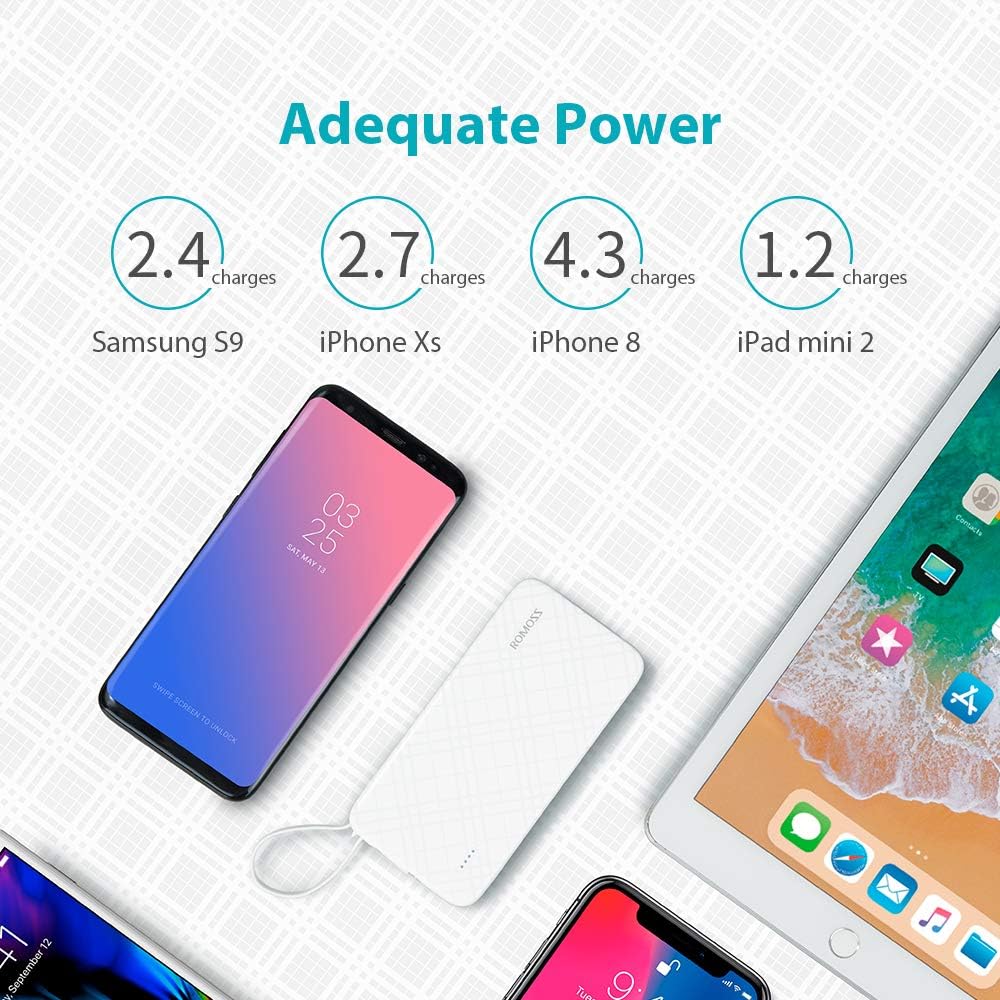
Image: Charging an iPhone or iPad. This image demonstrates the Romoss QS10 power bank charging an iPhone, utilizing the integrated cable with the detachable Lightning adapter.

Image: Charging a Type-C device. This image shows the Romoss QS10 power bank connected to and charging a Samsung S9+ (or similar Type-C device) using the integrated cable with the detachable Type-C adapter.
Estimated Charging Capacity:
The 10000mAh capacity can provide approximately:
- 4 full charges for an iPhone 8
- 2 full charges for a Samsung Galaxy S9
- 1 full charge for an iPad mini 2

Image: Adequate Power. This diagram illustrates the approximate number of charges the 10000mAh power bank can provide for different devices, such as Samsung S9, iPhone Xs, iPhone 8, and iPad mini 2.
5. Техникалык тейлөө
- Powerbankты өтө жогорку температурадан, түз күн нурунан жана нымдуулуктан алыс кармаңыз.
- Power банкты кулап же катуу таасирлерге дуушар кылуудан качыңыз.
- Аппаратты жумшак, кургак чүпүрөк менен тазалаңыз. Катуу химиялык заттарды же абразивдүү материалдарды колдонбоңуз.
- Store the power bank in a cool, dry place when not in use. For prolonged storage, charge the power bank to about 50% every three months to maintain battery health.
6. Кыйынчылыктарды
| Көйгөй | Мүмкүн себеп | Чечим |
|---|---|---|
| Power банк заряддалбай жатат | Charging cable or adapter is faulty; Power source is insufficient; Power bank is fully charged. | Try a different charging cable or adapter. Ensure the power source is active. Check LED indicators for full charge. |
| Түзмөк кубат банкынан кубатталбай жатат | Power bank is depleted; Integrated cable or adapter is not properly connected or faulty; Device is incompatible. | Recharge the power bank. Ensure the integrated cable and adapter are securely connected to both the power bank and your device. Test with another device if possible. |
| Lightning/Type-C adapter not working or showing 'not compatible' message | Adapter is damaged or not fully seated; Device firmware issue. | Ensure the adapter is firmly connected to the Micro USB cable and your device. Inspect the adapter for any visible damage. If issues persist, consider replacing the adapter. |
| Powerbank колдонуу учурунда жылуу сезилет | Заряддоо/разряддоо учурунда кадимкидей иштөө. | Бул кадыресе көрүнүш. Эгерде ал өтө ысып кетсе, дароо электр кубатынан ажыратып, кардарларды тейлөө кызматына кайрылыңыз. |
7. Техникалык шарттар
| Өзгөчөлүк | Деталь |
|---|---|
| Модель номери | QS10-301-01-UK-Update |
| Кубаттуулугу | 10000mAh |
| Батарея түрү | Литий полимери |
| Киргизүү | 5V/2.1A (Micro USB, Lightning, Type-C) |
| Чыгуу | 5V/2.1A |
| Өлчөмдөрү (L x W x Y) | 14.99 x 7.37 x 1.27 см |
| Салмагы | 238 г |
| Сунушталган колдонуу | Tablet, Phone |
8. Кепилдик жана колдоо
The Romoss QS10 Power Bank comes with a 12 айлык кепилдик сатып алынган күндөн тартып. Бул кепилдик өндүрүштүк кемчиликтерди камтыйт жана буюмдун нормалдуу колдонууда белгиленгендей иштешин камсыздайт.
For technical support, warranty claims, or any inquiries regarding your Romoss product, please contact Romoss customer service. Refer to the contact information provided on the product packaging or the official Romoss webэң заманбап колдоо каналдары үчүн сайт.