
Introduction
Thank you for choosing the MIFA A3 Soundbox Bluetooth Portable Speaker. This manual provides essential information for the safe and efficient use of your device. Please read it thoroughly before operating the speaker and retain it for future reference.
Коопсуздук маалыматы
- Динамикти экстремалдык температурага, түз күндүн нуруна же жогорку нымдуулукка дуушар кылбаңыз.
- Спикерди түшүрүүдөн же катуу таасирлерге дуушар кылуудан качыңыз.
- Динамикти өз алдынча бөлүктөргө бөлбөңүз же оңдоого аракет кылбаңыз. Квалификациялуу тейлөө кызматкерлерине кайрылыңыз.
- Keep the speaker away from water and liquids, despite its waterproof rating, to prevent damage to charging ports or internal components.
- Use only the specified charging cable and adapter.
Пакеттин мазмуну
Сураныч, пакетте төмөнкү нерселерди текшериңиз:
- MIFA A3 Bluetooth Portable Speaker
- USB заряддоо кабели
- AUX аудио кабели
- Колдонуучунун Колдонмосу (бул документ)
Продукт бүттүview
The MIFA A3 speaker features intuitive touch controls and multiple connectivity options. Familiarize yourself with the speaker's layout:
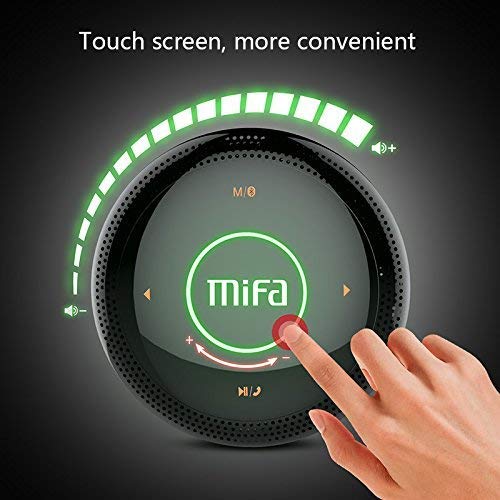
1-сүрөт: Жогорку view of the MIFA A3 speaker, highlighting the touch-sensitive control panel. The panel displays volume indicators, play/pause, and track navigation buttons. A central 'Mifa' logo is also visible.
- Сенсордук башкаруу панели: Located on the top surface for volume adjustment, playback control, and mode selection.
- Микрофон: Үнсүз чалуу үчүн.
- Заряддоо порту: Заряддоо үчүн микро USB порту.
- AUX киргизүү: 3.5mm audio jack for wired connection.
- Микро SD карта слоту: Түздөн-түз эстутум картасынан музыка ойнотуу үчүн.
Жайгашуу
1. Динамикти кубаттоо
Биринчи колдонуудан мурун динамикти толук заряддаңыз. Берилген USB заряддоо кабелин динамиктин заряддоо портуна, экинчи учун USB кубат адаптерине (кошумча эмес) же компьютердин USB портуна туташтырыңыз.
- Заряддоо индикатору заряддоо учурунда күйөт.
- The indicator will turn off or change color once fully charged.
- A full charge provides approximately 8 hours of continuous playtime.
2. Күйгүзүү/өчүрүү
- Күйгүзүү үчүн: Press and hold the Power button (usually integrated into the touch panel or a dedicated button) for 2-3 seconds until you hear an audible prompt or see an indicator light.
- Өчүрүү үчүн: Press and hold the Power button again for 2-3 seconds.
Иштөө нускамалары
1. Bluetooth Жупташтыруу
- Ensure the speaker is powered on and in Bluetooth pairing mode (indicated by a flashing blue light or audible prompt).
- Түзмөгүңүздө (смартфон, планшет, компьютер) Bluetooth иштетип, жеткиликтүү түзмөктөрдү издеңиз.
- Select "MIFA A3" from the list of devices.
- Once paired, the speaker will provide an audible confirmation, and the indicator light will become solid blue.
- The speaker will automatically connect to the last-paired device when powered on, if that device's Bluetooth is active and within range.
2. AUX туташуу
For devices without Bluetooth, use the provided 3.5mm AUX audio cable:
- Connect one end of the AUX cable to the speaker's AUX input port.
- Экинчи жагын аудио шайманыңыздын гарнитура уячасына туташтырыңыз.
- Динамик автоматтык түрдө AUX режимине өтөт.
3. Micro SD карта ойнотуу
Insert a Micro SD card (up to 32GB, FAT32 format) with music files белгиленген уячага салыңыз. Динамик картаны автоматтык түрдө аныктап, ойнотууну баштайт.
4. Touch Control Operations
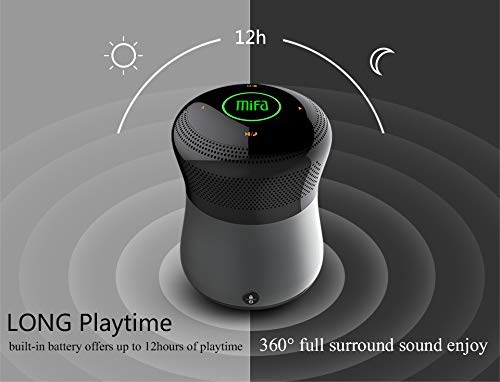
2-сүрөт: The MIFA A3 speaker shown with an overlay indicating "LONG Playtime" (up to 12 hours) and "360° full surround sound enjoy." This image emphasizes the speaker's battery life and audio dispersion.
- Үндү көзөмөлдөө: Slide your finger clockwise on the touch panel to increase volume, counter-clockwise to decrease.
- Ойнотуу/тындыруу: Tap the central Play/Pause icon.
- Кийинки трек: Tap the "Next" arrow icon.
- Мурунку трек: Tap the "Previous" arrow icon.
- Режим которуу: Tap the "M/O" icon to cycle between Bluetooth, AUX, and Micro SD card modes.
- Кулпу баскычы: Press the lock icon to prevent accidental touch inputs.
5. Call Handling (Bluetooth Mode)
- Чакырууга жооп берүү: Tap the Play/Pause icon when a call comes in.
- Чакырууну аяктоо: Tap the Play/Pause icon again.
- Чакырууну четке кагуу: Press and hold the Play/Pause icon for 2 seconds.
Техникалык тейлөө
- Динамикти жумшак, кургак чүпүрөк менен тазалаңыз. Абразивдүү тазалагычтарды же эриткичтерди колдонбоңуз.
- Динамикти узак убакытка колдонбогондо салкын, кургак жерде сактаңыз.
- Charge the battery at least once every three months to maintain battery health.
Проблемаларды чечүү
| Көйгөй | Мүмкүн чечим |
|---|---|
| Динамик күйбөйт. | Батарея заряддалганын текшериңиз. Кубат булагына туташып, кайра аракет кылыңыз. |
| Bluetooth аркылуу жупташтыруу мүмкүн эмес. |
|
| Үн жок. |
|
| Үн сапаты начар. |
|
Техникалык шарттар
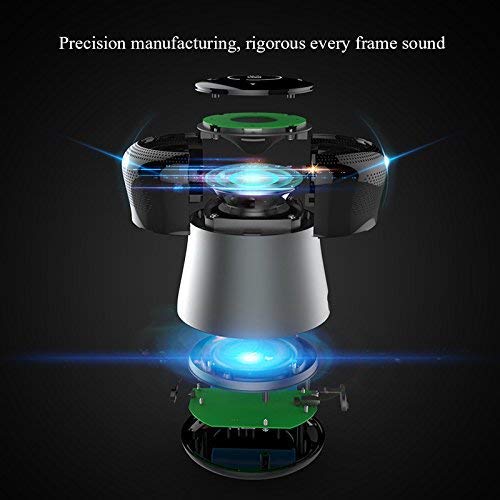
3-сүрөт: An exploded diagram of the MIFA A3 speaker, illustrating its internal components and structural design, emphasizing precision manufacturing.
| Модел | MIFA A3 |
| Чыгуу күчү | 10 Вт |
| Байланыш | Bluetooth 4.2, AUX, Micro SD Card |
| Батарея | 1800 мАч Li-ion |
| Оюн убактысы | 8 саатка чейин (60% көлөмдө) |
| Заряддоо убактысы | Болжол менен 3-4 саат |
| Микрофон | Handsfree чалуулар үчүн орнотулган |
| Суу өткөрбөйт | Yes (as per product specifications, but general caution advised for ports) |
| Башкаруу ыкмасы | тийүү |
| Шайкеш түзмөктөр | Ноутбук, компьютер, смартфон, планшет |
Кепилдик жана колдоо
MIFA products are designed to provide reliable performance. For warranty information or technical support, please refer to the warranty card included with your purchase or visit the official MIFA webсайт. Кепилдик дооматтар үчүн сатып алганыңыздын далилин сактаңыз.
For further assistance, you may contact MIFA customer support through their official channels.