
1. Киришүү
Сатып алганыңыз үчүн рахматasing the MIFA A30 Bluetooth Speaker. This manual provides essential information for setting up, operating, and maintaining your device. Please read it thoroughly before use to ensure optimal performance and longevity of your speaker.
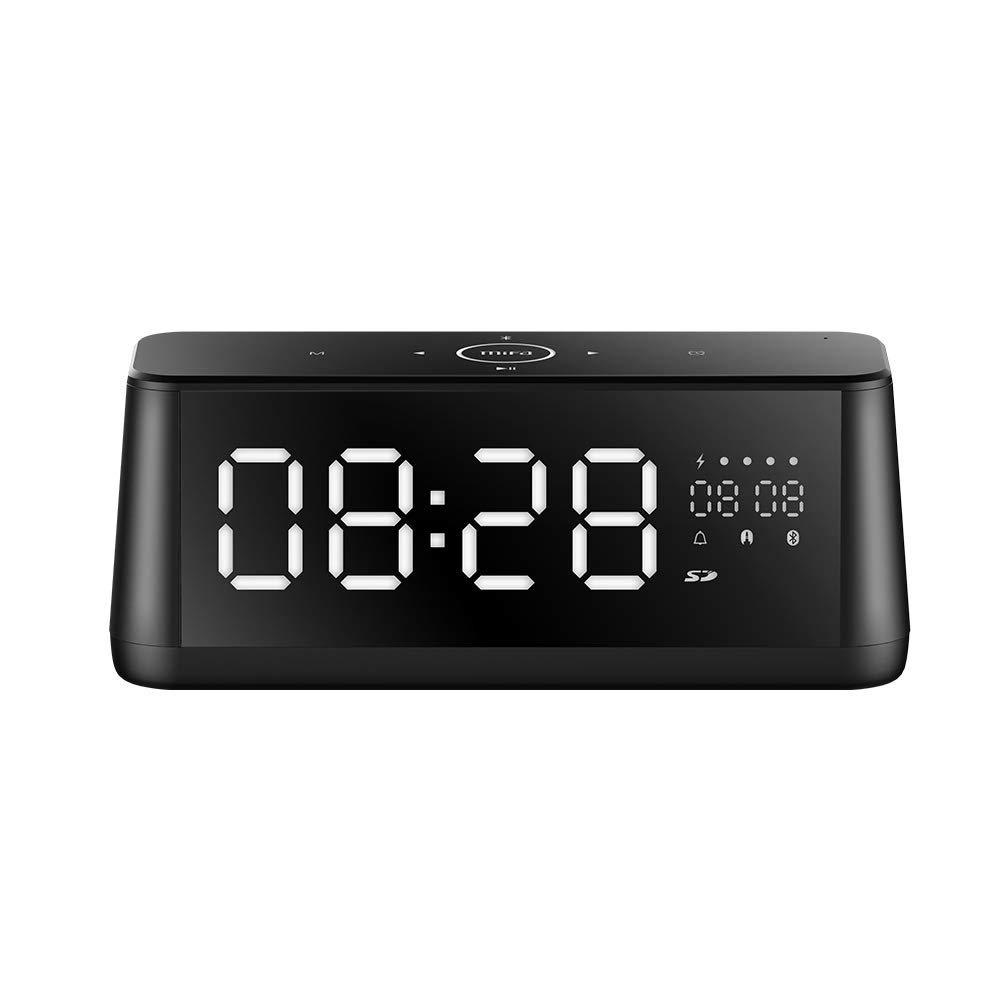
Сүрөт 1.1: Алдыңкы view of the MIFA A30 Bluetooth Speaker, displaying the time on its large LED screen.
2. Коопсуздук маалыматы
- Динамикти экстремалдык температурага, түз күндүн нуруна же жогорку нымдуулукка дуушар кылбаңыз.
- Спикерди түшүрүүдөн же катуу таасирлерге дуушар кылуудан качыңыз.
- Түзмөктү өз алдынча бөлүктөргө бөлбөңүз, оңдобоңуз же өзгөртпөңүз. Оңдоо иштери үчүн ыйгарым укуктуу тейлөө кызматкерлерине кайрылыңыз.
- Keep the speaker away from water and other liquids, despite its waterproof rating, to prevent damage to ports when open.
- Use only the specified charging cable and adapter.
- Динамикти жумшак, кургак чүпүрөк менен тазалаңыз. Абразивдүү тазалагычтарды колдонбоңуз.
3. Пакеттин мазмуну
Сураныч, пакетте төмөнкү нерселерди текшериңиз:
- MIFA A30 Bluetooth Speaker
- USB заряддоо кабели
- 3.5 мм аудио кабель
- Колдонуучунун Колдонмосу (бул документ)
4. Продукт бүтүп калдыview
4.1. Компоненттер
The MIFA A30 speaker features a robust design with advanced audio components for high-quality sound reproduction.

Сүрөт 4.1: Жарылып кеткен view illustrating the internal components of the MIFA A30, including two 15-watt drivers and two low-frequency passive radiators.
4.2. Башкаруу панели жана порттор
The speaker's top panel features capacitive touch controls, and the rear panel houses various connectivity ports.
Сүрөт 4.2: жогорудан ылдыйга view of the MIFA A30 control panel, indicating the functions of each touch button for mode, playback, volume, and clock adjustment.
- M (режим) баскычы: Short press to switch between Bluetooth, TF Card, and AUX modes.
- Bluetooth башкаруу: Long press to turn off Bluetooth, short press to turn on.
- Мурунку трек баскычы: Мурунку трекке өтүү үчүн кыска басыңыз.
- Play/Pause/Hands-Free Button: Short press to play/pause music. Short press to answer/end calls. Long press to reject calls.
- Кийинки трек баскычы: Кийинки трекке өтүү үчүн кыска басыңыз.
- Саат баскычы: Long press for clock adjustment.
- Көлөмү: Үнүн жогорулатуу үчүн сааттын жебеси боюнча буруңуз.
- Үнүн азайтуу: Үндү азайтуу үчүн сааттын жебесине каршы буруңуз.
- Микрофон: Handsfree чалуулар үчүн орнотулган микрофон.
- LED дисплей: Shows time, date, battery level, and current mode.
5. Орнотуу
5.1. Динамикти кубаттоо
Before first use, fully charge the speaker. Connect the provided USB charging cable to the speaker's charging port and the other end to a USB power adapter (not included) or a computer's USB port. The LED display will indicate charging status.
5.2. Күйгүзүү / Өчүрүү
- Күйгүзүү үчүн: Press and hold the Play/Pause button until the LED display lights up.
- Өчүрүү үчүн: Press and hold the Play/Pause button until the LED display turns off. The speaker will automatically screen out and power off to save battery after a period of inactivity.
6. Иштөө нускамалары
6.1. Bluetooth Жупташтыруу
- Ensure the speaker is powered on and in Bluetooth mode (indicated by the Bluetooth icon on the LED display). If not, short press the 'M' button to switch to Bluetooth mode.
- Смартфонуңузда же планшетиңизде Bluetooth'ду иштетиңиз жана жеткиликтүү түзмөктөрдү издеңиз.
- Select "MIFA A30" from the list of devices.
- Once paired, the speaker will emit a confirmation sound, and the Bluetooth icon on the display will stop flashing.
- The speaker will automatically re-connect to the last paired device when powered on, if the device is within range.
6.2. Аудио ойнотуу
- Ойнотуу/тындыруу: Play/Pause баскычын кыска басыңыз.
- Кийинки трек: Кийинки трек баскычын кыскача басыңыз.
- Мурунку трек: Мурунку трек баскычын кыскача басыңыз.
- Үндү тууралоо: Үндү жогорулатуу үчүн үндү башкарууну сааттын жебеси боюнча, үнүн азайтуу үчүн сааттын жебесине каршы буруңуз.
6.3. Hands Free Чалуу
Bluetooth аркылуу смартфонго туташканда:
- Чакырууга жооп берүү: Play/Pause баскычын кыска басыңыз.
- Чакырууну аяктоо: Чалуу учурунда Play/Pause баскычын кыска басыңыз.
- Чакырууну четке кагуу: Long press the Play/Pause button when a call comes in.
6.4. TF картасын ойнотуу
- Insert a Micro-SD (TF) card with supported audio files (FLAC/APE/MP3/WMA/WAV) into the TF card slot.
- Short press the 'M' button to switch to TF Card mode. The speaker will automatically begin playing music from the card.
6.5. AUX киргизүү
- Connect one end of the 3.5mm audio cable to the speaker's AUX input port and the other end to the audio output of your device (e.g., MP3 player, computer).
- Short press the 'M' button to switch to AUX mode.
- Эми аудио туташкан түзмөгүңүздөгү динамик аркылуу ойнотулат.
6.6. Clock and Display Settings
- Саатты тууралоо: Long press the Clock button to enter time setting mode. Use the Next/Previous buttons to adjust values and the Play/Pause button to confirm.
- Display Luminance: The LED display has 7 adjustable luminance levels. Refer to the full product documentation for specific adjustment steps, typically involving short presses of the Clock button or a combination with volume controls.
7. Техникалык тейлөө
- Тазалоо: Wipe the speaker's surface with a soft, dry, lint-free cloth. Do not use liquid or aerosol cleaners.
- Сактагыч: Узак мөөнөткө колдонулбаганда, динамикти салкын, кургак жерде, тике күн нурунан жана экстремалдык температурадан алыс сактаңыз.
- Батареяга кам көрүү: Батареянын иштөө мөөнөтүн узартуу үчүн, бат-баттан батарейканы толук зарядсыздандырбаңыз. Колдонулбаса дагы, динамикти дайыма заряддап туруңуз.
8. Кыйынчылыктарды
| Көйгөй | Мүмкүн себеп | Чечим |
|---|---|---|
| Динамик күйбөйт. | Батарея аз. | Динамикти кеминде 2 саатка заряддаңыз. |
| Үн жок. | Үнү өтө төмөн; туура эмес режим; түзмөк туташкан эмес. | Increase speaker and device volume. Ensure correct mode (Bluetooth/AUX/TF Card). Re-pair Bluetooth device or check AUX cable connection. |
| Bluetooth жупташуусу болбой жатат. | Динамик жупташтыруу режиминде эмес; түзмөк өтө алыс; тоскоолдук бар. | Ensure speaker is in Bluetooth mode. Move device closer to speaker. Turn off other Bluetooth devices. Try forgetting "MIFA A30" on your device and re-pairing. |
| TF Card not playing. | Туура эмес режим; колдоого алынбайт file format; card error. | Switch to TF Card mode. Ensure files are FLAC/APE/MP3/WMA/WAV. Reinsert TF card or try a different card. |
9. Техникалык шарттар
| Өзгөчөлүк | Деталь |
|---|---|
| Модель аты | A30 |
| Динамик түрү | Китеп текчеси |
| Байланыш технологиясы | Bluetooth 4.2, Auxiliary (3.5mm), Micro-SD (TF Card) |
| Аудио чыгаруу режими | Стерео |
| Динамиктин максималдуу чыгаруу күчү | 30 Ватт (2 x 15 Вт драйверлер) |
| Bass Enhancement | Two low-frequency boosters |
| Батарея сыйымдуулугу | 4000 мАч |
| Оюн убактысы | Up to 10-12 hours (depending on volume and content) |
| Башкаруу ыкмасы | Capacitive Touch Panel |
| Дисплей | 7.2" x 2.8" Mirror LED Screen with 106 LEDs, 7-level adjustable luminance |
| Колдоого алынган аудио форматтары | FLAC/APE/MP3/WMA/WAV |
| Камтылган микрофон | Ооба, үнсүз чалуулар үчүн |
| Суу өткөрбөйт | Yes (Note: Ensure ports are covered for water resistance) |
| Түс | Кара |
| Монтаж түрү | Столдун үстү |
10. Кепилдик жана колдоо
The MIFA A30 Bluetooth Speaker typically comes with a 30-day warranty from the date of purchase, covering manufacturing defects. Please retain your proof of purchase for warranty claims.
For technical support, troubleshooting assistance beyond this manual, or warranty inquiries, please contact MIFA customer service through their official website or the retailer where the product was purchased. Provide your product model (A30) and purchase details when seeking support.