
MIFA A20
MIFA A20 Bluetooth Speaker Колдонуучунун колдонмосу
Модел: A20
1. Продукт бүтүп калдыview
The MIFA A20 is a portable Bluetooth speaker designed to deliver high-quality audio with powerful bass and True Wireless Stereo (TWS) capabilities. Its robust aluminum alloy housing ensures durability and a premium aesthetic. This manual will guide you through its features, setup, and operation.


2. Өзгөчөлүктөрү
- Exceptional Wireless Stereo: Connect two A20 speakers via a single device for huge stereo sound and double the volume; two exposed radiators let you see the sound.
- Impressive Bass: Dual drivers, triple radiators and Class-D chips ensure distortion-free crystal loud sound and strong bass with 30W peak power output.
- Узак ойнотуу: 4000 mAh rechargeable Li-ion battery offers 12 hours playtime at 70% volume; LED indicators to tell you the battery remaining; can play while charging.
- Endless Audio Options: Aux capability for non-Bluetooth devices; 32GB Micro SD card supported to save your phone's battery; built-in microphone for HD hands-free calls.
- Bluetooth 4.2: Instantly pairs with your Smartphone, Tablet, Laptop, iPhone, Samsung, etc.; auto-reconnects to the last used device within 66 feets away.
3. Пакеттин мазмуну
Сураныч, төмөнкү нерселер үчүн кутучаны белгилеңиз:
- MIFA A20 Bluetooth Speaker
- USB заряддоо кабели
- 3.5 мм аудио кабель (AUX)
- User Manual
4. Продукциянын схемасы жана башкаруу элементтери
Familiarize yourself with the speaker's layout and control buttons.
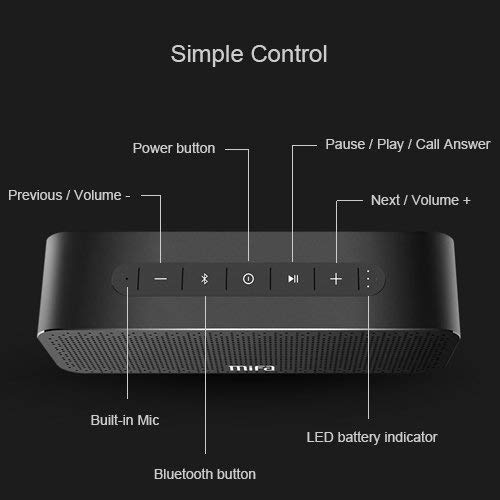
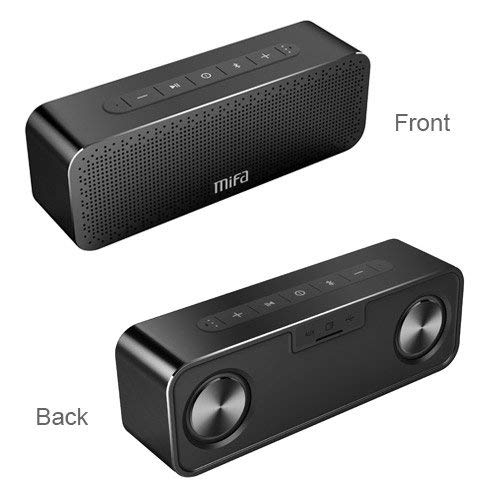
Башкаруу баскычтары:
- Кубат баскычы: Күйгүзүү/өчүрүү үчүн басып туруңуз.
- Bluetooth баскычы: Bluetooth жупташтыруу режимине кирүү үчүн басыңыз.
- Play/Pause / Call Answer Button: Press to play/pause music; press to answer/end calls.
- Previous / Volume - Button: Press to go to previous track; press and hold to decrease volume.
- Next / Volume + Button: Press to go to next track; press and hold to increase volume.
Indicators and Ports:
- Кыналган мик: Үнсүз чалуулар үчүн.
- LED батарея көрсөткүчү: Батареянын абалын көрсөтөт.
- Заряддоо порту: заряддоо үчүн USB порту.
- AUX киргизүү: Зымдуу аудио туташуу үчүн 3.5 мм уяча.
- Микро SD карта слоту: For playing music directly from a Micro SD card (up to 32GB).
5. Орнотуу
5.1 Динамикти заряддоо
Before first use, fully charge the speaker. Connect the provided USB charging cable to the speaker's charging port and the other end to a USB power adapter (not included) or a computer's USB port. The LED indicator will show charging status and turn off when fully charged.
5.2 Bluetooth жупташтыруу
- Turn on the MIFA A20 speaker by pressing and holding the Power button.
- Динамик автоматтык түрдө Bluetooth жупташтыруу режимине өтөт, бул көк түстөгү LED жарыгы менен көрсөтүлөт. Эгер андай болбосо, Bluetooth баскычын басыңыз.
- Түзмөгүңүздө (смартфон, планшет, ноутбук) Bluetooth иштетиңиз жана жеткиликтүү түзмөктөрдү издеңиз.
- Select "MIFA A20" from the list of devices.
- Once paired, the LED indicator will turn solid blue, and you will hear a confirmation sound.
- The speaker will automatically reconnect to the last paired device when turned on, if within range.
5.3 Чыныгы зымсыз стерео (TWS) жупташтыруу
Кеңири стерео үндөргө жетүү үчүнtage, you can pair two MIFA A20 speakers together.
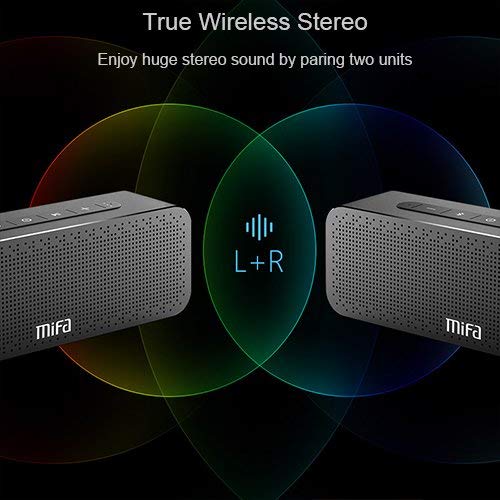
- Ensure both MIFA A20 speakers are turned on and not connected to any Bluetooth device.
- On one speaker (this will be the primary speaker), press and hold the Bluetooth button until you hear a prompt indicating TWS pairing mode.
- The two speakers will automatically search for and connect to each other. This may take a few seconds.
- Once connected, you will hear a confirmation sound, and the LED indicators on both speakers will change to reflect the TWS connection.
- Эми түзмөгүңүздү 5.2-бөлүмдө сүрөттөлгөндөй Bluetooth аркылуу негизги динамикке туташтырыңыз. Аудио эки динамик аркылуу тең стерео режиминде ойнотулат.
5.4 Micro SD картасын колдонуу
Insert a Micro SD card (up to 32GB, formatted to FAT32) with your music files into the Micro SD card slot. The speaker will automatically switch to Micro SD card mode and begin playing music.
5.5 AUX киргизүүнү колдонуу
Connect one end of the 3.5mm audio cable to the AUX input port on the speaker and the other end to the audio output jack of your non-Bluetooth device. The speaker will automatically switch to AUX mode.
6. Динамикти иштетүү
6.1 Музыканы ойнотуу
- Ойнотуу/тындыруу: Play/Pause баскычын басыңыз.
- Көлөмү: Көлөмү + баскычын басып, кармап туруңуз.
- Үнүн азайтуу: Үн көлөмү - баскычын басып, кармап туруңуз.
- Кийинки трек: Short press the Next / Volume + button.
- Мурунку трек: Short press the Previous / Volume - button.
6.2 Hands-Free чалуу
Bluetooth аркылуу туташканда, колонканы колсуз чалуулар үчүн колдонсо болот.
- Чакырууга жооп берүү: Press the Play/Pause / Call Answer button.
- Чакырууну аяктоо: Press the Play/Pause / Call Answer button during a call.
- Чакырууну четке кагуу: Press and hold the Play/Pause / Call Answer button when a call comes in.
7. Техникалык тейлөө
- Тазалоо: Динамикти тазалоо үчүн жумшак, кургак чүпүрөктү колдонуңуз. Абразивдүү тазалагычтарды же эриткичтерди колдонбоңуз.
- Батареяга кам көрүү: Батареянын иштөө мөөнөтүн узартуу үчүн динамикти бат-баттан толук кубаттап турбаңыз. Узак мөөнөткө колдонулбаса да, аны үзгүлтүксүз заряддаңыз.
- Сактагыч: Динамикти түз күн нурунан жана өтө температурадан алыс салкын, кургак жерде сактаңыз.
- Суу каршылык: The speaker is designed to be waterproof (as per specifications). However, avoid submerging it in water for extended periods or exposing it to high-pressure water jets. Ensure charging port cover is securely closed when near water.
8. Кыйынчылыктарды
| Көйгөй | Мүмкүн себеп | Чечим |
|---|---|---|
| Динамик күйбөйт | Батарея аз | Динамикти толук заряддаңыз. |
| Үн жок | Volume too low; Device not connected; Incorrect input mode | Increase volume on speaker and device; Ensure successful Bluetooth pairing or AUX connection; Check if correct input mode (Bluetooth/AUX/SD card) is selected. |
| Bluetooth аркылуу жупташтыруу мүмкүн эмес | Speaker not in pairing mode; Device Bluetooth off; Too far from speaker; Interference | Ensure speaker is in pairing mode (flashing blue LED); Turn on Bluetooth on your device; Move device closer to speaker; Turn off other Bluetooth devices nearby. |
| Бурмаланган үн | Volume too high; Low battery; Device too far | Reduce volume; Charge speaker; Move device closer to speaker. |
| TWS жупташтыруу ишке ашпай калды | Speakers already connected to a device; Not in TWS pairing mode | Disconnect both speakers from any Bluetooth devices; Ensure both speakers are in TWS pairing mode. |
9. Техникалык шарттар

| Өзгөчөлүк | Деталь |
|---|---|
| Модель аты | A20 |
| Материал | Алюминий |
| Динамик түрү | Вуфер |
| Байланыш технологиясы | Bluetooth, Auxiliary, Wireless |
| Bluetooth версиясы | 4.2 |
| Зымсыз диапазон | 66 фут (20 метр) чейин |
| Динамиктин максималдуу чыгаруу күчү | 30 Ватт |
| Аудио чыгаруу режими | Стерео |
| Көлөмдүү үн каналынын конфигурациясы | 2.0 |
| Батарея сыйымдуулугу | 4000 мАч |
| Батареянын иштөө мөөнөтү | 12 саатка чейин (70% үн менен) |
| Микро SD картаны колдоо | 32 ГБ чейин |
| Камтылган микрофон | Ооба |
| Суу өткөрбөйт | Ооба |
| Түс | Кара |
10. Кепилдик жана колдоо
Кепилдик маалымат
The MIFA A20 Bluetooth Speaker comes with a 30 күндүк кепилдик сатып алынган күндөн тартып өндүрүш кемчиликтерин жабуу. Кепилдик дооматтары үчүн сатып алганыңыздын далилин сактап коюңуз.
Кардарларды колдоо
For any questions, technical assistance, or warranty inquiries, please contact MIFA customer support through the retailer's platform or the official MIFA webсайт. Колдоо кызматына кайрылганда продуктуңуздун моделин жана сатып алуу жөнүндө маалыматты даярдап коюңуз.
Ask a question about this manual
Ask about setup, troubleshooting, compatibility, parts, safety, or missing instructions. Manuals+ will review the question and use this page’s manual context to help answer it.