
1. Киришүү
This document provides essential instructions for the Easytry123 replacement remote control, model Easytry3756. This remote is designed to operate specific Sanyo AC air conditioner units. It is a direct replacement and does not require programming or setup. Please ensure your Sanyo AC model is listed in the compatibility section before use.

Сүрөт 1: Алдыңкы view of the Easytry123 Replacement Remote Control.
2. Орнотуу жана Батареяны орнотуу
The Easytry123 remote control requires two AAA batteries (not included). No additional setup or coding is necessary for operation.
- Пульттун артындагы батарея отсегин табыңыз.
- Батарея бөлүкчөсүнүн капкагын ачуу үчүн ылдый жылдырыңыз.
- Insert two AAA batteries, ensuring correct polarity (+ and - terminals match the markings inside the compartment).
- Батарея бөлүкчөсүнүн капкагын бекем чыккыча ордуна жылдырыңыз.
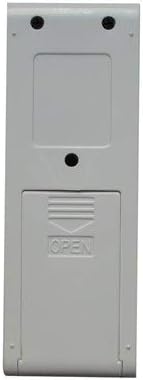
2-сүрөт: Артка view батарея бөлүмү менен алыстан башкаруу пультун.
3. Иштөө нускамалары
Once batteries are installed, the remote is ready for use. Point the remote control directly at the Sanyo AC unit's receiver. Note that while this is a functional replacement, some advanced or specific functions of your original remote may not be available on this replacement unit.
Баскыч функциялары:
- ӨЧҮК / КҮЙҮҮ: Кондиционер блогун күйгүзөт же өчүрөт.
- Күйөрман: Желдеткичтин ылдамдыгын тууралайт (мисалы, Төмөн, Орто, Жогорку, Авто).
- РЕЖИМ: Иш режимдери (мисалы, муздак, жылытуу, желдеткич, кургак, авто) аркылуу өтөт.
- + / -: Температура жөндөөсүн жогорулатат же төмөндөтөт.
- ТУРБО: Кыска мөөнөткө тез муздатууну же жылытууну иштетет.
- ДЕН СООЛУК: Абаны тазалоо же ден соолукка байланыштуу функцияларды иштетет (эгер кондиционер колдоого алса).
- ҮРГҮҮ: Controls the air direction or swing function.
- Нымдуулук: Adjusts humidity settings or activates dehumidification mode.
- УЙКУ: Activates sleep mode, which often adjusts temperature and fan speed for comfort during sleep.
- TIME: Used for setting timers (e.g., auto-on/off timer).
4. Шайкештик жөнүндө маалымат
This Easytry123 replacement remote control is specifically designed for the following Sanyo AC air conditioner models:
- SAP-KRV9AEH
- SAP-KRV12AEH
- SAP-KRV9AG
- SAP-KRV12AG
- SAP-KRV18AG
- SAP-KRV22AG
Маанилүү: This remote is not a universal remote control. It is crucial to verify that your Sanyo AC unit's model number is listed above to ensure proper functionality.
5. Кыйынчылыктарды
- Пульт жооп бербей жатат:
- Ensure fresh AAA batteries are correctly installed with proper polarity.
- Check if there are any obstructions between the remote control and the AC unit's receiver.
- Verify that you are within the effective operating range of the AC unit.
- Айрым функциялар иштебейт:
- As a replacement remote, it may not support all functions present on the original remote control. Refer to your AC unit's original manual for specific feature availability.
6. Техникалык шарттар
| Модель номери: | Easytry3756 |
| Бренд: | Easytry123 |
| Байланыш технологиясы: | Инфракызыл |
| Контроллердин түрү: | Control Button |
| Батареялар талап кылынат: | 2 x AAA (киргизилген эмес) |
| Өзгөчө өзгөчөлүгү: | Эргономикалык дизайн |
7. Кепилдик жана колдоо
Specific warranty information for this replacement remote control is not provided in the product details. For any support inquiries or warranty claims, please contact the manufacturer, Easytry123, directly through their official channels or the retailer from whom the product was purchased.