
Introduction
This manual provides essential information for the proper setup, operation, and maintenance of your Easytry123 Replacement Remote Control, model Easytry4030. This remote is designed as a replacement for various Sony TV models, including those compatible with original remote models such as RM-ED019, RM-ED032, RM-936, RM-938, RM-940, RM-943, RM-945, RM-946, and RM-952. Please note that as a replacement, some advanced functions of your original remote may not be fully supported. Ensure your TV model is listed as compatible before use.
Жайгашуу
1. Батареяны орнотуу
The remote control requires two (2) AAA batteries for operation. Batteries are not included with the remote and must be purchased separately.
- Пульттун артындагы батарея отсегин табыңыз.
- Батарея бөлүкчөсүнүн капкагын ачуу үчүн ылдый жылдырыңыз.
- Оң (+) жана терс (-) терминалдары бөлүмдүн ичиндеги белгилер менен туура дал келишин камсыз кылып, эки AAA батарейкасын салыңыз.
- Батарея бөлүкчөсүнүн капкагын бекем чыккыча ордуна жылдырыңыз.

Сүрөт 1: Батарея бөлүмү
This image shows the rear of the remote control with the battery cover removed, revealing the two slots for AAA batteries. Observe the correct polarity markings for battery insertion.
2. Алгачкы колдонуу
This replacement remote control is designed to work immediately with compatible Sony TV models without requiring complex programming. Simply point the remote towards your television and press the desired function button.
Маанилүү эскертүү: Due to the nature of replacement remotes, some specific or advanced functions present on your original remote may not be replicated or may behave differently. This remote is primarily designed for core television functions.
Иштөө нускамалары
The Easytry123 remote control features an ergonomic design with clearly labeled buttons for intuitive operation. Below is a general guide to common button functions:
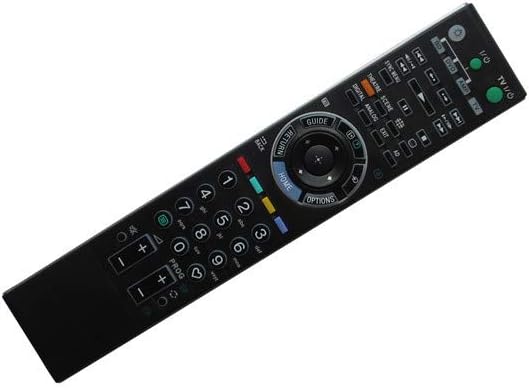
2-сүрөт: Алыстан башкаруунун схемасы
This image displays the front face of the remote control, highlighting the arrangement and labeling of all functional buttons, including power, volume, channel, navigation, and numerical keys.
- Кубаттуулук (киргизүү/чыгаруу): Телевизорду күйгүзөт же өчүрөт.
- TV/Video: Switches between TV and external video inputs.
- Сан баскычтары (0-9): Used for direct channel selection or inputting numbers.
- Көлөмү (+/-): Аудионун үнүн жогорулатат же азайтат.
- Channel (PROG +/-): Телеканалды өйдө же ылдый өзгөртөт.
- Үнсүз: Телевизордун үнүн өчүрөт.
- Навигация панели (Өйдө, Төмөн, Солго, Оңго, Кирүү): Менюларда багыттоо жана тандоолорду ырастоо үчүн колдонулат.
- ҮЙ: Сыналгынын негизги менюсуна же акылдуу сыналгы интерфейсине кирет.
- ОПЦИЯЛАР: Учурдагы экран үчүн контекстке сезгич параметрлерди көрсөтөт.
- RETURN/BACK: Мурунку экранга же менюга кайтат.
- ЖЕТЕКЧЕ: Электрондук программалык көрсөтмөнү (EPG) ачат.
- Түстүү баскычтар (кызыл, жашыл, сары, көк): Функциялар телевизордун моделине жана учурдагы менюга/тиркемеге жараша өзгөрүп турат.
- Ойнотуу башкаруулары (ойнотуу, тындыруу, токтотуу, артка түрүү, алдыга жылдыруу): For controlling media playback on compatible devices or TV functions.
Ensure there is a clear line of sight between the remote control's infrared emitter and the TV's IR receiver for optimal performance.
Техникалык тейлөө
Батареяны алмаштыруу
Replace batteries when the remote control's response becomes sluggish or stops working. Always replace both batteries simultaneously with new AAA batteries. Do not mix old and new batteries, or different types of batteries.
Тазалоо
Пультту тазалоо үчүн анын бетин жумшак, кургак чүпүрөк менен акырын сүртүңүз. өжөр кир үчүн, бир аз гamp cloth can be used, but ensure no moisture enters the remote. Do not use abrasive cleaners, alcohol, or solvents.
Сактагыч
Пультту салкын, кургак, күн нуру түз тийбеген, өтө жогорку температурадан жана жогорку нымдуулуктан алыс жерде сактаңыз. Эгерде пульт көпкө колдонулбаса, агып кетүүнүн алдын алуу үчүн батарейкаларды алып салуу сунушталат.
Проблемаларды чечүү
| Көйгөй | Мүмкүн себеп | Чечим |
|---|---|---|
| Пульт жооп бербей жатат. | Батареялар түгөнүп калган же туура эмес салынган. Пульт менен телевизордун ортосундагы тоскоолдук. | Replace batteries, ensuring correct polarity. Remove any objects blocking the signal path. Ensure you are within effective range and pointing directly at the TV's IR receiver. |
| Кээ бир функциялар иштебейт. | The replacement remote may not support all original TV functions. | This is expected for a replacement remote. Verify if the function is critical. If so, the original remote may be required for that specific function. |
| Баскычтар жабышчаак же жооп бербейт. | баскычтардын астындагы кир же таштанды. | Алыстан башкаруу пультун "Техникалык тейлөө" бөлүмүндө сүрөттөлгөндөй тазалаңыз. |
Техникалык шарттар
- Модель номери: Easytry4030
- Бренд: Easytry123
- Шайкеш түзмөктөр: Television (Various Sony models)
- Байланыш технологиясы: Инфракызыл (IR)
- Контроллердин түрү: Control Button
- Өзгөчө өзгөчөлүгү: Эргономикалык дизайн
- Батареялар талап кылынат: 2 x AAA (киргизилген эмес)
- Өндүрүүчү: Easytry123
- Келип чыккан өлкө: Кытай
- Биринчи жеткиликтүү болгон күнү: 31-октябрь, 2018-жыл
- ASIN: B07K236QV4
Кепилдик жана колдоо
Information regarding specific warranty terms or direct customer support for this Easytry123 product is not provided in the product details. For any inquiries or issues, please refer to the retailer or platform from which the product was purchased.