
Introduction
This manual provides instructions for the Sharper Image Motion Activated Candy Dispenser. This device is designed to dispense small, hard-shelled candies, nuts, and snacks using a touchless motion sensor, promoting hygiene and convenience. It is suitable for use in various settings, including homes and offices.
Маанилүү коопсуздук маалыматы
- Бул продукт 12 жашка чейинки балдар үчүн арналган эмес.
- The dispenser is designed for small, dry food items only. Do not use with liquids or sticky substances.
- Store the dispenser in a cool, dry area to maintain optimal performance and food quality.
- Ensure batteries are inserted correctly according to polarity markings. Do not mix old and new batteries, or different types of batteries.
- Remove batteries if the dispenser will not be used for an extended period to prevent leakage.
Пакеттин мазмуну
- 1x Sharper Image Motion Activated Candy Dispenser Unit
- User Manual
Note: 4 "AA" batteries are required and not included. An optional 6V DC 0.5A (300mA) AC power adapter is also not included.
Жайгашуу
1. Батареяны орнотуу
- Locate the battery compartment on the underside of the dispenser base.
- Батарея уясынын капкагын ачыңыз.
- Insert 4 "AA" batteries (not included), ensuring correct polarity (+/-) as indicated inside the compartment.
- Батарея уясынын капкагын бекем жабыңыз.
Alternatively, an optional 6V DC 0.5A (300mA) AC power adapter can be used (not included).
2. Диспенсерди толтуруу
- Before first use, clean the transparent container thoroughly.
- Remove the lid from the top of the dispenser.
- Carefully pour your desired treats into the container. Ensure the items are suitable for dispensing (see "Operating Instructions" for details).
- Капкакты коопсуз ордуна коюңуз.

Figure 1: Filling the dispenser with treats.
Иштөө нускамалары
Кыймыл сенсорун колдонуу
- Place your hand directly under the dispensing chute.
- The built-in motion sensor will detect your hand and activate the dispensing mechanism.
- Hold your hand under the chute for a moment to allow the treats to dispense. The amount dispensed may vary. If no treats dispense on the first attempt, briefly remove your hand and place it back under the sensor.
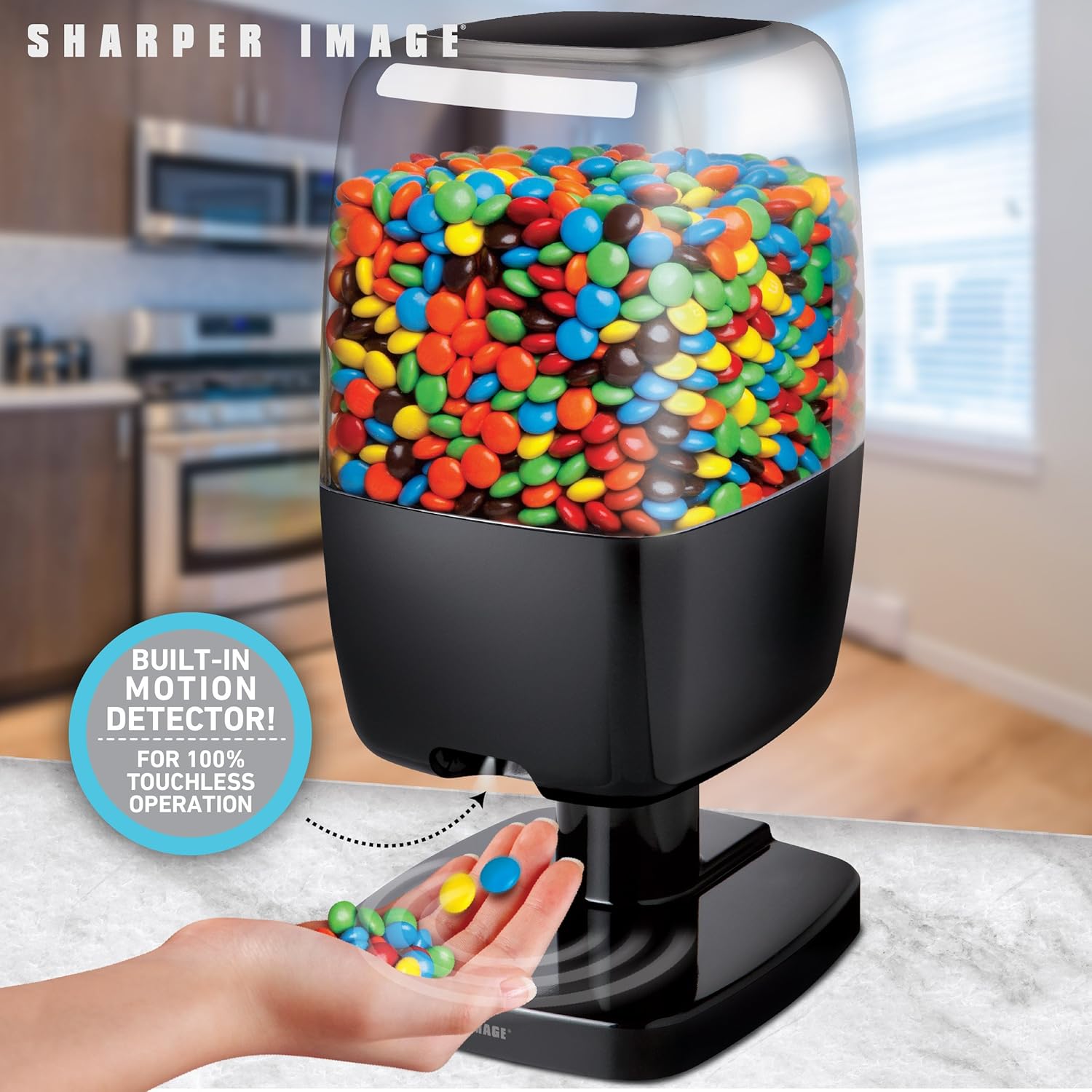
Figure 2: Hands-free dispensing in action.
Disabling Dispensing (Hidden Button)
A hidden button is located on the back of the dispenser. Pressing this button will temporarily disable the dispensing function, preventing treats from being dispensed even when the motion sensor is activated. Press it again to re-enable dispensing.
Recommended Items for Dispensing
For optimal performance, use items that are hard-shelled, dry, and approximately 0.75 inches (1.9 cm) or smaller in size. Examples камтыйт:
- Small Gumballs
- Hard shell, chocolate coated candy (e.g., M&M's)
- Hard shell, fruit flavored candy
- Фундук
- Jelly буурчак
- Small Jawbreakers
- Макадамия жаңгагы
- Карагай жаңгактар
- Shelled, unsalted peanuts
- Shelled Pistachios
- Small Jordan almonds
- Soy жаъгактар
- Күн карама уруктары
- Бүтүндөй бадам
- Salted Peanuts
Items NOT Recommended for Dispensing
Avoid using the following items to prevent blockages or damage to the dispenser:
- Candy that is wrapped
- Candy that has a soft chocolate coating
- Candy that is cylindrically or barrel-shaped
- Candy that is gummy
- Raisins or similar dried fruit
- Candy that is sticky
- Items larger than 0.75 inches (1.9 cm)
- Металл буюмдар

Figure 3: Guide for suitable and unsuitable items.
Техникалык тейлөө
Тазалоо
- To clean the dispenser, first ensure it is empty of all treats and batteries are removed.
- Сырткы беттерин жумшак менен сүртүңүз, гamp кездеме.
- The transparent container can be detached and washed with mild soap and water. Ensure it is completely dry before reassembling and refilling.
- Do not immerse the base unit in water or place it in a dishwasher.
Сактагыч
When not in use, store the dispenser in a cool, dry place away from direct sunlight and moisture. Remove batteries if storing for an extended period.
Проблемаларды чечүү
Dispenser Not Activating or Dispensing
- Батареяларды текшерүү: Ensure batteries are correctly installed and have sufficient charge. Replace with fresh "AA" batteries if necessary.
- Сенсор тоскоолдугу: Verify that the motion sensor area is clean and free from obstructions.
- Колдун жайгашуусу: Ensure your hand is placed directly under the sensor and held steady for a moment.
- Hidden Button: Check if the hidden button on the back of the dispenser has been pressed, disabling the dispensing function. Press it again to re-enable.
Treats Not Dispensing Properly or Getting Stuck
- Item Suitability: Confirm that the items being dispensed are suitable for the dispenser (refer to "Recommended Items" section). Avoid sticky, wrapped, or oversized items.
- Ашыкча толтуруу: Do not overfill the dispenser, as this can impede the dispensing mechanism.
- Бөгөттөө: Gently shake the dispenser or use a soft, non-abrasive tool to clear any blockages in the chute.
Кыска батареянын иштөө мөөнөтү
- Батарея сапаты: Use high-quality alkaline batteries for best performance and longevity.
- Колдонуу жыштыгы: Frequent use will naturally deplete batteries faster. Consider using an optional AC adapter for continuous power if available.
Техникалык шарттар
| Бренд: | Айкыныраак сүрөт |
| Модел: | B07KGMDK96 |
| Материал: | Пластик |
| Түсү: | Кара |
| Өлчөмдөрү (H x W x D): | Approximately 13.125 in. x 6.00 in. x 6.75 in. (33.3 cm x 15.2 cm x 17.1 cm) |
| Кубат булагы: | 4 "AA" batteries (not included) or optional 6V DC 0.5A (300mA) AC adapter (not included) |
| Max Item Size: | Up to 0.5 inches (1.27 cm) in size (for optimal dispensing) |

Сүрөт 4: Продукциянын өлчөмдөрү.
Кепилдик жана колдоо
Кепилдик жөнүндө маалымат же техникалык колдоо алуу үчүн, өнүмүңүздүн таңгагында берилген байланыш маалыматтарын караңыз же расмий Sharper Image веб-сайтына кириңиз. webсайт. Сатып алганыңыздын далили катары сатып алуу дүмүрчөгүңүздү сактаңыз.