
Introduction
This manual provides instructions for the Easytry123 replacement remote control, designed for use with various Sanyo LCD HDTV television models. This remote offers essential functions for operating your compatible Sanyo television.
Маанилүү эскертүү:
- This is a replacement remote control. While it provides core functionality, some advanced or specific features of your original Sanyo remote may not be supported.
- Ensure your television model is listed in the compatibility section to guarantee proper function.
Пакеттин мазмуну
Пакетке төмөнкүлөр кирет:
- 1 x Easytry123 Replacement Remote Control (Model: Easytry4382)
Batteries and an instruction manual are not included with this product.
Жайгашуу
Батарея орнотуу
Алыстан башкаруу пультун иштетүү үчүн эки (2) AA батарейкасы (кошулмага кирбейт) керек. Батарейкаларды орнотуу үчүн төмөнкү кадамдарды аткарыңыз:
- Пульттун артындагы батарея бөлүкчөсүнүн капкагын табыңыз.
- Аны алып салуу үчүн өтмөктү басып, капкакты ылдый жылдырыңыз.
- Insert two AA batteries, ensuring the positive (+) and negative (-) terminals align correctly with the markings inside the compartment. Incorrect installation can prevent the remote from functioning.
- Батарея бөлүкчөсүнүн капкагын бекем чыккыча ордуна жылдырыңыз.
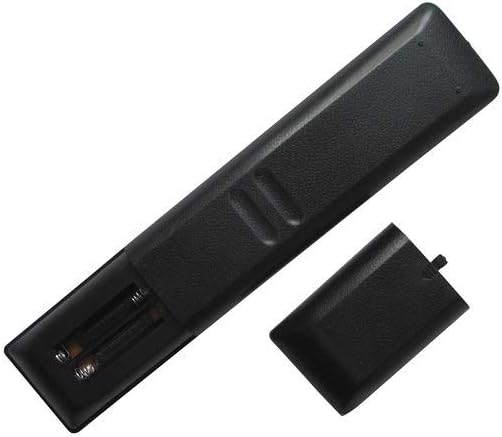
Сүрөт: Арткы view of the remote control with the battery cover open, revealing the battery slots.
Иштөө нускамалары
Point the remote control directly at your Sanyo television's infrared sensor. Ensure there are no obstructions between the remote and the TV.

Сүрөт: алдыңкы view of the remote control, displaying all buttons.
Негизги функциялар
- КҮЧ: Телевизорду күйгүзөт же өчүрөт.
- САНДЫК ТҮЙМӨЛӨР (0-9): Түздөн-түз каналдарды тандоо.
- CH +/-: Каналдарды ырааттуу түрдө өзгөртөт.
- VOL +/-: Үн деңгээлин тууралайт.
- Үнсүз: Телевизордун үнүн өчүрөт же калыбына келтирет.
- КИРҮҮ: Жеткиликтүү киргизүү булактары (мисалы, HDMI, AV) аркылуу циклдерди иштетет.
- МЕНЮ: Телевизордун негизги менюсуна кирүүгө мүмкүндүк берет.
- DIRECTIONAL PAD (Up, Down, Left, Right): Меню параметрлери боюнча чабыттайт.
- КИРҮҮ: Менюдагы тандоону ырастайт.
- ЧЫГУУ: Учурдагы менюдан же экрандагы дисплейден чыгат.
- МААЛЫМАТ: Учурдагы программа же киргизүү жөнүндө маалыматты көрсөтөт.
Кошумча функциялар
Depending on your specific Sanyo TV model, the following buttons may provide additional functionality:
- СҮРӨТ: Accesses picture settings.
- ҮН: Accesses sound settings.
- УЙКУ: Телевизордун автоматтык түрдө өчүшү үчүн таймерди коёт.
- ТАЙМЕР: Sets a timer for the TV to turn on automatically.
- PLAY/PAUSE/STOP/REW/FF: Controls for media playback if your TV supports it (e.g., USB media).
- SUB CH: Sub-channel selection.
- ЭСКЕ АЛУУ: Мурункуга кайтат viewed каналы.
- ЖАРДАМ: Accesses on-screen help.
Техникалык тейлөө
Тазалоо
Алыстан башкаруу пультун тазалоо үчүн жумшак, кургак чүпүрөктү колдонуңуз. Өтө кир болсо, бир азampen the cloth with water or a mild, non-abrasive cleaner. Avoid using harsh chemicals or abrasive materials, as these can damage the remote's surface or buttons.
Батареяны алмаштыруу
Replace batteries when the remote's response becomes sluggish or stops working. Always replace both AA batteries at the same time with new ones. Do not mix old and new batteries, or different types of batteries.
Сактагыч
If the remote control will not be used for an extended period, remove the batteries to prevent leakage, which can damage the remote's internal components.
Проблемаларды чечүү
- Пульт жооп бербей жатат:
- Батареялардын туура полярдуулукта жана туура орнотулганын текшериңиз.
- Эски батареяларды жаңы AA батареялары менен алмаштырыңыз.
- Ensure there is a clear line of sight between the remote control and the TV's infrared sensor. Remove any obstructions.
- Try operating the remote closer to the TV.
- Айрым функциялар иштебейт:
- As a replacement remote, it may not support all advanced or specific functions of your original Sanyo remote. Refer to your TV's original manual for specific feature compatibility.
- Verify that your TV model is listed as compatible with this remote.
Техникалык шарттар
| Модель номери | Easytry4382 |
| Бренд | Easytry123 |
| Шайкеш түзмөктөр | Sanyo LCD HDTV Televisions (Models: FXVF, FXVB, FXVC, FXVG, FXVL, FXVM, AVM3651, AVM3651G, DS27510, DS27820, DS31820, DS32830, DS32830H) |
| Байланыш технологиясы | Инфракызыл (IR) |
| Controller Type | Control Button |
| Power Source | 2 x AA батарейкалар (киргизилген эмес) |
Кепилдик жана колдоо
For warranty information and customer support, please refer to the seller or manufacturer directly. This product is typically covered by a limited warranty against manufacturing defects. Keep your purchase receipt as proof of purchase.
For further assistance or inquiries, please contact the Easytry123 customer service or the retailer from whom you purchased this remote control.