
1. Киришүү
The Zerone Sport Action DV Camera is a compact and portable device designed for capturing high-definition video during various outdoor activities. Featuring 1080P and 720P recording options, a 120-degree wide-angle lens, and an IPX-4 waterproof aluminum alloy shell, this camera is built for durability and ease of use. It includes a built-in microphone for audio recording and provides vibration feedback for operational status.
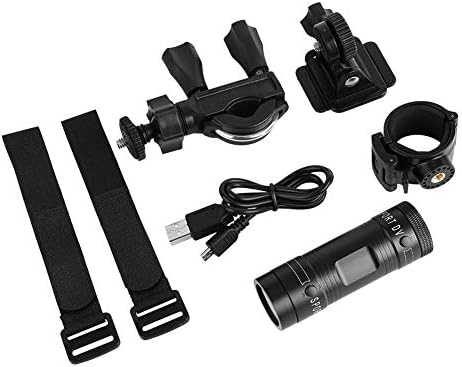
Image 1.1: The Zerone Sport Action DV Camera unit.
2. Коопсуздук маалыматы
- Камераны экстремалдык температурага же түз күн нуруна узак убакытка калтырбаңыз.
- While the camera features an IPX-4 waterproof rating, it is designed to withstand splashes and light rain. Do not submerge or soak the camera in water.
- Аппаратты күчтүү магнит талаасынан алыс кармаңыз.
- Зыян келтирбөө үчүн көрсөтүлгөн кубаттоочу кабелди жана кубат адаптерин гана колдонуңуз.
- Камераны бөлүктөргө бөлүүгө же өзгөртүүгө аракет кылбаңыз, анткени бул кепилдикти жокко чыгарып, зыян келтириши мүмкүн.
- Камераны колдонбогон учурда кургак, салкын жерде сактаңыз.
3. Пакеттин мазмуну
Сураныч, бардык буюмдар бар экенин текшерүү үчүн пакетти текшериңиз:
- Zerone Sport Action DV Camera Unit
- USB заряддоо кабели
- Mounting Accessories (e.g., bike mount, helmet mount, strap mounts)
- Rechargeable Battery (may be pre-installed)
- Колдонуучунун Колдонмосу (бул документ)
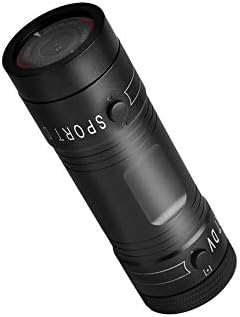
Image 3.1: Contents of the Zerone Sport Action DV Camera package, showing the camera, USB cable, and various mounting options.
4. Камера бүткөнview
Камеранын компоненттери жана башкаруу элементтери менен таанышыңыз.
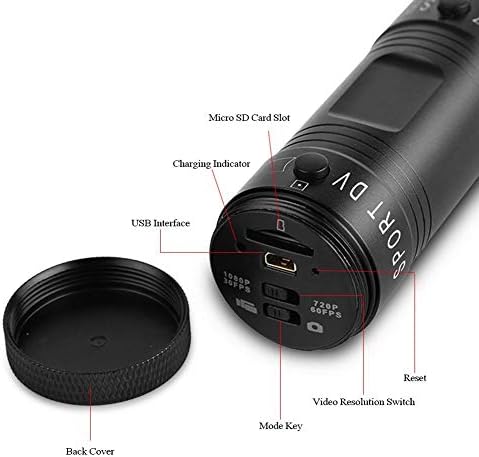
Сүрөт 4.1: Детальдуу view of the camera's rear end, highlighting the Micro SD card slot, USB interface, charging indicator, mode key, video resolution switch (1080P 30fps / 720P 60fps), and reset button.
- Микро SD карта слоту: Insert your Micro SD card here. A card is required for operation.
- Заряддоо көрсөткүчү: Displays charging status. A red light indicates charging; it turns off when fully charged.
- USB интерфейси: Заряддоо жана компьютерге туташтыруу үчүн.
- Режим ачкычы: Used to switch between recording modes (e.g., video, photo).
- Видеонун чечилишин которгуч: Selects between 1080P 30fps and 720P 60fps recording resolutions.
- Калыбына келтирүү баскычы: Used to reset the device if it becomes unresponsive.
- Power Button (Front): Located on the front side of the camera.
- Record/Stop Button (Back): Located on the back side of the camera.
5. Орнотуу
5.1 Батареяны заряддоо
- Connect the camera to a USB power source (e.g., computer, wall adapter) using the provided USB cable.
- The кызыл жарык on the back of the camera will illuminate, indicating that it is charging.
- Толук заряддалгандан кийин кызыл жарык өчөт.
- Note: If the camera blinks red and blue when plugged in, it indicates that an SD card is not inserted. This is not a charging indicator.
5.2 Микро SD картаны салуу
A Micro SD card (not included) is required for recording video and photos. The camera supports Micro SD cards up to a certain capacity (check product packaging for maximum supported size, typically 32GB or 64GB for similar devices).
- Камеранын арткы капкагын бурап алыңыз.
- Locate the Micro SD card slot (refer to Image 4.1).
- Micro SD картаны ордуна чыкылдаган үн чыкканча акырындык менен уячага салыңыз. Картанын туура багытталганын текшериңиз.
- Replace the back cover, ensuring it is securely tightened to maintain water resistance.
5.3 Камераны орнотуу
The camera comes with various mounting accessories for different applications.
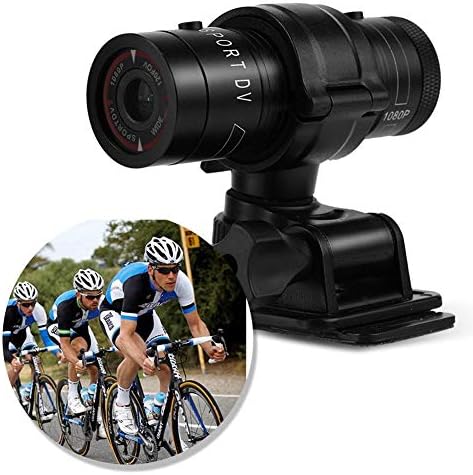
Image 5.1: The camera attached to a bicycle handlebar, demonstrating one of its mounting options.
- Велосипедге орнотуу: cl колдонуңузamp mount to attach the camera securely to bicycle handlebars or other tubular structures.
- Туулга орнотуу: Utilize the adhesive or strap mounts to fix the camera to a helmet.
- Strap Mounts: For attaching to various gear or body parts.
Ensure all mounts are securely fastened before engaging in activities to prevent the camera from falling.
6. Камераны иштетүү
6.1 Күйгүзүү/өчүрүү
- Күйгүзүү үчүн, басып, кармап туруңуз Кубат баскычы (front switch) until the camera vibrates.
- Өчүрүү үчүн, басып туруңуз Кубат баскычы again until the camera vibrates once.
6.2 Selecting Video Resolution
Before recording, select your desired video resolution using the switch on the back of the camera (refer to Image 4.1).
- Которуштургучту жылдырыңыз "1080P 30fps" for Full HD video at 30 frames per second.
- Которуштургучту жылдырыңыз "720P 60fps" for HD video at 60 frames per second.
6.3 Видеону жаздыруу
- Камера күйгүзүлгөнүн текшериңиз.
- басыңыз Жаздыруу/Токтоо баскычы (back switch) to start recording. The camera will vibrate three times to indicate recording has started.
- Жазууну токтотуу үчүн, басыңыз Жаздыруу/Токтоо баскычы again. The camera will vibrate once to indicate recording has stopped.
6.4 Компьютерге туташуу
өткөрүп берүү үчүн files or access recorded content:
- Камера өчүк экенин текшериңиз.
- Камераны компьютериңизге берилген USB кабели аркылуу туташтырыңыз.
- The camera will be recognized as a removable storage device.
- You can then access and transfer your video files.
7. Техникалык тейлөө
- Тазалоо: Use a soft, dry cloth to clean the camera body. For the lens, use a specialized lens cleaning cloth and solution. Avoid abrasive materials.
- Сактагыч: When not in use for extended periods, store the camera in a cool, dry place. Ensure the battery is partially charged (around 50%) to prolong its lifespan.
- Суу каршылык: Regularly check that the back cover is securely tightened to maintain the IPX-4 water resistance. Avoid exposing the USB port or SD card slot to moisture when the cover is open.
- Батареяга кам көрүү: Avoid fully discharging the battery frequently. Recharge it when the low battery indicator appears.
8. Кыйынчылыктарды
| Көйгөй | Мүмкүн себеп | Чечим |
|---|---|---|
| Камера күйбөйт. | Батарея түгөнүп калды. | Камераны толугу менен заряддаңыз. |
| Camera blinks red and blue, then turns off. | No Micro SD card inserted or card is faulty. | Insert a functional Micro SD card. Ensure it is properly seated. |
| Видео жаздыруу мүмкүн эмес. | Micro SD картасы жок, карта толуп калган же картада ката кетти. | Insert a Micro SD card, delete old fileс, же картаны форматтаңыз (бул бардык маалыматтарды өчүрөт). |
| Видеонун сапаты начар. | Линза кир; жарык аз шарттарда; чечилиш туура эмес коюлган. | Clean the lens. Ensure adequate lighting. Select 1080P resolution for higher detail. |
| Камера жооп бербей жатат. | Программанын катасы. | Use a thin object (like a paperclip) to press the Калыбына келтирүү баскычы (refer to Image 4.1). |
9. Техникалык шарттар
| Өзгөчөлүк | Деталь |
|---|---|
| Бренд | Zerone |
| Модель номери | Zeronefg3h149y2s |
| Видео тартуунун резолюциясы | 1080p (30 кадр/сек.), 720p (60 кадр/сек.) |
| Lens Angle | 120-degree A+ grade wide-angle |
| Суу өткөрбөйт рейтинги | IPX-4 (splash-proof) |
| Shell Material | Алюминий эритмеси |
| Фото сенсор технологиясы | CMOS |
| Максималдуу диафрагма | 1.8 миллиметр |
| Flash эс тутум түрү | Micro SD (card not included) |
| Видео тартуу форматы | AVI |
| Колдоого алынган аудио формат | AAC, MP3, PCM, FLAC, or Dolby Digital/AC-3 |
| Байланыш технологиясы | USB |
| Элемент Салмагы | 10.8 унция (болжол менен 306 грамм) |
| Продукциянын өлчөмдөрү | 11.81 x 6.3 x 5.91 дюйм (болжол менен 30 x 16 x 15 см) |
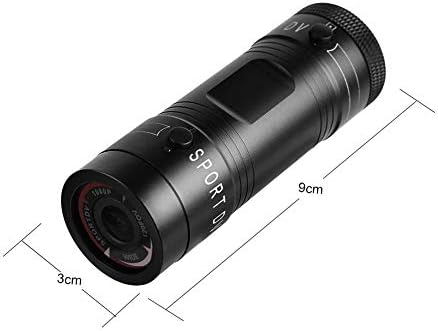
Image 9.1: Physical dimensions of the camera, showing a length of 9cm and a diameter of 3cm.
10. Кепилдик жана колдоо
Кепилдик маалыматы жана техникалык колдоо үчүн, сатып алууңуз менен бирге берилген документтерди караңыз же сатуучу/өндүрүүчү менен түз байланышыңыз. Кепилдик дооматтар үчүн сатып алганыңыздын далилин сактаңыз.
Manufacturer: Zerone
For further assistance, you may visit the Zerone Store on Amazon: Zerone Store