
1. Продукт бүтүп калдыview
The Sato One-Touch Timer TM-22 is a versatile digital timer designed for various timing needs, from kitchen use to laboratory applications. It combines ease of use with practical features to enhance your daily tasks.
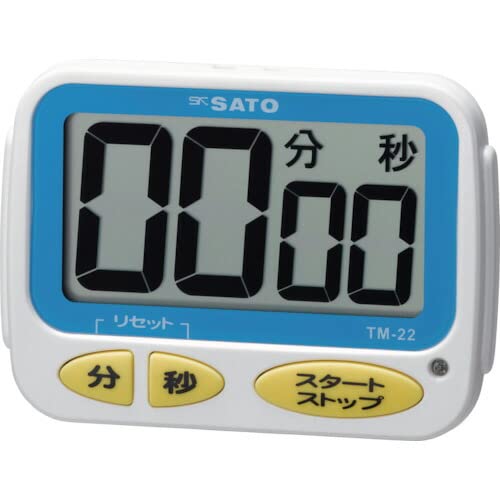
Сүрөт 1: Алдыңкы view of the Sato One-Touch Timer TM-22. The timer features a clear digital display and control buttons.
Негизги өзгөчөлүктөрү:
- Automatic Reset Alarm: The alarm sounds for 5 seconds at the set time and automatically resets to the initial set time.
- Жөнөкөй операция: The primary key is for starting; no complex operations are required to stop the timer's alarm cycle.
- Dual Notification: Alerts users with both sound (70dB) and light.
- Drip-Proof Construction: Designed to resist splashes, making it suitable for kitchen environments.
- Бир нече орнотуу параметрлери: Equipped with a magnet on the back for attachment to metal surfaces and a strap for hanging.
- Артка саноо жана санауу функциялары: Supports both decreasing and increasing time measurements.
2. Орнотуу
Батарея орнотуу:
The TM-22 timer requires one AAA battery for operation. A battery is included with the unit.
- Locate the battery compartment cover on the back of the timer.
- Бөлүктү ачуу үчүн капкакты жылдырыңыз же ачыңыз.
- Оң (+) жана терс (-) терминалдары бөлүмдүн ичиндеги белгилер менен туура дал келишин камсыз кылып, бир AAA батареясын салыңыз.
- Батарея бөлүкчөсүнүн капкагын бекем орнотуңуз.
The timer should power on, and the display will show '00:00' or the last set time.
3. Иштөө нускамалары
The TM-22 timer features both countdown and count-up functionalities.
3.1. Артка эсептөө таймери
This function allows you to set a specific duration, and the timer will count down to zero.
- Убакытты коюу: Use the 'M' (Minute) button and 'S' (Second) button to adjust the desired countdown duration. The timer can be set from 1 second up to 99 minutes and 59 seconds.
- Артка саноону баштоо: Press the 'START' button to begin the countdown.
- Ойготкуч эскертме: When the time reaches zero, an alarm will sound for 5 seconds, accompanied by a flashing light.
- Автоматтык абалга келтирүү: After the 5-second alarm, the timer automatically resets to the initial set time, ready for the next countdown without manual intervention.
- Тыныгуу/Токтоо: To pause the countdown, press the 'START' button again. To resume, press 'START' once more. To clear the set time, press the 'RESET' button (if available) or hold the 'START' button for a few seconds.
3.2. Count-up Timer
This function measures elapsed time from zero.
- Start Count-up: Ensure the timer display shows '00:00'. If not, press the 'RESET' button to clear any previous settings. Press the 'START' button to begin counting upwards from zero.
- Пауза/Резюме: To pause the count-up, press the 'START' button. To resume, press 'START' again.
- Кайтаруу: To reset the count-up timer to '00:00', press the 'RESET' button (if available) or hold the 'START' button for a few seconds while paused.
4. Техникалык тейлөө
Тазалоо:
To maintain the timer's appearance and functionality:
- Wipe the exterior of the timer with a soft, dry cloth.
- Абразивдүү тазалоочу каражаттарды, эриткичтерди же химиялык заттарды колдонбоңуз, анткени алар пластмассага зыян келтириши мүмкүн.asing же дисплей.
- The timer is drip-proof, but do not immerse it in water or expose it to heavy splashing.
Батареяны алмаштыруу:
Replace the battery when the display becomes dim or the timer's functions become erratic.
- Follow the battery installation steps outlined in the "2. Setup" section.
- Always use a fresh AAA battery.
- Колдонулган батарейкаларды жергиликтүү эрежелерге ылайык жок кылыңыз.
5. Кыйынчылыктарды
If you encounter issues with your TM-22 timer, refer to the following common problems and solutions:
| Көйгөй | Мүмкүн себеп | Чечим |
|---|---|---|
| Таймер күйбөй жатат. | Батарея өлүп калган же туура эмес орнотулган. | Check battery polarity. Replace with a new AAA battery. |
| Display is faint or flickering. | Батареянын кубаттуулугу төмөн. | AAA батареясын алмаштырыңыз. |
| Сигнализация чырылдабай жатат. | Volume obstruction or internal issue. | Ensure the speaker is not covered. Check battery level. If problem persists, contact support. |
| Timer does not reset automatically after alarm. | This feature is specific to the countdown function. | Ensure you are using the countdown function. For count-up, manual reset is required. |
6. Техникалык шарттар
| Өзгөчөлүк | Деталь |
|---|---|
| Модель номери | ТМ-22 |
| Максималдуу убакыт | 99 мүнөт 59 секунд |
| Minimum Timing | 1 секунд |
| Өлчөмдөрү (H x W x D) | 67 мм x 93 мм x 20 мм |
| Салмагы | 96 г |
| Power Source | AAA батареясы x 1 (кошулган) |
| Ойготкучтун үнү | 70 дБ |
| Функциялар | Countdown, Count-up |
| Өзгөчөлүктөр | Drip-proof construction, Magnet on back, Hanging strap, Sound and light notification |
7. Кепилдик жана колдоо
For warranty information, technical assistance, or customer support regarding your Sato One-Touch Timer TM-22, please contact your authorized retailer or the manufacturer, Sato Corporation. Keep your purchase receipt as proof of purchase.
Please visit the official Sato webэң акыркы колдоо маалыматы жана байланыш маалыматтары үчүн сайт.