
Introduction
This manual provides detailed instructions for the installation, operation, and maintenance of your MekedeTech Android Car Stereo GPS. This unit is designed to upgrade your vehicle's infotainment system with advanced features including GPS navigation, wireless CarPlay/Android Auto, 4G LTE connectivity, and a high-resolution touch screen. Please read this manual thoroughly before installation and use to ensure proper function and safety.
Шайкештик
This Android car stereo is compatible with the following Mercedes-Benz and Volkswagen models:
- Mercedes-Benz Sprinter W906/W209/W311/W315/W318 (2006-2012)
- Mercedes-Benz B200/B150/B170/A180/A160
- Mercedes-Benz Viano (2006-2012)
- Mercedes-Benz Vito W639 (2006-2012)
- Mercedes-Benz A-class W169 (2004-2012)
- Mercedes-Benz B-class W245 (2004-2012)
- Volkswagen Crafter (2006-2012)
- Volkswagen LT3 (2006-2011)
Пакеттин мазмуну
Төмөндө тизмеленген нерселердин баары пакетиңизге камтылганын текшериңиз:
- MekedeTech Android Car Stereo Unit
- Dash Kit
- Электр кабели
- RCA кабели
- Реверсивдүү камера кабели
- USB кабелдери
- Car Dash Cam
Орнотуу жана орнотуу
The MekedeTech Android Car Stereo is designed for plug-and-play installation. However, professional installation is recommended. Ensure the vehicle's power is disconnected before beginning installation.
- Даярдоо: Carefully remove your existing car stereo unit and dashboard trim. Refer to your vehicle's specific service manual for detailed removal instructions.
- Зымдар: Connect the provided power cable, RCA cable, reversing camera cable, and USB cables to the corresponding ports on the new Android stereo and your vehicle's wiring harness. Ensure all connections are secure.
- Optical Fiber Box (if applicable): If your car has an amplifier sound system, an additional Optical Fiber Box is required for audio functionality. This box is not included and must be purchased separately. Connect it according to its specific instructions.
- Монтаждоо: Install the new Android stereo unit into the dashboard using the provided dash kit. Ensure it is securely fitted and aligned.
- Сыноо: Reconnect the vehicle's power. Turn on the ignition and test all functions of the stereo, including audio, touch screen response, GPS, and connectivity features.
- Жыйынтыктоочу жыйын: Бардык функциялар текшерилгенден кийин, башкаруу панелинин жасалгасын кайра чогултуңуз.
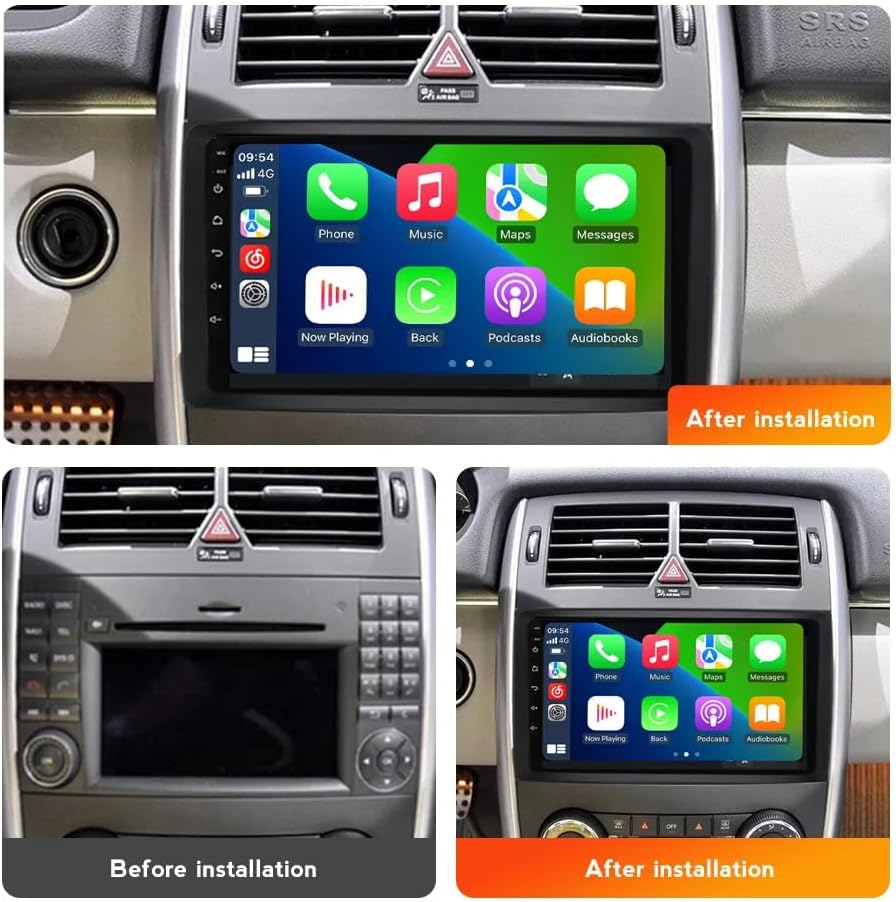
Image: Comparison of the dashboard before and after installing the MekedeTech Android Car Stereo, showcasing the new CarPlay interface.

Image: Comparison of the dashboard before and after installing the MekedeTech Android Car Stereo, displaying the radio interface.

Image: Technical drawing showing the dimensions of the MekedeTech Android Car Stereo unit (244mm x 130mm x 240mm).
Иштөө нускамалары
1. Күйгүзүү/өчүрүү
Түзмөктү күйгүзүү же өчүрүү үчүн кубат баскычын (адатта алдыңкы панелде жайгашкан) басып, кармап туруңуз. Кыска басуу, адатта, аудиону өчүрөт же кайра күйгүзөт.
2. Сенсордук экран интерфейси
The unit features a 9-inch IPS touch screen with a resolution of 1280*720. Navigate through menus and applications by tapping, swiping, and pinching gestures, similar to a smartphone.
3. Зымсыз CarPlay жана зымдуу Android Auto
Connect your iPhone wirelessly via Bluetooth and Wi-Fi for CarPlay, or your Android phone via USB for wired Android Auto. This allows you to access navigation, music, messages, and other apps directly from the stereo's screen.
- Wireless CarPlay үчүн: Ensure Bluetooth and Wi-Fi are enabled on your iPhone. Pair your iPhone with the stereo via Bluetooth. Once paired, the stereo will prompt you to enable CarPlay.
- Зымдуу Android Auto үчүн: Connect your Android phone to the stereo using a USB cable. Follow the on-screen prompts to initiate Android Auto.
4. 4G LTE жана Wi-Fi байланышы
The unit supports 4G LTE connectivity. Insert a 4G SIM card into the designated slot to access the internet directly. Alternatively, you can connect to a Wi-Fi hotspot for internet access.
- 4G LTE: Insert a compatible 4G SIM card into the SIM card slot. The unit will automatically detect the network.
- Wi-Fi: Go to the 'Settings' menu, select 'Wi-Fi', and choose your desired network. Enter the password if required.
5. GPS навигациясы
The stereo has built-in GPS navigation with pre-installed maps. Access the navigation application from the main menu. Ensure the GPS antenna is properly installed for optimal signal reception.
6. Bluetooth 5.0
Pair your mobile device via Bluetooth for hands-free calling and audio streaming. Go to 'Settings' > 'Bluetooth' to search for and connect to your device.
7. Руль башкаруу
The unit retains original steering wheel control functions, allowing you to switch songs, change channels, and adjust volume without removing your hands from the steering wheel. This feature is pre-configured.
8. DSP үн системасы
The built-in Digital Signal Processor (DSP) enhances audio quality. Access the sound settings in the menu to customize equalizer presets and audio preferences.
Техникалык тейлөө
To ensure the longevity and optimal performance of your MekedeTech Android Car Stereo, follow these maintenance guidelines:
- Тазалоо: Экранды жана сыртын тазалоо үчүн жумшак, кургак чүпүрөктү колдонуңуз. өжөр тактар үчүн, бир аз гamp жумшак, абразивдүү эмес тазалоочу каражаты бар кездемени колдонсо болот. Күчтүү химиялык заттардан алыс болуңуз.
- Программалык камсыздоо жаңыртуулары: Periodically check for software updates provided by MekedeTech to ensure you have the latest features and bug fixes. Updates can typically be found in the system settings or on the manufacturer's webсайт.
- Температура: Аппаратты өтө ысык жана муздак температурага узак убакыт бою тийгизүүдөн сактаңыз.
- Байланыштары: Кабелдин бардык туташууларынын бекемдигин жана коррозияга учурабагандыгын текшерүү үчүн мезгил-мезгили менен текшерип туруңуз.
Проблемаларды чечүү
Эгерде сиз унааңыздын стереосу менен көйгөйлөргө туш болсоңуз, төмөнкү жалпы көйгөйлөрдү чечүү кадамдарын караңыз:
- Кубат жок: Check all power cable connections. Ensure the vehicle's ignition is on. Verify the fuse in the power cable is intact.
- Аудио жок: Confirm speaker connections. If your vehicle has an amplifier sound system, ensure the Optical Fiber Box is correctly installed and functioning. Check volume levels and mute settings.
- Сенсордук экран жооп бербейт: Бирдикти өчүрүп күйгүзүп көрүңүз. Эгер маселе чечилбесе, баштапкы абалга келтириңиз (эскертүү: бул колдонуучунун бардык дайындарын өчүрөт).
- GPS сигналын жоготуу: GPS антеннасынын туура орнотулганын жана ачык экенин текшериңиз view асмандын. Зарыл болсо, унааны ачык жерге жылдырыңыз.
- Bluetooth/Wi-Fi байланышындагы көйгөйлөр: Ensure Bluetooth/Wi-Fi is enabled on both the stereo and your mobile device. Try unpairing and re-pairing devices. Restart both devices.
- CarPlay/Android Auto туташпай жатат: For CarPlay, ensure Wi-Fi is also enabled on your iPhone after Bluetooth pairing. For Android Auto, try a different USB cable. Ensure the Android Auto app is updated on your phone.
If these steps do not resolve the issue, please contact MekedeTech customer support.
Техникалык шарттар
| Бренд | MekedeTech |
| Операция системасы | Android 12 OS |
| CPU | 8 ядролуу A53 1.8 ГГц |
| Эс | 2 ГБ ОЗУ, 32 ГБ ROM |
| Screen Size | 9 дюйм |
| Screen Resolution | 1280 x 720 IPS Touch Screen |
| Power Output | 4*50 Вт |
| Байланыш | 4G LTE, Wi-Fi, Bluetooth 5.0 |
| Навигация | Built-in GPS, Worldwide Maps |
| Өзгөчөлүктөр | Wireless CarPlay, Wired Android Auto, DSP Sound System, Steering Wheel Control Support |
| Аудио форматтары | APE/FLAC/WAV/MP3/WMA ж.б. |
| Видео форматтары | MKV/RMVB/AVI/MP4/MDV ж.б. |
| Сүрөт форматтары | PNG/JPEG/JPG/GIF/WBMP/BNP ж.б. |
Кепилдик жана колдоо
Кепилдик маалымат
This MekedeTech Android Car Stereo comes with a 1 жылдык кепилдик сатып алынган күндөн тартып. Бул кепилдик өндүрүштүк кемчиликтерди жана нормалдуу колдонуудагы бузулууларды камтыйт. Бул туура эмес орнотуу, туура эмес колдонуу, кырсыктар же уруксатсыз өзгөртүүлөрдөн келип чыккан зыянды камтыбайт.
Кардарларды колдоо
For technical assistance, warranty claims, or any questions regarding your product, please contact MekedeTech customer support. Refer to the contact information provided with your purchase or visit the official MekedeTech webколдоо булактары үчүн сайт.