
Introduction
This manual provides instructions for the Easytry123 replacement remote control, model Easytry4921. This remote is designed to be compatible with various Saba LED and LCD HDTV models, including LED26V11, SBV1943H, SBV2243H, SCB1909W, SCB1910VX, LED32PV412, and S19104DVD. Please read this manual carefully before use to ensure proper operation.
Маанилүү эскертүү:
- This is a replacement remote control. Some advanced functions of your original TV remote may not be supported.
- Ensure your TV model is listed in the compatible models for full functionality.
- Batteries are not included with this remote control.
Жайгашуу
1. Батареяны орнотуу
Алыстан башкаруу пультун иштеши үчүн эки (2) AAA батарейкасы керек. Батарейкаларды орнотуу үчүн төмөнкү кадамдарды аткарыңыз:
- Пульттун артындагы батарея бөлүкчөсүнүн капкагын табыңыз.
- Бөлүмдү ачуу үчүн өтмөктү басып, капкакты ылдый жылдырыңыз.
- Insert two AAA batteries, ensuring the positive (+) and negative (-) terminals align correctly with the markings inside the compartment. Incorrect installation can prevent the remote from functioning.
- Батарея бөлүкчөсүнүн капкагын бекем чыккыча ордуна жылдырыңыз.
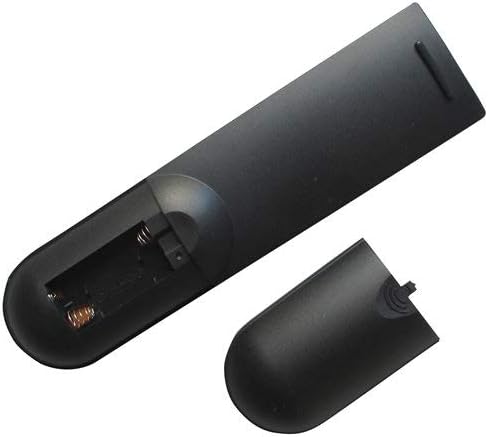
Image: Back of the remote control with the battery cover removed, revealing the battery compartment. This shows where to insert the AAA batteries.

Image: Back of the remote control with the battery cover partially removed, illustrating the correct orientation for battery insertion.
After installing the batteries, the remote control is ready for use. No programming is typically required for this replacement remote.
Иштөө нускамалары
This remote control operates using infrared (IR) technology. Ensure there is a clear line of sight between the remote control and the TV's IR receiver for optimal performance.
Негизги функциялар:
- Кубат баскычы: Телевизорду күйгүзөт же өчүрөт.
- Канал өйдө/төмөн: Телеканалды өзгөртөт.
- Үнүн жогорулатуу/төмөндөтүү: Телевизордун аудио үнүн тууралайт.
- Үнсүз баскычы: Телевизордун үнүн өчүрөт же кайра күйгүзөт.
- Киргизүү/Булак баскычы: Жеткиликтүү киргизүү булактары (мисалы, HDMI 1, AV, Component) аркылуу циклдерди иштетет.
- Сан баскычтары (0-9): Телеканалдарды түз тандаңыз.
- Меню баскычы: Accesses the TV's on-screen menu.
- Чабыттоо баскычтары (өйдө, ылдый, солго, оңго, OK/Enter): Used to navigate through TV menus and confirm selections.
Refer to your television's original user manual for specific functions and menu navigation details, as these may vary by TV model.
Техникалык тейлөө
Алыстан башкарууну тазалоо
Пультту тазалоо үчүн жумшак, кургак чүпүрөктү колдонуңуз. өжөр кир үчүн, бир аз гampen the cloth with water or a mild, non-abrasive cleaner. Do not use harsh chemicals or immerse the remote control in water.
Батареяны алмаштыруу
Replace the batteries when the remote control's response becomes sluggish or stops working. Always replace both batteries at the same time with new AAA batteries. Do not mix old and new batteries, or different types of batteries, as this can lead to leakage or damage.
Батареянын коопсуздугу:
- Эгер алыстан башкаруу куралы узак убакыт бою колдонулбаса, батарейкаларды алып салыңыз.
- Колдонулган батарейкаларды жергиликтүү эрежелерге ылайык жок кылыңыз.
- Батареяларды балдар жетпеген жерде сактаңыз.
Проблемаларды чечүү
| Көйгөй | Мүмкүн себеп | Чечим |
|---|---|---|
| Пульт иштебейт. |
|
|
| Кээ бир функциялар иштебейт. |
|
|
| Алыстан башкаруу пульту үзгүлтүккө учурап иштейт. |
|
|
Техникалык шарттар
- Модел: Easytry4921
- Бренд: Easytry123
- Шайкеш түзмөктөр: Saba LED/LCD HDTVs (LED26V11, SBV1943H, SBV2243H, SCB1909W, SCB1910VX, LED32PV412, S19104DVD)
- Байланыш технологиясы: Инфракызыл (IR)
- Контроллердин түрү: Control Button
- Кубат булагы: 2 x AAA Батареялар (киргизилген эмес)
- Өзгөчө өзгөчөлүгү: Эргономикалык дизайн
Кепилдик жана колдоо
Information regarding specific warranty terms for this Easytry123 replacement remote control is not provided in the product details. For any support inquiries or further assistance, please contact the seller directly through the platform where the purchase was made.
Please refer to the original product listing or your purchase documentation for any available warranty information.