
Easytry123 Easytry4949
User Manual: Easytry123 Replacement Remote Control
Модель: Easytry4949
1. Киришүү
Thank you for choosing the Easytry123 Replacement Remote Control. This remote is designed to be a functional replacement for your original Lavis RC-1900 LA-LED191 LCD HDTV TV remote. While it aims to replicate core functionalities, please note that some advanced or specific features of your original remote may not be fully supported by this replacement unit.
This manual provides essential information on setting up, operating, and maintaining your new remote control to ensure a smooth user experience.
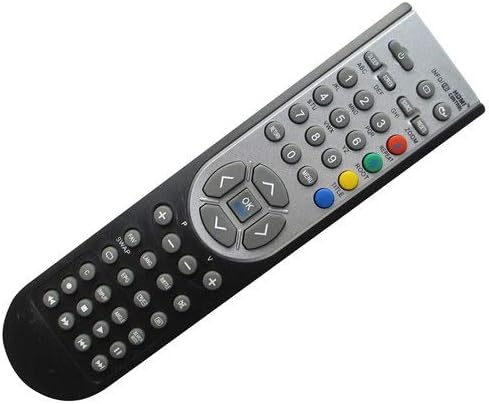
Сүрөт 1: Алдыңкы view of the Easytry123 Replacement Remote Control.
2. Орнотуу
2.1 Батареяны орнотуу
Your Easytry123 Replacement Remote Control requires two (2) AAA batteries (not included). Follow these steps to install them correctly:
- Пульттун артындагы батарея отсегин табыңыз.
- Өтмөктү ылдый басып, аны ачуу үчүн батареянын капкагын ылдый жылдырыңыз.
- Insert two AAA batteries, ensuring that the positive (+) and negative (-) terminals align with the markings inside the compartment. Incorrect insertion can prevent the remote from functioning.
- Батареянын капкагын бекем чыккыча ордуна жылдырыңыз.

2-сүрөт: Капкагы алынган батарея бөлүмү.
Note: Always use new batteries and replace both batteries at the same time. Do not mix old and new batteries or different types of batteries.
3. Пультту иштетүү
This section outlines the basic functions of your replacement remote control. Point the remote directly at your TV's infrared receiver for optimal performance.
- Кубат баскычы: Located at the top, typically red or clearly marked. Press once to turn the TV on or off.
- Сан баскычтары (0-9): Used to directly input channel numbers.
- Channel Up/Down (CH+/CH-): Used to navigate through channels sequentially.
- Volume Up/Down (VOL+/VOL-): Used to adjust the sound level.
- Үнсүз баскычы: Silences the TV audio. Press again to restore sound.
- Navigation Buttons (Arrow Keys & OK/Enter): Менюларда багыттоо жана тандоолорду ырастоо үчүн колдонулат.
- Киргизүү/Булак баскычы: Жеткиликтүү киргизүү булактары (HDMI, AV ж.б.) аркылуу циклдерди жүргүзөт.
- Меню баскычы: Accesses the TV's main menu for settings and adjustments.
Important: As a replacement remote, some advanced functions or specific buttons found on your original TV remote (e.g., smart TV features, specific app buttons) may not be present or fully functional. The primary purpose of this remote is to provide essential TV control.
4. Техникалык тейлөө
4.1 Тазалоо
To keep your remote control in good condition, clean it periodically:
- Пульттун бетин сүртүү үчүн жумшак, кургак чүпүрөктү колдонуңуз.
- өжөр кир үчүн, бир аз гampчүпүрөктү суу же жумшак, абразивдүү тазалагыч менен жууп салыңыз. Тазалоочу каражатты түздөн-түз пультка чачпаңыз.
- Катуу химиялык заттарды, эриткичтерди же абразивдүү тазалагычтарды колдонуудан алыс болуңуз, анткени алар пульттун жасалгасына же ички бөлүктөрүнө зыян келтириши мүмкүн.
4.2 Батареяны алмаштыруу
Replace the batteries when the remote's response becomes sluggish or it stops working. Refer to Section 2.1 for battery installation instructions. Always dispose of used batteries responsibly according to local regulations.
4.3 Сактоо
If you plan not to use the remote control for an extended period, it is advisable to remove the batteries to prevent leakage, which could damage the remote.
5. Кыйынчылыктарды
If you encounter issues with your Easytry123 Replacement Remote Control, please refer to the following common problems and solutions:
- Пульт жооп бербей жатат:
- Батареялар туура полярдуулук менен (+/-) туура салынганын текшериңиз.
- Батареяларды жаңыларына алмаштырыңыз.
- Пульт менен телевизордун инфракызыл сенсорунун ортосунда эч кандай тоскоолдуктар жок экенин текшериңиз.
- Пультту түз эле телевизорго багыттап жатканыңызды текшериңиз.
- Only some functions work, or certain buttons do not respond:
- This is a replacement remote. As stated in the product description, it may not work with all functions as the original remote. Core functions like power, volume, and channel control should generally work.
- Verify that your TV model (Lavis RC-1900 LA-LED191) is explicitly listed as compatible.
- Баскычтар жабышчаак же жооп бербей жатат:
- The remote may need cleaning. Refer to Section 4.1.
- Ensure no liquid has spilled into the remote. If so, discontinue use and allow it to dry completely.
6. Техникалык шарттар
| Өзгөчөлүк | Деталь |
|---|---|
| Бренд | Easytry123 |
| Модель номери | Easytry4949 |
| Шайкеш түзмөктөр | Lavis RC-1900 LA-LED191 LCD HDTV TV |
| Байланыш технологиясы | Инфракызыл (IR) |
| Controller Type | Control Button |
| Өзгөчө өзгөчөлүк | Эргономикалык |
| Батареялар талап кылынат | 2 x AAA (киргизилген эмес) |
7. Кепилдик жана колдоо
Please note that specific warranty information for this replacement remote control is not provided in the product packaging or description. As a replacement item, it is typically sold without an explicit manufacturer's warranty.
For any issues not covered in the troubleshooting section, or for further assistance, please contact the seller or retailer from whom you purchased this product. They may be able to provide additional support or guidance regarding returns or exchanges in accordance with their store policies.
Always retain your proof of purchase for any potential inquiries.
Ask a question about this manual
Ask about setup, troubleshooting, compatibility, parts, safety, or missing instructions. Manuals+ will review the question and use this page’s manual context to help answer it.