
Easytry123 Easytry4957
Instruction Manual
Easytry123 Remote Control for Medion MD20272ES/PTA MD20057 RC-1900 LCD HDTV TV
Продукт бүттүview
This document provides essential information for the Easytry123 Replacement Remote Control, model Easytry4957, designed for Medion MD20272ES/PTA, MD20057, and RC-1900 LCD HDTV TVs. This remote is a replacement unit and may not offer all functions of the original remote. Please ensure your TV model is listed as compatible before use.
Негизги өзгөчөлүктөр төмөнкүлөрдү камтыйт:
- Ыңгайлуу иштетүү үчүн эргономикалык дизайн.
- Infrared (IR) connectivity for reliable operation.
- Button control interface for straightforward navigation.
- Designed for use with compatible television models.
Продукт сүрөттөрү
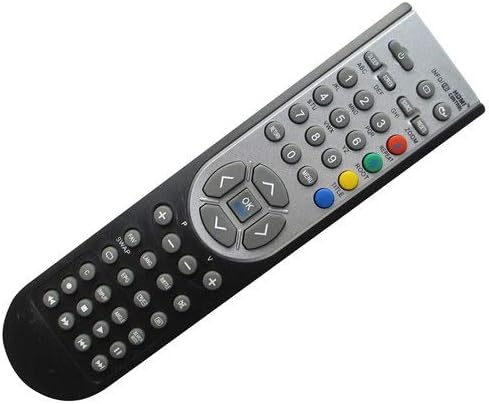
1-сүрөт: Фронт view of the remote control, displaying the button layout including numerical keys, navigation pad, volume, channel, and media controls.

2-сүрөт: Артка view of the remote control, highlighting its ergonomic curve and solid black casing.

3-сүрөт: Артка view of the remote control with the battery cover removed, showing the battery compartment designed for two AAA batteries.
Орнотуу нускамалары
This remote control does not require complex setup or programming. Its primary setup involves battery installation.
- Батарея орнотуу:
- Алыстан башкаруу пультунун арткы бетиндеги батарея бөлүмүн табыңыз (3-сүрөттү караңыз).
- Батареянын капкагын ылдый жылдырыңыз же ачкычты басып, көтөрүңүз.
- Оң (+) жана терс (-) терминалдары бөлүмдүн ичиндеги белгилер менен туура дал келишин камсыз кылып, эки (2) AAA батарейканы салыңыз.
- Батареянын капкагын бекем чыккыча ордуна жылдырыңыз.
- Алгачкы колдонуу:
Once batteries are installed, the remote is ready for use. Point the remote directly at your Medion LCD HDTV TV and press the power button to test functionality. No pairing or code entry is typically required for this infrared replacement remote.
Note: This product does not come with batteries or a printed manual. The information provided here serves as the complete instruction guide.
Иштөө нускамалары
The Easytry123 replacement remote control operates via infrared signals and is designed for intuitive use with compatible Medion LCD HDTV TVs. Its button layout is standard for television remote controls.
- Кубат баскычы: Located at the top, typically red or clearly marked, to turn the TV on or off.
- Сан баскычтары (0-9): Түз канал тандоо үчүн.
- Channel Up/Down (CH+/CH-): Каналдар боюнча ырааттуу багыт алуу үчүн.
- Volume Up/Down (VOL+/VOL-): Аудио үнүн жөндөө үчүн.
- Үнсүз баскычы: To instantly silence the TV audio.
- Navigation Pad (Arrow Keys and OK/Enter): Used to navigate menus, select options, and confirm choices on the TV screen.
- Киргизүү/Булак баскычы: To switch between different video inputs (e.g., HDMI, AV, Component).
- Меню/Орнотуулар баскычы: To access the TV's on-screen menu for picture, sound, and other settings.
- Медиа ойнотууну көзөмөлдөө: Buttons like Play, Pause, Stop, Rewind, Fast Forward may be present for controlling media playback if your TV supports it.
Important: As a replacement remote, some advanced or specific functions of your original TV remote may not be supported. Functionality is dependent on the TV model's compatibility with standard infrared commands.
Техникалык тейлөө
Proper maintenance will extend the life of your remote control.
- Тазалоо: Пультту аарчуу үчүн жумшак, кургак чүпүрөктү колдонуңуз. Өтө кир болсо, бир азampкездемени суу же жумшак, абразивдүү эмес тазалоочу каражат менен сүртүңүз. Күчтүү химиялык заттарды колдонбоңуз же пультту суюктукка салбаңыз.
- Батареяга кам көрүү: If the remote will not be used for an extended period (e.g., more than a month), remove the batteries to prevent leakage and potential damage to the remote.
- Сактагыч: Пультту салкын, кургак жерде, күндүн түз тийген нурунан, өтө жогорку температурадан жана жогорку нымдуулуктан алыс сактаңыз.
- Колдонуу: Avoid dropping the remote or subjecting it to strong impacts, which can damage internal components.
Проблемаларды чечүү
Эгерде сиз алыстан башкаруу пультуңузда көйгөйлөргө туш болсоңуз, төмөнкү көйгөйлөрдү чечүү кадамдарын колдонуп көрүңүз:
- Алыстан жооп бербейт:
- Батареяларды текшерүү: Ensure batteries are inserted correctly with the correct polarity (+/-). Replace old or depleted AAA batteries with new ones.
- Көрүү сызыгы: Make sure there is a clear line of sight between the remote's infrared emitter (at the front tip) and the TV's IR receiver. Obstructions can block the signal.
- Аралык: Ensure you are within a reasonable operating distance from the TV (typically up to 20 feet).
- Айрым баскычтар иштебей жатат:
- Шайкештик: As a replacement remote, some specific functions or buttons may not be compatible with your particular TV model. Refer to your TV's original manual for its specific remote commands.
- Stuck Buttons: Check if any buttons are physically stuck or jammed. Gently press them to free them.
- Интерференция:
Strong light sources (like direct sunlight or certain energy-saving lamps) can sometimes interfere with infrared signals. Try operating the remote in different lighting conditions.
If the issue persists after trying these steps, the remote may be faulty, or your TV model might not be fully compatible. Verify your TV model number against the compatible models listed for this remote.
Техникалык шарттар
| Бренд | Easytry123 |
| Модель номери | Easytry4957 |
| Шайкеш түзмөктөр | Medion MD20272ES/PTA, MD20057, RC-1900 LCD HDTV TV |
| Байланыш технологиясы | Инфракызыл (IR) |
| Controller Type | Control Button |
| Өзгөчө өзгөчөлүк | Эргономикалык |
| Батареялар талап кылынат | 2 x AAA батарейкалар (киргизилген эмес) |
| Дата биринчи жеткиликтүү | 7-декабрь, 2018-жыл |
Кепилдик жана колдоо
Specific warranty information for this Easytry123 replacement remote control is not provided in the product details. For any warranty claims, returns, or technical support inquiries, please contact the seller directly through the platform where the purchase was made.
The manufacturer of this product is Easytry123.
Ask a question about this manual
Ask about setup, troubleshooting, compatibility, parts, safety, or missing instructions. Manuals+ will review the question and use this page’s manual context to help answer it.