
1. Киришүү
Welcome to the user manual for your Easytry123 Replacement Remote Control. This manual provides essential information for the proper setup, operation, and maintenance of your new remote. This remote is designed as a replacement for specific Sunstech LCD HDTV TV models. Please note that as a replacement unit, some advanced or unique functions of your original TV remote may not be fully supported. Ensure your TV model is listed in the title for compatibility.
2. Продукт бүтүп калдыview
The Easytry123 Replacement Remote Control is an ergonomic, button-controlled device utilizing infrared technology for seamless interaction with compatible Sunstech televisions. Its design focuses on ease of use for common television functions.
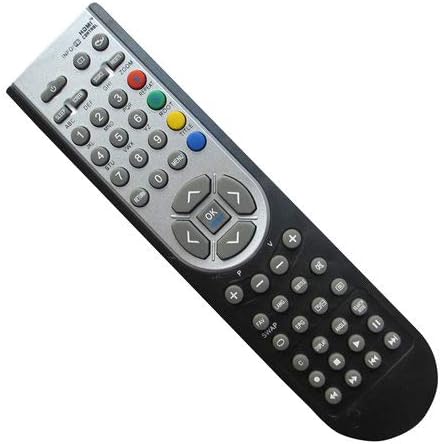
2.1-сүрөт: Фронт view of the Easytry123 Replacement Remote Control, showing various function buttons including power, number keys, volume, channel, navigation, and menu controls.
3. Орнотуу
Your Easytry123 Replacement Remote Control requires two AAA batteries (not included) for operation. Follow these steps to install the batteries:
- Пульттун артындагы батарея отсегин табыңыз.
- Батареянын кулпусун ачып, кулпуну басыңыз.
- Оң (+) жана терс (-) терминалдары бөлүмдүн ичиндеги белгилер менен туура дал келишин камсыз кылып, эки AAA батарейкасын салыңыз.
- Батареянын капкагын бекем чыккыча ордуна жылдырыңыз.
The remote is now ready for use. No additional programming is typically required for compatible Sunstech TV models.
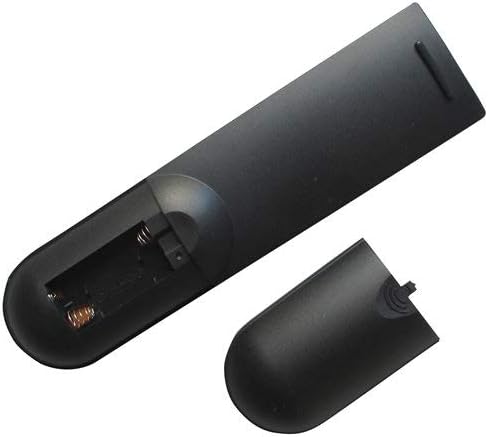
3.1-сүрөт: Артка view of the remote control with the battery compartment open, illustrating where to insert the two AAA batteries.
4. Иштөө нускамалары
This remote control operates using infrared signals. Ensure there is a clear line of sight between the remote and your television's IR receiver. Point the remote directly at the TV for optimal performance.
Негизги функциялар:
- Кубат баскычы: Телевизорду күйгүзөт же өчүрөт.
- Сан баскычтары (0-9): Түздөн-түз каналдарды тандоо.
- Үнүн жогорулатуу/төмөндөтүү: Үн деңгээлин тууралайт.
- Канал өйдө/төмөн: Каналды ырааттуу түрдө өзгөртөт.
- Чабыттоо баскычтары (өйдө, ылдый, солго, оңго): Used to navigate menus and on-screen options.
- OK/Киргизүү баскычы: Менюлардагы тандоолорду ырастайт.
- Меню баскычы: Сыналгынын негизги менюсуна кирет.
- Киргизүү/Булак баскычы: Ар кандай видео киргизүү булактарынын (мисалы, HDMI, AV) ортосунда которулат.
For specific functions not listed, refer to your Sunstech TV's original user manual, as replacement remotes may have varying levels of compatibility for advanced features.
5. Техникалык тейлөө
Алыстан башкаруу пультуңуздун узак мөөнөттүү жана туура иштешин камсыз кылуу үчүн, төмөнкү техникалык тейлөө көрсөтмөлөрүн аткарыңыз:
- Тазалоо: Wipe the remote with a soft, dry cloth. Avoid using liquid cleaners or abrasive materials, as they can damage the surface or internal components.
- Батареяны алмаштыруу: Replace batteries promptly when the remote's responsiveness decreases. Always replace both batteries at the same time with new ones of the same type (AAA). Remove batteries if the remote will not be used for an extended period to prevent leakage.
- Сактагыч: Пультту салкын, кургак жерде, күндүн түз тийген нурунан, өтө жогорку температурадан жана жогорку нымдуулуктан алыс сактаңыз.
- Колдонуу: Avoid dropping the remote or exposing it to strong impacts, which can damage internal circuitry.
6. Кыйынчылыктарды
- Пульт жооп бербей жатат:
- Батареялар туура полярдуулук менен туура салынганын текшериңиз.
- Эски батареяларды жаңы AAA батареялары менен алмаштырыңыз.
- Пульт менен телевизордун инфракызыл сенсорунун ортосунда эч кандай тоскоолдуктар жок экенин текшериңиз.
- Пульттун түз телевизорго багытталганын текшериңиз.
- Айрым функциялар иштебейт:
- As a replacement remote, certain advanced or unique functions specific to your original TV remote may not be supported. This is normal for universal or replacement remotes.
- Verify that your TV model is explicitly listed as compatible with this remote.
7. Техникалык шарттар
| Модель номери | Easytry4915 |
| Бренд | Easytry123 |
| Шайкеш түзмөктөр | Television (Sunstech LCD HDTV TV models: 24LEDTIRSABK, TL-EI19HDMKII, TL-I 32 HD-MKWBK, TLEI19HD-MKIIWBK, TLEI22HDMKII) |
| Байланыш технологиясы | Инфракызыл |
| Controller Type | Control Button |
| Батареялар талап кылынат | 2 x AAA (киргизилген эмес) |
| Өзгөчө өзгөчөлүк | Эргономикалык дизайн |
8. Кепилдик жана колдоо
Specific warranty details and direct customer support information for the Easytry123 Replacement Remote Control are not provided within the product's general specifications. For any issues or inquiries regarding your remote, please contact the seller or retailer from whom you purchased the product. They will be able to provide assistance or guide you to the appropriate support channels.