
1. Киришүү
The AUTOOL X60 OBD computer is a smart and powerful automotive meter designed to provide essential vehicle data. It is particularly useful for vehicles that lack a built-in speedometer, engine temperature gauge, oil thermometer, boost gauge, or fuel consumption meter. The X60 monitors and displays critical information such as battery voltagд, кыймылдаткычты заряддоо тtage, and provides warnings for over-speed and engine temperature. It also features real-time data stream reading, trouble code scanning, and clearing capabilities.
2. Негизги өзгөчөлүктөрү
- Колдоого алынган унаалар: Compatible with petrol vehicles using standard OBD-II protocol, especially those manufactured after 1996 (US), 2002 (EU petrol), 2004 (EU diesel), and 2009 (Asia).
- Оңой орнотуу: Simple plug-and-play setup via the OBD port, requiring no wire modification. Includes a mount and dual-sided tape for secure placement.
- Өркүндөтүлгөн жабдыктар: Powered by a 32-bit ARM CORTEX-M3 kernel CPU with a maximum operating frequency of 72MHz, supporting multiple high-speed auto communication protocols.
- Эскертүү функциялары: Features water temperature warning, over-speed alarm, shifting reminders, and vehicle malfunction warnings to enhance driving safety.
- Көп функциялуу дисплей: Displays various parameters including driving speed, engine RPM, battery voltage, coolant temperature, oil temperature, oil pressure, driving distance, fuel consumption, clock, engine load, and intake pressure.
- Диагностикалык мүмкүнчүлүктөр: Reads real-time data streams, scans, and clears trouble codes.
3. Пакеттин мазмуну
The AUTOOL X60 package includes the following items:
- 1 x AUTOOL X60 Digital Meter
- 1 x OBD кабели
- 1 x Dual-Sided Tape
- 1 x User Manual
- 1 х кат

Video: Unboxing the AUTOOL X60 and reviewing its package contents.
4. Орнотуу жана орнотуу
Follow these steps to properly install your AUTOOL X60 Digital Meter:
- OBD-II портун табыңыз: Identify your vehicle's OBD-II diagnostic port, typically located under the dashboard on the driver's side.
- OBD кабелин туташтырыңыз: Plug the provided OBD cable into the vehicle's OBD-II port.
- Маршруттук кабель: Carefully route the OBD cable to the desired mounting location for the X60 unit, ensuring it does not interfere with driving controls or safety features. You may tuck the cable into seams for a cleaner look.
- Connect to X60: Plug the other end of the OBD cable (USB port) into the AUTOOL X60 unit.
- Mount X60: Use the provided mount and dual-sided tape to securely fix the X60 unit on your dashboard or preferred location. Ensure the display is clearly visible and does not obstruct your view жолдун.

Image: Step-by-step visual guide for connecting the OBD adapter and mounting the AUTOOL X60 unit.

Image: Various angles of the AUTOOL X60 and its mounting base, showing how it attaches to the dashboard.
Video: Demonstrates the installation process and how the Autool Dashboard Meter functions in a vehicle.
Video: Shows the AUTOOL X60 Multi-Function Digital Meter in action, including its installation and various display modes.
5. Иштөө нускамалары
5.1. Күйгүзүү/өчүрүү
The AUTOOL X60 automatically powers on when the vehicle is started and powers off when the vehicle is turned off, as it draws power directly from the OBD-II port.
5.2. Меню навигациясы
The unit features a single multi-directional button (often a scroll wheel or rocker switch) on the top or side for navigation. Pressing the button typically confirms a selection, while tilting it left/right or rotating it allows you to scroll through options or change display modes.
5.3. Display Modes and Parameters
The X60 offers multiple display interfaces and a wide range of parameters. You can cycle through different display layouts and select which parameters are shown on the screen.

Сүрөт: Мисamples of different interface displays available on the AUTOOL X60, showing various data points like speed, RPM, and temperatures.

Image: Icons representing the various displayable functions (e.g., Driving Speed, Engine RPM, Battery Voltage) and alarm functions (e.g., Speed Alarm, Coolant Temp. Alarm).
Common Displayable Parameters:
- Engine Coolant Temperature (ECT)
- Average Fuel Consumption (AVG)
- Revolutions-per-Minute (RPM)
- Turbo Pressure (PSI)
- Тtage (VLT)
- Inlet Pressure (MAP)
- Air-Fuel Ratio (A/F)
- Driving Time (MIN)
- Driving Distance (DIS)
- Engine Load (ELD)
- System Time (TIM)
- Total Mileage (ODO)
- Oil Temperature (OIT)
- Altitude (ASL)
- Тросселдин абалы сенсору (TPS)
- Transmission Temperature (CVT)
- Driving Direction (DIR)
5.4. Ойготкучтун функциялары
The X60 provides audible and visual alerts for various conditions:
- Water Temperature Warning: Alerts if engine coolant temperature exceeds a set limit.
- Over-Speed Alarm: Notifies the driver if the vehicle speed surpasses a pre-set threshold.
- Shifting Reminding: Provides prompts for optimal gear shifting.
- Vehicle Malfunction Warning: Alerts to detected engine or system malfunctions.
- Чарчаган Айдоо Ойготкуч: Reminds the driver to take a break after extended driving periods.
- RPM ойготкуч: Alerts if engine RPM exceeds a set limit.
- Тtage Ойготкуч: Warns if battery voltage falls outside optimal range.
5.5. Тутум орнотуулары
Access the system settings menu to customize various aspects of the X60, including:
- Тил топтому: Дисплей тилин өзгөртүңүз.
- Үн которгуч: Үндүү эскертүүлөрдү иштетүү же өчүрүү.
- Жарыктык: Adjust screen brightness (manual or automatic).
- Бирдиги: Switch between Metric (km/h, Celsius) and Imperial (mph, Fahrenheit) units.
- Ойготкучтун босоголору: Configure specific values for speed, RPM, voltage, and temperature alarms.
- Убакытты тууралоо: Set or adjust the clock.

Image: Illustrates the automatic light sensor feature, which adjusts screen brightness for optimal visibility during both daytime and nighttime driving.
6. Техникалык тейлөө
To ensure the longevity and optimal performance of your AUTOOL X60 Digital Meter, follow these maintenance guidelines:
- Тазалоо: Use a soft, dry cloth to clean the display screen and the unit's exterior. Avoid abrasive cleaners or solvents that could damage the device.
- Кабелдик текшерүү: Periodically check the OBD cable for any signs of wear, fraying, or damage. Replace if necessary to maintain a secure connection.
- Экологиялык шарттар: Аппаратты экстремалдык температурага, түз күн нуруна узак убакытка же ашыкча нымдуулукка дуушар кылуудан алыс болуңуз.
- Программалык камсыздоонун жаңыртуулары: Check the official AUTOOL webТүзмөгүңүздө эң акыркы функциялар жана каталарды оңдоо бар экенине ынануу үчүн жеткиликтүү болгон микропрограммалык камсыздоонун жаңыртуулары үчүн сайтты колдонуңуз.
7. Кыйынчылыктарды
If you encounter issues with your AUTOOL X60, refer to the following common troubleshooting steps:
- "Failed to Connect" Message:
- Ensure the OBD cable is securely plugged into both the vehicle's OBD-II port and the X60 unit.
- Verify your vehicle is compatible with the X60 (12V OBD-II standard, manufactured after specified dates).
- Turn off the vehicle, unplug the X60, wait a few seconds, and then plug it back in and restart the vehicle.
- Check for any loose connections or damage to the OBD cable.
- Туура эмес окуулар:
- Ensure the correct units (Metric/Imperial) are selected in the system settings.
- Some parameters may require calibration or adjustment in the system settings (e.g., speed adjustment).
- If specific sensors are not reading, try unplugging and replugging the unit.
- Дисплей күйбөйт:
- Унаанын от алдыруу системасы күйүк экенин ырастаңыз.
- Check the OBD cable connection.
- Унаанын батареясынын жетиштүү заряддалганын текшериңиз.
- Annoying Beeping Sounds:
- Access the system settings to adjust or disable specific alarm sounds (e.g., over-speed, RPM alarm).
8. Техникалык шарттар
| Өзгөчөлүк | Description |
|---|---|
| Operating Voltage | 10-18В DC |
| Иштөө агымы | <80мА |
| CPU | 32-bit ARM CORTEX-M3 kernel |
| Максималдуу иштөө жыштыгы | 72 МГц |
| Элемент Салмагы | 5.6 унция |
| Пакеттин өлчөмдөрү | 3.8 x 3.3 x 3.1 дюйм |
| Өндүрүүчү бөлүгүнүн номери | X60-AMZ-101 |
| UPC | 733810027102, 714583379629, 733810044451 |
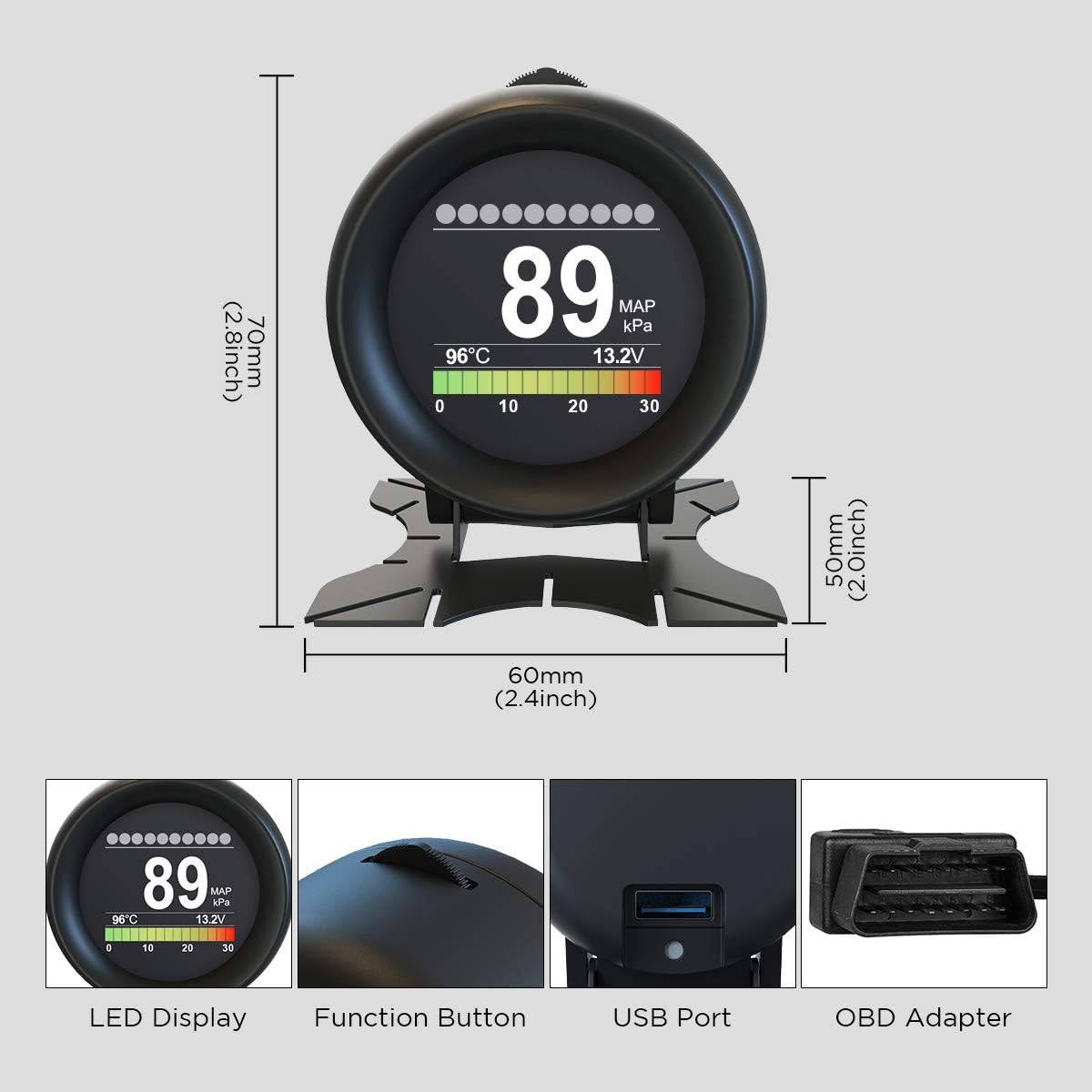
Сүрөт: деталдуу view of the AUTOOL X60 showing its dimensions (70mm height, 60mm width) and key components like the LED display, function button, USB port, and OBD adapter.

Image: Diagram illustrating the pinout of a standard OBD-II connector, indicating which pins are used for various signals like SAE J1850 Bus+, Chassis, Signal Ground, CAN High/Low, and Vehicle Battery Positive.
9. Кепилдик жана колдоо
For warranty information, technical support, or service inquiries, please refer to the contact details provided in your product packaging or visit the official AUTOOL webсайт. Сатып алуу квитанциясын кепилдик дооматтары үчүн сатып алуунун далили катары сактаңыз.