1. Киришүү
This manual provides essential information for the safe and efficient operation of the Buderus Basic Controller BC10. The BC10 is designed for integration with EMS (Energy Management System) heating systems, offering basic control functionalities. Please read this manual thoroughly before installation and operation to ensure proper use and to prevent damage or injury.
2. Коопсуздук маалыматы
Ар дайым төмөнкү коопсуздук чараларын сактаңыз:
- Электр коопсуздугу: Installation and maintenance must be performed by qualified personnel only. Disconnect power before servicing.
- Экологиялык шарттар: Do not expose the controller to moisture, extreme temperatures, or direct sunlight.
- Колдонуу максаты: Use the BC10 only for its intended purpose as a basic controller for Buderus EMS heating systems.
- Зыян: Do not operate the device if it appears damaged. Contact a qualified technician for inspection and repair.
3. Пакеттин мазмуну
Пакетте бардык буюмдар бар экенин текшериңиз:
- Buderus Basic Controller BC10
- Монтаждоочу жабдыктар (бурамалар, дубал сайгычтар)
- Көрсөтмө (бул документ)
4. Продукт бүтүп калдыview
The Buderus Basic Controller BC10 provides essential control and monitoring functions for your heating system. Below is an image illustrating the controller's main components.
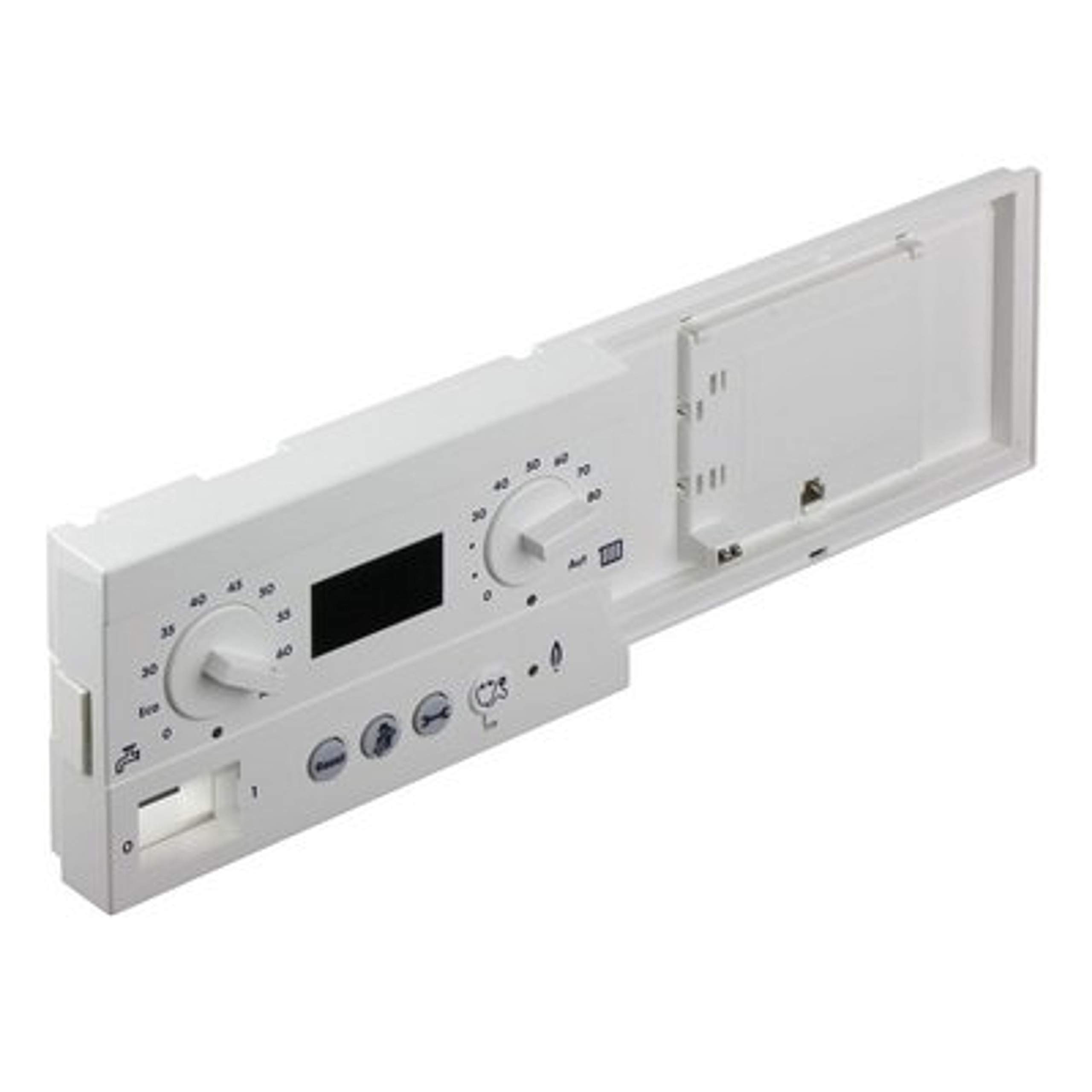
Сүрөт 1: Алдыңкы view of the Buderus Basic Controller BC10. This image shows the main display screen and control buttons for adjusting settings and viewсистеманын абалын аныктоо.
4.1. Компоненттер
- Дисплей: Shows current system status, temperature, and error codes.
- Башкаруу баскычтары: Used for navigation through menus and adjusting settings.
- Туташуу терминалдары: Located at the rear for electrical connections to the EMS system.
5. Орнотуу жана орнотуу
Installation should only be performed by a qualified heating technician.
- Электр энергиясын өчүрүү: Ensure the main power supply to the heating system is disconnected before beginning installation.
- Монтаждоо: Select a suitable location for the controller, away from direct heat sources or moisture. Mount the BC10 securely to a wall using the provided mounting hardware.
- Зымдар: Connect the BC10 to the EMS bus terminals of your Buderus heating system according to the wiring diagram provided in your heating system's main manual. Ensure correct polarity.
- Кубат туташуу: Once all connections are secure, restore power to the heating system.
- Баштапкы конфигурация: The controller will perform an initial self-test. Follow any on-screen prompts for basic setup, such as language selection or time/date settings.
6. Иштөө нускамалары
The BC10 provides a user-friendly interface for basic control.
6.1. Менюда багыттоо
- колдонуу ЖОГОРУ/ТӨМӨН меню параметрлери аркылуу жылдыруу үчүн баскычтар.
- басыңыз OK параметрди тандоо же орнотууну ырастоо үчүн баскыч.
- басыңыз КАЙТ button to return to the previous menu or cancel an action.
6.2. Температураны тууралоо
- From the main screen, navigate to the "Temperature" menu.
- Select the desired heating circuit or hot water setting.
- колдонуу ЖОГОРУ/ТӨМӨН buttons to adjust the target temperature.
- Басыңыз OK жаңы жөндөөнү сактоо үчүн.
7. Техникалык тейлөө
The Buderus BC10 controller requires minimal maintenance.
- Тазалоо: Дисплейди сүртүңүз жана вasing жумшак, кургак чүпүрөк менен. Абразивдүү тазалагычтарды же эриткичтерди колдонбоңуз.
- Текшерүү: Мезгил-мезгили менен с-га кандайдыр бир көрүнүктүү зыян келтирилгенин текшерип туруңузasing же байланыштар.
- Кесиптик кызмат: For internal components or complex issues, contact a certified Buderus service technician.
8. Кыйынчылыктарды
Жалпы маселелер жана аларды чечүү үчүн төмөнкү таблицага кайрылыңыз.
| Көйгөй | Мүмкүн себеп | Чечим |
|---|---|---|
| Контроллердин дисплейи бош. | Электр энергиясы жок же туташуу үзгүлтүккө учурайт. | Check power supply to the heating system. Verify wiring connections to the BC10. |
| Температураны туура эмес окуу. | Sensor malfunction or incorrect calibration. | Consult your heating system's main manual for sensor troubleshooting. Contact service if issue persists. |
| Баскычтар жооп бербейт. | Убактылуу программалык ката. | Disconnect power to the heating system for 30 seconds, then reconnect. If issue persists, contact service. |
For error codes displayed on the screen, refer to your main Buderus heating system manual or contact Buderus customer support.
9. Техникалык шарттар
- Модел: BC10
- Бөлүмдүн номери: 7747010612
- Шайкештик: Buderus EMS heating systems
- Электр камсыздоо: Via EMS bus
- Иштөө температурасы: 0°Cден 50°Cге чейин (32°F—122°F)
- Коргоо классы: IP20
- Өлчөмдөрү (болжол менен): Refer to product packaging or technical data sheet for precise measurements.
10. Кепилдик жана колдоо
For detailed warranty information, please refer to the warranty card included with your product or visit the official Buderus website. Technical support can be obtained by contacting your local Buderus service partner or by visiting the support section of the Buderus website. Please have your model number (BC10) and part number (7747010612) ready when contacting support.
Official Buderus Webсайт: www.buderus.com