
Introduction
Thank you for choosing the Hoco Bluetooth Headset E11. This manual provides essential information for setting up, operating, maintaining, and troubleshooting your new headset. Please read it carefully before use to ensure optimal performance and longevity of your device.
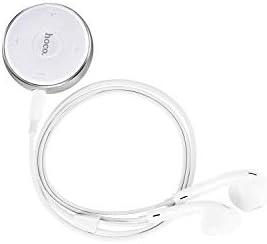
Image: The Hoco Bluetooth Headset E11, featuring a compact circular control unit and white wired earbuds.
Пакеттин мазмуну
- Hoco Bluetooth Headset E11
- USB заряддоо кабели
- User Manual
Жайгашуу
Гарнитураны заряддоо
Before first use, fully charge the headset. Connect the provided USB charging cable to the charging port on the headset and the other end to a USB power source (e.g., computer USB port, wall adapter). The indicator light will show charging status and turn off or change color when fully charged.
Түзмөк менен жупташтыруу
- Гарнитура өчүрүлгөнүн текшериңиз.
- Press and hold the multi-function button on the headset until the indicator light flashes red and blue alternately, indicating pairing mode.
- Түзмөгүңүздө (смартфон, планшет ж.б.) Bluetooth иштетиңиз жана жеткиликтүү түзмөктөрдү издеңиз.
- Select "Hoco E11" from the list of found devices.
- If prompted, enter "0000" as the passcode.
- Once successfully paired, the indicator light will flash blue slowly or turn off, and you will hear a confirmation tone.
Иштеп жатат
Күйгүзүү/өчүрүү
- Күйгүзүү: Press and hold the multi-function button for approximately 3 seconds until the blue indicator light flashes.
- Өчүрүү: Press and hold the multi-function button for approximately 5 seconds until the red indicator light flashes and then turns off.
Чалууларды башкаруу
- Чалууга жооп берүү/аяктоо: Көп функциялуу баскычты бир жолу басыңыз.
- Чакырууну четке кагуу: Көп функциялуу баскычты 2 секунд басып туруңуз.
- Акыркы номерди кайра терүү: Көп функциялуу баскычты эки жолу басыңыз.
Музыканы ойнотуу
- Ойнотуу/тындыруу: Көп функциялуу баскычты бир жолу басыңыз.
- Кийинки трек: Көлөмү + баскычын басып, кармап туруңуз.
- Мурунку трек: Үн көлөмү - баскычын басып, кармап туруңуз.
- Көлөмү: Көлөм + баскычын басыңыз.
- Үнүн азайтуу: Үн көлөмү - баскычын басыңыз.
Техникалык тейлөө
To ensure the longevity and optimal performance of your Hoco E11 headset, follow these maintenance guidelines:
- Тазалоо: Use a soft, dry, lint-free cloth to clean the headset. Do not use abrasive cleaners, solvents, or strong chemicals.
- Сактагыч: Store the headset in a cool, dry place away from direct sunlight and extreme temperatures. Avoid storing in dusty or humid environments.
- Батареяга кам көрүү: Батареянын толук зарядын тез-тез кетирүүдөн алыс болуңуз. Батареянын иштөө мөөнөтүн сактоо үчүн, көпкө колдонулбаса да, гарнитураны үзгүлтүксүз кубаттап туруңуз.
Проблемаларды чечүү
| Көйгөй | Чечим |
|---|---|
| Гарнитура күйбөй жатат. | Ensure the headset is fully charged. Connect to a power source and try again. |
| Түзмөк менен жупташтыруу мүмкүн эмес. | Ensure the headset is in pairing mode (flashing red and blue). Turn off and on Bluetooth on your device. Move closer to the headset. |
| Үн жок же үнү төмөн. | Гарнитурадагы жана туташкан түзмөгүңүздүн үнүнүн деңгээлин текшериңиз. Гарнитура туура туташтырылганын текшериңиз. |
| Байланыш тез-тез үзүлөт. | Ensure there are no obstacles between the headset and your device. Move closer to your device. Avoid strong electromagnetic interference. |
Техникалык шарттар
- Модел: E11
- Бренд: Hoco
- Пакеттин өлчөмдөрү: 17 x 12 x 5.6 см
- Салмагы: 240 г
- ASIN: B07M82BT9Q
- Note: Specific Bluetooth version, battery capacity, and playtime may vary. Refer to product packaging for precise details.
Кепилдик жана колдоо
Hoco products are designed and manufactured to the highest quality standards. This product is covered by a limited warranty against manufacturing defects from the date of purchase. Please retain your proof of purchase for warranty claims.
For technical support, warranty inquiries, or further assistance, please contact your local Hoco distributor or the retailer from whom you purchased the product. You may also visit the official Hoco webкөбүрөөк маалымат алуу үчүн сайт.