
1. Продукт бүтүп калдыview
The HOSMART Wireless Intercom System HY810-CA-002 provides reliable and secure communication for homes and offices. This system features a 1/2-mile long range in ideal conditions and supports 10 channels for versatile use. Designed for ease of use, it integrates essential functions for effective communication.

Image 1: HOSMART Wireless Intercom System unit.
Негизги өзгөчөлүктөрү:
- Узак аралыкка байланыш: Up to 1/2 mile in ideal conditions, suitable for various environments.
- Көп каналдуу колдоо: 10 channels for flexible communication between multiple units.
- Individual Functions: Includes Monitor, Talk, VOX (Voice Operated Exchange), and Group call capabilities.
- Clear Digital Communication: Anti-interference signal technology ensures clear and secure conversations.
- Power Bank Compatibility: Can be powered by a 5V 1A power bank for portable use.

Image 2: Features of the HOSMART Intercom System, including range, sound clarity, and monitoring capabilities.
2. Орнотуу нускамалары
2.1 Пакеттен чыгаруу жана жайгаштыруу
Carefully remove all components from the packaging. The system typically includes two intercom units and their respective power adapters. Place the units in desired locations, ensuring they are within range for optimal performance. Avoid placing units near large metal objects or other electronic devices that may cause interference.
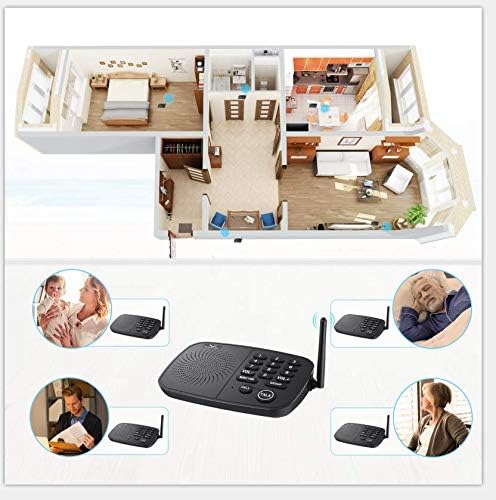
Сүрөт 3: Мисample placement of intercom units within a home environment.
2.2 Кубат туташтыруу
- Connect the provided power adapter to the DC 5V port on the back of each intercom unit.
- Plug the power adapter into a standard electrical outlet. The unit will power on automatically.
- Alternatively, for portable use, connect a 5V 1A power bank to the DC 5V port.
2.3 Канал орнотуу
To enable communication between units, ensure they are set to the same channel. The HY810-CA-002 supports 10 channels (0-9).
- On each unit, press the desired channel number button (0-9) to select a channel.
- Confirm that all units intended to communicate are set to the identical channel number.

Сүрөт 4: Детальдуу view of the intercom unit's controls, including channel buttons.
3. Иштөө нускамалары
3.1 Чалуу
- Ensure both units are powered on and set to the same channel.
- басыңыз ЧАЛ button on your unit. The receiving unit will ring.
- To answer, the recipient presses the СҮЙЛӨШҮҮ баскычы.
3.2 Two-Way Communication (Talk Function)
The system operates in a half-duplex mode, meaning only one person can speak at a time.
- To speak, press and hold the СҮЙЛӨШҮҮ button. Speak clearly into the microphone.
- бошотуңуз СҮЙЛӨШҮҮ жооп угуу үчүн баскычты басыңыз.
- The other party follows the same procedure to respond.
3.3 Монитор функциясы
The Monitor function allows continuous listening to another unit for a set period (e.g., 24 hours). This is useful for monitoring children, elderly individuals, or specific areas.
- On the unit you wish to listen тартып, басыңыз МОНИТОР баскычы.
- On the unit you wish to listen чейин, select the channel of the monitoring unit.
- The monitoring unit will transmit audio continuously.

Image 5: The monitor function allows continuous audio transmission, useful for observing sleeping individuals.
3.4 Group Call Function
The Group call function enables communication with all other units simultaneously within the intercom system that are set to the same group channel.
- басыңыз ГРУППА баскычы.
- Speak into the microphone. All units on the same group channel will hear your message.
3.5 Үндү тууралоо
колдонуу VOL+ жана VOL- buttons to adjust the speaker volume to a comfortable level.
4. Техникалык тейлөө
To ensure the longevity and optimal performance of your HOSMART Wireless Intercom System, follow these maintenance guidelines:
- Тазалоо: Wipe the units with a soft, dry cloth. Do not use abrasive cleaners, solvents, or harsh chemicals.
- Электр камсыздоо: Always use the original power adapters provided with the system.
- Курчап турган чөйрө: Keep the units away from excessive moisture, direct sunlight, and extreme temperatures.
- Сактагыч: Эгерде түзмөктөрдү узак убакытка сактап жатсаңыз, аларды электр тармагынан сууруп, салкын, кургак жерде сактаңыз.
5. Кыйынчылыктарды
If you encounter issues with your intercom system, refer to the following troubleshooting steps:
| Көйгөй | Мүмкүн себеп | Чечим |
|---|---|---|
| Кубат жок/Бирдик күйбөйт | Кубат адаптери туташкан эмес же бузук; розеткада көйгөй бар. | Кубат адаптери ишенимдүү туташтырылганын жана иштеген розеткага сайылганын текшериңиз. Башка розеткадан аракет кылып көрүңүз. |
| No communication between units | Units are on different channels; out of range; interference. | Verify all units are set to the same channel. Reduce distance between units. Relocate units away from potential interference sources. |
| Poor sound quality/Static | Interference; units too far apart; low battery (if using power bank). | Move units to a different location. Ensure power bank is charged if used. |
| Unit loses channel setting after unplugging | This model may not retain channel settings without continuous power. | Re-set the desired channel after each power cycle. |
| Incompatibility with older/other brand units | Different communication protocols or frequencies. | This system is designed to work with compatible HOSMART units. Ensure all units are of the same model or confirmed compatible. |
6. Техникалык шарттар
| Өзгөчөлүк | Деталь |
|---|---|
| Модель номери | HY810-CA-002 |
| ASIN | B07MFTMN99 |
| Пакеттин өлчөмдөрү | 8.39 x 7.09 x 3.66 дюйм |
| Элемент Салмагы | 1.96 фунт |
| Каналдар | 10 |
| Диапазон | Up to 1/2 mile (in ideal situations) |
| Power Input | DC 5V 1A |
| Сертификаттар | FCC, CE, ROSH Certified |
7. Кепилдик жана колдоо
HOSMART provides a lifetime quality warranty for this wireless intercom system, ensuring your benefit and satisfaction. The product has passed FCC, CE, and ROSH certifications.
For any questions, technical assistance, or warranty claims, please contact HOSMART customer support. Responsive customer service is available to assist you with product inquiries and support needs.
Contact Information: Refer to the product packaging or the official HOSMART webэң акыркы кардарларды колдоо чоо-жайын алуу үчүн сайт.