
BONTEC ST10-1
BONTEC TV Stand Swivel Instruction Manual
Model: ST10-1 | Brand: BONTEC
Introduction
Thank you for choosing the BONTEC Swivel TV Stand. This manual provides essential information for the safe and proper assembly, operation, and maintenance of your new TV stand. Please read this manual thoroughly before beginning assembly and retain it for future reference.
Маанилүү коопсуздук маалыматы
WARNING: Failure to read and follow all instructions may result in property damage, serious personal injury, or death.
- Салмак сыйымдуулугу: Do not exceed the maximum load capacity of 45 kg (99 lbs). This stand is designed for TVs between 26 and 55 inches.
- VESA шайкештиги: Ensure your TV's VESA pattern (mounting hole distance) is compatible: 100x100, 200x100, 200x200, 300x200, 300x300, 400x200, 400x300, 400x400 mm.
- Туруктуу бети: Always place the TV stand on a stable, level, and sturdy surface.
- Балдар жана үй жаныбарлары: Балдарды жана үй жаныбарларын чогултуу аянтынан алыс кармаңыз. Чакан бөлүктөрү муунтуу коркунучу болушу мүмкүн.
- Айнек негизи: The base is made of tempered safety glass. Handle with care to prevent breakage.
- Ассамблея: Assemble the product exactly as instructed. Do not modify the structure or use parts not supplied by the manufacturer.
- Куралдар: Use appropriate tools for assembly. Do not overtighten screws.
- Стендди жылдыруу: When moving the stand with a TV mounted, always lift it carefully and avoid dragging to prevent damage or tipping.
Пакеттин мазмуну
Before assembly, verify that all parts listed below are present and undamaged. If any parts are missing or damaged, contact BONTEC customer support immediately.
| Part | Description | Саны |
|---|---|---|
| Айнек базасы | Tempered glass base (400 x 260mm) | 1 |
| Колдоо тилкеси | Main vertical support pole | 1 |
| Сыналгыга орнотуучу пластина | Horizontal bracket for TV attachment | 1 |
| Телевизорду орнотуучу куралдар | Vertical arms that attach to TV | 2 |
| Аппараттык комплект | Assorted screws, washers, spacers, anti-slip feet, cable clips | 1 комплект |
Note: The hardware kit includes various screw sizes to fit different TV models. Refer to your TV's manual for correct screw length.
Орнотуу жана чогултуу
Туура чогултуу үчүн бул кадамдарды кылдаттык менен аткарыңыз. Айрыкча телевизорду орнотууда белгилүү бир кадамдар үчүн эки адам болушу сунушталат.
Step 1: Attach Anti-Slip Feet to Glass Base
Carefully place the tempered glass base (Part A) upside down on a soft, clean surface to prevent scratches. Attach the six anti-slip rubber feet to the designated spots on the underside of the glass base. These feet provide stability and protect your furniture.

Image: Underside of the glass base showing the placement of six anti-slip rubber feet for enhanced stability and surface protection.
Step 2: Secure Support Column to Glass Base
Align the bottom of the main support column (Part B) with the pre-drilled holes on the top side of the glass base. Use the provided screws and washers to securely fasten the support column to the glass base. Ensure it is tightly secured but do not overtighten.

Image: The main components of the TV stand assembled, showing the sturdy glass base and the central support column.
Step 3: Attach TV Mounting Plate to Support Column
Slide the TV mounting plate (Part C) onto the top of the support column. Secure it using the designated screws. This plate allows for height adjustment later.

Image: The TV stand with the mounting plate in place, illustrating the multiple height adjustment settings available for optimal viewing.
Step 4: Attach TV Mounting Arms to TV
Identify the VESA mounting holes on the back of your television. Select the appropriate screws, washers, and spacers from the hardware kit that fit your TV's VESA pattern. Attach the two TV mounting arms (Part D) to the back of your TV. Ensure the arms are level and securely fastened.
Video: BONTEC Swivel Table Top TV Stand Assembly Guide
Video: This video demonstrates the assembly process of the BONTEC Swivel Table Top TV Stand, including attaching the mounting arms to the TV and securing the TV to the stand.
5-кадам: Телевизорду стендге орнотуңуз
With assistance, carefully lift the TV with the attached mounting arms and hook them onto the TV mounting plate on the stand. Ensure the arms are properly seated. Secure the TV to the mounting plate using the safety screws or clips provided in the hardware kit to prevent accidental dislodgement.
Operating Your TV Stand
Айлануу функциясы
The BONTEC TV stand features a ±50-degree swivel function, allowing you to adjust the viewing angle for optimal comfort from various positions in your room. Gently rotate the TV to the desired angle. Avoid forcing the swivel beyond its limits.
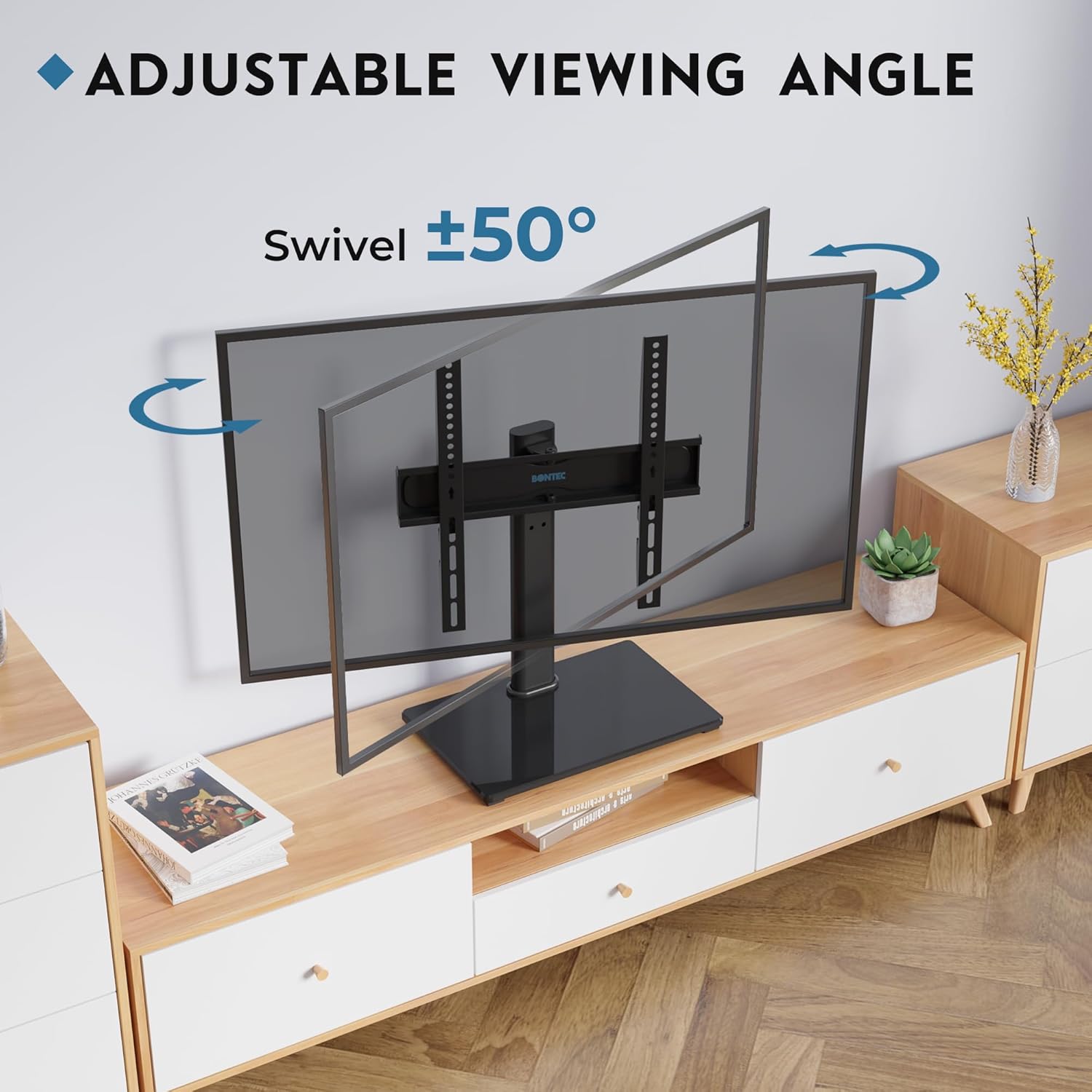
Image: A television mounted on the stand, demonstrating its ability to swivel 50 degrees left or right for flexible viewбурчтар.
Бийиктигин тууралоо
This stand offers multiple height adjustment options to suit your viewing preferences and accommodate soundbars or other components. The mounting arms can be adjusted to 2 height levels (each by 50mm), and the TV plate can be adjusted to 2 height levels (each by 40mm). To adjust the height, carefully remove the TV from the stand (with assistance), reposition the mounting arms or plate to the desired height, and re-secure the TV.
Сүрөт: деталдуу view of the TV stand highlighting the various height adjustment points on both the TV hooks and the main plate.
Кабель башкаруу
Utilize the integrated cable management system on the back of the support column to organize and conceal unsightly cables. This helps maintain a tidy and organized entertainment area.
Техникалык тейлөө
- Тазалоо: жумшак колдонуу, damp стендди тазалоо үчүн чүпүрөк колдонуңуз. Капталына же айнекке зыян келтириши мүмкүн болгон абразивдүү тазалоочу каражаттардан же эриткичтерден алыс болуңуз.
- Текшерүүлөр: Мезгил-мезгили менен бардык бурамалар менен байланыштарды текшерип туруңуз, алар бекем жана бекем бойдон калууда. Керек болсо кайра тартыңыз.
- Айнек багуу: For the tempered glass base, use a glass cleaner and a microfiber cloth for streak-free cleaning.
Проблемаларды чечүү
- Problem: TV stand feels unstable.
- Чечим: Ensure all screws are tightened securely. Verify the stand is placed on a flat, level, and sturdy surface. Check that the anti-slip feet are properly attached to the glass base.
- Көйгөй: Телевизор орнотулгандан кийин түз эмес.
- Чечим: Re-check the attachment of the TV mounting arms to the TV and the mounting plate. Adjust the height settings on the mounting arms to compensate for any slight tilt.
- Көйгөй: Телевизорду айландыра албай жатам.
- Чечим: Ensure no cables are obstructing the swivel mechanism. Check that the TV is not pushed too far against a wall or other furniture, limiting its movement.
Техникалык шарттар
| Өзгөчөлүк | Деталь |
|---|---|
| Модель номери | ST10-1 |
| Бренд | BONTEC |
| Туура келген сыналгы өлчөмдөрү | 26 - 55 дюйм |
| Максималдуу жүктөө жөндөмдүүлүгү | 45 кг (99 фунт) |
| VESA шайкештиги | 100x100, 200x100, 200x200, 300x200, 300x300, 400x200, 400x300, 400x400 мм |
| Swivel Angle | ±50 градус |
| Бийиктигин тууралоо | Multiple levels (mounting arms: 2x50mm; plate: 2x40mm) |
| Негизги материал | 8 мм чыңалган коопсуздук айнеги |
| Column/Bracket Material | High-Quality Cold-Rolled Steel |
| Продукциянын өлчөмдөрү (L x W x Y) | 16.73 x 10.24 x 24.41 inches (approximate, fully extended) |
| Элемент Салмагы | 10.19 фунт |
Кепилдик жана колдоо
BONTEC products are manufactured with high-quality materials and undergo rigorous testing to ensure durability and reliability. This product comes with a standard manufacturer's warranty against defects in materials and workmanship. For specific warranty terms and conditions, please refer to the warranty card included with your purchase or visit the official BONTEC webсайт.
If you encounter any issues during assembly or operation, or if you have questions about your product, please do not hesitate to contact BONTEC customer support. Our dedicated team is ready to assist you.
Байланыш маалыматы:
- Webсайт: www.bontec.com
- Электрондук почта: support@bontec.com
- Телефон: Өнүмүңүздүн таңгагын караңыз же webаймактык байланыш номерлери үчүн сайт.
Please have your model number (ST10-1) and purchase date ready when contacting support.
Ask a question about this manual
Ask about setup, troubleshooting, compatibility, parts, safety, or missing instructions. Manuals+ will review the question and use this page’s manual context to help answer it.