
1. Киришүү
The Fuzion Ultra Mini Scale MT1000 is a compact and precise digital weighing instrument designed for various applications requiring accurate measurements up to 1000 grams. Its small size and multiple features make it suitable for weighing small items such as jewelry, food ingredients, or other small components.
This manual provides essential information for the proper setup, operation, maintenance, and troubleshooting of your Fuzion Ultra Mini Scale MT1000.
2. Продукт бүтүп калдыview
The Fuzion Ultra Mini Scale MT1000 features a durable stainless steel weighing platform, a clear blue backlit LCD display, and intuitive button controls. Its ultra-compact design ensures portability and ease of storage.

A compact digital scale with a stainless steel weighing platform and a blue backlit LCD display.

A diagram illustrating the main components and features of the scale, including the protective cover (which doubles as a weighing pan), battery compartment, bright backlit LCD display, Tare function, and stainless steel weighing platform.
Негизги өзгөчөлүктөрү:
- Ultra Mini Design: Highly portable and easy to store.
- High-Precision: Accurate measurements with 0.1g readability.
- Жарыктандырылган LCD дисплейи: Ар кандай жарыктандыруу шарттарында так көрсөткүчтөрдү камсыз кылат.
- Тара функциясы: Allows you to subtract the weight of a container.
- Бир нече бирдиктер: Supports 6 different weighing units (g, oz, gn, ct, dwt, ozt).
- Автоматтык өчүрүү функциясы: Батареянын иштөө мөөнөтүн үнөмдөйт.
- Ашыкча жүктөө көрсөткүчү: Alerts when capacity is exceeded.
- Батареянын төмөн көрсөткүчү: Батареяларды алмаштыруу керек болгондо кабарлайт.
3. Орнотуу
3.1 Батареяны орнотуу
- Таразанын астыңкы жагында жайгашкан батарея бөлүмүнүн капкагын ачыңыз.
- Туура полярдуулукту (+/-) камсыз кылып, эки (2) AAA батарейкасын салыңыз.
- Батарея уясынын капкагын бекем жабыңыз.

The Fuzion Ultra Mini Scale shown alongside two AAA batteries, indicating the power source required for operation.
3.2 Алгачкы жайгаштыруу
Place the scale on a hard, flat, and stable surface. Avoid placing it on soft or uneven surfaces, as this can affect accuracy. Ensure there are no vibrations or air currents that could interfere with weighing.
4. Операция
4.1 Күйгүзүү/өчүрүү
- Таразаны күйгүзүү үчүн, баскычын басыңыз [ON/OFF] button. The display will show "88888" then "0.0" or "0.00".
- Таразаны өчүрүү үчүн, баскычын басып кармап туруңуз [ON/OFF] button for a few seconds until the display turns off. The scale also features an automatic shut-off function after a period of inactivity to save battery life.
4.2 Бирдикти конверсиялоо
Тараза бирдигин өзгөртүү үчүн басыңыз [M] (Mode) button repeatedly. The scale will cycle through the available units: grams (g), ounces (oz), grains (gn), carats (ct), pennyweights (dwt), and troy ounces (ozt).
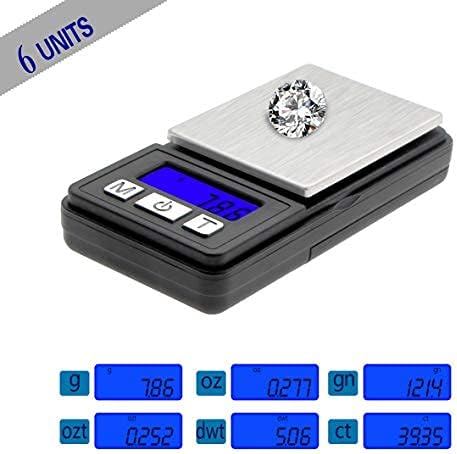
The scale displaying various units of measurement including grams (g), ounces (oz), grains (gn), carats (ct), pennyweights (dwt), and troy ounces (ozt), highlighting its versatility.
4.3 Тара Функциясы
The Tare function allows you to subtract the weight of a container, so you only measure the net weight of the contents.
- Turn on the scale and wait for it to display "0.0" or "0.00".
- Place an empty container (e.g., a bowl or the scale's protective cover) on the weighing platform. The display will show the weight of the container.
- басыңыз [T] (Tare) button. The display will reset to "0.0" or "0.00".
- Place the items you wish to weigh into the container. The display will now show only the weight of the items.

A visual guide demonstrating how to use the Tare function: 1) Turn on the scale, 2) Place a container on the scale, 3) Press the 'T' button to zero the scale, 4) Add items to the container for weighing.
4.4 Таразалоочу буюмдар
- Ensure the scale is on and displaying "0.0" or "0.00" in your desired unit.
- Carefully place the item(s) to be weighed onto the center of the weighing platform.
- LCD экранда көрсөтүлгөн туруктуу салмакты окуңуз.

Сүрөт шоуcasing the multi-purpose applications of the scale, suitable for weighing small items like jewelry, coins, pills, and coffee beans.
5. Калибрлөө
Calibration ensures the accuracy of your scale over time. It is recommended to calibrate your scale periodically or if you suspect inaccurate readings. A 1000g calibration weight (not included) is typically required for this model.
- Turn the scale OFF.
- басып, кармап туруңуз [M] (Mode) button, then press the [ON/OFF] button simultaneously until "CAL" appears on the display.
- Release both buttons. The display will then show the required calibration weight (e.g., "1000.0g").
- Place the exact calibration weight (e.g., 1000g) onto the center of the weighing platform.
- Wait for the display to show "PASS" and then return to normal weighing mode (e.g., "0.0" or "0.00").
- Remove the calibration weight. The scale is now calibrated and ready for use.
6. Техникалык тейлөө жана кам көрүү
- Тазалоо: Таразаны бир аз d менен сүртүңүзamp кездеме. Таразаны сууга салбаңыз же абразивдүү тазалагычтарды колдонбоңуз.
- Сактагыч: Store the scale in a clean, dry environment. Avoid extreme temperatures and humidity. The protective cover can be used to shield the weighing platform.
- Батареяны алмаштыруу: Replace batteries when the "Lo" indicator appears on the display. Remove batteries if the scale will not be used for an extended period.
- Колдонуу: Handle the scale with care. Avoid dropping it or subjecting it to strong impacts, as this can damage the internal sensors.
7. Кыйынчылыктарды
| Көйгөй | Мүмкүн себеп | Чечим |
|---|---|---|
| Дисплейде "Lo" көрсөтүлөт | Батареянын кубаттуулугу төмөн. | AAA батареяларын алмаштырыңыз. |
| Display shows "OUE2" | Ашыкча жүктөө. Салмак максималдуу сыйымдуулуктан ашып кетти. | Ашыкча салмакты дароо алып салыңыз. 1000 г ашпаңыз. |
| Так эмес окуулар | Unstable surface, scale not tared, needs calibration, or damaged sensor. | Place on a stable surface. Use Tare function. Perform calibration. If problem persists, contact support. |
| Масштаб күйбөйт | Батареялар туура эмес орнотулган же өлүп калган. | Батареянын полярдуулугун текшериңиз же батарейкаларды алмаштырыңыз. |
8. Техникалык шарттар

An image illustrating the compact size of the Fuzion Ultra Mini Scale, showing its length (3.4 inches), width (1.7 inches), and height (0.59 inches), along with the platform size.
- Модел: MT1000
- Сыйымдуулугу: 1000г (1кг)
- Окуу мүмкүнчүлүгү: 0.1г
- Тараза бирдиктери: г, унция, гн, кт, dwt, ozt
- Дисплей: Көк түстөгү арткы жарыктандырылган LCD
- Күч: 2 x AAA Батареялар (кошулган)
- Scale Dimensions (L x W x H): 3.4 дюйм x 1.7 дюйм x 0.59 дюйм
- Platform Size (L x W): 1.93 дюйм x 1.5 дюйм
- Таза Салмагы: Болжол менен 58.7г (2.08 унция)
- Материалдар: ABS пластик, дат баспас болоттон жасалган
- Өзгөчөлүктөр: Tare Function, Auto-Off, Overload Indication, Low Battery Indication
9. Кепилдик жана колдоо
Fuzion products are manufactured with quality and precision. For warranty information or technical support, please refer to the contact details provided with your purchase or visit the official Fuzion webсайт. Сураныч, кепилдик дооматтар үчүн сатып алуу далилиңизди сактап коюңуз.