
Introduction
This manual provides essential information for the proper use and maintenance of your Easytry123 replacement infrared remote control. This remote is designed to be compatible with specific Philips LED HDTV TV models, including 49PUS6501/12, 49PUS6551/12, 49PUS6561/12, 49PUS7101/12, 49PUS7181/12, 49PUT6801/98, and 55PUS6501/12. Please verify your TV model number to ensure compatibility.
Important Note: This is a replacement remote control and may not support all functions of your original TV remote. It is not a universal remote control.
Продукт бүттүview

Сүрөт 1: Фронт view of the Easytry123 replacement remote control, showing the power button, navigation pad, channel/volume controls, and numeric keypad.
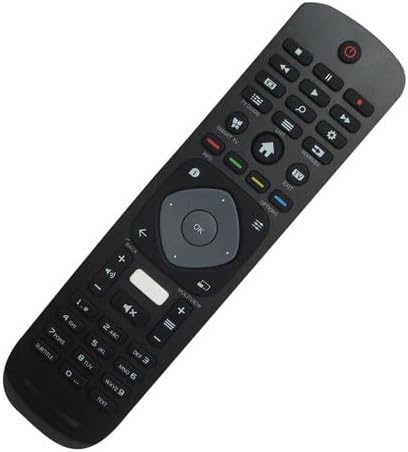
Сүрөт 2: Бурчтуу алдыңкы view of the remote control, highlighting its ergonomic design and button layout.

Сүрөт 3: Артка view батарея бөлүмүнүн капкагын көрсөтүп, алыстан башкаруу пультунун
The Easytry123 replacement remote control features a standard button layout for TV operation, including power, channel, volume, navigation, and numeric input. It is designed for comfortable handling and intuitive use.
Жайгашуу
1. Батареяны орнотуу
- Пульттун артындагы батарея отсегин табыңыз.
- Батарея бөлүмүнүн капкагын ачуу үчүн ылдый же сыртка жылдырыңыз.
- Эки (2) AAA батарейкасын салып, оң (+) жана терс (-) терминалдары бөлүмдүн ичиндеги диаграммаларга дал келгенин текшериңиз.
- Батарея уясынын капкагын бекем жабыңыз.
No setup or coding is required for this remote control. Once batteries are installed, it is ready for use with compatible Philips TV models.
Иштөө нускамалары
This remote control operates using infrared (IR) technology. Ensure there is a clear line of sight between the remote control and the IR receiver on your television for optimal performance.
- Кубат баскычы: Телевизорду күйгүзүү же өчүрүү үчүн басыңыз.
- Сандык баскычтоп (0-9): Канал номерлерин түз киргизүү үчүн колдонуңуз.
- Канал өйдө/төмөн: Press to change channels sequentially.
- Үнүн жогорулатуу/төмөндөтүү: Press to adjust the sound volume.
- Үнсүз баскычы: Press to mute or unmute the TV sound.
- Навигация панели (жебе баскычтары жана OK): Use to navigate menus and confirm selections.
- Back/Exit Buttons: Used to return to the previous screen or exit menus.
- Smart TV/Home Button: Accesses the TV's smart features or home screen.
Functionality may vary depending on your specific TV model. Some advanced features or specific buttons present on your original remote may not be replicated on this replacement unit.
Техникалык тейлөө
Батареяны алмаштыруу
Алыстан башкаруу пульту жай жооп берсе же иштебей калса, батареяларды алмаштырыңыз. Ар дайым эки батареяны тең бир эле учурда жаңы AAA батареялары менен алмаштырыңыз. Эски жана жаңы батареяларды, же ар кандай типтеги батареяларды аралаштырбаңыз.
Тазалоо
Пультту тазалоо үчүн жумшак, кургак чүпүрөктү колдонуңуз. өжөр кир үчүн, бир аз гampкездемени суу менен сүртүңүз. Катуу химиялык заттарды, абразивдүү тазалоочу каражаттарды же ашыкча нымдуулукту колдонуудан алыс болуңуз, анткени алар пультту бузуп коюшу мүмкүн.
Проблемаларды чечүү
- Пульт жооп бербей жатат:
- Батареялар туура полярдуулук менен туура салынганын текшериңиз.
- Эски батареяларды жаңы AAA батареялары менен алмаштырыңыз.
- Пульт менен телевизордун инфракызыл кабыл алгычынын ортосунда эч кандай тоскоолдуктар жок экенин текшериңиз.
- Confirm that the remote is pointed directly at the TV.
- Айрым функциялар иштебейт:
- As a replacement remote, it may not support all functions of the original TV remote. This is normal for some replacement units.
- Verify that your TV model is listed as compatible.
- Кыска иштөө диапазону:
- Батареяларды алмаштырыңыз.
- Күчтүү жарык булактарынын (мисалы, түз күн нуру) инфракызыл сигналга тоскоол болбой турганын текшериңиз.
Техникалык шарттар
| Бренд | Easytry123 |
| Модель номери | Easytry5633 |
| Шайкеш түзмөктөр | Television (Specific Philips LED HDTV models) |
| Байланыш технологиясы | Инфракызыл (IR) |
| Controller Type | Control Button |
| Максималдуу диапазон | 10 метр (болжол менен 33 фут) |
| Батареялар талап кылынат | 2 x AAA батарейкалар (киргизилген эмес) |
| Өзгөчө өзгөчөлүк | Replacement item; may not work with all original functions. Not a universal remote. |
Кепилдик жана колдоо
Кепилдик маалымат
This Easytry123 remote control comes with a 90-day warranty from the date of purchase. This warranty covers manufacturing defects under normal use. It does not cover damage caused by misuse, accidents, unauthorized modifications, or battery leakage.
Кардарларды колдоо
For any questions, issues, or warranty claims regarding your Easytry123 remote control, please contact the seller or manufacturer directly through your purchase platform. Provide your order number and a detailed description of the issue for prompt assistance.