
Walfront inskam115
Walfront Wireless Endoscope Camera Inskam 115 User Manual
Model: inskam115
1. Продукт бүтүп калдыview
The Walfront Wireless Endoscope Camera Inskam 115 is a versatile inspection tool designed for various applications, including vehicle inspection, pipeline inspection, air conditioning inspection, and object retrieval. It features a wireless WiFi connection for real-time video viewing, recording, and photo capture. The camera is equipped with a mini 8mm waterproof LED lens and boasts an IP67 waterproof rating for the lens and tube. Its 6 adjustable LED lights ensure clear visibility in dark environments. The portable design with a flexible extension tube makes it easy to operate.
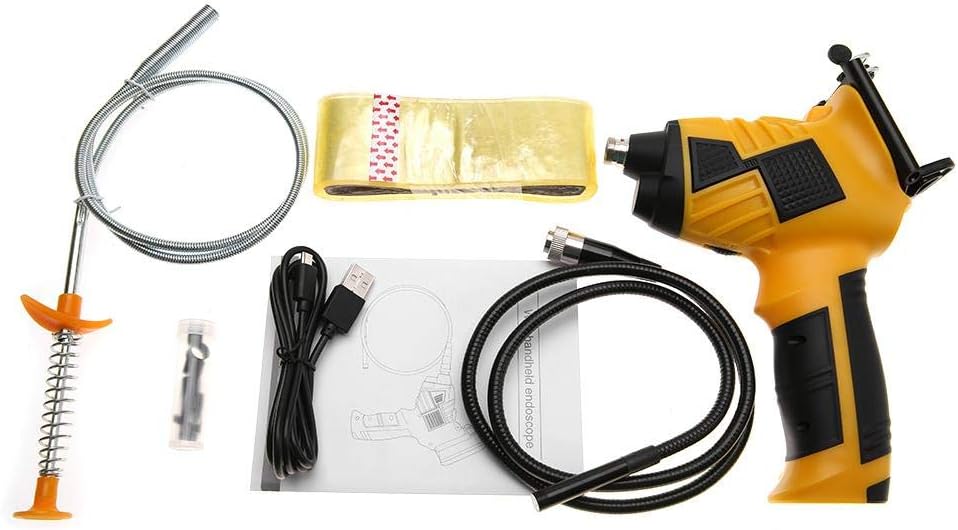
Figure 1: Walfront Inskam 115 Wireless Endoscope Camera and included accessories.
2. Коопсуздук маалыматы
- Түзмөктү жарылуучу атмосферада, мисалы, тез күйүүчү суюктуктар, газдар же чаң бар жерде колдонбоңуз.
- Keep the device away from water and other liquids, except for the waterproof camera lens and tube (IP67 rated). The main unit is not waterproof.
- Аппаратты ажыратууга же өзгөртүүгө аракет кылбаңыз. Оңдоо иштери квалификациялуу кызматкерлер тарабынан гана жүргүзүлүшү керек.
- Ensure the device is fully charged before use to avoid interruptions during inspection.
- Avoid direct eye exposure to the LED lights, as they can be bright.
- Аппаратты колдонбогондо салкын, кургак жерде сактаңыз.
3. Пакеттин мазмуну
Төмөндө тизмеленген нерселердин баары пакетиңизде бар экенин текшериңиз:
- 1 x Handle (Main Unit)
- 1 x Spool (for flexible cable storage)
- 1 x Transparent Adhesive (likely for mounting/securing)
- 1 x Stripper (unclear context, possibly a cable stripper or a tool for removing something)
- 1 x USB кабели (заряддоо үчүн)
- 1 x User Manual
- 1 x Magnet (attachment for camera tip)
- 1 x Hook (attachment for camera tip)
- 1 x Mirror (attachment for camera tip, for side viewing)
- 1 x Protective Cap (for camera lens)
Figure 2: Contents of the Walfront Inskam 115 package, including the main unit, flexible cable, USB cable, and various attachments.
4. Техникалык шарттар
| Өзгөчөлүк | Description |
|---|---|
| Модел | inskam115 |
| Кабелдин узундугу параметрлери | 1 Meter (flexible), 3 Meter (flexible), 5 Meter (hard cable), 10 Meter (hard cable) |
| Материал | ABS + металл |
| Сүрөт сенсору | CMOS |
| Камеранын чечилиши | 1920x1080, 1280x720, 640x480 |
| Горизонталдуу Viewбурч | 70° |
| Фокустун узундугу | 40-5000мм |
| Берүү жыштыгы | 2400-2483.5 МГц |
| Минималдуу жарыктандыруу | 0 Lux |
| Батарея | 1 x Lithium Battery, 3.7V, 2600mAh |
| LED жарыктары | 6 pcs (adjustable brightness) |
| WiFi берүү расстояние | 10 м |
| Суу өткөрбөйт рейтинги | IP67 (объектив/түтүк үчүн гана) |
| Линзанын диаметри | 8мм |
| Колдоого алынган системалар | Android 4.2 / iOS 8.0 and higher |
| Салмагы | 739g ~ 1174g (approx., depending on cable length) |
| Продукциянын өлчөмдөрү | 24 x 18 x 11 см (таңгактоо) |

Figure 3: Approximate dimensions of the Walfront Inskam 115 main unit.
5. Орнотуу
5.1 Аппаратты заряддоо
Before first use, fully charge the endoscope. Connect the provided USB cable to the charging port on the handle and plug the other end into a standard USB power adapter (not included) or a computer USB port. The charging indicator light will show the charging status.
5.2 Колдонмону орнотуу
To use the endoscope, you need to download the compatible application on your smartphone or tablet. Издөө "Inskam" or refer to the QR code in the printed user manual (if available) in your device's app store (Google Play Store for Android, Apple App Store for iOS). Install the application.
5.3 Камера зондун туташтыруу
Carefully connect the endoscope camera probe cable to the designated port on the main handle unit. Ensure a secure connection. You can attach accessories like the magnet, hook, or mirror to the camera tip if needed for your inspection.
5.4 Attaching Your Smartphone (Optional)
The handle includes a phone holder. Extend the holder and securely place your smartphone or tablet into it. This allows for convenient viewиш учурунда.

Figure 4: The endoscope handle with a smartphone securely mounted in the integrated holder.
6. Иштөө нускамалары
6.1 Powering On and WiFi Connection
- Press and hold the power button on the endoscope handle to turn it on. The WiFi indicator light will illuminate.
- On your smartphone/tablet, go to your WiFi settings.
- Locate and connect to the WiFi network named "Inskam_XXXX" (where XXXX is a unique identifier). No password is usually required.
- Once connected, open the Inskam application. The live video feed from the endoscope camera should appear on your screen.
6.2 LED жарыктыгын жөндөө
The endoscope features 6 adjustable LED lights around the camera lens. Use the brightness adjustment wheel or button on the handle (refer to the specific button layout in your printed manual) to increase or decrease the illumination as needed for clear viewing in dark areas.

Figure 5: The endoscope camera head with its 6 highly photosensitive LED lights, demonstrating adjustable brightness.
6.3 Сүрөттөрдү жана видеолорду тартуу
Within the Inskam application, you will find buttons for capturing images and recording videos. Press the respective button to take a still photo or start/stop video recording. Captured media will be saved directly to your smartphone's gallery or the app's designated folder.

Figure 6: Detail of the endoscope handle, highlighting the phone holder and the dedicated picture/video capture button.
6.4 Колдонмо Examples
The Walfront Inskam 115 is suitable for a wide range of inspection tasks:
- Automobile Inspection: Examining engine components, hard-to-reach areas under the hood, or inside vehicle doors.
- Түтүктөрдү текшерүү: Checking for blockages, corrosion, or damage in drains, pipes, and conduits.
- Кондиционерди текшерүү: Inspecting ducts, vents, and internal components of AC units.
- Object Search: Retrieving small lost items from confined spaces.
- Жабдууларды тейлөө: Visual inspection of machinery for wear and tear without extensive disassembly.
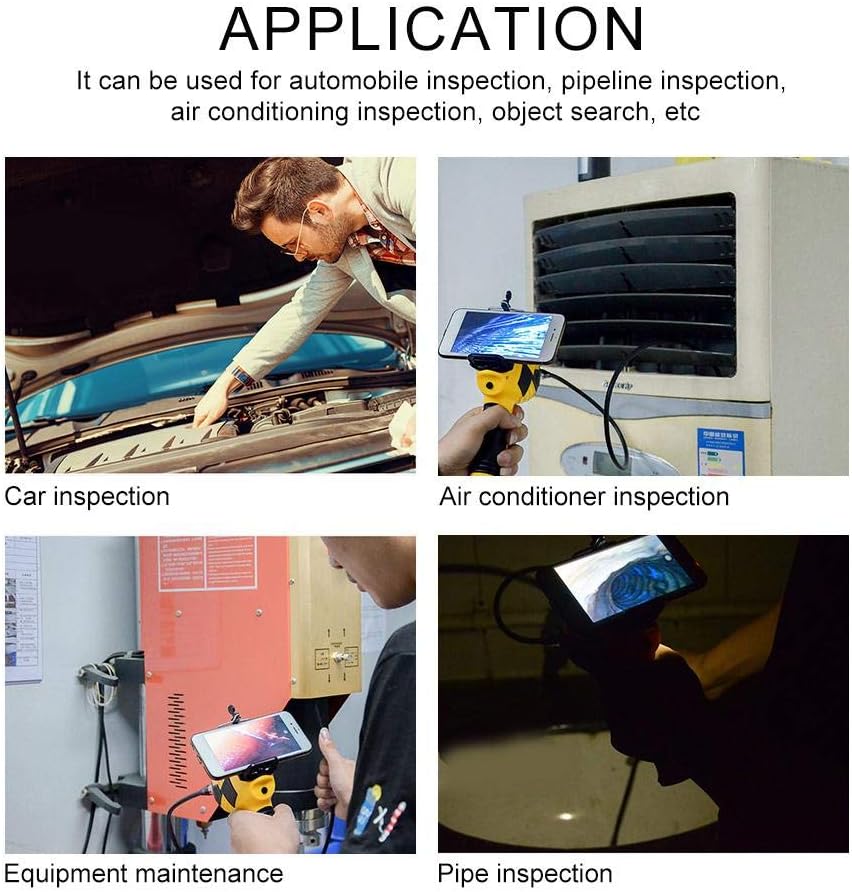
7-сүрөт: Мисamples of how the Walfront Inskam 115 can be used for various inspection and maintenance tasks.
7. Техникалык тейлөө
- Тазалоо: After each use, especially in dirty or wet environments, gently wipe the camera lens and cable with a soft, damp cloth. For stubborn dirt, a mild detergent can be used. Ensure the lens is dry before storage. Do not submerge the main handle unit in water.
- Сактагыч: Store the endoscope and its accessories in a clean, dry place, away from direct sunlight and extreme temperatures. Use the provided spool to neatly coil the camera cable to prevent kinks or damage.
- Батареяга кам көрүү: Батареянын иштөө мөөнөтүн узартуу үчүн, батареяны тез-тез толук зарядсыздандырбаңыз. Эгер узак убакытка сактасаңыз, аны бир нече ай сайын 50% га чейин кубаттаңыз.
8. Кыйынчылыктарды
| Көйгөй | Мүмкүн себеп | Чечим |
|---|---|---|
| No image on screen / App not connecting |
|
|
| Poor image quality / Dark image |
|
|
| Түзмөк заряддалбай жатат |
|
|
9. Кепилдик жана колдоо
Walfront products are manufactured to high-quality standards. For information regarding warranty coverage, please refer to the warranty card included with your purchase or contact your retailer. If you encounter any issues or require technical assistance, please contact Walfront customer support through their official webсайтты же продуктуңуз менен берилген байланыш маалыматын.
For further assistance, you may visit the Walfront store on Amazon: Walfront Amazon Store
10. Жок кылуу маалыматы
This symbol on the product or its packaging indicates that this product shall not be treated as household waste. Instead, it shall be handed over to the applicable collection point for the recycling of electrical and electronic equipment. By ensuring this product is disposed of correctly, you will help prevent potential negative consequences for the environment and human health, which could otherwise be caused by inappropriate waste handling of this product. The recycling of materials will help to conserve natural resources. For more detailed information about recycling of this product, please contact your local city office, your household waste disposal service or the shop where you purchased the product.
Ask a question about this manual
Ask about setup, troubleshooting, compatibility, parts, safety, or missing instructions. Manuals+ will review the question and use this page’s manual context to help answer it.