
1. Киришүү
This manual provides detailed instructions for setting up, operating, maintaining, and troubleshooting your Tenda F6 11N 300Mbps Wireless Router. The Tenda F6 is designed to provide a stable and high-speed wireless network for your home, supporting the 802.11n standard with speeds up to 300Mbps. Please read this manual carefully before using the device to ensure proper installation and optimal performance.
2. Пакеттин мазмуну
Please verify that all items are present in your package. If any item is missing or damaged, contact your retailer.
- Tenda F6 11N Wireless Router
- Кубаттуу адаптер
- Ethernet кабели
- Ыкчам орнотуу колдонмосу
3. Продукт бүтүп калдыview
3.1 Front Panel: LED Indicators
Алдыңкы панелде роутердин абалын көрсөткөн LED индикаторлору бар:
- Power LED: Кубаттын абалын көрсөтөт. Күйгүзүлгөндө жашыл түстө күйөт.
- WAN LED: Indicates WAN port status. Solid green when connected, blinking when data is transmitted.
- LAN диоддору (1-3): Indicate LAN port status. Solid green when connected, blinking when data is transmitted.
- WLAN LED: Indicates wireless network status. Solid green when Wi-Fi is active, blinking during data transmission.
- WPS LED: Indicates WPS function status. Blinks during WPS connection attempt.
3.2 Rear Panel: Ports and Buttons
The rear panel provides all necessary connection ports and buttons:
- WAN Port (10/100Mbps): Connects to your modem or internet service provider's network.
- LAN Ports (1-3, 10/100Mbps): Connects to wired devices such as computers, smart TVs, or gaming consoles.
- Калыбына келтирүү/WPS баскычы: Press and hold for 8 seconds to restore factory default settings. A short press activates the WPS function for easy wireless connection.
- Кубат киргизүү: Камтылган кубат адаптерине туташат.
- Антенналар: Four external, non-detachable antennas for wireless signal transmission and reception.
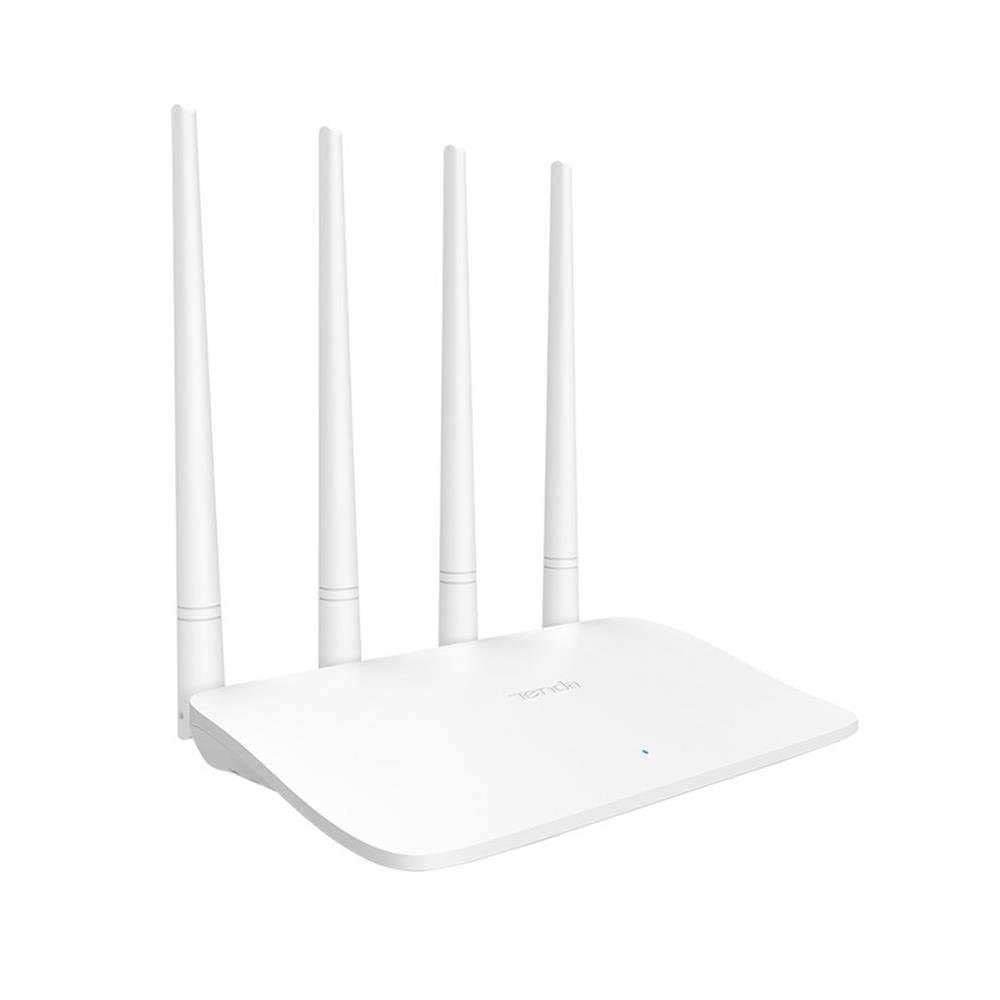
Image: Tenda F6 11N Wireless Router showing its compact design and four external antennas. The rear panel includes the WAN port, three LAN ports, the Reset/WPS button, and the power input.
4. Орнотуу колдонмосу
4.1 Аппараттык туташуу
- Маршрутизаторду жайгаштырыңыз: Роутерди үйүңүздүн борбордук бөлүгүнө, тоскоолдуктардан жана тоскоолдук жаратышы мүмкүн болгон түзмөктөрдөн (мисалы, зымсыз телефондор, микротолкундуу мештер) алыс коюңуз.
- Модемге туташуу: Connect one end of the Ethernet cable to the WAN port (usually blue) on your Tenda F6 router and the other end to the LAN port on your modem.
- Кубатка туташуу: Connect the power adapter to the router's power input and then plug the adapter into a power outlet. The Power LED should light up.
- Түзмөктөрдү туташтыруу (кошумча): For initial setup or wired connections, connect an Ethernet cable from a LAN port (yellow) on the router to your computer's Ethernet port.
4.2 Баштапкы конфигурация
- Маршрутизатор интерфейсине кирүү: ачуу а web browser (e.g., Chrome, Firefox) on a connected computer or mobile device. In the address bar, type
192.168.0.1ortendawifi.comжана Enter басыңыз. - Кирүү: The default login password is usually
adminor left blank for the first setup. Follow the on-screen prompts to set a new, strong login password. - Интернетти орнотуу устасы: The router will typically launch a Quick Setup Wizard. Follow the steps to configure your internet connection type (e.g., PPPoE, Dynamic IP, Static IP). Your Internet Service Provider (ISP) will provide this information.
- Зымсыз орнотуулар: Set your Wi-Fi Network Name (SSID) and a strong Wi-Fi password. It is recommended to use WPA2-PSK encryption.
- Жөндөөлөрдү сактоо: Save your configurations. The router may reboot to apply the changes.
5. Иштөө нускамалары
After initial setup, you can manage your network settings through the web интерфейс.
5.1 Зымсыз тармак орнотуулары
- SSIDди өзгөртүү: багыттоо Зымсыз орнотуулар to change your Wi-Fi network name.
- Сырсөздү өзгөртүү: Коопсуздук үчүн Wi-Fi сырсөзүңүздү дайыма жаңыртып туруңуз.
- Коопсуздук режими: Ensure WPA2-PSK is selected for the strongest encryption.
- WPS функциясы: Briefly press the Reset/WPS button on the router or enable WPS in the web interface to connect WPS-compatible devices without entering a password.
5.2 Тармакты башкаруу
- Ата-энелик көзөмөл: кирүү Ата-энелик көзөмөл section to manage internet access times and content for specific devices.
- Өткөрүү жөндөмдүүлүгүн көзөмөлдөө: Колдонуу Өткөрүү жөндөмдүүлүгүн көзөмөлдөө to allocate specific bandwidth to connected devices, ensuring fair usage.
- Системалык куралдар: Under Системалык куралдар, you can find options for:
- Кайра жүктөө: Роутерди кайра иштетиңиз.
- Заводдун баштапкы абалга келтирүү: Restore the router to its original factory settings (all configurations will be lost).
- Системалык журнал: View system events and activities.
- Кирүү паролу: Change the password for accessing the router's web интерфейс.
6. Техникалык тейлөө
Үзгүлтүксүз тейлөө сиздин роутериңиздин узак иштөөсүн жана оптималдуу иштешин камсыз кылууга жардам берет.
- Кадимки кайра жүктөө: Reboot your router periodically (e.g., once a month) to clear its memory and refresh network connections.
- Программалык камсыздоонун жаңыртуулары: Check the Tenda official webмикропрограммалык камсыздоону жаңыртуу сайты. Микропрограммалык камсыздоону жаңыртуу иштин натыйжалуулугун жакшыртып, жаңы функцияларды кошуп, каталарды оңдой алат.
- Физикалык тазалоо: Роутерди таза жана чаңсыз кармаңыз. Ашыкча ысып кетүүнүн алдын алуу үчүн жакшы желдетүүнү камсыз кылыңыз.
- Коопсуз жайгаштыруу: Keep the router in a secure location, away from direct sunlight, moisture, and extreme temperatures.
7. Кыйынчылыктарды
Эгер көйгөйлөргө туш болсоңуз, төмөнкү жалпы көйгөйлөрдү жана чечимдерди караңыз:
| Көйгөй | Чечим |
|---|---|
| Интернетке кирүү жок |
|
| Weak or Unstable Wi-Fi Signal |
|
| Роутерге кирүү мүмкүн эмес Web Интерфейс |
|
| Wi-Fi сырсөзүн унутуп калдым |
|
8. Техникалык шарттар
| Бренд | Tenda |
| Модел | F6 11N |
| Зымсыз стандарт | IEEE 802.11b/g/n |
| Зымсыз ылдамдык | 300 Мбит/сек |
| Жыштык | 2.4 ГГц |
| Антенналар | 4 external, non-detachable |
| WAN порттору | 1 x 10/100 Мбит/сек |
| LAN порттору | 3 x 10/100 Мбит/сек |
| Buttons | 1 x Reset/WPS button |
| Эс | 16 MB |
| Power Consumption (No Load) | 1.66 Вт |
| Энергияны керектөө (толук жүктөө) | 1.98 Вт |
| Өлчөмдөрү (L x W x Y) | 171.3 × 171.3 × 36.4 мм |
| Коопсуздук протоколдору | WPA-PSK/WPA2-PSK, WPA/WPA2 |
| Системалык куралдар | Factory Reset, Login Password Management, System Log, Reboot |
| Шайкеш түзмөктөр | Smart TV, Tablet, PC, Laptop |
| Сунушталган колдонуу | Үй |
| Модемдин шайкештиги | Ооба |
| Тtage | 230V |
| Элемент Салмагы | 200 грамм |
9. Кепилдик жана колдоо
For warranty information and technical support, please refer to the warranty card included in your product package or visit the official Tenda website. Tenda provides customer support to assist with any product-related inquiries or issues.
Official Tenda Webсайт: www.tendacn.com