
1. Киришүү
The OWON B41T+ is a high-precision 4 1/2 digit (21999 counts) True RMS digital multimeter designed for accurate electrical measurements. It features Bluetooth connectivity, allowing seamless integration with Android (4.3+) and iOS (7.0+) smartphones and tablets. This device supports various measurement functions including voltage, current, resistance, capacitance, frequency, duty cycle, and temperature. Advanced features include standalone data logging, graphical display of measurements on connected smart devices, and Japanese voice output for readings.
2. Коопсуздук маалыматы
Please read and understand all safety instructions before operating the OWON B41T+ Digital Multimeter. Failure to follow these instructions may result in electric shock, fire, or damage to the device.
- Сыноочу зымдарды чынжырчага туташтыруудан мурун, мультиметр туура иштөө режиминде экенине ар дайым ынаныңыз.
- Өлчөө диапазону үчүн максималдуу киргизүү чегинен ашпаңыз.
- Inspect test leads for damage before each use. Replace damaged leads immediately.
- Avoid using the multimeter in wet environments or during electrical storms.
- Always disconnect power to the circuit under test before measuring resistance, capacitance, or continuity.
- Том менен иштөөдө этият болуңузtag30V AC RMS, 42V пик же 60V DC жогору, анткени булар шок коркунучун жаратат.
3. Продукт бүтүп калдыview жана компоненттер
The OWON B41T+ Digital Multimeter is designed for ease of use and durability. Below are the main components and included accessories.
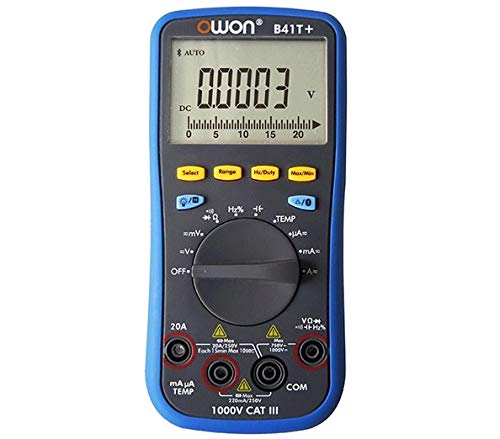
3.1-сүрөт: Алдыңкы жана каптал view of the OWON B41T+ Digital Multimeter, showing the display, function dial, and input jacks.
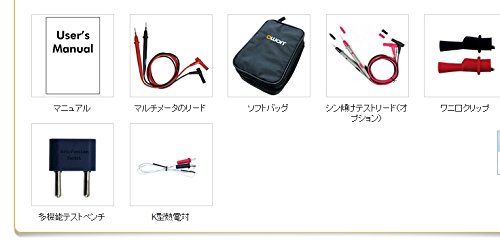
3.2-сүрөт: Included accessories: User's Manual, Multimeter test leads, Soft bag, K-type thermocouple (temperature probe), and a multi-function test bench adapter.
4. Орнотуу
4.1 Батареяны орнотуу
The OWON B41T+ is powered by batteries. To install or replace batteries:
- Мультиметр өчүрүлгөнүн текшериңиз.
- Аппараттын артындагы батарея бөлүкчөсүнүн капкагын табыңыз.
- Батарея отсегин ачуу үчүн бурагычты колдонуңуз.
- Керектүү батареяларды туура полярдуулукту сактап, салыңыз.
- Батарея бөлүгүнүн капкагын бекем жабыңыз.
4.2 Колдонмону орнотуу жана Bluetooth жупташтыруу
To utilize the smart device connectivity features, download the OWON multimeter application from your device's app store (compatible with Android 4.3+ and iOS 7.0+).
- Download and install the official OWON multimeter app on your smartphone or tablet.
- Turn on the OWON B41T+ multimeter.
- Акылдуу түзмөгүңүздө Bluetooth күйгүзүңүз.
- Open the OWON app and follow the on-screen instructions to search for and pair with your B41T+ device. The Bluetooth icon on the multimeter display will indicate a successful connection.
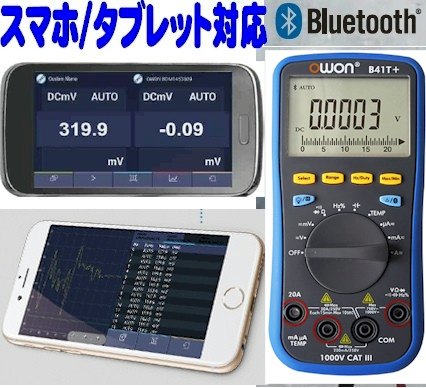
4.1-сүрөт: The OWON B41T+ multimeter displaying a measurement, with a smartphone screen showing the corresponding app interface.
5. Иштөө нускамалары
The OWON B41T+ offers a wide range of measurement functions. Use the central rotary dial to select the desired measurement mode.
5.1 Негизги өлчөөлөр
To perform a basic measurement:
- Select the appropriate function (e.g., V for voltage, A for current, Ω for resistance) using the rotary dial.
- Connect the test leads to the correct input jacks on the multimeter (e.g., COM and VΩmA for voltage/resistance, COM and 20A or mAμA for current).
- Сыноочу зымдарды текшерилип жаткан чынжырчага же компонентке туташтырыңыз.
- Read the measurement value on the multimeter's display.
5.2 Advanced Features with Bluetooth Connectivity
When connected to a smartphone or tablet via Bluetooth, the OWON B41T+ provides enhanced functionality:
- Маалыматтарды каттоо: Record measurement data over time directly to your smart device.
- Графикалык дисплей: View real-time measurement trends and historical data in graphical format.
- Үн чыгаруу: The device can announce measurement readings in Japanese, allowing for hands-free operation.
- Маалыматтарды башкаруу: Save, store, print, and email measurement data (CSV format) directly from the app.
- Көп түзмөк байланышы: Connect two OWON B41T+ units simultaneously to your smart device to monitor two different parameters (e.g., voltage and current, or voltage and resistance) on a dual-screen display.
- Алыстан иштөө: Utilize remote desktop applications like TeamViewer to control the connected smartphone/tablet from anywhere, enabling remote monitoring and operation of the multimeter.

5.1-сүрөт: Illustration of advanced features including simultaneous measurement with two multimeters, data logging, graphical display, and voice output.
6. Техникалык шарттар
The following table details the technical specifications of the OWON B41T+ Digital Multimeter.

6.1-сүрөт: Detailed specifications including measurement ranges, resolution, and accuracy.
| Параметр | Диапазон | Резолюция | Тактык |
|---|---|---|---|
| DC Voltage (V) | 220мВ, 2.2В, 22В, 220В, 1000В | 0.01mV, 0.1mV, 1mV, 10mV, 0.1V | ±(0.05%+10dig) to ±(0.8%+25dig) |
| AC Voltage (V) | 220мВ, 2.2В, 22В, 220В, 750В | 0.01mV, 0.1mV, 1mV, 10mV, 0.1V | ±(1.0%+25диг) |
| Туруктуу ток (A) | 220μA, 2200μA, 22mA, 220mA, 20A | 0.01μA, 0.1μA, 1μA, 10μA, 1mA | ±(0.8%+10dig) to ±(2.0%+25dig) |
| AC тогу (A) | 220μA, 2200μA, 22mA, 220mA, 20A | 0.01μA, 0.1μA, 1μA, 10μA, 1mA | ±(1.5%+25dig) to ±(2.5%+35dig) |
| Каршылык (Ω) | 220Ω, 2.2kΩ, 22kΩ, 220kΩ, 2.2MΩ, 22MΩ, 220MΩ | 0.01Ω, 0.1Ω, 1Ω, 10Ω, 100Ω, 1kΩ, 10kΩ | ±(0.4%+5dig) to ±(5%+10dig) |
| Сыйымдуулук (F) | 2.2nF, 22nF, 220nF, 2.2μF, 22μF, 220μF, 2.2mF, 22mF | 1pF, 10pF, 100pF, 1nF, 10nF, 100nF, 1μF, 10μF | ±(2.5%+15диг) |
| Жыштык (Гц) | 220Hz, 2.2kHz, 22kHz, 220kHz, 2.2MHz, 22MHz | 0.01Hz, 0.1Hz, 1Hz, 10Hz, 100Hz, 1kHz | ±(0.1%+4диг) |
| Милдеттик цикл | 0.1% - 99.9% (>1kHz) | 0.1% | ±(1.2%+3диг) |
| Температура (°C / °F) | -50°Cден 400°Cге чейин, -58°Fтен 752°Fге чейин | 0.1°C, 0.1°F | ±(2.5%+3dig) to ±(1.2%+8dig) |
| Макс саны | 21999 | ||
| Көрсөтүү Сampлинг | 3 жолу / экинчи | ||
| Auto колому | Ооба | ||
| Data Logger | 10 hours, 10,000 points | ||
| Чыныгы RMS | Ооба | ||
| Арткы жарык | Ооба | ||
| Диод сыноо | Ооба | ||
| Үзгүлтүксүздүк тести | Ооба | ||
| Ашыкча ток коргоо | CAT III 1000V, CAT IV 600V | ||
| Power Source | 3V (1.5V x 2) AA Alkaline Batteries | ||
| Bluetooth | Android 4.3+, iOS 7.0+ | ||
| Өлчөмдөр | 85мм x 185мм x 30мм | ||
| Салмагы | Болжол менен 320г | ||
7. Техникалык тейлөө
Proper maintenance ensures the longevity and accuracy of your OWON B41T+ Digital Multimeter.
- Тазалоо: Аппаратты кургак, жумшак чүпүрөк менен сүртүңүз. Абразивдүү тазалагычтарды же эриткичтерди колдонбоңуз.
- Батареяны алмаштыруу: Replace batteries promptly when the low battery indicator appears on the display. Refer to Section 4.1 for battery installation instructions.
- Сактагыч: Store the multimeter in a cool, dry place away from direct sunlight and extreme temperatures. If storing for extended periods, remove the batteries to prevent leakage.
- Сыноочулар: Regularly inspect test leads for any signs of wear, cuts, or damage. Replace them if necessary to ensure safe and accurate measurements.
8. Кыйынчылыктарды
If you encounter issues with your OWON B41T+ Digital Multimeter, refer to the following common problems and solutions:
| Көйгөй | Мүмкүн себеп | Чечим |
|---|---|---|
| Түзмөк күйбөйт. | Өлүк же туура эмес орнотулган батарейкалар. | Туура полярдуулукту камсыз кылуу менен батарейкаларды алмаштырыңыз. |
| No reading or 'OL' (Overload) displayed. | Incorrect function selected, open circuit, or measurement exceeds range. | Select the correct function. Check for proper circuit connection. Switch to a higher range if available. |
| Bluetooth байланышы ишке ашпай калды. | Bluetooth not enabled, app not running, or device out of range. | Ensure Bluetooth is on for both devices. Restart the app. Move devices closer. Check app compatibility with OS version. |
| Туура эмес окуулар. | Damaged test leads, environmental interference, or incorrect measurement technique. | Inspect and replace test leads if damaged. Ensure proper connection. Avoid strong electromagnetic fields. |
9. Кепилдик жана колдоо
For warranty information and technical support, please refer to the documentation included with your purchase or visit the official OWON website. If you require further assistance, contact OWON customer service through their designated support channels.