
1. Киришүү
Thank you for choosing the mcdodo Smart LED Auto Disconnect and Auto Recharge Nylon Braided Sync Charge USB Data Cable. This cable is designed to provide efficient and safe charging for your compatible devices, featuring intelligent power management to protect your device's battery life. It incorporates an auto-disconnect function upon full charge and an auto-recharge mechanism to maintain optimal battery levels.
This manual will guide you through the proper setup, operation, and maintenance of your new cable.
2. Продукциянын өзгөчөлүктөрү
- Smart LED көрсөткүчү: Two-color LED light to indicate charging status (orange for quick charge, green for trickle charge, off for full charge).
- Авто ажыратуу: Automatically stops charging when your device reaches 100% battery to prevent overcharging.
- Auto Recharge: Initiates charging again after approximately 120 minutes if the device's battery level drops, ensuring your device remains fully charged.
- Туруктуу курулуш: Features a nylon braided exterior and alloy shell for enhanced durability and resistance to bending.
- Маалыматтарды өткөрүү: Supports data synchronization between your device and a computer.

Figure 1: ашыкview of the mcdodo Smart LED Auto Disconnect USB Data Cable.
3. Орнотуу нускамалары
- Кубат Булагына туташуу: Insert the USB-A end of the cable into a compatible USB power adapter (not included) or a computer's USB port. Ensure the power source provides adequate current (e.g., 2.4 Amps for optimal charging).
- Түзмөккө туташуу: Insert the Lightning connector end of the cable into your compatible smartphone or tablet's charging port.
- Initial Indication: Upon connection, the LED indicator on the Lightning connector will illuminate, typically orange, indicating that charging has begun.
4. Иштөө нускамалары
4.1 Заряддоо процесси
The cable's intelligent LED indicator provides visual feedback on the charging status:
- Orange Light Flashing: Indicates the device is undergoing quick charging.
- Жашыл жарык күйүк: Indicates the device is in trickle charge mode, nearing full capacity.
- Light Off Automatically: Indicates the device has reached 100% charge, and the auto-disconnect feature has activated.

Figure 2: LED indicator states for charging status.
4.2 Auto Disconnect and Auto Recharge
The cable features a second-generation intelligent control IC that manages the charging cycle:
- When your device reaches 100% charge, the cable will automatically stop power delivery to prevent overcharging, indicated by the LED turning off.
- After approximately 120 minutes (2 hours) of being fully charged and disconnected, the cable will automatically identify the power status and initiate a cycle charge if the battery level has dropped, ensuring your device remains fully charged without continuous power flow.
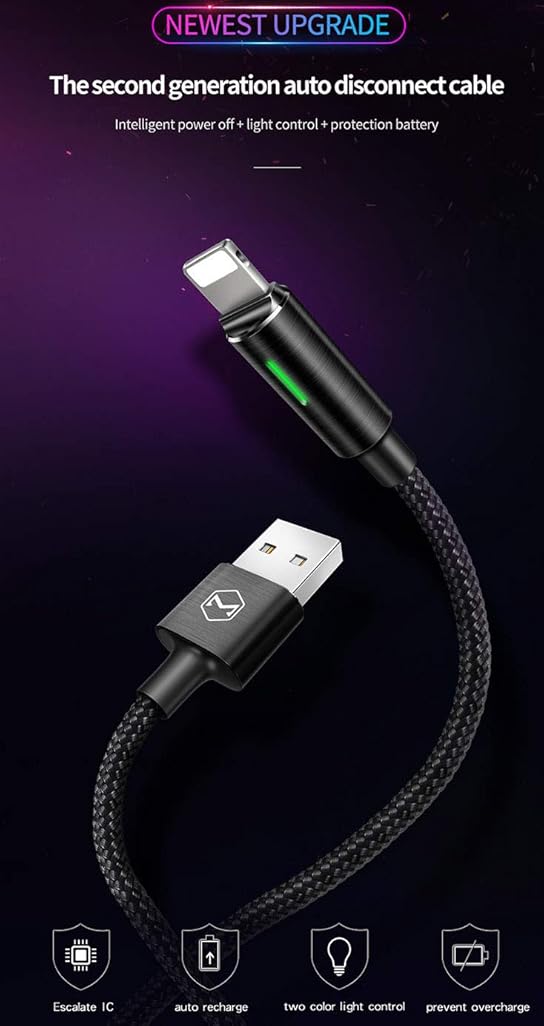
Figure 3: Smart IC for safe overnight charging.
4.3 Маалыматтарды өткөрүү
To transfer data, connect the USB-A end of the cable to a computer's USB port and the Lightning end to your compatible device. Your device should then be recognized by the computer for data synchronization.
Video 1: Demonstration of the Second Generation Smart Auto Disconnect and Auto Recharge feature.
5. Техникалык тейлөө
- Тазалоо: Кабель менен туташтыргычтарды акырын сүртүү үчүн жумшак, кургак чүпүрөктү колдонуңуз. Суюк тазалоочу каражаттарды же абразивдүү материалдарды колдонуудан алыс болуңуз.
- Сактагыч: Store the cable in a cool, dry place away from direct sunlight and extreme temperatures. Avoid tightly coiling the cable or placing heavy objects on it.
- Колдонуу: Always grasp the connector head when plugging or unplugging the cable. Avoid pulling directly on the cable itself to prevent damage to the internal wires. Do not bend the cable sharply, especially near the connectors.
6. Кыйынчылыктарды
- Түзмөк кубатталбай жатат:
- Кабелдин эки учу тең бекем туташтырылганын текшериңиз.
- Кубат адаптери же USB порту иштеп жатканын текшериңиз.
- Түзмөгүңүздүн кубаттоо порту таза жана таштандыдан таза экенин текшериңиз.
- Жай кубаттоо:
- Confirm that your power adapter provides sufficient output (e.g., 2.4A). Lower current adapters may result in slower charging.
- Avoid using the device extensively while charging, as this can slow down the process.
- LED көрсөткүч иштебейт:
- If the LED does not light up when connected, ensure the cable is properly plugged into both the power source and the device.
- If the device is already fully charged, the LED will turn off as part of the auto-disconnect feature.
- Cable Not Compatible with All Boxes: Some power adapters may not be fully compatible. Ensure you are using a standard USB-A power adapter.
7. Техникалык шарттар
| Өзгөчөлүк | Деталь |
|---|---|
| Бренд | mcdodo |
| Модель номери | 694536541795 |
| Туташтыргыч түрү | USB Type A to Lightning |
| Кабель түрү | USB Data and Charge Cable |
| Шайкеш түзмөктөр | Smartphones, Tablets (e.g., Phone XS Max/XS/8/7/6/5/Pod/Pad and More) |
| Өзгөчөлүктөр | Braided, Data Transfer, Auto Disconnect, Auto Recharge, Smart LED Indicator |
| Түс | Кара |
| Узундук | 4FT/1.2M |
| Сырткы материал | Нейлон |
| Максималдуу томtage | 5 вольт |
| AC адаптер агымы | 2.4 Amps |
| Ватtage | 12 ватт |
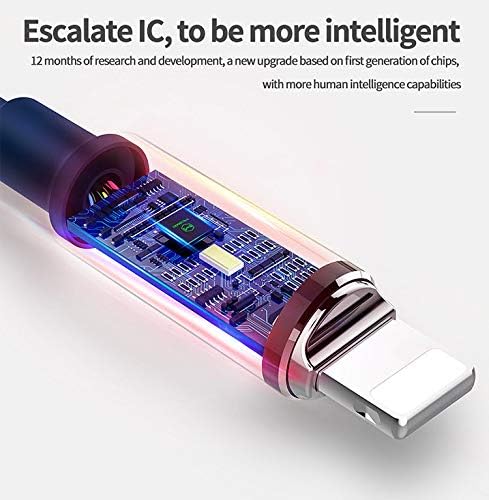
4-сүрөт: Ички view of the intelligent control IC.
8. Кепилдик жана колдоо
Specific warranty information for this product is not provided in the available data. For detailed warranty terms and customer support, please refer to the official mcdodo webсайтына кириңиз же сатуучуга түз кайрылыңыз.
You can visit the mcdodo store for more information: mcdodo Store