
Introduction
This manual provides comprehensive instructions for the Hoco ES20 Original Series Wireless V5.0 Earphones. Please read this manual carefully before using the product to ensure proper operation and to maximize your user experience. Keep this manual for future reference.
Продукт бүттүview
The Hoco ES20 earphones are designed for wireless audio playback and hands-free communication. The package includes two wireless earphones and a portable charging case.

Сүрөт 1: Hoco ES20 Wireless Earphones. This image displays both the left and right earphones, highlighting their in-ear design and compact form factor.
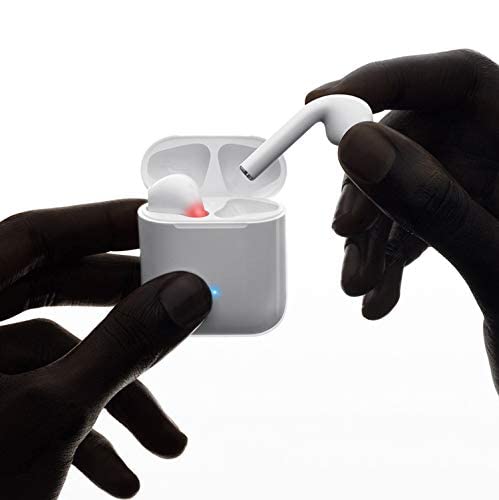
Сүрөт 2: Hoco ES20 Earphones in Charging Case. The earphones are shown placed inside their charging case, indicating the charging status with an illuminated LED.
Техникалык шарттар
| Өзгөчөлүк | Деталь |
|---|---|
| Wireless Version | V5.0 |
| Колдоого алынган протоколдор | Headset, Hands-free, A2DP, Avrcp |
| Берүү жыштыгы | 2.4 ГГц |
| Берүүнүн диапазону | 10 метр |
| Заряддоо Voltage | DC5V |
| Заряддоо убактысы (наушник) | Болжол менен 1 саат |
| Talk Time | 2 саат |
| Музыканы ойнотуу убактысы | 2 саат |
| Заряддоо корпусунун батареясынын сыйымдуулугу | 400mAh |
| Earphone Battery Capacity (Each) | 40mAh |
| Күтүү убактысы | 200 саат |
| Жалпы салмагы (корпус менен) | 44.8г |
| Жалгыз наушниктин салмагы | 3.8г |
| Камтылган компоненттер | Bluetooth Headphones, 1 Charging Cable |
Жайгашуу
1. Наушникти жана капты заряддоо
- Place both earphones into the charging case. Ensure they are correctly seated.
- Connect the charging cable to the charging port on the case and to a DC5V power source (e.g., USB wall adapter, computer USB port).
- The indicator light on the charging case will show charging status. A full charge for the earphones takes approximately 1 hour. The charging case itself has a 400mAh battery capacity.
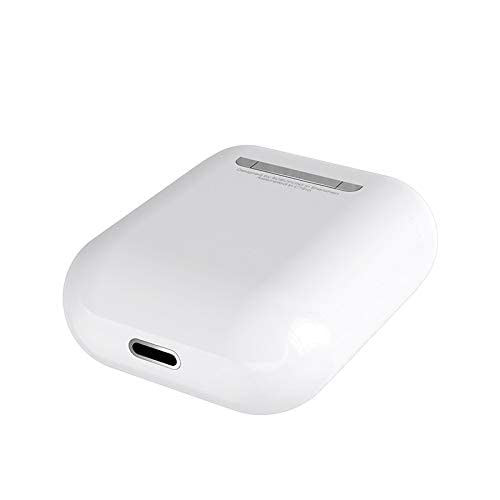
Сүрөт 3: Hoco ES20 Charging Case Port. This image shows the charging port located at the bottom of the charging case, where the charging cable is connected.
2. Түзмөк менен жупташтыруу
- Кулакчындардын заряддалганын текшериңиз.
- Заряддоо кутучасын ачыңыз. Кулакчындар автоматтык түрдө жупташтыруу режимине өтөт.
- Смартфонуңузда же башка Bluetooth иштетилген түзмөгүңүздө Bluetooth жөндөөлөрүнө өтүңүз.
- Издөө available devices and select "Hoco ES20" (or similar name) from the list.
- Once connected, the earphones will indicate successful pairing (e.g., an audio prompt or LED change).
- For Apple phones and some Android phones, the battery level of the earphones may be displayed on your device.
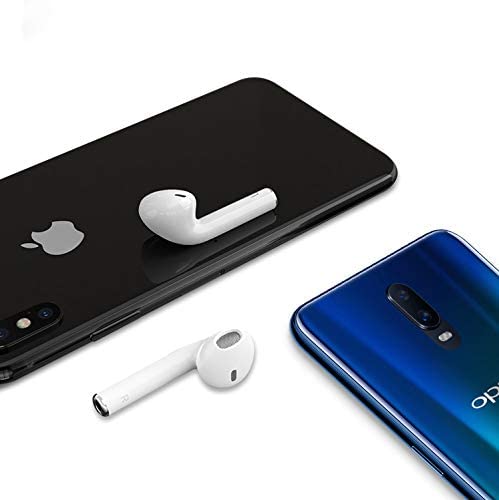
Сүрөт 4: Hoco ES20 Earphones with Smartphones. This image illustrates the earphones positioned near two different smartphones, demonstrating their compatibility with various mobile devices.
Иштөө нускамалары
Негизги функциялар (сенсордук башкаруу)
- Күйгүзүү: Earphones power on automatically when removed from the charging case.
- Өчүрүү: Earphones power off automatically when placed back into the charging case.
- Ойнотуу/тындыруу: Tap the touch area on either earphone once.
- Чалууга жооп берүү/аяктоо: Tap the touch area on either earphone once during an incoming call or an active call.
- Чакырууну четке кагуу: Press and hold the touch area on either earphone for approximately 2 seconds during an incoming call.
- Кийинки трек: Оң кулакчындын тийүү аймагын эки жолу таптаңыз.
- Мурунку трек: Сол кулакчындын тийүү аймагын эки жолу таптаңыз.
- Үн Жардамчысын жандыруу: Triple-tap the touch area on either earphone.
Техникалык тейлөө
- Кулакчындарды жана кубаттоочу кутучаны таза жана кургак кармаңыз.
- Продукцияны өтө жогорку температурага, нымдуулукка же дат басуучу заттарга дуушар кылбаңыз.
- Do not attempt to disassemble or modify the earphones or charging case, as this will void the warranty and may cause damage.
- Use a soft, dry cloth to clean the earphones and charging contacts.
- Кулакчындарды коргоо жана кубаттап туруу үчүн колдонулбаган учурда кубаттоо кутучасында сактаңыз.
Проблемаларды чечүү
Жалпы маселелер жана чечимдер
- Кулакчындар жупташкан жок:
- Эки кулакчындын тең кубатталганын текшериңиз.
- Place earphones back in the case, close it, then open it again.
- Түзмөгүңүздөгү Bluetooth'ду өчүрүп, күйгүзүңүз.
- Delete "Hoco ES20" from your device's Bluetooth list and try pairing again.
- Бир гана наушник иштейт:
- Эки кулакчындын тең кубатталганын текшериңиз.
- Place both earphones back in the charging case, close the lid, wait a few seconds, then open the lid and remove them together.
- If the issue persists, try resetting the earphones (refer to manufacturer's website if a specific reset procedure is not in this manual).
- Үн жок же үнү төмөн:
- Түзмөгүңүздөгү жана кулакчыныңыздагы үн деңгээлин текшериңиз.
- Наушниктердин түзмөгүңүзгө туура туташтырылганын текшериңиз.
- Башка колдонмодон же булактан аудио ойнотуп көрүңүз.
- Заряддоо маселелери:
- Заряддоо кабели корпуска да, кубат булагына да бекем туташтырылганын текшериңиз.
- Корпустун кубаттоо порту таза жана таштандылардан таза экенин текшериңиз.
- Башка заряддоо кабелин же кубат адаптерин колдонуп көрүңүз.
- Poor connection/intermittent audio:
- Ensure your device is within the 10-meter transmission range.
- Avoid obstacles between your device and the earphones.
- Башка зымсыз түзмөктөрдүн кийлигишүүсүн азайтыңыз.
Кепилдик жана колдоо
The Hoco ES20 Wireless Earphones come with a 6 айлык кепилдик сатып алынган күндөн тартып. Бул кепилдик өндүрүш кемчиликтерин камтыйт. Кепилдик дооматтары үчүн сатып алганыңыздын далилин сактап коюңуз.
For technical support or warranty inquiries, please contact your retailer or the official Hoco support channels. Refer to the product packaging or Hoco's official webбайланыш маалыматы үчүн сайт.