
Introduction
Welcome to the user manual for your KECHAODA A27 Mini Mobile Phone. This compact and functional keypad phone is designed for essential communication. This manual provides detailed instructions on how to set up, operate, maintain, and troubleshoot your device to ensure optimal performance. Please read this manual thoroughly before using your phone.
Кутуга эмнелер кирет
Upon opening your KECHAODA A27 package, you should find the following items:
- KECHAODA A27 Mini Mobile Phone
- USB заряддоо кабели
- Кайра заряддалуучу литий-иондук батарейка
- Колдонуучунун Колдонмосу (бул документ)
Note: A wall charger adapter is NOT included in the box. Please use a compatible USB charger (5V/1A recommended) to charge your device.
Продукт бүттүview
The KECHAODA A27 is a compact feature phone designed for portability and essential functions. It features a keypad for easy dialing and navigation, a small LCD display, and supports dual SIM cards.

Сүрөт 1: Алдыңкы жана арткы view of the KECHAODA A27 Mini Mobile Phone in Gold. The back features the KECHAODA brand logo and speaker grille.

2-сүрөт: Каптал view of the KECHAODA A27 Mini Mobile Phone, showcasing анын slim profile.
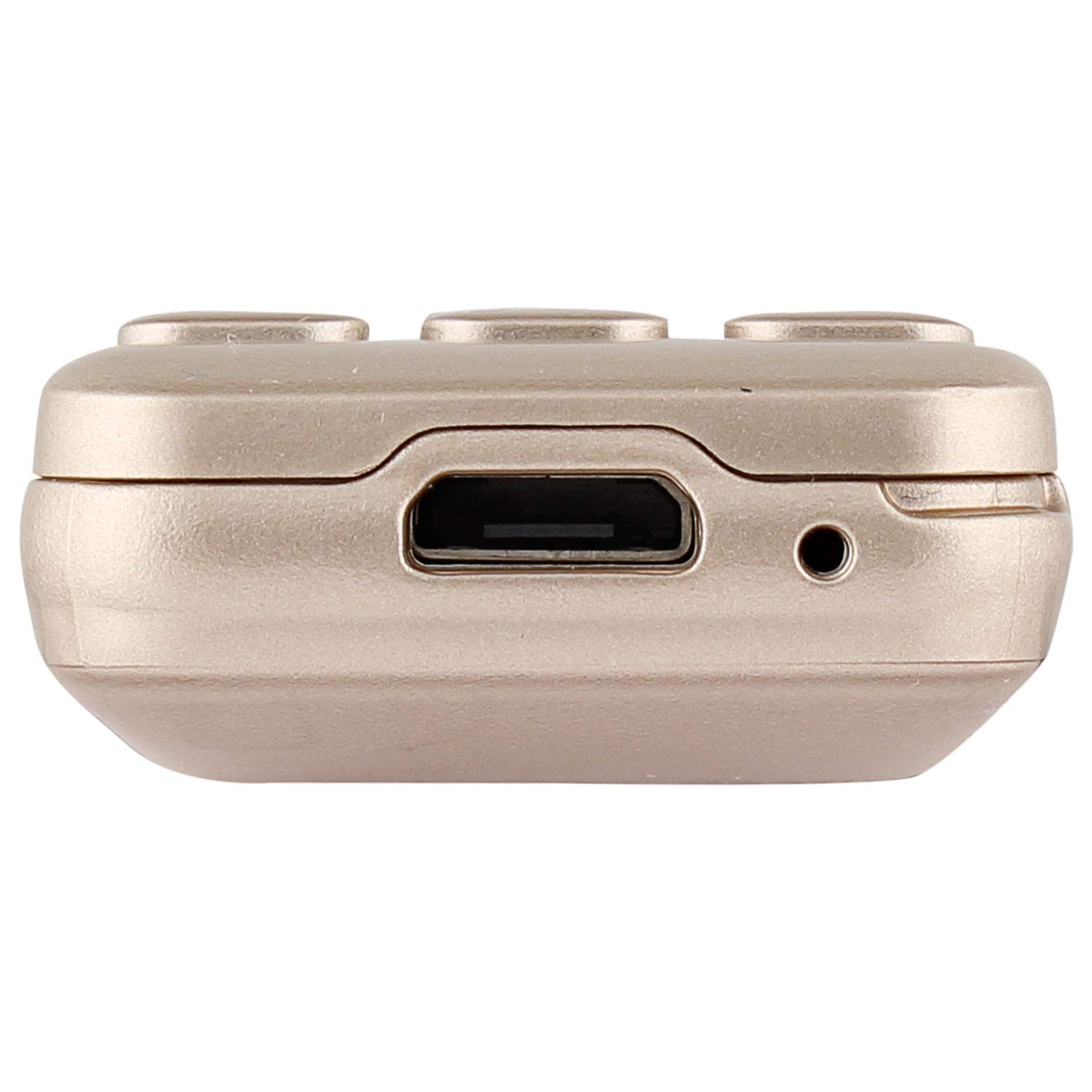
3-сүрөт: Жогорку view of the KECHAODA A27 Mini Mobile Phone, highlighting the Micro USB charging port and a small audio jack (if present, based on image).
Продукт бүттүview Video
Видео 1: Кыскача продуктview of the KECHAODA A27 Mini Mobile Phone, demonstrating its size and key features.
Орнотуу колдонмосу
1. Inserting SIM Cards and Battery
- Арткы капкакты алып салуу: Телефондун арткы капкагын акырын ачыңыз.
- SIM карталарды салыңыз: Locate the SIM card slots. This phone supports dual SIM cards. Carefully insert your SIM cards into the designated slots with the gold contacts facing down. Ensure they are securely seated.
- Insert External Memory Card (Optional): If you wish to expand storage, insert a compatible external memory card (up to 16GB) into the dedicated slot.
- Батарея салыңыз: Place the provided Lithium-Ion battery into the battery compartment, aligning the gold contacts on the battery with those in the phone.
- Арткы капкакты алмаштыруу: Carefully align and snap the back cover back into place until it is secure.
2. Аппаратты заряддоо
- Connect the small end of the USB charging cable to the Micro USB port on the top of your phone.
- Connect the larger end of the USB cable to a compatible USB wall adapter (not included) or a computer's USB port.
- The phone will indicate that it is charging. For initial use, it is recommended to charge the phone for approximately 30 minutes. Avoid overcharging.
3. Күйгүзүү / Өчүрүү
- Күйгүзүү үчүн: Экран күйгөнгө чейин Күйгүзүү/Чалууну бүтүрүү баскычын (адатта кызыл телефон сүрөтчөсү менен белгиленген) басып туруңуз.
- Өчүрүү үчүн: Press and hold the Power/End Call button until the power-off options appear, then select "Power Off" or simply hold until the device shuts down.
Иштөө нускамалары
Негизги навигация
- Use the directional keys (up, down, left, right) to navigate through menus.
- басыңыз OK/Тандоо button (usually in the center of the directional keys) to confirm selections.
- колдонуу Артка/Таза button to go back to the previous screen or delete characters.
- The Чалуу button (green phone icon) is used to make calls or answer incoming calls.
- The Чакырууну аяктоо/Кубат берүү button (red phone icon) is used to end calls or power the phone on/off.
Чалууларды кабыл алуу жана кабыл алуу
- Чалуу үчүн: Телефон номерин баскычтопту колдонуп киргизип, баскычты басыңыз Чалуу баскычы.
- Чалууга жооп берүү үчүн: Телефон шыңгыраганда, басыңыз Чалуу баскычы.
- Чалууну аяктоо үчүн: басыңыз Чакырууну аяктоо баскычы.
Sending and Receiving SMS
- "Билдирүүлөр" менюсуна өтүңүз.
- "Билдирүү жазуу" же "Жаңы SMS" тандаңыз.
- Ариптакта аркылуу билдирүүңүздү киргизиңиз.
- Алуучунун номерин киргизиңиз же байланыштардан тандаңыз.
- "Жөнөтүү" тандаңыз.
Bluetooth байланышы
The KECHAODA A27 supports Bluetooth 2.0 for connecting to compatible devices like headsets or for use as a Bluetooth dialer.
- "Орнотуулар" > "Bluetooth" бөлүмүнө өтүңүз.
- Bluetooth'ту "күйгүзүңүз".
- тандоо "Издөө түзмөктөр" же "Жаңы түзмөктү жупташтыруу".
- Тизмеден каалаган түзмөктү тандап, жупташтыруу үчүн экрандагы көрсөтмөлөрдү аткарыңыз.
- The phone can also synchronize your contact list via Bluetooth.
MP3 ойнотуу
If an external memory card with MP3 files is inserted, you can play music:
- Navigate to the "Multimedia" or "Music Player" menu.
- Select "Play" to start music playback.
Камераны колдонуу
The phone includes a basic VGA rear camera.
- Go to the "Camera" application from the main menu.
- колдонуу OK/Тандоо сүрөткө тартуу үчүн баскыч.
Техникалык тейлөө
Батареяга кам көрүү
- Батареянын иштөө мөөнөтүн узартуу үчүн, бат-баттан батарейканы толук зарядсыздандырбаңыз.
- Charge the mobile for approximately 30 minutes and then remove it from charging. Avoid leaving it connected for extended periods after it's fully charged.
- Батареяны экстремалдуу температурага калтырбаңыз.
Телефонуңузду тазалоо
- Телефондун сыртын тазалоо үчүн жумшак, кургак, түксүз чүпүрөктү колдонуңуз.
- Катуу химиялык заттарды, тазалоочу эриткичтерди же күчтүү жуучу каражаттарды колдонуудан алыс болуңуз.
Сактагыч
- Телефонду түз күн нурунан жана экстремалдык температурадан алыс салкын, кургак жерде сактаңыз.
- Эгерде батарейканы узак убакытка сактасаңыз, анын терең разряддалышын алдын алуу үчүн жарым-жартылай (болжол менен 50%) заряддалганын текшериңиз.
Проблемаларды чечүү
| Көйгөй | Мүмкүн себеп | Чечим |
|---|---|---|
| Телефон күйбөйт. | Батарея түгөнүп калган же туура салынган эмес. | Ensure the battery is correctly inserted and charged. Connect to a charger for at least 30 minutes. |
| Тармак сигналы жок. | SIM card not inserted correctly or out of network coverage. | SIM картанын сайылганын текшериңиз. Тармактын камтуусу жакшыраак аймакка жылыңыз. |
| Cannot make or receive calls/SMS. | SIM card issues, network problem, or insufficient balance. | Verify SIM card status and network connection. Contact your service provider. |
| Bluetooth туташпай жатат. | Bluetooth is off or device is out of range. | Ensure Bluetooth is enabled on both devices and they are within pairing range. Try re-pairing. |
| Батареянын иштөө мөөнөтү кыска. | Frequent usage, old battery, or improper charging. | Reduce usage, ensure proper charging cycles (30 mins charge, avoid overcharging). Consider replacing the battery if it's old. |
Техникалык шарттар
| Модел | A27 |
| Бренд | Кечаода |
| Дисплей өлчөмү | 0.66 дюйм |
| Дисплей түрү | LCD |
| RAM өлчөмү | 32 MB |
| Ички сактагыч | 16 GB (expandable via external memory slot) |
| Операция системасы | Symbian 9.3 |
| Процессордун ылдамдыгы | 400 МГц |
| Уюлдук технология | 2G (GSM) |
| Байланыш | Bluetooth, USB |
| Батарея сыйымдуулугу | 300 мАч литий-ион |
| Камера | VGA арткы камера |
| Продукциянын өлчөмдөрү | 7 x 3 x 1.5 сантиметр |
| Элемент Салмагы | 100 г |
| Материал | Пластик |
Кепилдик жана колдоо
Your KECHAODA A27 Mini Mobile Phone comes with a standard brand warranty. For specific details regarding the warranty period, terms, and conditions, please refer to the warranty card included in your product packaging or visit the official KECHAODA product detail page where you purchased the device.
For further assistance, technical support, or replacement policy information, please visit the product detail page on the retailer's website or contact KECHAODA customer service.