
1. Продукт бүтүп калдыview
The AOPUTTRIVER AP-007-APP Bluetooth Anemometer is a digital device designed for accurate measurement of wind speed and temperature. It features Bluetooth connectivity for seamless integration with a dedicated mobile application, enabling real-time data display, logging, and export. This instrument is suitable for various applications including HVAC installation, CFM calculation, duct vent analysis, and outdoor activities.
Негизги өзгөчөлүктөрү:
- Bluetooth байланышы: Connects automatically to iPhone, iPad, Android phones, or tablets via the "Intelligent Anemometer" app.
- Маалыматтарды экспорттоо: Save measurement data in Excel or TXT format through the mobile application.
- Өлчөө диапазону: Max wind speed up to 67.1 mph (±5% accuracy); Wind temperature from 14°F to 113°F (-10°C to 45°C) (±2°C accuracy).
- Бир нече бирдиктер: Measures wind speed in m/s, km/h, ft/min, knots, mph. Measures wind temperature in °C/°F.
- Wind Chill Indication: Provides wind chill readings.
- Sensitive Vanes: Equipped with 8 sensitive vanes for precise measurements.
- Штатив орнотуу: Features a 1/4 inch screw interface at the bottom for tripod connection, allowing for hands-free operation.
- Арткы жарык функциясы: Enables use in dim lighting conditions.
- Авто өчүрүү: Automatically powers off after 5 minutes of inactivity to conserve battery life.
2. Пакеттин мазмуну
Төмөндө тизмеленген нерселердин баары пакетиңизге камтылганын текшериңиз:

Image: AOPUTTRIVER AP-007-APP Bluetooth Anemometer package contents.
- 1x AP-007APP Bluetooth Anemometer
- 2x 1.5V ААА батареялары
- 1x Small Tripod
- 1x коргоочу кап
- 1x Lanyard
- 1x Instruction Manual
3. Орнотуу жана орнотуу
3.1. Батареяны орнотуу
Locate the battery compartment on the back of the anemometer. Insert two 1.5V AAA batteries, ensuring correct polarity. Close the battery compartment cover securely.
3.2. Колдонмону орнотуу жана Bluetooth туташуу
To utilize the Bluetooth features and mobile application:

Image: Steps for app download and Bluetooth connection.
- Колдонмону жүктөп алыңыз: Scan the QR code provided in the manual or search for "Intelligent Anemometer" in the Google Play Store (for Android) or Apple App Store (for iOS). Download and install the application on your smartphone or tablet.
- Power On Anemometer: Turn on the AP-007-APP anemometer.
- Bluetooth иштетүү: Мобилдик түзмөгүңүздө Bluetooth иштетилгенин текшериңиз.
- Колдонмону ачуу: Launch the "Intelligent Anemometer" app. The app will automatically search for and pair with the nearest AP-007-APP device.
- Туташуу көрсөткүчү: A green light on the left side of the anemometer will illuminate upon successful connection.
Note: Ensure your phone is not connected to other Bluetooth devices before attempting to pair with the anemometer.
3.3. Tripod Connection
The anemometer is equipped with a standard 1/4 inch screw interface at its base, allowing for connection to a tripod (included). This feature is useful for stable, hands-free measurements, especially during activities like shooting, boat sailing, kite flying, or drone operation.

Image: Anemometer with tripod installation.
4. Иштөө нускамалары
4.1. Негизги функциялар
Familiarize yourself with the buttons on the anemometer:

Image: Anemometer with labeled function buttons.
- Кубат баскычы (Кызыл): Түзмөктү КҮЙГҮЗҮҮ/ӨЧҮРҮҮ үчүн басыңыз.
- UNIT баскычы: Cycles through different wind speed measurement units (m/s, km/h, ft/min, knots, mph).
- MAX/MIN баскычы: Displays the maximum or minimum recorded wind speed value.
- ° F/° C баскычы: Switches between Fahrenheit and Celsius for temperature display.
- ОРТ баскычы: Displays the average wind speed value.
- Backlight Button (*): LCD арткы жарыгын күйгүзөт же өчүрөт.
4.2. Өлчөөлөрдү алуу
To take a measurement, hold the anemometer so that the fan blades are directly exposed to the wind flow. The wind speed and temperature readings will be displayed on the LCD screen. For optimal accuracy, ensure the device is held steady and the airflow is unobstructed.
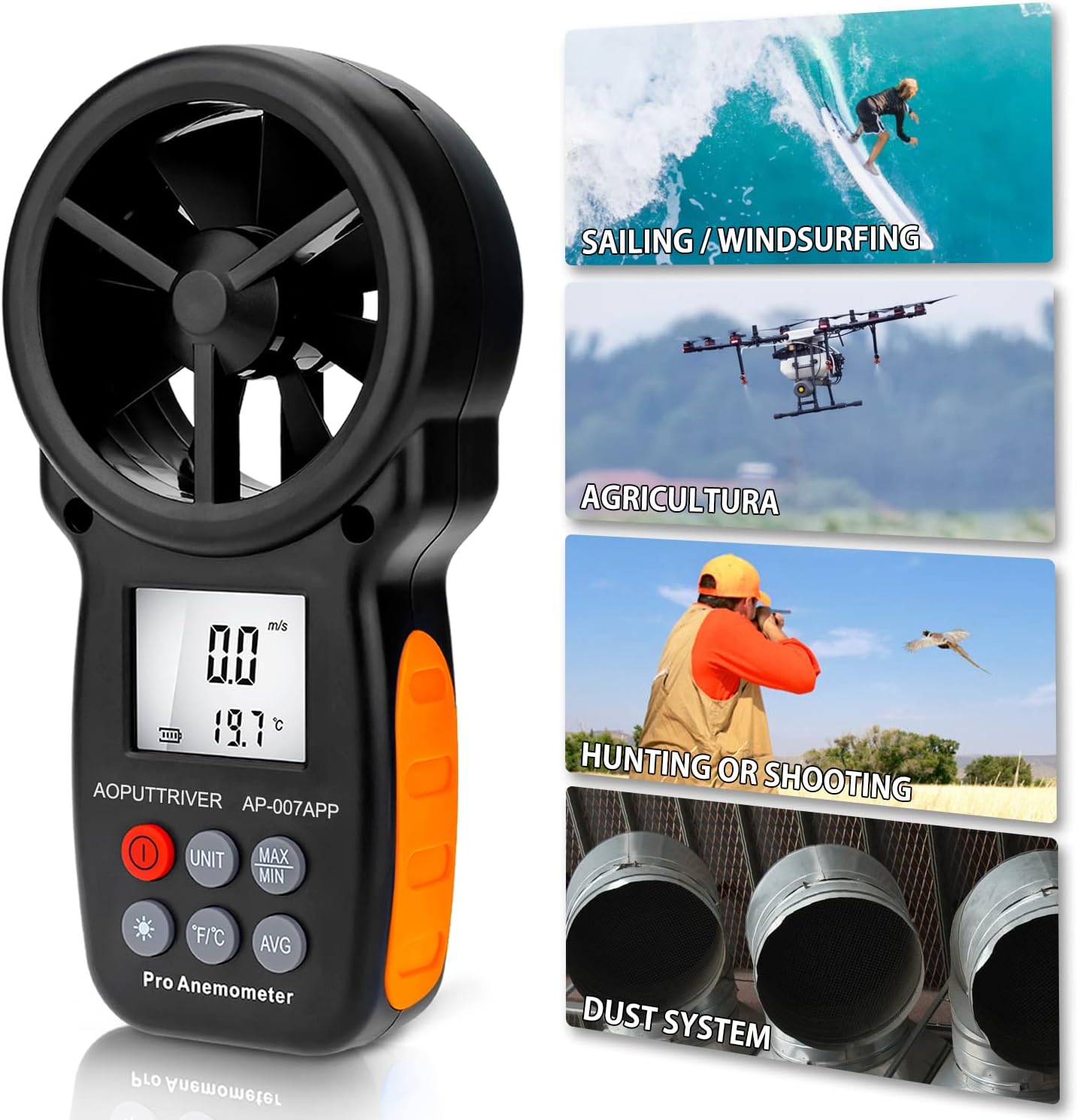
Image: Anemometer in various outdoor use scenarios.
4.3. Using the Mobile App
Once connected via Bluetooth, the "Intelligent Anemometer" app provides a comprehensive interface for monitoring and managing data. The app displays real-time wind speed and temperature, allows for data logging, and offers options to save data for further analysis.
Video: Demonstration of the AOPUTTRIVER AP-007-APP Bluetooth Anemometer and its mobile application features, including real-time data display.
4.4. Арткы жарык функциясы
Press the backlight button (marked with an asterisk) to activate the LCD backlight. This improves visibility of the display in low-light conditions. Press the button again to turn off the backlight.
5. Data Export (for iPhone)
To export data saved on your iPhone to a computer:
Video: Demonstration of connecting the anemometer to a PC and saving data from the iPhone app via iTunes.
- Connect your iPhone to your PC using a USB cable.
- Open iTunes on your computer.
- In iTunes, select your iPhone device.
- "" бөлүмүнө өтүңүзFile Sharing" section.
- Select the "iAnemometer" app from the list.
- You will see the saved data files (e.g., CSV, TXT). Select the desired files and click "Save" to transfer them to your computer.
6. Техникалык шарттар

Image: Anemometer dimensions and function parameters.
| Параметр | Нарк |
|---|---|
| Бренд | AOPUTTRIVER |
| Модел | AP-007-APP |
| Шамалдын ылдамдыгы | 0.3-30 m/s (67.1 mph) |
| Шамалдын ылдамдыгынын тактыгы | окуунун ±5% |
| Температура диапазону | -10°Cден 45°Cге чейин (14°Fтен 113°Fге чейин) |
| Температуранын тактыгы | ±2°C (±3.6°F) |
| Резолюция | 0.1 m/s; 0.2°C |
| Bluetooth диапазону | Болжол менен 10м (32.8 фут) |
| Электр камсыздоо | 2x 1.5V ААА батареялары |
| Элементтин өлчөмдөрү (L x W x Y) | 6.49 x 3.34 x 1.5 дюйм (165 x 85 x 38 мм) |
| Элемент Салмагы | 200 грамм |
| Материал | 007APP+Tripod |
7. Техникалык тейлөө
To ensure the longevity and accuracy of your AOPUTTRIVER AP-007-APP Bluetooth Anemometer, follow these maintenance guidelines:
- Тазалоо: Аппаратты жумшак, кургак чүпүрөк менен сүртүңүз. Абразивдүү тазалагычтарды же эриткичтерди колдонбоңуз.
- Сактагыч: Store the anemometer in a cool, dry place, away from direct sunlight and extreme temperatures. If storing for extended periods, remove the batteries to prevent leakage.
- Этияттык менен мамиле кылуу: The fan blades are sensitive components. Avoid dropping the device or subjecting it to impacts, as this can damage the blades and affect measurement accuracy.
- Батареяны алмаштыруу: Replace batteries when the low battery indicator appears on the display to ensure continuous operation and accurate readings.
8. Кыйынчылыктарды
If you encounter issues with your anemometer, refer to the following common problems and solutions:
- Түзмөк күйбөйт:
- Батареялар туура орнотулганын жана заряды жетиштүү экендигин текшериңиз. Керек болсо алмаштырыңыз.
- Bluetooth connection fails or is unstable:
- Мобилдик түзмөгүңүздө Bluetooth иштетилгенин текшериңиз.
- Verify that no other Bluetooth devices are actively connected to your phone, which might interfere with pairing.
- Restart both the anemometer and the "Intelligent Anemometer" app.
- Make sure you have downloaded the correct app by scanning the QR code or searching for "Intelligent Anemometer" specifically.
- Inaccurate wind speed readings:
- Ensure the fan blades are unobstructed and facing the wind directly.
- Check for any debris or damage to the fan blades.
- App lags or freezes:
- Колдонмону жаап, кайра ачыңыз.
- Мобилдик түзмөгүңүздүн операциялык тутуму жаңыртылганын текшериңиз.
9. Кардарларды колдоо кызматы
For technical assistance, warranty information, or any product-related inquiries, please refer to the contact details provided in your product packaging or visit the AOPUTTRIVER official website. AOPUTTRIVER offers 24/7 technical support to assist you with any problems you may encounter.