
1. Киришүү
This manual provides instructions for the Zerone Universal Remote Control, designed as a replacement for various Haier TV models. It is compatible with Haier HTR-A18M, 55D3550, 40D3500M, and 48D3500 series televisions. This remote control offers direct access to digital TV functions without complex programming.

Image 1.1: The Zerone Universal Remote Control in use, demonstrating its compatibility with Haier HTR-A18M, 55D3550, 40D3500M, and 48D3500 TV models.
2. Орнотуу
2.1 Батареяны орнотуу
Алыстан башкаруу пультун иштеши үчүн эки (2) AAA батарейкасы (кошулмага кирбейт) керек. Батарейкаларды орнотуу үчүн төмөнкү кадамдарды аткарыңыз:
- Пульттун артындагы батарея отсегин табыңыз.
- Батареянын кулпусун ачып, кулпуну басыңыз.
- Оң (+) жана терс (-) терминалдары бөлүмдүн ичиндеги белгилер менен туура дал келишин камсыз кылып, эки AAA батарейкасын салыңыз.
- Батареянын капкагын бекем чыккыча ордуна жылдырыңыз.
The remote is ready for use immediately after battery installation; no additional programming is required for compatible Haier TV models.

Сүрөт 2.1: Детальдуу view of the remote control, highlighting the battery compartment for AAA battery installation.
3. Иштөө нускамалары
3.1 Негизги функциялар
This remote control provides standard functions for your Haier TV. Point the remote directly at your television's infrared receiver for optimal performance.
- Кубат баскычы (U): Телевизорду күйгүзөт же өчүрөт.
- Киргизүү: Selects video input sources (HDMI, AV, etc.).
- Сан баскычтары (0-9): Түз канал тандоо.
- VOL +/-: Үндү чоңойтуу же азайтууну тууралайт.
- CH +/-: Каналдарды өйдө же төмөн которот.
- БАСУУ: Телевизордун аудиосун өчүрөт же кайра күйгүзөт.
- МЕНЮ: Телевизордун негизги менюсуна кирет.
- Навигация баскычтары (Өйдө, Төмөн, Солго, Оңго, ОК): Менюларды карап чыгып, тандоолорду ырастайт.
- АРТКА / ЧЫГУУ: Returns to the previous screen or exits the current menu.
- ДИСПЛЕЙ: Shows current channel information.
- SAP / AUDIO: Selects audio language or mode.
- УЙКУ: Sets the sleep timer.
- PICTURE / WIDE: Adjusts picture mode or aspect ratio.
- CH.LIST / FAVORITE: Accesses channel list or favorite channels.
- Media Control Buttons (Play, Pause, Fast Forward, Rewind): Медиа ойнотууну башкарат.
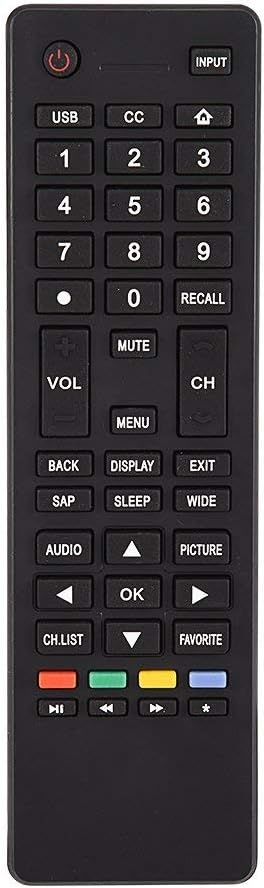
Сүрөт 3.1: Бүттүview of the remote control's button layout for easy identification of functions.
3.2 Иштөө диапазону
The remote control has a stable signal transmission distance of up to 10 meters (33 feet). Actual remote distance may vary depending on environmental factors and the specific model of your TV.
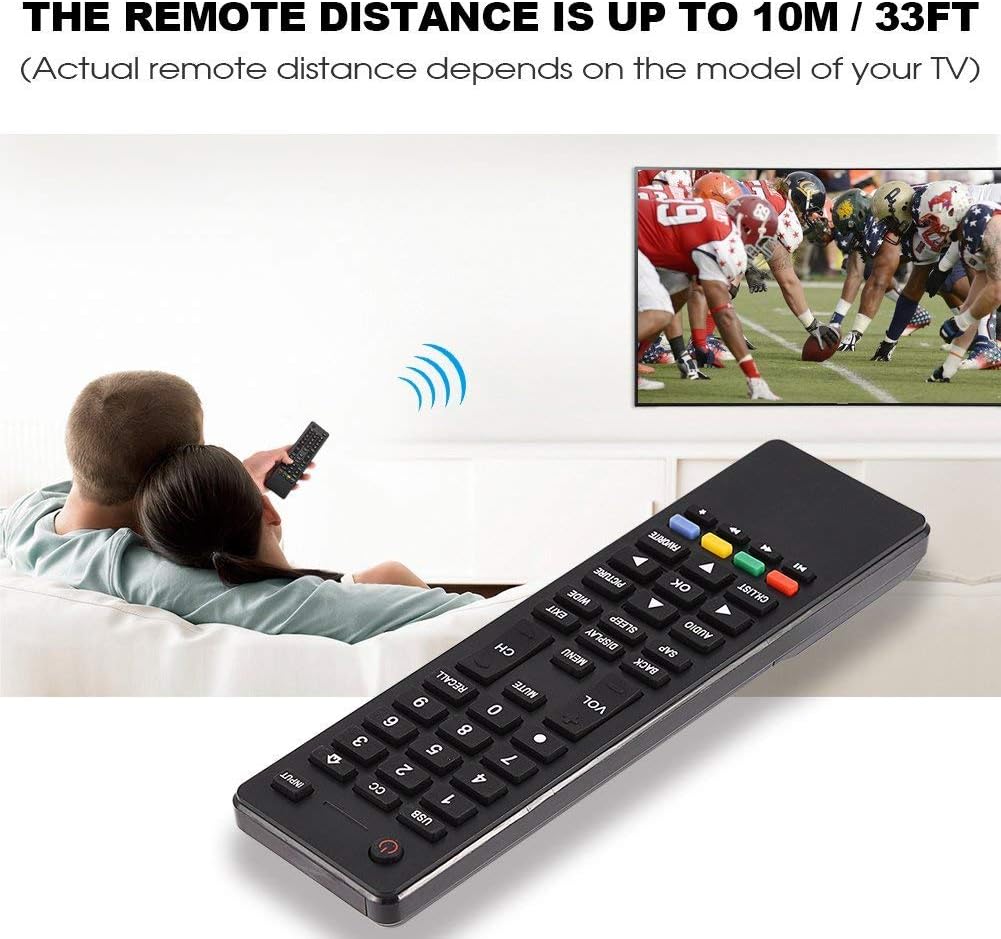
Image 3.2: Visual representation of the remote control's effective operating distance to the television.
4. Техникалык тейлөө
4.1 Тазалоо
Алыстан башкаруу пультун тазалоо үчүн жумшак, кургак чүпүрөктү колдонуңуз. Өтө кир болсо, бир азampen the cloth with water or a mild cleaning solution. Avoid using harsh chemicals or abrasive cleaners, as these can damage the remote's surface or internal components.
4.2 Батареяга кам көрүү
- Пульттун реакциясы жайлап калса же иштебей калса, батареяларды алмаштырыңыз.
- Эски жана жаңы батарейкаларды же ар кандай типтеги батареяларды аралаштырбаңыз.
- Эгерде алыстан башкаруу пульту көпкө чейин колдонулбаса, агып кетүүнүн алдын алуу үчүн батарейкаларды алып салыңыз.
- Колдонулган батарейкаларды жергиликтүү эрежелерге ылайык таштаңыз.
5. Кыйынчылыктарды
5.1 Алыстан башкаруу жооп бербейт
- Батареяларды текшерүү: Ensure batteries are inserted correctly with the correct polarity (+/-) and are not depleted. Replace with fresh AAA batteries if necessary.
- Line of Sight: Make sure there are no obstructions between the remote control and the TV's infrared sensor.
- Дистанция: Confirm you are within the effective operating range (up to 10 meters / 33 feet).
- TV шайкештиги: Verify that your TV model is listed as compatible (Haier HTR-A18M, 55D3550, 40D3500M, 48D3500).
5.2 Buttons Not Working Correctly
- Таза пульту: Dust or debris under buttons can cause malfunction. Refer to the Maintenance section for cleaning instructions.
- Батареяны текшерүү: Weak batteries can lead to inconsistent button responses. Replace batteries.
6. Техникалык шарттар
| Өзгөчөлүк | Деталь |
|---|---|
| Бренд | Zerone |
| Шайкеш түзмөктөр | Haier HTR-A18M, 55D3550, 40D3500M, 48D3500 TVs |
| Байланыш технологиясы | Инфракызыл |
| Максималдуу диапазон | 10 метр (33 фут) |
| Батарея түрү | 2 x AAA (киргизилген эмес) |
| Controller Type | Control Button |
| Материал | ABS |
| Модель номери | Zerone9rnag3b5y4-cr |
| UPC | 647213811490 |

Image 6.1: Physical dimensions of the Zerone Universal Remote Control.
7. Кепилдик маалыматы
Бул продукт Amazon Renewed буюму катары сунушталат. Amazon Renewed өнүмдөрү кесипкөй түрдө текшерилип, жаңыдай көрүнүшү үчүн сыналган. Эгер сиз сатып алганыңызга канааттанбасаңыз, жаңыртылган өнүмдөр Amazon Renewed кепилдиги боюнча алмаштырууга же акчаңызды кайтарып алууга укуктуу.
Additionally, the manufacturer provides a 90 күндүк чектелген кепилдик. For specific details regarding the terms and conditions of this warranty, please refer to the documentation provided at the time of purchase or contact customer support.
8. Кардарларды колдоо кызматы
If you encounter any issues or have questions regarding your Zerone Universal Remote Control that are not addressed in this manual, please contact the seller or Amazon Renewed customer service for assistance.
For Amazon Renewed Guarantee claims, please visit the Amazon Renewed program page or contact Amazon customer support directly.