
1. Киришүү
The BTMETER BT-770T is a True RMS 6000 counts digital multimeter designed for precise measurements in various electrical and electronic applications. It offers a wide range of functions including AC/DC voltage, AC/DC current up to 20A, resistance, continuity, capacitance, frequency, transistor hFE, diode testing, and temperature measurement. This manual provides essential information for safe and effective operation of your BT-770T multimeter.

Image: The BTMETER BT-770T Digital Multimeter, showcasing its large display and overall design. The display measures 2.36 inches (60mm) in width and 1.18 inches (30mm) in height.
2. Коопсуздук маалыматы
Always adhere to safety precautions when using the multimeter to prevent electric shock or damage to the instrument. This device is rated IEC CAT III 1000V and CAT IV 600V, providing high-voltage protection across all ranges. It features dual fuses (800mA/250V and 20A/250V) for enhanced safety.
- Ар бир диапазон үчүн белгиленген максималдуу киргизүү маанилеринен ашпаңыз.
- Өлчөөлөрдү жүргүзүүдөн мурун, сыноо зымдары жакшы абалда жана туура туташтырылганын текшериңиз.
- Voltage on circuits with power exceeding 1000V DC or 750V AC.
- Ток чынжырлары менен иштөөдө өтө этият болуңуз.
- Батареяны так көрсөткүчтөрдү камсыз кылуу үчүн батарейка аз индикатор пайда болгондо алмаштырыңыз.
- Do not operate the meter if it appears damaged or if the rubber sleeve is removed.
3. Продукт бүтүп калдыview
Familiarize yourself with the components of your BT-770T multimeter for optimal use.

Image: A detailed diagram of the BTMETER BT-770T Multimeter, highlighting its key functional components.
- Кызыл жарык көрсөткүчү: Illuminates for certain functions like NCV detection.
- CDS sensor: Detects ambient light for automatic backlight control.
- Green light indicator: Illuminates for certain functions.
- Чоң LCD экран: Displays measurement readings and function indicators.
- Transistor hFE test socket: Транзистордун күчөшүн текшерүү үчүн.
- Dial indicator lamp: Illuminates the function dial in low light.
- 20A Max input jack: For high current measurements.
- 600mA/600uA Max input jack: For low current measurements.
- Detachable rubber sleeve: Тамчылардан жана таасирлерден коргоону камсыз кылат.
- Continuity, LED, and Diode test input jack: For these specific functions.
- COM T- Port: Бардык өлчөөлөр үчүн жалпы терминал.
The multimeter also features a 180° rotatable kickstand and a strong magnet on the back for hands-free operation.

Сүрөт: Жакын план views of the BTMETER BT-770T, illustrating its protective rubber sleeve, the battery compartment for a 9V battery, and the integrated 180° rotatable kickstand.
4. Орнотуу
4.1 Батареяны орнотуу
The BT-770T multimeter requires one 9V battery (included). To install or replace the battery:
- Мультиметр өчүрүлгөнүн текшериңиз.
- Аппараттын артындагы батарея бөлүкчөсүн табыңыз.
- Use a slim Phillips head screwdriver to open the battery cover.
- Insert the 9V battery, observing correct polarity.
- Батареянын капкагын ордуна коюп, аны бурама менен бекитиңиз.
4.2 Сыноо өткөргүчтөрүн туташтыруу
Connect the black test lead to the COM terminal. Connect the red test lead to the appropriate input jack based on the measurement function:
- VΩHzCapTemp: Том үчүнtage, каршылыкты, жыштыкты, сыйымдуулукту жана температураны өлчөө.
- mAµA: For low current measurements (up to 600mA).
- 20A: Жогорку ток өлчөө үчүн (20А чейин).
5. Иштөө нускамалары
Turn the rotary switch to select the desired measurement function. The multimeter features an automatic backlight that activates in low light conditions via a CDS sensor, illuminating both the screen and the dial indicator.

Image: The BTMETER BT-770T Multimeter in use, demonstrating live wire identification with a single test lead and the automatic backlight feature activating in a dark environment.
5.1-томtage Өлчөө (AC/DC)
- Айланма которгучту V~ (AC Voltagд) же V- (ТК көлөмүtagд) кызмат орду.
- Сыноо өткөргүчтөрүн текшерилип жаткан схемага же компонентке параллелдүү туташтырыңыз.
- Томду окуңузtagЖК экранындагы e мааниси.
5.2 Учурдагы өлчөө (AC/DC)
Абайлаңыз: Always connect the multimeter in series with the circuit when measuring current. Ensure the circuit is de-energized before connecting the leads.
- Set the rotary switch to the A~ (AC Current) or A- (DC Current) position.
- Select the appropriate input jack (mAµA or 20A) based on the expected current.
- Сынак өткөргүчтөрүн чынжыр менен катар туташтырыңыз.
- Схемага кубат бериңиз жана учурдагы маанини окуңуз.
5.3 Каршылыкты өлчөө
- Set the rotary switch to the Ω (Resistance) position.
- Каршылыкты өлчөөдөн мурун чынжырдын токтун өчүрүлгөнүн текшериңиз.
- Компонент боюнча сыноо өткөргүчтөрүн туташтырыңыз.
- Каршылык маанисин окуңуз.
5.4 Үзгүлтүксүздүк тести
- Set the rotary switch to the Continuity position.
- Сынамык өткөргүчтөрдү чынжыр же компонент боюнча туташтырыңыз.
- An audible beep and a green indicator light will confirm continuity (low resistance).
5.5 Диоддун сыноосу
- Set the rotary switch to the Diode position.
- Кызыл өткөргүчтү анодго, караны диоддун катодуна туташтырыңыз.
- Алга томtage тамчы көрсөтүлөт. Ачык чынжырды текшерүү үчүн өткөргүчтөрдү тескери буруңуз.
5.6 Сыйымдуулукту өлчөө
- Set the rotary switch to the Capacitance position.
- Сыноодон мурун конденсатордун толук зарядсыздангандыгын текшериңиз.
- Конденсатор аркылуу сыноо өткөргүчтөрүн туташтырыңыз.
- Сыйымдуулуктун маанисин окуңуз.
5.7 Жыштыктарды өлчөө
- Set the rotary switch to the Hz (Frequency) position.
- Сыноо өткөргүчтөрүн сигнал булагына туташтырыңыз.
- Жыштыктын маанисин окуу.
5.8 Температураны өлчөө
The BT-770T includes an extensible thermocouple for temperature measurements.
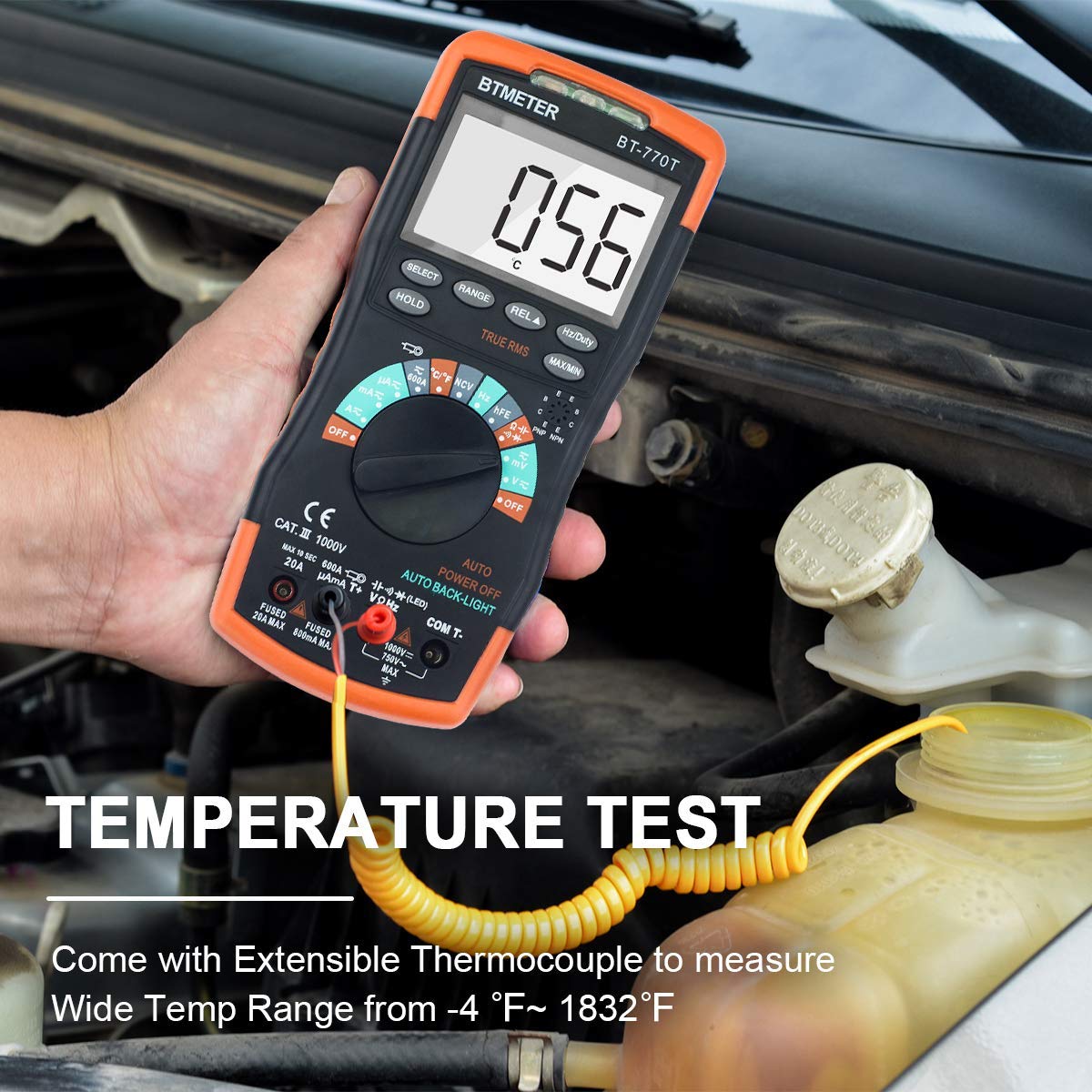
Image: The BTMETER BT-770T Multimeter being used to measure temperature with its extensible thermocouple, shown in an automotive engine bay.
- Set the rotary switch to the Temp position (°C/°F).
- Connect the thermocouple to the appropriate input jacks.
- Термопаранын учун температурасы өлчөнүүчү объекттин үстүнө же ичине коюңуз.
- Дисплейдеги температураны окуңуз.
5.9 Контактсыз томtage (NCV) аныктоо
NCV функциясы AC көлөмүн аныктоого мүмкүндүк беретtagд түз байланышсыз.
- Айланма которгучту NCV абалына коюңуз.
- Move the top of the multimeter near the conductor.
- An audible beep and a red indicator light will signal the presence of AC voltage.
5.10 Data Hold, Max/Min, Auto Power Off
- КОЛДО: Учурдагы көрсөткүчтү дисплейде тоңдуруу үчүн HOLD баскычын басыңыз. Коё берүү үчүн кайра басыңыз.
- МАКС/МИН: Press the MAX/MIN button to record the maximum or minimum measured value. Press again to cycle through MAX, MIN, and normal modes.
- Авто өчүрүү: Мультиметр батареянын иштөө мөөнөтүн үнөмдөө үчүн бир аз убакыт иштебей тургандан кийин автоматтык түрдө өчөт.
6. Техникалык шарттар
The following tables detail the measurement ranges, resolutions, and accuracies of the BTMETER BT-770T.

Image: Comprehensive tables outlining the ranges, resolutions, and accuracies for DC Voltage, AC Voltage (True RMS), DC Current, AC Current (True RMS), Resistance, and Temperature measurements of the BTMETER BT-770T Multimeter.
6.1 Жалпы спецификациялар
- Дисплей: 6000 Counts, True RMS
- Коопсуздук рейтинги: IEC CAT III 1000V, CAT IV 600V
- Кубат булагы: 9V Battery (Alimenté par batterie)
- Элемент Салмагы: 1 Pound (453.59 grams)
- Өлчөмдөрү: 22.71 x 14.6 x 6.81 см (Пакет)
- Модель номери: БТ-770Т
- UPC: 778469100592
6.2 Температураны өлчөө
| Диапазон | Тактык | Резолюция |
|---|---|---|
| -20~150 °C | ± (3 °C + 1 цифра) | 1 °C |
| 150 ~ 1000 ° C | ± (rdg 3% + 2 цифра) | 1 °C |
| -4~302 °F | ± (5 °F + 2 digits) | 1 °F |
| 302~1832 °F | ± (rdg 3% + 3 цифра) | 1 °F |
6.3 DC Voltage
| Диапазон | Резолюция | Тактык |
|---|---|---|
| 60мВ | 0.01мВ | ±(rdg 0.8% + 2 цифра) |
| 600мВ | 0.1мВ | ±(rdg 0.8% + 2 цифра) |
| 6V | 1мВ | ±(rdg 0.5% + 2 цифра) |
| 60V | 10мВ | ±(rdg 0.5% + 2 цифра) |
| 600V | 100мВ | ±(rdg 0.5% + 2 цифра) |
| 1000V | 1V | ±(rdg 0.8% + 2 цифра) |
6.4 AC томtage (True RMS)
| Диапазон | Резолюция | Тактык |
|---|---|---|
| 60мВ | 0.01мВ | ±(rdg 1.5% + 3 цифра) |
| 600мВ | 0.1мВ | ±(rdg 1.5% + 3 цифра) |
| 6V | 1мВ | ±(rdg 1.0% + 3 цифра) |
| 60V | 10мВ | ±(rdg 1.0% + 3 цифра) |
| 600V | 100мВ | ±(rdg 1.0% + 3 цифра) |
| 750V | 1V | ±(rdg 1.5% + 3 цифра) |
6.5 Туруктуу ток
| Диапазон | Резолюция | Тактык |
|---|---|---|
| 600μA | 0.1μA | ±(rdg 1.2% + 2 цифра) |
| 6000μA | 1μA | ±(rdg 1.2% + 2 цифра) |
| 60мА | 10μA | ±(rdg 1.2% + 2 цифра) |
| 600мА | 100μA | ±(rdg 1.2% + 2 цифра) |
| 6A | 1мА | ±(rdg 2.0% + 3 цифра) |
| 20A | 10мА | ±(rdg 2.0% + 3 цифра) |
| 600A (with clamp адаптер) | 100мА | ±(rdg 2.5% + 5 цифра) |
6.6 AC Current (True RMS)
| Диапазон | Резолюция | Тактык |
|---|---|---|
| 600μA | 0.1μA | ±(rdg 1.5% + 5 цифра) |
| 6000μA | 1μA | ±(rdg 1.5% + 5 цифра) |
| 60мА | 10μA | ±(rdg 1.5% + 5 цифра) |
| 600мА | 100μA | ±(rdg 1.5% + 5 цифра) |
| 6A | 1мА | ±(rdg 2.5% + 5 цифра) |
| 20A | 10мА | ±(rdg 2.5% + 5 цифра) |
| 600A (with clamp адаптер) | 100мА | ±(rdg 3.0% + 5 цифра) |
6.7 Каршылык
| Диапазон | Резолюция | Тактык |
|---|---|---|
| 600Ω | 0.1Ω | ±(rdg 1.0% + 2 цифра) |
| 6 кОм | 1Ω | ±(rdg 1.0% + 2 цифра) |
| 60 кОм | 10Ω | ±(rdg 1.0% + 2 цифра) |
| 600 кОм | 100Ω | ±(rdg 1.0% + 2 цифра) |
| 6МΩ | 1KΩ | ±(rdg 1.5% + 3 цифра) |
| 60МΩ | 10KΩ | ±(rdg 1.5% + 3 цифра) |
7. Техникалык тейлөө
7.1 Тазалоо
Жарнама менен эсептегичти сүртүңүзamp кездеме жана жумшак жуугуч. Абразивдерди же эриткичтерди колдонбоңуз.
7.2 Батареяны алмаштыруу
Replace the 9V battery when the low battery indicator appears on the display. Refer to section 4.1 for instructions.
7.3 Сактагычты алмаштыруу
If the current measurement functions stop working, the fuses may need replacement. The BT-770T uses two fuses: 800mA/250V and 20A/250V. Consult a qualified technician for fuse replacement to ensure proper safety and functionality.
8. Кыйынчылыктарды
- Дисплей жок: Check battery installation and charge. Replace if necessary.
- Туура эмес окуулар: Ensure test leads are properly connected and the correct function range is selected. Check for damaged leads.
- Токту өлчөө иштебей жатат: Check the fuses. Refer to section 7.3.
- "OL" on display: Indicates an overload or out-of-range measurement. Select a higher range or ensure the component is within the meter's capabilities.
9. Кепилдик жана колдоо
The BTMETER BT-770T Digital Multimeter comes with a 12 айлык кепилдик from the date of purchase, covering manufacturing defects. For technical support or warranty claims, please contact BTMETER customer service through their official webсайт же сатуучу.