
Sharp SJX-640-BK3
Sharp Side by Side Refrigerator SJX-640-BK3 User Manual
Модел: SJX-640-BK3 | Бренд: Sharp
1. Коопсуздук боюнча маанилүү маалымат
Please read all safety instructions carefully before operating your new Sharp refrigerator. Keep this manual for future reference.
- Муздаткыч бекем, тегиз бетке коюлганын текшериңиз.
- Шаймандын корпусундагы же орнотулган конструкциядагы желдетүү тешиктерин жаап албаңыз.
- Эритүү процессин тездетүү үчүн өндүрүүчү сунуштагандан башка механикалык түзүлүштөрдү же башка каражаттарды колдонбоңуз.
- Муздаткычтын схемасын бузбаңыз.
- Электр шаймандарын, эгерде алар өндүрүүчү сунуштаган түргө кирбесе, шаймандын тамак-аш сактоочу бөлүмдөрүнүн ичинде колдонбоңуз.
- Тазалоодон же техникалык тейлөөдөн мурун шайманды розеткадан ажыратыңыз.
2. Орнотуу жана орнотуу
2.1 Пакеттен чыгаруу
Бардык таңгак материалдарын, анын ичинде скотч жана коргоочу пленкаларды кылдаттык менен алып салыңыз. Болочок келечектеги ташуу үчүн таңгактарды сактаңыз.
2.2 Орнотуу
Place the refrigerator in a location with adequate air circulation. Avoid direct sunlight or proximity to heat sources. Ensure sufficient clearance around the appliance for proper ventilation (e.g., 10cm at the back and sides, 30cm at the top).
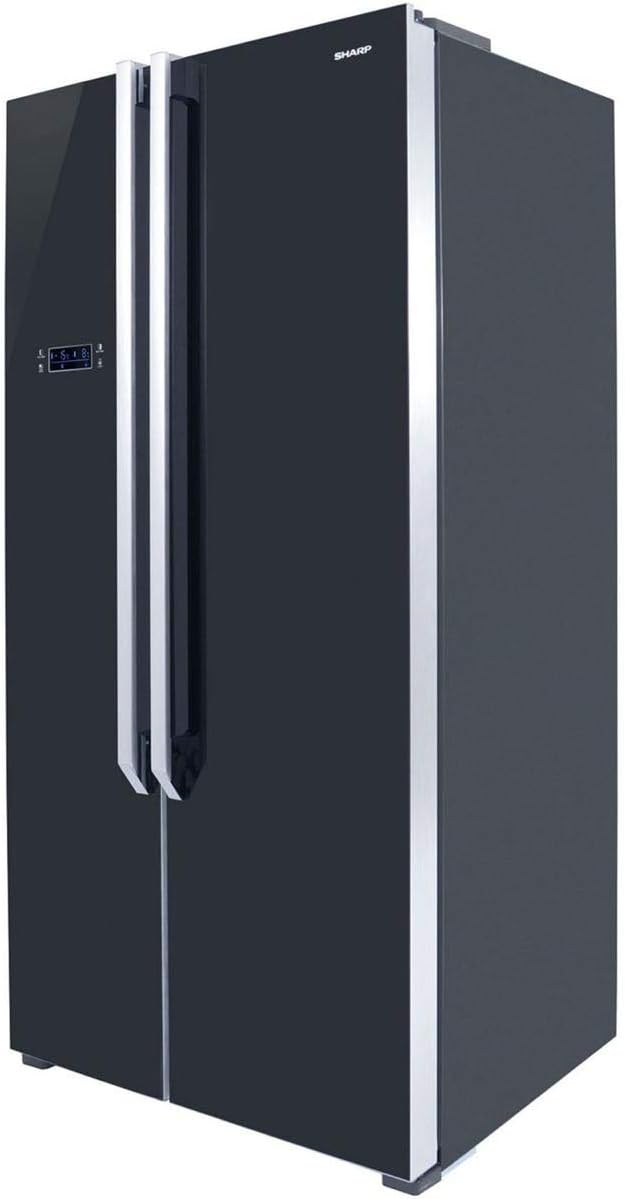
2.1-сүрөт: Бурчтуу view of the Sharp SJX-640-BK3 refrigerator, showing its sleek black glass finish and side profile, important for understanding placement requirements.
2.3 Тегиздөө
Муздаткычтын стабилдүү жана түз болушу үчүн анын түбүндөгү тегиздөөчү буттарды тууралаңыз. Бул титирөөнүн алдын алып, эшиктин туура жабылышын камсыздайт.
2.4 Электрдик туташуу
Connect the refrigerator to a dedicated, grounded electrical outlet. Do not use extension cords or adapters. Allow the refrigerator to stand upright for at least 2-4 hours before plugging it in to allow refrigerants to settle.
3. Иштөө нускамалары
3.1 Башкаруу панелинин үстүнөview
The Sharp SJX-640-BK3 features a Digital Smart Control panel located on the exterior of the freezer door. This panel allows you to adjust temperatures and access various functions.

Сүрөт 3.1: Алдыңкы view of the Sharp SJX-640-BK3 refrigerator, highlighting the external Digital Smart Control panel on the left door.
3.2 Температура орнотуулары
Use the control panel to set the desired temperature for both the refrigerator and freezer compartments. The Digital Smart Control senses when warm food is stored and adjusts cooling accordingly.
3.3 Magic Cool Zone
The Magic Cool Zone compartment offers flexible temperature control for specific items. Select from the following modes:
- Жаңы: Ideal for general produce and dairy.
- Жашылча: Optimized for keeping vegetables crisp and fresh.
- Балык: Maintains a lower temperature suitable for fresh fish.
- Эт: Provides optimal conditions for storing fresh meat.
3.4 Өзгөчөлүктөр
- Xpress Can Chiller: A dedicated compartment designed to rapidly chill beverages.
- Spill-Proof Shelves: Tempered glass shelves with raised edges to contain accidental spills and prevent liquids from dripping to lower shelves.
- Температура сигнализациясы: Alerts you if the internal temperature fluctuates significantly, helping to preserve food freshness.
- Эшик Ойготкуч: Sounds an alert if a refrigerator door is left open for an extended period.
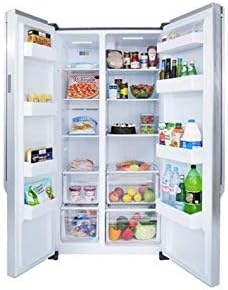
3.2-сүрөт: Интерьер view of the Sharp SJX-640-BK3 refrigerator, showcasing the spacious compartments, spill-proof glass shelves, and storage bins.
4. Техникалык тейлөө жана тазалоо
4.1 Ички тазалоо
Regularly clean the interior with a mild detergent and warm water. Wipe dry with a soft cloth. Remove shelves and drawers for thorough cleaning as needed. Do not use abrasive cleaners or solvents.
4.2 Тышкы тазалоо
Wipe the exterior surfaces, including the black glass finish, with a soft, damp кездеме. Кежир тактар үчүн жумшак айнек тазалагычты колдонуңуз. Финишке зыян келтирүүчү катаал химиялык заттардан алыс болуңуз.
4.3 Эшиктин пломбалары
Clean the door seals regularly to ensure a tight seal. A dirty or damaged seal can lead to inefficient cooling.
4.4 Автоматтык эритүү
Бул муздаткычта тоңдургуч камераны кол менен эритүү зарылдыгын жокко чыгарган автоматтык эритүү системасы бар.
5. Кыйынчылыктарды
Кызматка кайрылуудан мурун, төмөнкү жалпы маселелерди жана чечимдерди текшериңиз:
| Көйгөй | Мүмкүн себеп | Чечим |
|---|---|---|
| Муздаткыч муздабайт | Электр менен камсыздоо маселеси, температуранын жөндөөлөрү өтө жогору, эшик туура жабылган эмес. | Check power plug, adjust temperature, ensure doors are fully closed. |
| адаттан тыш үндөр | Refrigerator not level, items vibrating inside, normal compressor sounds. | Level the appliance, rearrange items, normal operation sounds are expected. |
| Эшиктин сигнализациясы бат-баттан угулат | Door not fully closed, obstruction, faulty sensor. | Ensure nothing blocks the door, check door seals, close door firmly. |
| Полго суу | Дренаждык түтүк бүтүп калган, ашыкча нымдуулук. | Clear drain tube (refer to service manual if needed), ensure proper ventilation. |
6. Техникалык шарттар
Technical specifications for the Sharp SJX-640-BK3 Side by Side Refrigerator:
| Өзгөчөлүк | Деталь |
|---|---|
| Бренд аты | Sharp |
| Модел маалыматы | SJX-640-BK3 |
| Продукциянын өлчөмдөрү | 70 x 90 x 178 см |
| Кубаттуулугу | 24 куб фут (640 литр) |
| Тоңдургучтун кубаттуулугу | 24 Cubic Feet (shared total capacity) |
| Орнотуу түрү | бурун |
| Форма фактору | Жанаша |
| Өзгөчөлүктөр | Compact, Digital Smart Control, Magic Cool Zone, Xpress Can Chiller, Spill-Proof Shelves, Temperature Alarm, Door Alarm |
| Түс | Кара |
| Эритүү | Автоматтык |
| Эшик илгичтери | Жанаша |
| Эшиктин материал түрү | Айнек |
| Текче түрү | Айнек |
| Материалдын түрү | Металл |
| Жеткирүү Салмагы | 110 кг |
| Дата биринчи жеткиликтүү | 10 2019-март |
7. Кепилдик жана колдоо
For detailed warranty information, please refer to the warranty card included with your product or visit the official Sharp website. For technical support or service inquiries, please contact Sharp customer service through their official channels.
You can visit the official Sharp store on Amazon for more products and information: Sharp дүкөнү
Ask a question about this manual
Ask about setup, troubleshooting, compatibility, parts, safety, or missing instructions. Manuals+ will review the question and use this page’s manual context to help answer it.