
1. Киришүү
This user manual provides detailed instructions for the installation, operation, and maintenance of the HaiweiTech H.265 HDMI CVBS Decoder (Model: HHD-101). This device is designed to decode various IP video streams, including H.264/H.265, RTMP, RTSP, RTP, HTTP, HLS, and UDP, and output them via HDMI (up to 4K resolution) and CVBS/BNC interfaces. It is ideal for advertisement displays, monitoring, and other video distribution applications.

Figure 1.1: HaiweiTech H.265 HDMI CVBS Decoder
The image displays the compact, black metal casing of the HaiweiTech H.265 HDMI CVBS Decoder, featuring a ribbed top surface for heat dissipation and various ports on the front panel.
2. Продукт бүтүп калдыview
2.1. Негизги өзгөчөлүктөрү
- Киргизүүнү колдоо: Decodes up to 4 (multi-view) channels of H.264/H.265 IP streams (RTMP/RTSP/RTP/HTTP/HLS/UDP), MPEG1, MPEG2, MPEG4, SL hyperlink (P-P), VP8/VP9/AVS/AVS+. Supports 2*1080P + 2*720P simultaneous decoding.
- Чыгуу интерфейстери: 1x HDMI output (up to 4096x2160P 30FPS) and 1x CVBS/BNC output. Includes RS485 out.
- Чечимди колдоо: 4096x2160 (30/25/24 FPS), 3840x2160 (30/25/24 FPS), 1080P (60/50/30/25/24 FPS), 1080I (60/50 FPS), 720P (60/50/25/24 FPS), 576P (50 FPS).
- Төмөн күтүү: Haiwei proprietary protocol-based ultra-low latency point-to-point transmission solution available with the decoder.
- Кошумча кызматтар: SDK/API, IP finder/Video management platform/iOS Android APP, solution analysis, and OEM services are available.
2.2. Пакеттин мазмуну

2.1-сүрөт: Пакеттин мазмуну
The image shows the decoder unit, a power adapter, an Ethernet cable, and an AV cable, which are typically included in the product package.
2.3. Device Interfaces

2.2-сүрөт: Арткы панелдин интерфейстери
This diagram clearly labels the various ports on the rear panel of the decoder: LAN (Ethernet port for IP input), RST (Reset button), LED (Status Indicators), AV Out (CVBS/Audio Out), HDMI Out (up to 4K), BNC Video Out (CVBS), and RS485 I/O.
- LAN: Ethernet port for IP video input. Configuration of the decoder's IP gateway may be required.
- LED көрсөткүчтөрү: Red indicates Power ON, Green indicates Network activity.
- RST: Reset button. Press and hold until the green LED turns off to reset the device.
- AV OUT: CVBS (Composite Video Broadcast Signal) and analog audio output.
- HDMI OUT: High-Definition Multimedia Interface output, supporting resolutions up to 4K.
- BNC OUT: BNC connector for CVBS video output.
- 485: Serial communication interface for control and data transfer (GND, IO-1, IO-2, 485A, 485B).
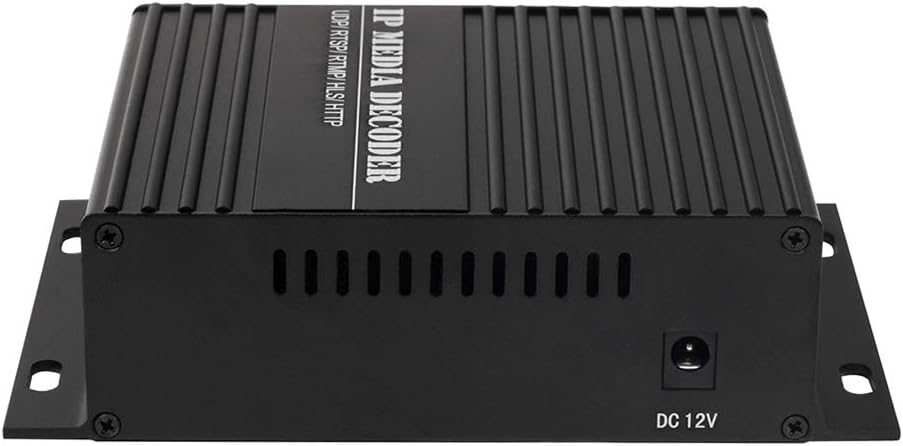
2.3-сүрөт: Киргизилген кубат
The image shows the side of the decoder with the DC 12V power input port.
3. Орнотуу
Follow these steps to set up your HaiweiTech H.265 HDMI CVBS Decoder:
- Туташуу кубаты: Connect the provided 12V 2A power adapter to the DC 12V input port on the decoder and plug it into a power outlet. The red LED indicator should illuminate.
- Тармак туташуусу: Connect an Ethernet cable from your network (router or switch) to the LAN port on the decoder. Ensure your network provides access to the IP video streams you intend to decode. The green LED indicator should illuminate, indicating network activity.
- Видео чыгаруу туташуусу:
- For HDMI output, connect an HDMI cable from the HDMI OUT port on the decoder to the HDMI input of your display (monitor, TV, projector).
- For CVBS output, connect a BNC cable from the BNC OUT port to your display's BNC input, or use the AV OUT port with the provided AV cable for composite video and analog audio.
- Мүмкүнчүлүк Web Интерфейс: The decoder typically obtains an IP address via DHCP. To find its IP address and configure settings, you may need to use an IP scanner tool or refer to your router's connected devices list. Once the IP address is known, open a web browser and enter the decoder's IP address to access its web- негизделген конфигурация интерфейси.
- Configure IP Stream: ичинде web interface, navigate to the input settings. Enter the full RTSP, RTMP, HTTP, HLS, or UDP stream URL, including any necessary username and password. Ensure the syntax is correct.

Figure 3.1: Typical System Integration
This diagram illustrates how the decoder fits into a larger video system, receiving streams from an encoder via a network and outputting to a local display or user device.
4. Иштөө нускамалары
Once the decoder is set up and configured with the correct IP stream, it will automatically begin decoding and outputting the video and audio to the connected display(s).
- Single Channel Decoding: For single stream decoding, ensure only one IP stream URL is configured as active in the web interface. The decoder will output this stream to both HDMI and CVBS simultaneously.
- көп-View Декоддоо: The decoder supports multi-view decoding for up to 4 channels (2*1080P + 2*720P). Configure multiple stream URLс ичинде web interface and select the multi-view layout option if available. The decoder will combine these streams into a single output display.
- Чечим жана кадр ылдамдыгы: The decoder will attempt to output the stream at its native resolution and frame rate, up to the maximum supported by the device (4K@30FPS). Ensure your display supports the output resolution.
- Аудио чыгаруу: Audio embedded in the IP stream will be output via HDMI and the analog AV OUT port.
- RS485 башкаруу: If applicable, connect RS485 devices for external control or data communication as per your system requirements.
5. Техникалык тейлөө
To ensure optimal performance and longevity of your decoder, follow these maintenance guidelines:
- Тазалоо: Аппараттын сыртын тазалоо үчүн жумшак, кургак чүпүрөктү колдонуңуз. Суюк тазалагычтарды же аэрозолдорду колдонбоңуз.
- Вентиляция: Ensure the decoder is placed in a well-ventilated area. Do not block the ventilation slots on the device.
- Температура: Түзмөктү көрсөтүлгөн температура диапазонунда иштетиңиз. Ашыкча ысыктан же сууктан алыс болуңуз.
- Программалык камсыздоонун жаңыртуулары: Мезгил-мезгили менен өндүрүүчүнүн текшерүү website (if available) for firmware updates. Updates can improve performance, add features, or fix bugs.
- Power Cycle: Эгерде түзмөк жооп бербей калса, кубат адаптерин сууруп, 10 секунд күтүп, андан кийин кайра туташтырыңыз.
6. Кыйынчылыктарды
If you encounter issues with your decoder, refer to the following common problems and solutions:
| Көйгөй | Мүмкүн себеп | Чечим |
|---|---|---|
| Видео чыгышы жок / Кара экран |
|
|
| Video freezes or disconnects frequently |
|
|
| Кирүү мүмкүн эмес web интерфейс |
|
|
| Аудио жок |
|
|
7. Техникалык шарттар
| Өзгөчөлүк | Деталь |
|---|---|
| Модель номери | HHD-101 |
| Input Protocols | H.264/H.265 IP (RTMP/RTSP/RTP/HTTP/HLS/UDP), MPEG1, MPEG2, MPEG4, SL hyperlink (P-P), VP8/VP9/AVS/AVS+ |
| Max Input Channels | Up to 4 (multi-view), e.g., 2*1080P + 2*720P |
| Output Interfaces | 1x HDMI, 1x CVBS/BNC, 1x RS485 |
| HDMI Output Resolution | Up to 4096x2160P @ 30FPS |
| Колдоого алынган токтомдор | 4096x2160 (30/25/24), 3840x2160 (30/25/24), 1080P (60/50/30/25/24), 1080I (60/50), 720P (60/50/25/24), 576P (50) |
| Power Input | DC 12V 2A |
| Пакеттин өлчөмдөрү | 8.27 x 6.81 x 3.03 дюйм |
| Элемент Салмагы | 1.57 фунт |
| Өндүрүүчү | HaiweiTech |
| Келип чыккан өлкө | Кытай |
8. Кепилдик жана колдоо
HaiweiTech is dedicated to providing solutions for various streaming industries. The company designs, produces, develops, and upgrades its software and hardware, offering OEM/ODM services.
For technical support, SDK/API documentation, IP finder tools, video management platforms, or inquiries regarding iOS/Android applications and solution analysis, please refer to the official HaiweiTech support channels. While specific warranty details are not provided in this manual, it is recommended to contact HaiweiTech directly or refer to your purchase documentation for warranty information and service requests.
You can visit the HaiweiTech store on Amazon for more information: HaiweiTech Amazon Store