
1. Киришүү
The Divoom Macchiato is a palm-sized, portable Bluetooth speaker with an integrated FM radio tuner, designed to deliver high-quality audio in a compact form factor.
2. Пакеттин мазмуну
Сураныч, төмөнкү нерселер үчүн кутучаны белгилеңиз:
- Divoom Macchiato Bluetooth Speaker
- USB заряддоо кабели
- User Manual
- (Additional accessories may vary by region)
3. Продукт бүтүп калдыview
Спикердин компоненттери жана башкаруу элементтери менен таанышыңыз.
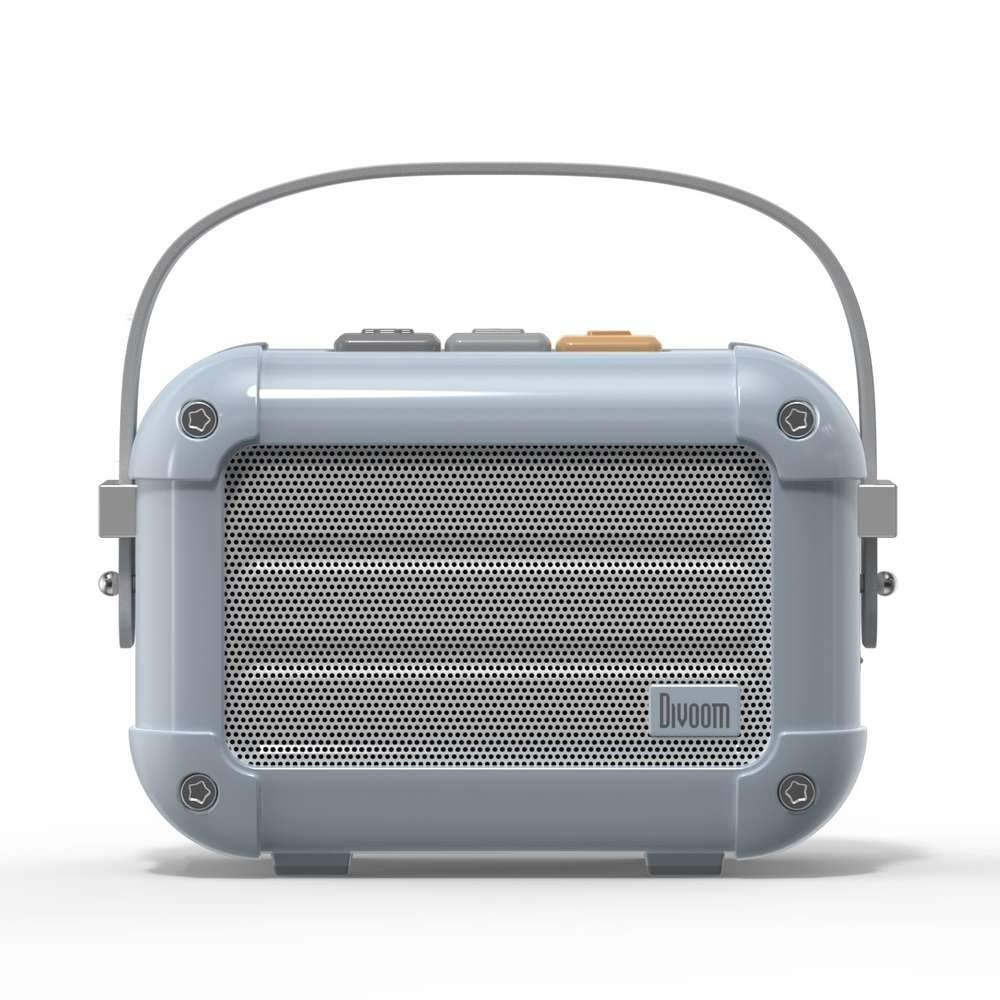
Сүрөт 3.1: Алдыңкы view of the Divoom Macchiato Bluetooth Speaker in blue.
3.1 Башкаруу каражаттары жана порттор
The Divoom Macchiato speaker features intuitive controls for easy operation.
- Үстүнкү баскычтар: Typically control power, volume, track navigation, and mode selection (e.g., Bluetooth, FM).
- Заряддоо порту: Usually a USB Type-C port for charging the device.
- TF карта уячасы: Allows playback of music directly from a TF (MicroSD) card.
- FM антеннасы: An extendable antenna for improved FM radio reception.

3.2-сүрөт: Артка view of the Divoom Macchiato Bluetooth Speaker, showing the charging port and TF card slot.
4. Орнотуу
4.1 Күйгүзүү/өчүрүү
- Күйгүзүү үчүн: Press and hold the power button (usually one of the top buttons) for approximately 2-3 seconds until you hear an audible cue or see an indicator light.
- Өчүрүү үчүн: Press and hold the power button for approximately 2-3 seconds until you hear an audible cue or the indicator light turns off.
4.2 Bluetooth жупташтыруу
- Ensure the speaker is powered on and in Bluetooth pairing mode. The indicator light will typically blink rapidly.
- Мобилдик түзмөгүңүздө (смартфон, планшет ж.б.) Bluetooth функциясын иштетиңиз.
- Издөө "Divoom Macchiato" in the list of available Bluetooth devices.
- Select "Divoom Macchiato" to connect. Once connected, the speaker will provide an audible confirmation, and the indicator light will turn solid.
Эскертүү: Динамик күйгүзүлгөндө акыркы жупташтырылган түзмөккө автоматтык түрдө кайра туташуу аракетин көрөт.
4.3 FM Radio Setup
- Оптималдуу кабыл алуу үчүн FM антеннасын толугу менен узартыңыз.
- Switch the speaker to FM radio mode using the mode button (refer to your specific model's button layout).
- Use the track navigation buttons (usually +/-) to scan for available FM stations.
- Some models may allow saving favorite stations; refer to your specific model's instructions for details.
5. Иштөө нускамалары
5.1 Music Playback (Bluetooth/TF Card)
- Ойнотуу/тындыруу: Press the Play/Pause button (often integrated with the power button or a dedicated button).
- Үндү көзөмөлдөө: Үндү жогорулатуу (+) жана үндү азайтуу (-) баскычтарын колдонуңуз.
- Кийинки трек: Press and hold or short press the next track button (often the + button).
- Мурунку трек: Press and hold or short press the previous track button (often the - button).
- TF картасын ойнотуу: MP3 менен TF картасын салыңыз files into the TF card slot. The speaker should automatically switch to TF card mode or require manual selection via the mode button.
5.2 App Features (if applicable)
For enhanced functionality, download the Divoom companion app from your device's app store. The app may offer features such as:
- Customizing sound profiles.
- Accessing additional audio sources.
- Managing FM radio stations.
- Микробдор жаңыртуулары.
6. Техникалык тейлөө
- Тазалоо: Динамиктин бетин тазалоо үчүн жумшак, кургак чүпүрөктү колдонуңуз. Абразивдүү тазалагычтарды же эриткичтерди колдонбоңуз.
- Сактагыч: Динамикти түз күн нурунан жана өтө температурадан алыс салкын, кургак жерде сактаңыз.
- Батареяга кам көрүү: Батареянын иштөө мөөнөтүн узартуу үчүн, бат-баттан батарейканы толук зарядсыздандырбаңыз. Узак убакыт колдонулбаса да, динамикти үзгүлтүксүз заряддап туруңуз.
- Суу каршылык: This model is NOT waterproof. Avoid exposure to water or high humidity.
7. Кыйынчылыктарды
| Көйгөй | Чечим |
|---|---|
| Динамик күйбөйт. | Батарея заряддалганын текшериңиз. Динамикти USB кубаттоо кабели аркылуу кубат булагына туташтырыңыз. |
| Bluetooth аркылуу жупташтыруу мүмкүн эмес. |
|
| Үн жок же үнү төмөн. |
|
| FM радиосун кабыл алуу начар. |
|
8. Техникалык шарттар
| Өзгөчөлүк | Деталь |
|---|---|
| Модель номери | MACCHIATO |
| Бренд | Divoom |
| Байланыш технологиясы | Bluetooth |
| Зымсыз байланыш технологиясы | Bluetooth |
| Динамиктин максималдуу чыгаруу күчү | 6 Ватт |
| Динамик түрү | Саундбар |
| Монтаж түрү | Столдун үстү |
| Продукт үчүн сунушталган колдонуу | Музыка |
| Башкаруу ыкмасы | Үн |
| Суу өткөрбөйт | ЖАЛГАН (Суу өткөрбөйт) |
9. Кепилдик жана колдоо
For warranty information and customer support, please refer to the documentation included with your product or visit the official Divoom webсайт. Сатып алуу квитанциясын кепилдик дооматтары үчүн сатып алуунун далили катары сактаңыз.