
1. Киришүү
Сатып алганыңыз үчүн рахматasing the WLIVE ADSJ612BL Mobile TV Stand. This manual provides detailed instructions for the safe assembly, operation, and maintenance of your new TV stand. Please read this manual thoroughly before installation and retain it for future reference.
This mobile TV stand is designed to accommodate 30-65 inch LCD TVs and monitors, offering flexibility and convenience for various environments, including homes, offices, and display settings.

Figure 1: WLIVE ADSJ612BL Mobile TV Stand with a television mounted, showcasing its double-pole design and integrated shelf.
2. Коопсуздук маалыматы
Төмөнкү коопсуздук чараларын сактаңыз, зыян же буюмдун бузулушуна жол бербөө үчүн:
- Салмак сыйымдуулугу: Do not exceed the maximum load capacity of 60kg for the TV rack and 10kg for the shelf. Overloading can cause instability and damage.
- Туура орнотуу: Бардык компоненттердин чогултуу көрсөтмөлөрүнө ылайык бекем бекитилгенин текшериңиз. Бош калган бөлүктөр туруксуздукка алып келиши мүмкүн.
- Туруктуулук: Always engage the caster brakes when the stand is in a stationary position to prevent accidental movement.
- Балдар жана үй жаныбарлары: Keep children and pets away from the TV stand during assembly and ensure the TV is securely mounted to prevent tipping.
- Кыймыл: When moving the stand, ensure the TV is securely attached and move slowly and carefully, especially over uneven surfaces.
- Курчап турган чөйрө: Do not place the stand in areas with high humidity, extreme temperatures, or direct sunlight.
3. Пакеттин мазмуну
Монтаждоодон мурун, бардык бөлүктөрү бар экенин жана бузулбаганын текшериңиз. Эгерде кандайдыр бир бөлүктөрү жок же бузулуп калса, кардарларды колдоо менен байланышыңыз.
- Main Frame Components (Base, Poles, TV Mounting Brackets)
- Жөнгө салынуучу текче
- Casters with Locking Mechanism
- Assembly Hardware (Screws, Washers, Nuts)
- Display Mounting Screws (various sizes for VESA compatibility)
- Монтаждоо куралдары (мисалы, Hex ачкыч, ачкыч)
- Instruction Manual
4. Чогултуу жана орнотуу
Туура чогултуу үчүн бул кадамдарды кылдаттык менен аткарыңыз. Айрыкча телевизорду орнотууда белгилүү бир кадамдар үчүн эки адам болушу сунушталат.
4.1 Assemble the Base and Poles
- Attach the casters to the base frame. Ensure the locking casters are positioned as indicated in the diagram.
- Secure the vertical support poles to the base using the provided hardware.
4.2 Install the Adjustable Shelf
- Slide the adjustable shelf onto the vertical poles at your desired height.
- Secure the shelf in place using the locking mechanism or screws provided.
4.3 Mount the TV Brackets
- Identify the correct VESA mounting screws for your TV from the provided selection.
- Attach the TV mounting brackets to the back of your television, ensuring they are level and securely fastened.
4.4 Attach the TV to the Stand
- With assistance, carefully lift the TV and hook the mounted brackets onto the main support frame of the stand.
- Secure the TV to the stand using the safety screws or locking mechanisms to prevent accidental dislodgement.
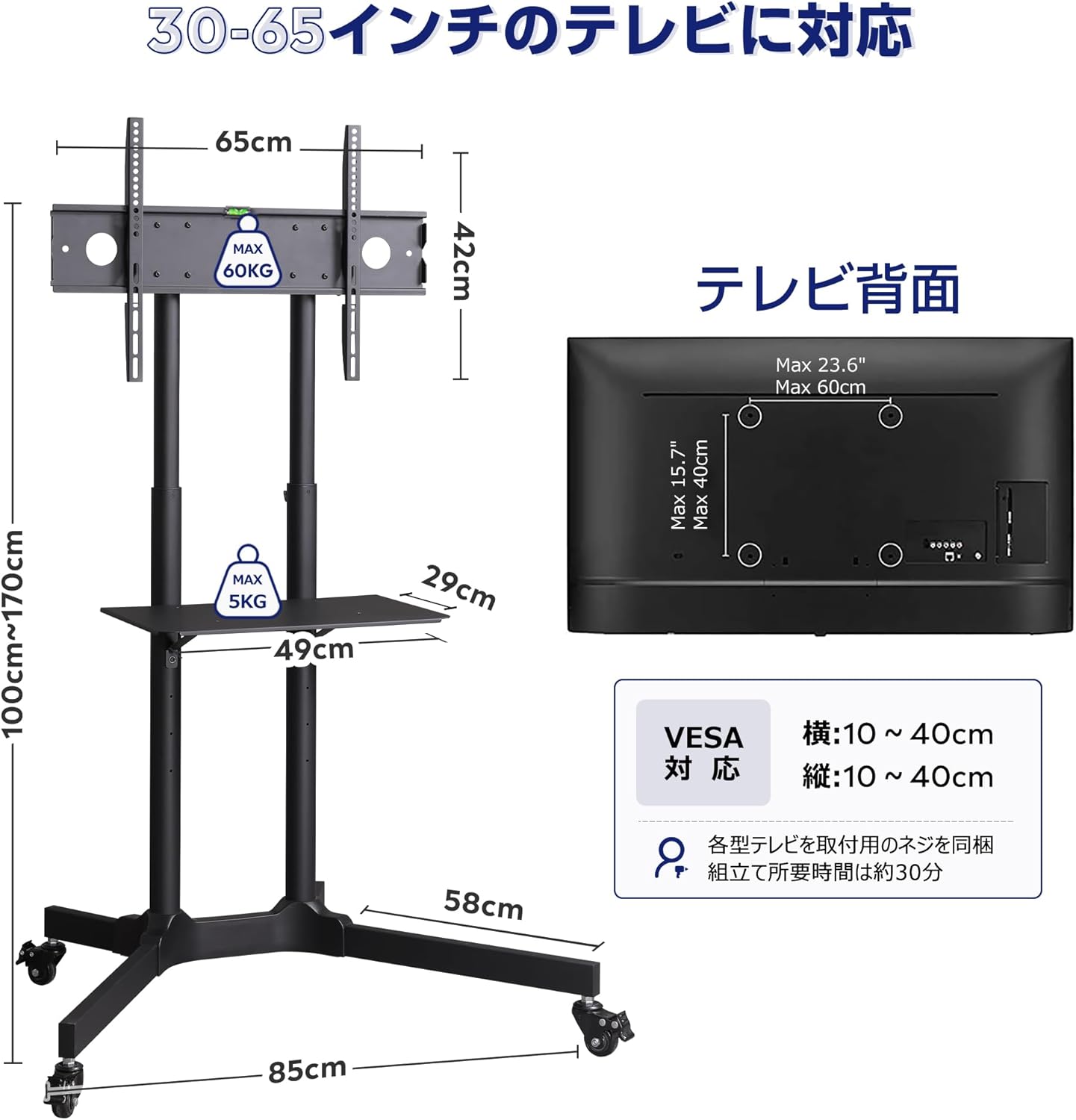
Figure 2: Technical diagram detailing the dimensions of the WLIVE TV Stand and its VESA mounting compatibility, suitable for 30-65 inch TVs.

Figure 3: Visual representation of the WLIVE TV Stand's robust double-pole structure, emphasizing its 60kg load capacity and durable steel construction.
5. Иштөө нускамалары
5.1 Бийиктикти тууралоо
The TV stand allows for height adjustment from 110cm to 170cm. To adjust the height:
- Loosen the height adjustment knobs or levers on the vertical poles.
- Carefully raise or lower the TV mounting frame to the desired height.
- Tighten the adjustment knobs/levers securely to lock the TV in position.

Figure 4: Diagram illustrating the height adjustment mechanism of the WLIVE TV Stand, showing a range from approximately 100cm to 170cm.
5.2 Тууралоо Viewбурч
The TV mounting brackets may allow for a slight tilt adjustment. Consult your TV's manual or the bracket instructions for specific angle adjustment procedures.
5.3 Стендди жылдыруу
To move the TV stand:
- Ensure all caster brakes are disengaged.
- Gently push the stand to its new location. Avoid sudden movements or pushing over obstacles.
- Once in position, engage all caster brakes to secure the stand.

Figure 5: A person easily moving the WLIVE Mobile TV Stand, highlighting the integrated casters with locking mechanisms for stability.

Figure 6: Two usage scenarios: the TV stand set at a lower height for seated viewing in a meeting, and at a higher height for presentations or reception areas.
6. Техникалык тейлөө
- Тазалоо: Трибунаны жумшак, кургак чүпүрөк менен сүртүңүз. Өжөр тактар үчүн бир аз сүртүңүзamp кездеме жана жумшак жуучу каражат менен тазалап, андан кийин жакшылап кургатыңыз. Абразивдүү тазалоочу каражаттардан алыс болуңуз.
- Үзгүлтүксүз текшерүүлөр: Мезгил-мезгили менен бардык бурамалар менен байланыштарды текшерип туруңуз, алар бекем бойдон калууда. Керек болсо кайра тартыңыз.
- Кастерге тейлөө: Keep casters free of dust and debris to ensure smooth movement.
7. Кыйынчылыктарды
7.1 Stand is Unstable
- Бардык монтаж бурамалары толугу менен бекемделгенин текшериңиз.
- Verify that the TV's weight does not exceed the stand's maximum load capacity (60kg).
- Check that the stand is placed on a flat, level surface.
7.2 Стендди жылдыруудагы кыйынчылык
- Ensure all caster brakes are disengaged.
- Check casters for any obstructions or debris. Clean if necessary.
7.3 Телевизор Деңгээлде эмес
- Re-check the installation of the TV mounting brackets on the TV back to ensure they are level.
- Adjust the TV on the stand's mounting plate if minor horizontal adjustments are possible.
8. Техникалык шарттар
| Өзгөчөлүк | Спецификация |
|---|---|
| Модель номери | ADSJ612BL |
| Туура келген сыналгы өлчөмдөрү | 30-65 дюйм |
| VESA шайкештиги | 10x10cm to 60x40cm |
| Негизги кузов өлчөмдөрү (туурасы x тереңдиги x бийиктиги) | 88 x 66.5 x 110-170 см |
| Текче өлчөмдөрү | 49 x 30 см |
| Продукт Салмагы | 14.2 кг |
| Max Load Capacity (TV Rack) | 60 кг |
| Max Load Capacity (Shelf) | 10 кг |
| Материал | Болот |
| Кыймыл түрү | Эңкейтүүчү |
| Максималдуу кыйшаюу бурч | 15 градус |
| Чогултуу ыкмасы | Floor Mount |
| Камтылган аксессуарлар | Assembly tools, Display mounting screws |
9. Кепилдик жана колдоо
9.1 Кепилдик маалыматы
This WLIVE product comes with a бир жылдык кепилдик from the date of purchase. The warranty covers manufacturing defects and material flaws under normal use. It does not cover damage caused by improper installation, misuse, accidents, or unauthorized modifications.
9.2 Кардарларды колдоо
For any questions regarding assembly, operation, troubleshooting, or warranty claims, please contact WLIVE customer support. Have your model number (ADSJ612BL) and purchase information ready when contacting support.
Please refer to your purchase platform or WLIVE's official webакыркы байланыш маалыматы үчүн сайт.