
1. Киришүү
The Remotec ZXT-600, also known as AC Master, is a Z-Wave Plus compliant device designed to bridge Z-Wave commands to Infrared (IR) signals for controlling split air conditioners. It acts as a Z-Wave thermostat, enabling smart control over various AC brands and models worldwide.
This device utilizes a comprehensive built-in and cloud-stored IR database, ensuring compatibility with a wide range of air conditioning units. As a security-enabled Z-Wave Plus device, it requires a compatible security-enabled Z-Wave Plus Controller for full functionality.
Негизги өзгөчөлүктөрү:
- Functions as a Z-Wave thermostat.
- Converts Z-Wave commands to IR signals for up to 250 brands of split air conditioners with best-in-class worldwide AC model coverage.
- Features an ever-green, up-to-date cloud-based IR code library.
- Supports easy-to-use and advanced learning search approaches for IR codes.
- Provides room temperature feedback.
- Seamlessly integrates with any Z-Wave compliant gateway.
- Supports classic inclusion and Network Wide Inclusion (NWI).
2. Орнотуу жана орнотуу
Proper setup of the ZXT-600 involves powering the device, including it into your Z-Wave network, and configuring it to control your specific air conditioner unit.
2.1 Аппаратты кубаттоо
The ZXT-600 can be powered using either batteries or a Micro USB cable. For continuous operation, using a Micro USB power source is recommended. If using batteries, ensure they are correctly inserted according to the polarity markings.

2.1-сүрөт: The Remotec ZXT-600 device. This image shows the overall design of the ZXT-600, a compact white device with a black IR emitter strip, indicating its modern and discreet appearance suitable for various home environments.
2.2 Z-Wave тармагынын кошулушу
To integrate the ZXT-600 into your smart home system, it must be included in your Z-Wave network. The exact steps for inclusion may vary depending on your Z-Wave gateway's user interface. Refer to your gateway's manual for specific instructions on adding new devices.
- Initiate the inclusion mode on your Z-Wave gateway.
- Follow the ZXT-600's specific inclusion procedure (typically involving pressing a button on the device).
- Confirm successful inclusion on your gateway. As a security-enabled device, ensure your controller supports secure inclusion for full functionality.
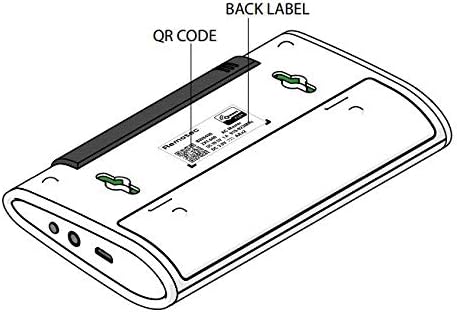
2.2-сүрөт: Артка view of the ZXT-600 with QR code and product label. This image highlights the back of the device, showing the product label which includes important information like the model number and a QR code, often used for easy device inclusion or registration with Z-Wave controllers.
2.3 IR Code Configuration
After Z-Wave inclusion, the ZXT-600 needs to be configured with the correct IR codes for your air conditioner. This process is typically managed through your Z-Wave gateway's interface, which will guide you through selecting the appropriate AC brand and model from the device's built-in or cloud-based IR library. Some gateways may also support an advanced learning search approach if your specific AC model is not found in the database.
2.4 Орнотуу
For optimal performance, place the ZXT-600 in a location where its IR emitter has a clear line of sight to the air conditioner's IR receiver. Avoid obstructions that could block the IR signal. The device's compact size allows for flexible placement.
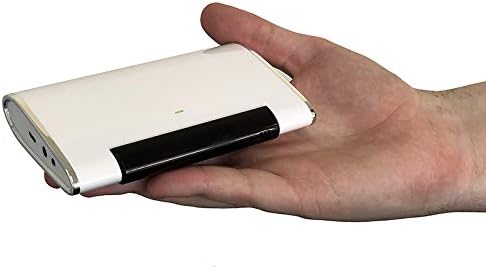
2.3-сүрөт: The ZXT-600 held in a hand, illustrating its compact size. This image provides a clear perspective on the device's small form factor, emphasizing its portability and ease of discreet placement near an air conditioning unit.
3. Иштөө нускамалары
Once configured, the ZXT-600 allows you to control your air conditioner via your Z-Wave gateway. It functions as a virtual thermostat within your smart home system.
3.1 Негизги башкаруу
Through your Z-Wave controller's interface, you can send commands to the ZXT-600 to adjust your air conditioner's settings, such as:
- Күйгүзүү/өчүрүү: Turn the AC unit on or off.
- Режим тандоо: Switch between cooling, heating, fan, or auto modes.
- Температураны жөндөө: Каалаган температураны коюңуз.
- желдеткич ылдамдыгы: Желдеткичтин ылдамдыгын жөндөңүз (мисалы, төмөнкү, орточо, жогорку, автоматтык).
The ZXT-600 translates these Z-Wave commands into the appropriate IR signals for your AC unit.
3.2 Temperature Feedback
The device includes a built-in temperature sensor that provides room temperature feedback to your Z-Wave gateway. This allows for accurate climate monitoring and automation within your smart home system.
4. Техникалык тейлөө
The Remotec ZXT-600 is designed for low maintenance. Regular care ensures optimal performance.
4.1 Тазалоо
Wipe the device periodically with a soft, dry cloth to remove dust. Do not use abrasive cleaners or solvents, as these can damage the casing же ички компоненттер.
4.2 Батареяны алмаштыруу
If operating on batteries, replace them when the low battery indicator (if available on your gateway's interface) is displayed. Refer to the device's battery compartment for the correct battery type and polarity.
4.3 Микропрограмма жаңыртуулары
Periodically check the Remotec website or your Z-Wave gateway manufacturer's support pages for any available firmware updates for the ZXT-600. Firmware updates can improve performance, add features, or resolve issues.
5. Кыйынчылыктарды
If you encounter issues with your ZXT-600, consider the following troubleshooting steps:
| Көйгөй | Мүмкүн болгон себеп / Чечим |
|---|---|
| Device not pairing with Z-Wave gateway. |
|
| AC unit not responding to commands. |
|
| Туура эмес температура көрсөткүчтөрү. |
|
| General unresponsiveness. |
|
For more detailed troubleshooting or advanced configuration, consult the specific documentation provided by Remotec or your Z-Wave gateway manufacturer. Some users have reported that setup can be complex and may require familiarity with Z-Wave systems.
6. Техникалык шарттар
| Өзгөчөлүк | Деталь |
|---|---|
| Модел | ZXT-600 |
| Өндүрүүчү | Remotec |
| Байланыш | Z-Wave Plus, Infrared (IR) |
| Power Source | Batteries (Yes), Micro USB (optional, for wired solution) |
| Өлчөмдөрү (пакет) | 5.3 x 3.4 x 1 дюйм |
| Элемент Салмагы | 3.98 унция |
| ASIN | B07Q41K59N |
7. Кепилдик жана колдоо
For information regarding the product warranty, please refer to the official Remotec website or contact the authorized distributor from whom you purchased the device. ZWaveProducts is noted as a master distributor for Remotec products in the USA and can be contacted for product support questions or warranty information.
Official support resources, including detailed manuals and firmware updates, are typically available on the manufacturer's webсайт. Колдоо кызматына кайрылганда өнүмүңүздүн моделин жана сериялык номерин даярдап коюңуз.