
1. Киришүү
The SYNCWIRE Magnetic Car Phone Holder provides a secure and adjustable mounting solution for your smartphone in your vehicle. Designed for dashboard installation, it features strong neodymium magnets and a 360-degree rotatable ball joint for optimal viewing angles. This manual provides detailed instructions for installation, operation, and maintenance to ensure a reliable and convenient experience.
Негизги өзгөчөлүктөрү:
- 4th Generation Neodymium Magnets: Ensures a strong hold for all smartphones, even with various phone cases.
- Solid Alloy Body: Crafted from aluminum alloy and soft silicone for durability and an antioxidant surface.
- Super Stick Force: Utilizes a reliable 3M VHB adhesive pad for strong and stable attachment to the dashboard.
- Freely Adjustable: Features a solid metal ball joint for 360-degree rotation, allowing you to swivel your display to your preferred position.
2. Кутуда эмне бар
- 1 x SYNCWIRE Magnetic Car Mount
- 2 x Metal Plates (Round and Square)
- 2 x 3M VHB Adhesive Pads (for mount)
- 2 x Protective Films (for phone/case)
- 1 x Alcohol Prep Pad
- 1 x User Manual
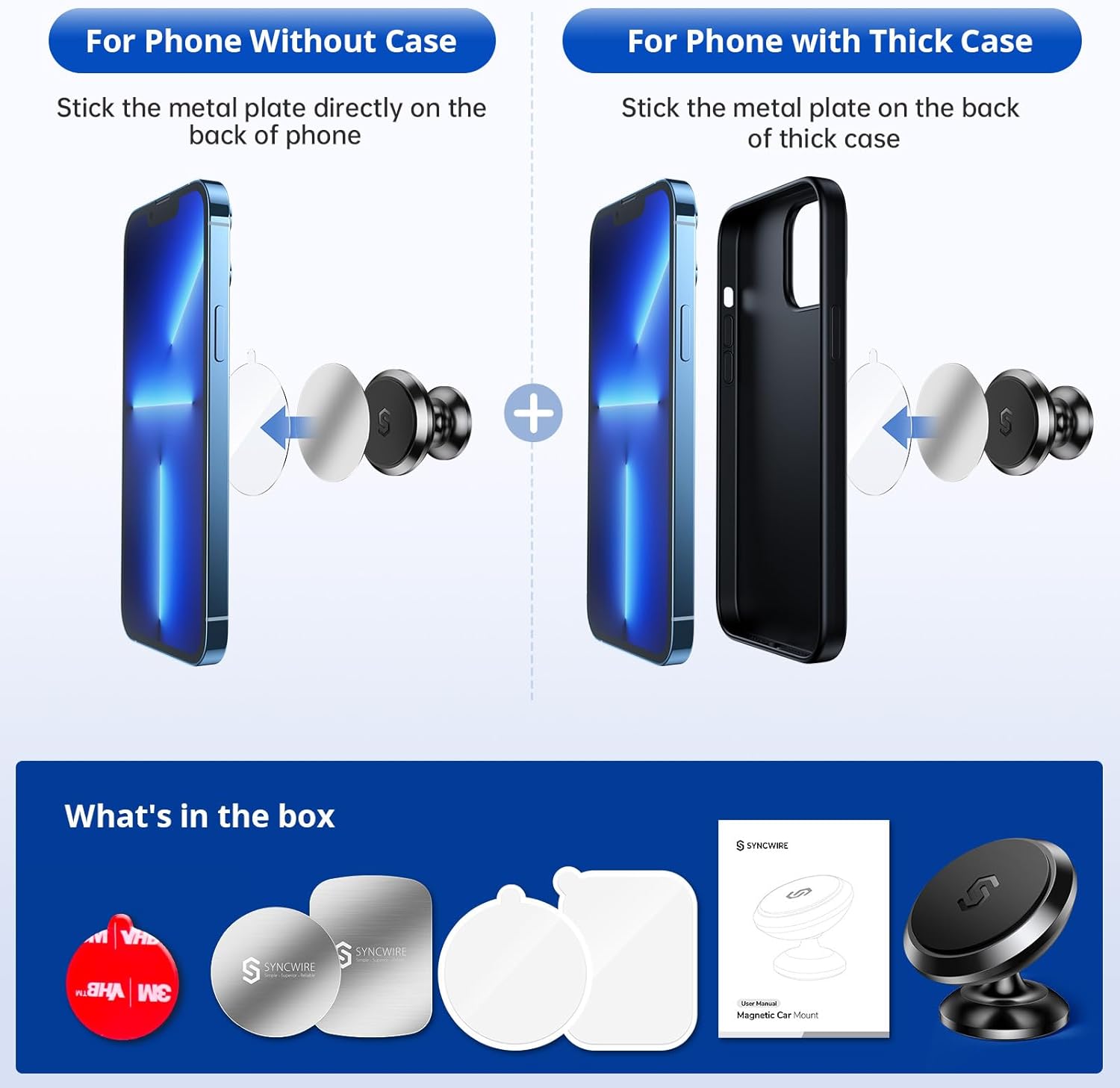
Image: Contents of the SYNCWIRE Magnetic Car Phone Holder box, showing the mount, two metal plates (round and square), 3M adhesive, and an instruction manual.
3. Орнотуу жана орнотуу
Follow these steps to properly install your SYNCWIRE Magnetic Car Phone Holder:
- Жалпак бетти тандаңыз: Select a flat, smooth area on your dashboard or car interior where you want to mount the holder. Avoid textured or leatherette surfaces for optimal adhesion.
- Бетти тазалоо: Use the included alcohol prep pad to thoroughly clean the chosen surface. Allow it to dry completely before proceeding. This ensures the 3M adhesive forms a strong bond.
- Тоону тиркөө: Peel off the red protective film from the 3M VHB adhesive pad on the base of the magnetic car mount. Firmly press the mount onto the cleaned surface for at least 30 seconds.
- Адгезия убактысына уруксат берүү: For maximum adhesion, allow the mount to cure for 24 hours before attaching your phone. This ensures the adhesive fully bonds to the surface.
- Prepare Your Phone/Case:
- For Phones Without a Case: Apply one of the clear protective films to the back of your phone where you intend to place the metal plate. Then, peel the adhesive from the metal plate and firmly attach it to the protective film.
- For Phones with a Case: You can either stick the metal plate directly to the back of your phone case or place it between your phone and a thin case (ensure the case is not too thick to interfere with magnetic strength). If sticking to the case, use a protective film first.
- Телефонуңузду тиркеңиз: Once the mount has cured and your phone/case is prepared, simply place your phone onto the magnetic surface of the holder. The strong magnets will securely hold your device.

Image: A hand cleaning a car dashboard surface with an alcohol wipe to prepare for mount installation.

Image: A hand pressing the magnetic car mount onto a car dashboard, demonstrating the adhesive application.
Image: Diagram illustrating the application of the metal plate to the back of a phone, either directly or onto a phone case, with a protective film.
Орнотуу видеосу:
Video: A detailed unboxing and demonstration of the Syncwire Magnetic Car Phone Mount, including installation steps.
4. Иштөө нускамалары
Using your SYNCWIRE Magnetic Car Phone Holder is straightforward:
- Телефонуңузду тиркөө: Simply bring your phone (with the metal plate attached) close to the magnetic surface of the mount. The strong N52 magnets will automatically snap your phone into place.
- жөндөө Viewбурч: The mount features a 360-degree rotatable ball joint. Gently swivel or tilt your phone to achieve your desired viewing angle for navigation, calls, or music control.
- Телефонуңузду ажыратыңыз: To remove your phone, simply pull it away from the magnetic surface. The strong hold ensures it won't accidentally fall off during driving, but is easy to remove when needed.

Image: An illustration highlighting the powerful N52 magnets used in the Syncwire car mount for a secure hold.

Image: A visual representation of the magnetic car phone holder's 360-degree rotation, allowing for flexible viewбурчтар.
Операция видеосу:
Video: A demonstration of the Syncwire Magnetic Car Mount in use, highlighting its strong hold and ease of phone attachment/detachment.
5. Техникалык тейлөө
To ensure the longevity and optimal performance of your car phone holder, follow these simple maintenance guidelines:
- Тазалоо: Periodically wipe the magnetic surface of the mount and the metal plate on your phone/case with a soft, dry cloth to remove dust and debris. Avoid using harsh chemicals or abrasive cleaners.
- Жабышкак текшерүү: Occasionally check the adhesion of the mount to your dashboard. If it appears to be loosening, re-clean the surface and re-apply the mount, ensuring sufficient curing time.
- Ашыкча температурадан сактаныңыз: While designed for car environments, prolonged exposure to extreme heat or cold may affect the adhesive.
6. Кыйынчылыктарды
If you encounter any issues with your SYNCWIRE Magnetic Car Phone Holder, consider the following:
- Алсыз магниттик кармап туруу:
- Ensure the metal plate is correctly positioned on your phone or case, centered for best results.
- Check if your phone case is too thick, as this can reduce magnetic strength. Try placing the metal plate on the outside of the case or using a thinner case.
- Verify that there are no obstructions (e.g., pop sockets, cardholders) between the metal plate and the mount.
- Mount Not Sticking to Dashboard:
- Re-clean the dashboard surface thoroughly with an alcohol prep pad and ensure it is completely dry before re-applying the mount.
- Ensure the surface is flat and smooth. The 3M VHB adhesive works best on non-porous, flat surfaces.
- Allow the adhesive to cure for the recommended 24 hours without placing any weight on it.
- If the original adhesive pad is compromised, use a new 3M VHB adhesive pad (extra pads may be included or can be purchased separately).
- Phone Wobbles or Falls:
- Confirm the magnetic hold is strong enough for your phone's weight and size.
- Ensure the ball joint is securely tightened if it has a locking mechanism (this model uses a friction fit, so ensure the base is firmly adhered).
7. Техникалык шарттар
| Продукциянын өлчөмдөрү | 3.1 x 3.5 x 1.3 дюйм |
| Элемент Салмагы | 0.176 унция |
| Элемент моделинин номери | SW-MPH238 |
| Түс | Кара |
| Өзгөчөлүктөр | Жөнгө салынуучу, 360° айлануу |
| Монтаж түрү | Куралдар тактасы |
| Шайкеш түзмөктөр | Смартфондор, планшеттер |
| Өндүрүүчү | Syncwire |
| Дата биринчи жеткиликтүү | 3-апрель, 2019-жыл |
8. Кепилдик жана колдоо
SYNCWIRE сунуш кылат 3 жылдык колдоо for this Magnetic Car Phone Holder. If you experience any issues such as the phone holder not securely holding your phone, missing accessories, breakage, or if it cannot be used for your car, please contact SYNCWIRE customer support for a replacement.
For further assistance or to claim your warranty, please visit the official SYNCWIRE webсайтка же түздөн-түз кардарларды тейлөөгө кайрылыңыз. Сатып алганыңыздын далили катары сатып алуу дүмүрчөгүңүздү сактаңыз.