
Hoco CW13
Hoco CW13 Wireless Charger User Manual
Introduction
Welcome to the Hoco CW13 Wireless Charger user manual. This guide provides detailed instructions on how to set up, operate, maintain, and troubleshoot your new wireless charger. Please read this manual carefully before using the product to ensure optimal performance and safety.
Продукт бүттүview
The Hoco CW13 is a universal portable wireless charger designed for fast charging of mobile devices. Its compact and lightweight design makes it an ideal companion for home and travel.
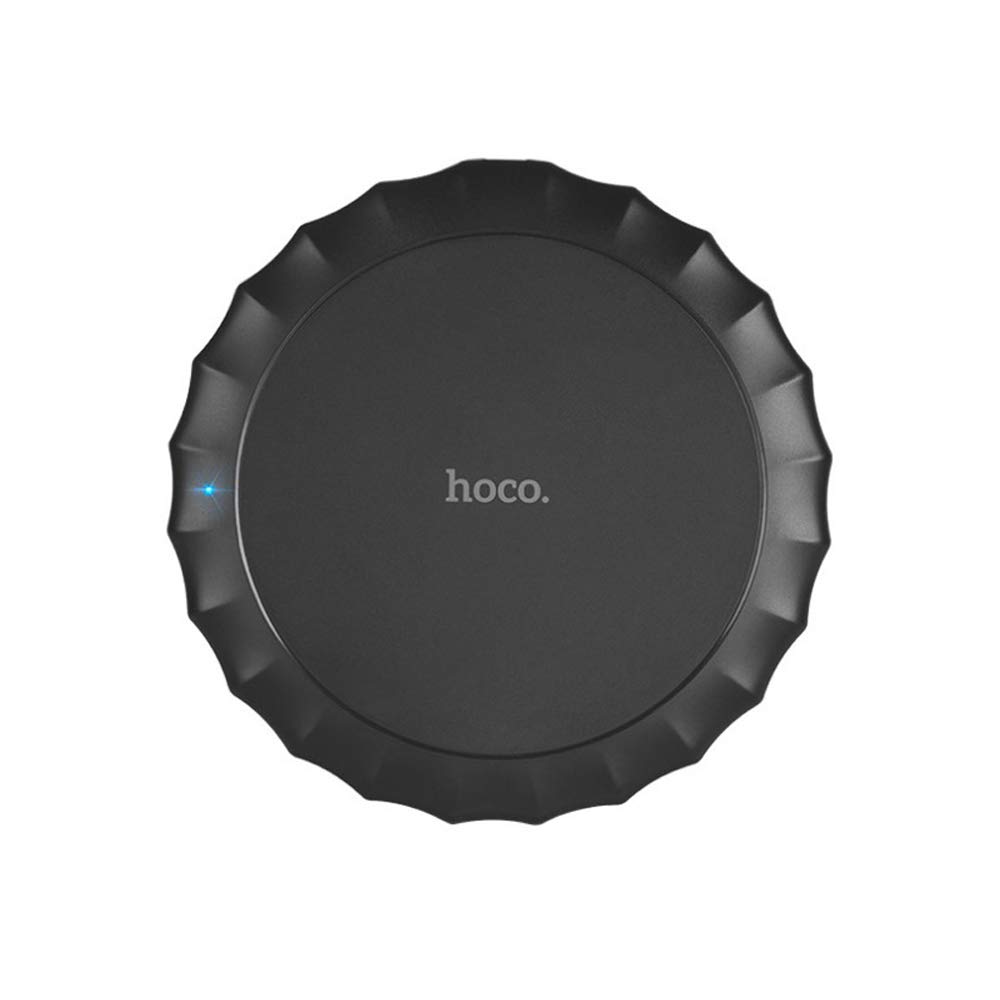
Бул сүрөт үстүн көрсөтөт view of the Hoco CW13 wireless charger. It features a sleek, black circular design with a corrugated edge, resembling a bottle cap. The "hoco." logo is prominently displayed in the center, and a small blue LED indicator light is visible on the left side, indicating power or charging status.
Өзгөчөлүктөрү
- Бренд: Hoco
- Модел: CW13
- Түсү: Кара
- Түрү: Зымсыз заряддагыч
- Зымсыз чыгуу: 5W
- Өткөрүү расстояние: 5-8мм
- Компакт өлчөмү: Диаметри 100 мм, калыңдыгы 10 мм
- Жеңил салмак: 62 грамм
- Тез заряддоо жөндөмү
- Portable дизайн
Орнотуу колдонмосу
Пакеттин мазмуну
Баштоодон мурун, пакетте бардык элементтер бар экенин текшериңиз:
- Hoco CW13 Wireless Charger
- USB заряддоо кабели
- Колдонуучунун Колдонмосу (бул документ)
Заряддагычты туташтыруу
- Connect the USB cable to the charging port on the Hoco CW13 wireless charger.
- Plug the other end of the USB cable into a compatible power adapter (e.g., wall charger, computer USB port) with a 5V input.
- The indicator light on the charger will illuminate, indicating it is powered on and ready for use.
Иштөө нускамалары
Түзмөгүңүздү заряддоо
- Ensure your mobile device is compatible with Qi wireless charging.
- Place your Qi-enabled device directly onto the center of the Hoco CW13 wireless charger.
- The indicator light on the charger may change color or blink to confirm that charging has begun. Your device's screen will also show a charging icon.
- For optimal charging, ensure the device is centered on the charging pad. Misalignment may reduce charging efficiency or prevent charging.
- Түзмөгүңүз толугу менен кубатталгандан кийин, аны заряддоо аянтчасынан чыгарыңыз.
Маанилүү эскертүүлөр
- Do not place metal objects, credit cards, or other foreign objects between the device and the charging pad, as this may interfere with charging or cause damage.
- Avoid using thick phone cases (over 3mm) as they might hinder wireless charging.
- The charger may become slightly warm during charging; this is normal.
Техникалык тейлөө
Тазалоо
To clean the charger, disconnect it from the power source. Use a soft, dry cloth to wipe the surface. Do not use harsh chemicals or abrasive cleaners.
Сактагыч
Кубаттоочу түзүлүштү колдонулбаган учурда салкын, кургак жерде, күндүн түз тийген нурларынан жана өтө жогорку температурадан алыс сактаңыз.
Проблемаларды чечүү
| Көйгөй | Мүмкүн себеп | Чечим |
|---|---|---|
| Түзмөк заряддалбай жатат | Түзмөк туура тегизделген эмес | Аппаратты заряддоо аянтчасынын ортосуна коюңуз. |
| Phone case is too thick | Телефондун кутусун чыгарып, кайра аракет кылыңыз. | |
| Charger not powered on | Ensure the USB cable is securely connected to a working power source and the indicator light is on. | |
| Жай кубаттоо | Using a non-fast charging adapter | Use a Quick Charge (QC) 2.0/3.0 or Power Delivery (PD) compatible adapter for faster charging. |
| Background apps running on device | Түзмөгүңүздөгү керексиз колдонмолорду жабыңыз. | |
| Charger getting hot | Кадимки иштөө | Slight warmth is normal. If it becomes excessively hot, disconnect immediately and contact support. |
Техникалык шарттар
| Өзгөчөлүк | Деталь |
|---|---|
| Бренд | Hoco |
| Модел | CW13 |
| Түс | Кара |
| Киргизүү көлөмүtage | 5V |
| Зымсыз чыгуу | 5W |
| Өткөрмө аралык | 5-8мм |
| Өлчөмдөрү (Диаметр x Калыңдыгы) | 100мм x 10мм |
| Салмагы | 62 грамм |
| Шайкеш түзмөктөр | Mobile Phones (Qi-enabled) |
| Өзгөчөлүктөр | Тез кубаттоо, жеңил дизайн |
| Камтылган компоненттер | Заряддагыч |
| Жалпы USB порттору | 1 (кубат киргизүү үчүн) |
Кепилдик жана колдоо
Кепилдик маалымат
This Hoco CW13 Wireless Charger comes with a standard manufacturer's warranty. Please refer to the warranty card included in your product packaging for specific terms and conditions, or visit the official Hoco webкөбүрөөк маалымат алуу үчүн сайт.
Кардарларды колдоо
If you encounter any issues or have questions regarding your Hoco CW13 Wireless Charger, please contact your retailer or the manufacturer's customer support. Contact information can typically be found on the product packaging or the official Hoco webсайт.
For online support, you may visit the Hoco official webсайтына же сатуучунун колдоо барагына кайрылыңыз.
Ask a question about this manual
Ask about setup, troubleshooting, compatibility, parts, safety, or missing instructions. Manuals+ will review the question and use this page’s manual context to help answer it.