
1. Киришүү
Thank you for choosing the NGS SKYGAZER 2.1 Sound Tower. This manual provides essential information for the safe and efficient operation of your new audio system. Please read this manual thoroughly before using the device and retain it for future reference.
2. Коопсуздук маалыматы
- Аппаратты жамгырдын, нымдуулуктун же экстремалдык температуранын таасиринде калтырбаңыз.
- Агрегаттын айланасын туура желдетүүнү камсыз кылыңыз. Эч кандай желдетүүчү тешиктерди жаап албаңыз.
- Аппаратты радиаторлор, жылуулук регистрлери, мештер же башка аппараттар (анын ичинде) сыяктуу жылуулук булактарынын жанына койбоңуз. ampкөтөргүчтөр) жылуулукту пайда кылуучу.
- Өндүрүүчү белгилеген тиркемелерди/аксессуарларды гана колдонуңуз.
- Аппаратты чагылгандуу бороондордо же узак убакыт бою колдонбогондо электр розеткасынан ажыратыңыз.
- Бардык тейлөөнү квалификациялуу тейлөө кызматкерлерине тапшырыңыз. Аппарат кандайдыр бир жол менен бузулганда тейлөө талап кылынат.
- Аппаратты күчтүү магнит талаасынан алыс кармаңыз.
3. Пакеттин мазмуну
Сураныч, сиздин пакетиңизде төмөнкү заттар бар экенин текшериңиз:
- NGS SKYGAZER 2.1 Sound Tower
- Электр кабели
- Алыстан башкаруу
- 3.5mm Audio Cable (AUX-in)
- Колдонуучунун Колдонмосу (бул документ)
4. Продукт бүтүп калдыview
The NGS SKYGAZER is a 2.1 channel sound tower designed for versatile audio playback and convenience. It features a CD player, USB port, AUX-in, Bluetooth connectivity, and a wireless charging pad.

Сүрөт 1: Алдыңкы view of the NGS SKYGAZER Sound Tower, showcasing its tall, sleek design and speaker arrangement.
Top Panel Controls and CD Player

2-сүрөт: Детальдуу view of the top panel, showing the CD tray, LED display, and control buttons for power, source, volume, and playback.
Спикер компоненттери

Figure 3: Close-up of the speaker drivers, including a larger woofer and a smaller tweeter, indicating a multi-driver audio setup.
Wireless Charging Pad and Controls
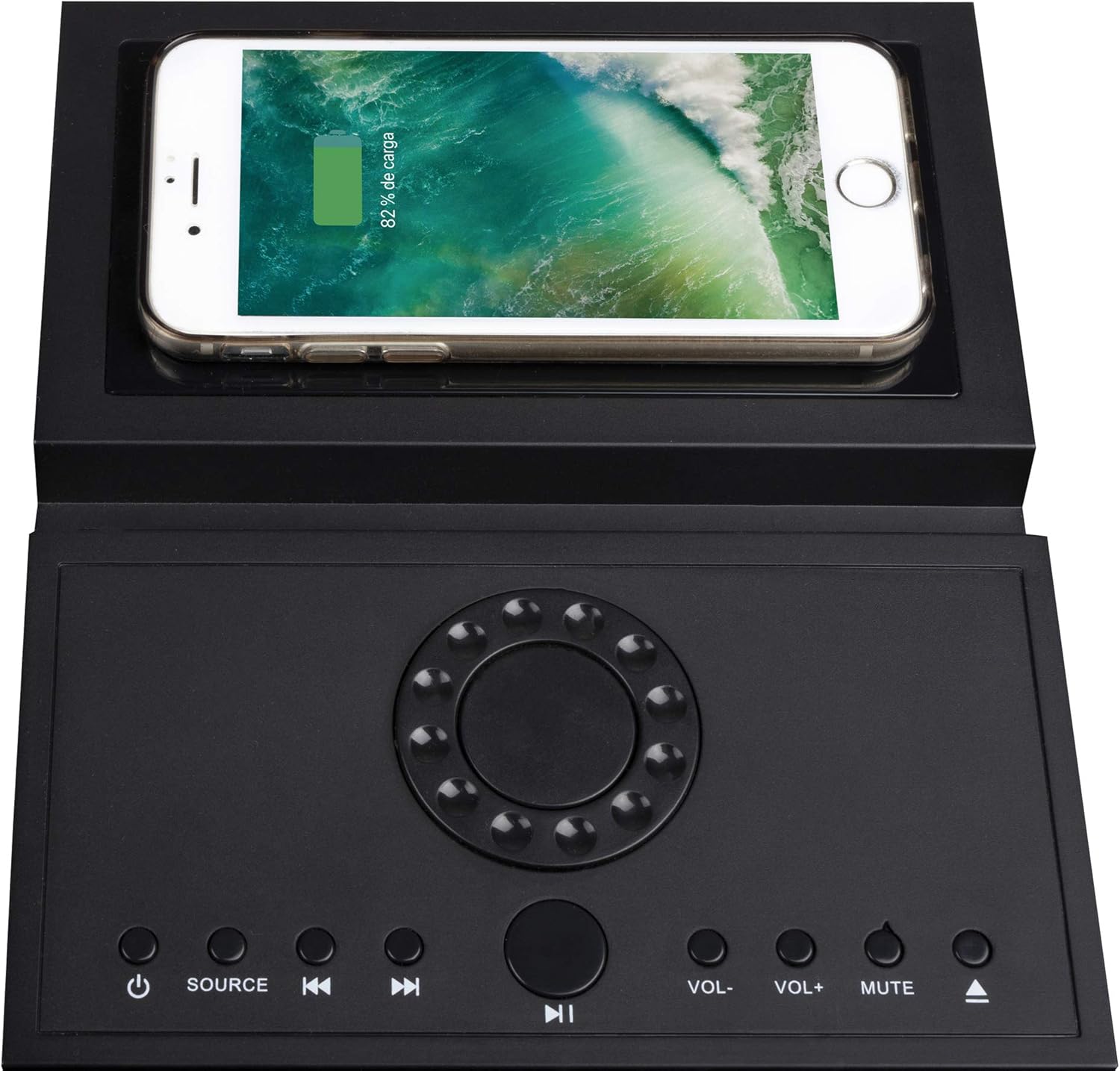
Figure 4: The top panel featuring a smartphone placed on the integrated wireless charging pad, demonstrating its functionality alongside the control buttons.
5. Орнотуу
5.1 Пакеттен чыгаруу жана жайгаштыруу
- Carefully remove the sound tower and all accessories from the packaging.
- Place the sound tower on a stable, flat surface. Ensure there is adequate space around the unit for ventilation.
- Attach the base to the bottom of the tower if it is not pre-assembled, following any specific instructions provided with the base.
5.2 Кубат туташтыруу
- Кубат кабелин үн мунаранын арткы жагындагы AC IN портуна туташтырыңыз.
- Электр кабелинин экинчи учун стандарттуу розеткага сайыңыз.
- Аппарат күтүү режимине өтөт.
6. Иштөө нускамалары
6.1 Күйгүзүү/өчүрүү
басыңыз КҮЧ баскычы ( ) on the top panel or remote control to turn the unit on or off. The LED display will illuminate when the unit is powered on.
6.2 Булакты тандоо
басыңыз БУЛАК button on the top panel or remote control repeatedly to cycle through available input modes: Bluetooth, CD, USB, and AUX.
6.3 Bluetooth операциясы
- Turn on the sound tower and select Bluetooth mode using the SOURCE button. The LED display will show "BT" and flash, indicating pairing mode.
- Мобилдик түзмөгүңүздө Bluetooth'ду иштетиңиз (смартфон, планшет ж.б.).
- Издөө "NGS SKYGAZER" in your device's Bluetooth settings and select it to pair.
- Once paired, the "BT" indicator on the sound tower's display will stop flashing and remain solid. You can now play audio from your device.
- колдонуу VOL+ / VOL- buttons on the unit or remote to adjust volume. Use the Мурунку/Кийинки трек тректерди өткөрүп жиберүү үчүн баскычтар.
6.4 CD ойноткучтун иштеши
- Тандоо CD mode using the SOURCE button.
- Gently insert a CD into the motorized CD tray located on the top panel. The tray will automatically pull the CD in.
- Ойнотуу автоматтык түрдө башталат. Болбосо, басыңыз ОЙНОО/ТЫНЫТТЫРУ баскычы.
- колдонуу Мурунку/Кийинки трек тректер арасында өтүү үчүн баскычтар.
- To eject the CD, press the ЧЫГАРУУ button (usually combined with the CD icon on the remote or top panel).
6.5 USB ойнотуу
- MP3 аудиосу бар USB флэш-дискти салыңыз fileUSB портуна киргизиңиз.
- Тандоо USB mode using the SOURCE button.
- Ойнотуу автоматтык түрдө башталат. Болбосо, басыңыз ОЙНОО/ТЫНЫТТЫРУ баскычы.
- колдонуу Мурунку/Кийинки трек тректер арасында өтүү үчүн баскычтар.
6.6 AUX-ин туташуу
- Connect one end of the 3.5mm audio cable to the AUX-in port on the sound tower.
- Connect the other end of the cable to the headphone jack or audio output of your external audio device (e.g., MP3 player, TV).
- Тандоо AUX mode using the SOURCE button.
- Тышкы түзмөгүңүздөн ойнотууну жана үнүн башкарыңыз.
6.7 Зымсыз заряддоо
The NGS SKYGAZER features a wireless charging pad on its top surface. To use this function:
- Ensure the sound tower is powered on.
- Place your Qi-compatible smartphone directly onto the designated wireless charging area on the top panel.
- The phone should indicate that it is charging. If not, adjust its position until charging begins.
Note: Wireless charging functionality may vary depending on the smartphone model and case.
7. Техникалык тейлөө
7.1 Тазалоо
- Тазалоодон мурун ар дайым аппаратты розеткадан сууруп алыңыз.
- Use a soft, dry cloth to wipe the exterior surfaces of the sound tower.
- Do not use liquid cleaners, aerosols, or abrasive cleaning agents, as these may damage the finish or internal components.
7.2 Сактоо
If you plan to store the sound tower for an extended period, unplug it from the power source and store it in a cool, dry place, away from direct sunlight and extreme temperatures.
8. Кыйынчылыктарды
| Көйгөй | Мүмкүн себеп | Чечим |
|---|---|---|
| Күч жок | Кубат кабели коопсуз туташкан эмес. | Check power cable connection to the unit and wall outlet. Ensure the outlet is functional. |
| Үн жок | Volume too low; incorrect source selected; audio cable not connected (AUX). | Increase volume. Select the correct input source. Ensure audio cables are properly connected. |
| Bluetooth жупташтыруу ишке ашпай калды | Device too far; Bluetooth not enabled on source; "NGS SKYGAZER" not selected. | Ensure device is within 10 meters. Enable Bluetooth on your device. Select "NGS SKYGAZER" from the list. Try restarting both devices. |
| CD ойнотулбай жатат же өткөрүп жиберилбейт | CD кир, чийилген же туура эмес салынган. | Clean the CD with a soft cloth. Check for deep scratches. Re-insert the CD correctly. Try a different CD. |
| Зымсыз кубаттоо иштебейт | Phone not Qi-compatible; phone not positioned correctly; phone case too thick. | Ensure your phone supports Qi wireless charging. Adjust phone position on the pad. Remove thick phone cases. |
9. Техникалык шарттар
- Модель аты: SKYGAZER
- Чыгуу күчү: 120 Ватт (2.1 каналдуу)
- Байланыш: Bluetooth, USB, AUX-in, CD Player
- Зымсыз байланыш: Bluetooth
- Башкаруу ыкмасы: Remote Control, Top Panel Buttons
- Кубат булагы: AC кабели
- Өзгөчөлүктөр: Wireless Charging Pad, LED Display
- Түсү: Кара
- Элемент Салмагы: Болжол менен 1 килограмм
- Шайкеш түзмөктөр: Ноутбуктар, смартфондор, планшеттер
10. Кепилдик жана колдоо
NGS products are designed and manufactured to the highest quality standards. For detailed warranty information and technical support, please refer to the warranty card included with your product or visit the official NGS website. Please note that spare parts availability information is not provided.
For further assistance, contact NGS customer support.