
1. Киришүү
Thank you for choosing Yoolax Motorized Blackout Roller Shades. This manual provides essential information for the safe and efficient use of your new shades. These shades are designed for indoor use, offering blackout capabilities, UV protection, noise reduction, and privacy. They feature a cordless design and are waterproof, oil-resistant, and dust-proof for enhanced durability.

Image: Yoolax Motorized Blackout Roller Shade installed in a kitchen.
2. Коопсуздук маалыматы
- Ensure all installation hardware is securely fastened to prevent the shades from falling.
- Keep remote controls out of reach of children to prevent unintended operation.
- Do not obstruct the movement of the shades during operation.
- Avoid exposing the motor or battery components to water or extreme temperatures.
- Only use the provided charging cable or a compatible USB charger for recharging the motor.
3. Пакеттин мазмуну
Орнотууну баштоодон мурун бардык компоненттер бар экендигин текшериңиз:
- Motorized Blind Unit
- Motor (integrated)
- Installation Accessories (brackets, screws, anchors)
- Standard Charging Cable
- Нускама (бул колдонмо)
- Remote Control (Optional, depending on purchase)
4. Орнотуу
For detailed installation steps, please refer to the official Орнотуу боюнча колдонмо (PDF). Below are general guidelines and measurement instructions.
Орнотуу үчүн өлчөө
Accurate measurements are crucial for proper fit and function. Consider whether you will be using an inside mount or an outside mount.
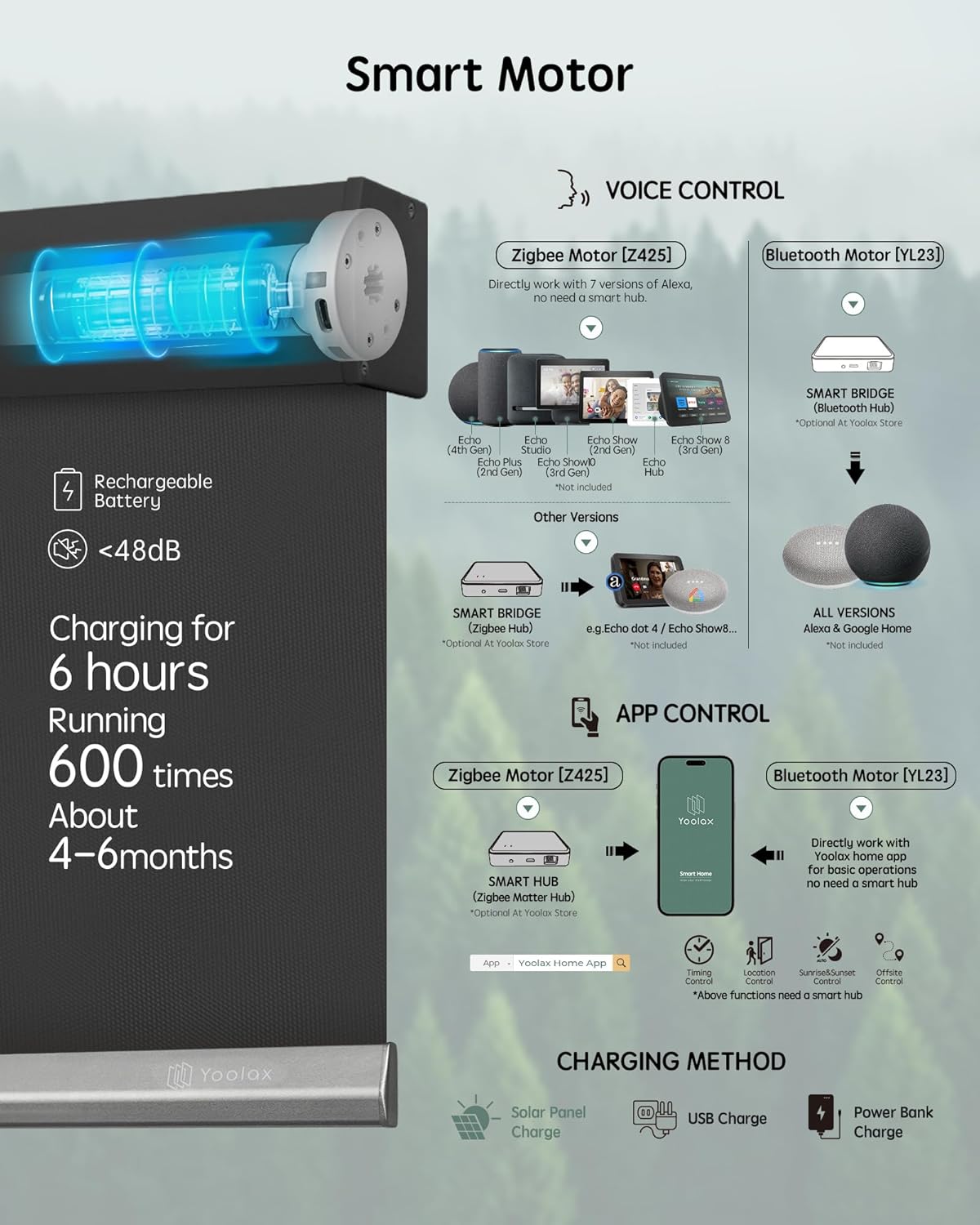
Image: Measurement guide for inside and outside window mounts.
Тоо ичинде:
- Order Width: Must be less than or equal to the window width.
- Order Height: Must be less than or equal to the window height.
- Window Depth: Must be greater than or equal to 2.4 inches.
- Маанилүү: Take the minimum measured value as the order width. The actual fabric width will be approximately 1.06 inches narrower than the ordered width due to side brackets/valance edge. Light blockers are available to address potential light leakage for inside mounts.
Тоо сыртында:
- Order Width: Window Width + 3-6 inches.
- Order Height: Window Height + 3-6 inches.
For multiple shades side-by-side, the measurement for each shade's width should be taken individually without additional reduction.
Image: Guide for measuring multiple shades installed adjacent to each other.
5. Операция
Your Yoolax motorized shades offer multiple control options for convenience.
Алыстан башкаруу
The Yoolax Lightwirl Remote and 16-Channel Remote are compatible with both Zigbee and Bluetooth motors. The Lightwirl Remote can control up to 9 blinds, while the 16-Channel Remote can control up to 16 blinds. Both remotes allow for individual or group control, and adjustment of the opening percentage.

Image: Remote control operation of Yoolax shades.
The remote requires a CR2450 battery (not included).
Колдонмо башкаруу
For Bluetooth motors, you can directly use the Yoolax Home App for basic control without a smart bridge. For Zigbee motors, a smart hub is required to enable app control and advanced features like timing, location, sunrise/sunset, and offsite control.

Image: Yoolax Home App interface for Bluetooth motor control.
Voice Control (Alexa Compatibility)
If your shades are equipped with a Zigbee motor (Z425), they can directly integrate with specific Alexa devices without a smart bridge. Compatible Alexa models include: Echo Plus 2nd Gen, Echo Show 2nd Gen, Echo Studio, Echo Show 10, Echo 4th Gen, Echo Show 8 3rd Gen, and Echo Hub.

Image: Voice control of Yoolax shades via Alexa.
For other Alexa versions (e.g., Echo Dot), a smart bridge is required for voice control functionality. To sync with Alexa, typically you press a button on the motor 3 times rapidly, then hold for 3 seconds until the motor jogs. Then, use the Alexa app or voice command "Alexa, discover my devices." Custom routines in the Alexa app may be needed for specific commands.
6. Smart Motor and Charging
Your Yoolax shades come with a built-in rechargeable battery motor, designed for quiet operation (less than 48dB).

Сүрөт: бүттүview of smart motor types, compatibility, and charging options.
Батареянын иштөө мөөнөтү жана заряддоо:
- A full charge typically lasts 4-6 months, depending on usage frequency.
- Заряддоо болжол менен 6 саатка созулат.
- Charging methods include:
- Standard USB Charger (cable included, charging block not included)
- Power Bank заряддагыч
- Optional Solar Panel Charger (available separately from Yoolax store)

Image: Various charging methods for the motorized shades.
7. Кароо жана тейлөө
To ensure the longevity and appearance of your Yoolax shades, follow these care instructions:
- Тазалоо: Тактарды гана тазалаңыз. Жумшак, нымдуу чүпүрөк колдонуңузamp cloth with mild soap if necessary. Do not immerse the shades in water.
- The vinyl fabric is waterproof, oil-resistant, and dust-proof, making it easy to maintain.
- Regularly check the mounting brackets and hardware for tightness.
- Avoid using harsh chemicals or abrasive cleaners, as these can damage the fabric or motor components.

Image: Key features of the Vinyl Series fabric, highlighting durability and ease of care.
8. Кыйынчылыктарды
If you encounter issues with your Yoolax motorized shades, refer to the following common problems and solutions:
| Көйгөй | Мүмкүн себеп | Чечим |
|---|---|---|
| Shade does not respond to remote/app. | Low battery, remote battery dead, motor not paired, obstruction. | Charge the motor. Replace remote battery (CR2450). Re-pair remote/app with motor. Check for obstructions. |
| Alexa voice commands not working. | Incorrect Alexa device, pairing issue, incorrect command phrasing. | Verify your Alexa device is compatible with Zigbee motor (Echo Plus 2nd Gen, Echo Show 2nd Gen, Echo Studio, Echo Show 10, Echo 4th Gen, Echo Show 8 3rd Gen, Echo Hub). Re-sync with Alexa. Set up custom routines in the Alexa app if default commands are not recognized. |
| Light leakage around the edges (inside mount). | Fabric is narrower than the ordered width due to hardware. | Сатып алууну карап көрөлүasing light blockers from the Yoolax store to minimize light gaps. |
| Motor makes noticeable noise during operation. | Normal operation sound (under 48dB), or potential obstruction. | The motor operates quietly, but some sound is normal. Ensure there are no obstructions hindering movement. If noise is excessive or unusual, contact support. |
9. Specifications (Model GR-09)
| Өзгөчөлүк | Деталь |
|---|---|
| Бренд | Yoolax |
| Модель номери | GR-09 |
| Материал | Полиэстер, поливинилхлорид (ПВХ) |
| Тунук эмес | Blackout |
| Product Dimensions (as per current variant) | 97"W x 117"H |
| Сунушталган колдонуу | Indoor, Home Décor, Window |
| Иштөө режими | Автоматтык |
| Өзгөчөлүктөр | Blackout, Cordless, Privacy, UV Protection, Window Treatments |
| Башкаруу түрү | Үн, Колдонмо, Алыстан башкаруу |
| Сууга туруктуулук деңгээли | Сууга чыдамдуу |
| Монтаж түрү | Тоо ичинде, Тоо сыртында |
| Power Source | Rechargeable Battery Motor |
10. Кепилдик жана колдоо
Yoolax is committed to providing quality products and customer satisfaction.
- Мотор Кепилдиги: Your Yoolax motorized shades come with a free 3-year motor warranty.
- Бузулган компоненттер: If you receive damaged components, please take photos and contact Yoolax customer service within 30 days for a free replacement.
- Техникалык колдоо: Yoolax offers long-term technical support for your convenience.
- Байланыш: For any questions, support, or warranty claims, please contact Yoolax customer service via Amazon message or through the official Yoolax webсайт.