
1. Киришүү
The AIYIMA GE5654 (TUBE-A3 Pro) is a compact and versatile tube preamplifier designed to enhance your home audio system. It features Bluetooth 5.0 connectivity and AUX input, along with independent treble and bass adjustments, allowing for a personalized audio experience. This device functions as a preamplifier and requires connection to a power ampкөтөргүч же кубаттуу динамиктер.
- Жакшыртылган үн сапаты: Utilizes GE5654 vacuum tubes for a warm and sweet audio output, with adjustable bass and treble controls.
- Dual Audio Inputs: Supports both Bluetooth 5.0 and AUX (3.5mm) audio input modes, switchable via a dedicated button.
- Replaceable Tubes: Designed for easy tube replacement, compatible with 6J1/6J2/6K4/GE5654/6AK5/6Ж1n tubes.
- Optimized Circuitry: Features a power circuit separate from the audio circuit to minimize interference and ensure clear sound.
- Маанилүү эскертүү: Бул алдын алаampкүч эмес, көтөргүч amplifier. It must be connected to powered speakers or a separate power amplifier. It is not suitable for direct connection to passive speakers without an amplifier, nor for use with record players or phonographs without an appropriate phono preamp.
2. Продукт бүтүп калдыview
2.1. Алдыңкы панелдин башкаруу элементтери

Сүрөт: алдыңкы view of the AIYIMA GE5654 (TUBE-A3 Pro) showing the power switch, working indicator, bass control, treble control, and volume control knobs.
- Кубат которгучу: Түзмөктү күйгүзөт/өчүрөт.
- Иштөө көрсөткүчү: Түзмөк күйгүзүлгөндө күйөт.
- Басс башкаруу: Төмөн жыштыктагы аудио чыгарууну тууралайт.
- Үч ыргак башкаруу: Жогорку жыштыктагы аудио чыгарууну тууралайт.
- Үндү көзөмөлдөө: Жалпы аудио чыгаруу деңгээлин тууралайт.
2.2. Арткы панелдин туташуулары
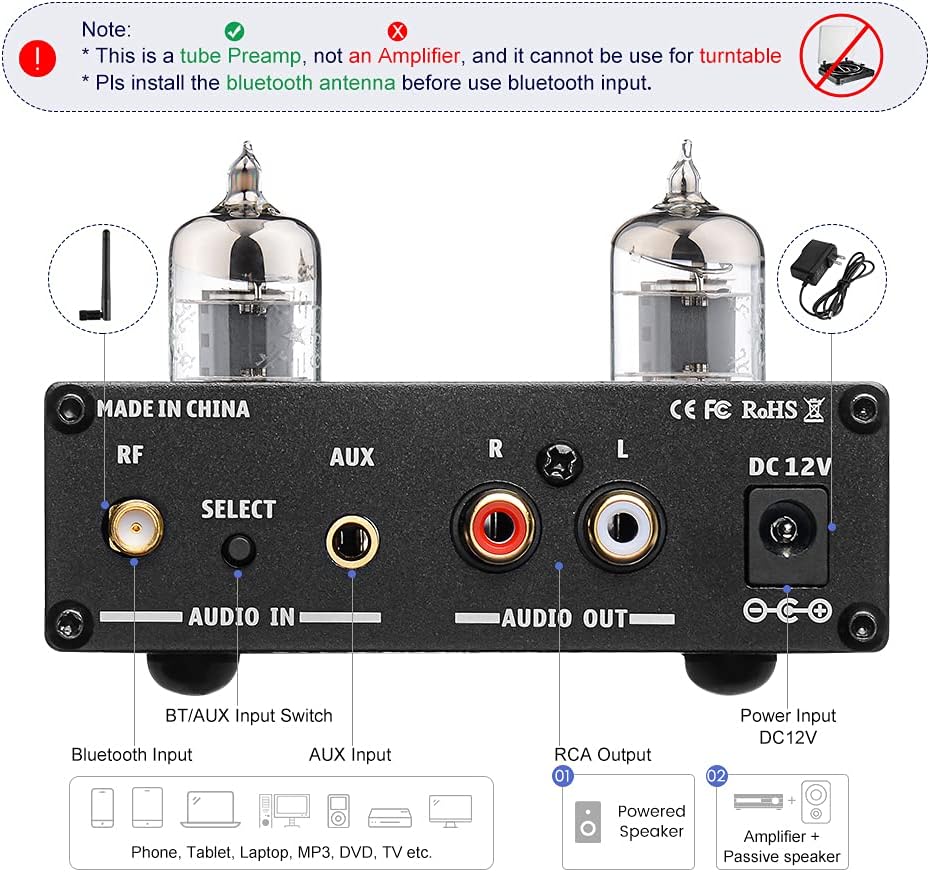
Сүрөт: Арткы view of the AIYIMA GE5654 (TUBE-A3 Pro) showing the Bluetooth antenna connector, input selector, AUX input, RCA audio outputs, and DC 12V power input.
- RF (Bluetooth антеннасы): Bluetooth антеннасы үчүн туташтыргыч.
- Select (Audio Input Switch): Button to switch between Bluetooth and AUX input modes.
- AUX киргизүү: 3.5mm stereo input for wired audio sources.
- Audio Out (RCA L/R): RCA stereo outputs to connect to a power ampкөтөргүч же кубаттуу динамиктер.
- DC 12V: Power input jack for the DC12V/1A power adapter.
2.3. Продукциянын өлчөмдөрү

Сүрөт: жогорудан төмөнгө view of the AIYIMA GE5654 (TUBE-A3 Pro) with dimensions: 118mm (4.65in) length, 95mm (3.74in) width, 30mm (1.18in) height.
3. Орнотуу нускамалары
- Пакеттен чыгаруу жана текшерүү: Этияттык менен алдын ала алып салууamplifier and all accessories from the packaging. Ensure all components are present and undamaged.
- Install Bluetooth Antenna: Screw the provided Bluetooth antenna into the 'RF' connector on the rear panel. Ensure it is securely tightened for optimal signal reception.
- Аудио чыгууну туташтыруу: Connect the RCA 'Audio Out' ports (L/R) on the rear panel of the preamplifier to the input ports of your power amplifier or powered speakers using appropriate RCA cables.
- Connect Audio Input (Choose One):
- Bluetooth киргизүү: Алдын ала камсыз кылууamplifier is in Bluetooth mode (indicated by a purple light, or red and blue flashing for search status). On your audio source device (e.g., smartphone, tablet), search for and connect to 'AIYIMA A3 Pro'.
- AUX киргизүү: Connect your audio source (e.g., CD player, computer) to the 'AUX' 3.5mm input jack on the rear panel using a 3.5mm audio cable. Press the 'Select' button to switch to AUX input mode (indicated by a red light).
- Туташуу кубаты: Connect the DC12V/1A power adapter to the 'DC 12V' input jack on the rear panel, then plug the adapter into a wall outlet. Caution: Do not use a power supply exceeding 12V.
- Күйгүзүү: Flip the 'Power' switch on the front panel to the ON position. The working indicator will light up.
Демонстрациялык видеону орнотуу
Video: This video demonstrates the connection of the AIYIMA GE5654 (TUBE-A3 Pro) preamplifier to an AIYIMA A07 power amplifier and speakers, showcasing both AUX and Bluetooth input modes and the treble/bass adjustment.
4. Иштөө нускамалары
- Күйгүзүү/өчүрүү: Use the 'Power' switch on the front panel to turn the unit on or off.
- Киргизүүнү тандоо: Press the 'Select' button on the rear panel to toggle between AUX and Bluetooth input modes. The working indicator light color will change to reflect the active input (Red for AUX, Purple for Bluetooth).
- Үндү тууралоо: Rotate the 'Volume' knob on the front panel to increase or decrease the audio output level.
- Үндү тууралоо: Use the 'Bass' and 'Treble' control knobs on the front panel to fine-tune the low and high frequencies according to your preference.

Image: The AIYIMA GE5654 (TUBE-A3 Pro) connected to a smartphone via Bluetooth and outputting to a speaker, demonstrating a typical usage scenario.
5. Түтүктөрдү алмаштыруу
The GE5654 (TUBE-A3 Pro) preamplifier allows for easy replacement of its vacuum tubes, offering flexibility for sound customization. Compatible tube models include 6J1, 6J2, 6K4, GE5654, 6AK5, and 6Ж1n.
- Өчүрүү жана өчүрүү: Before attempting to replace tubes, ensure the preamplifier is powered off and disconnected from the main power supply. Allow the unit to cool down completely.
- Gently Remove Old Tubes: Carefully grasp the existing tube and pull it straight upwards from its socket. Avoid twisting or bending the tube pins.
- Insert New Tubes: Align the pins of the new tube with the holes in the socket. Gently push the tube straight down until it is firmly seated. Do not force it.
- Отурууну текшерүү: Ensure both tubes are properly seated in their sockets before reconnecting power.

Image: A hand demonstrating the process of replacing a vacuum tube on the AIYIMA GE5654 (TUBE-A3 Pro) preampөмүрлүү.
6. Техникалык тейлөө
- Жумшак, кургак чүпүрөк менен сүртүп, аппаратты таза кармаңыз.
- Катуу химиялык заттарды же абразивдүү тазалагычтарды колдонуудан алыс болуңуз.
- Ашыкча ысып кетүүнүн алдын алуу үчүн аппараттын айланасында туура желдетүүнү камсыз кылыңыз.
- Protect the unit from moisture, direct sunlight, and extreme temperatures.
7. Кыйынчылыктарды
- Үн жок:
- Check if the power adapter is correctly connected and the unit is powered on.
- Verify all audio cables are securely connected to the correct input and output ports.
- Ensure the correct input mode (Bluetooth or AUX) is selected.
- Confirm the volume knob is not set to minimum and the connected power amplifier/powered speakers are also powered on and at an audible volume.
- Check if the vacuum tubes are properly seated in their sockets.
- Бурмаланган үн:
- Reduce the volume level on both the preampкөтөргүч жана аудио булагыңыз.
- Ensure your audio source is providing a clean signal. A noisy source will be ampалдын ала негизделгенampөмүрлүү.
- Adjust bass and treble controls to a neutral position or to your preference.
- Verify that the power supply is DC12V/1A and not exceeding 12V.
- Bluetooth туташуу маселелери:
- Ensure the Bluetooth antenna is securely installed.
- Алдын ала ырастооamplifier is in Bluetooth input mode (purple indicator light).
- Make sure your audio source device's Bluetooth is enabled and within range.
- Түзмөктү жупташып, кайра жупташып көрүңүз.
- Түзмөк күйбөй жатат:
- Check the power adapter and wall outlet.
- Кубат баскычы толугу менен ON абалында экенин текшериңиз.
8. Техникалык шарттар
| Өзгөчөлүк | Спецификация |
|---|---|
| Бренд аты | АЙЫМА |
| Модел | AIYIMA GE5654 (TUBE-A3 Pro) |
| Элементтин өлчөмдөрү (L x W x Y) | 4.69 x 3.74 x 1.22 дюйм (118 x 95 x 30 мм) |
| Элемент Салмагы | 520 грамм |
| Тtage | 12 вольт (ток) |
| Maximum Supply Voltage | 12 вольт (ток) |
| Minimum Supply Voltage | 12 вольт (ток) |
| Каналдардын саны | 2 |
| Монтаж түрү | Surface Mount |
| UPC | 749789527314 |
| Өндүрүүчү | YIMA TECH |
9. Кепилдик жана колдоо
For warranty information and technical support, please refer to the documentation included with your purchase or contact AIYIMA customer service directly. Keep your purchase receipt for warranty claims.