
1. Киришүү
This manual provides detailed instructions for the proper setup, operation, and maintenance of your Zerone USB Digital Microscope. This device is designed for various applications including industrial testing, laboratory research, educational purposes, and detailed examination of small objects. Please read this manual thoroughly before using the product to ensure optimal performance and longevity.
2. Коопсуздук маалыматы
- Түзмөктү өтө жогорку температурага, нымдуулукка же дат басуучу заттарга дуушар кылбаңыз.
- Avoid direct exposure of the LED lights to eyes.
- Аппаратты балдардан алыс кармаңыз.
- Берилген аксессуарларды же шайкеш келген алмаштыруучуларды гана колдонуңуз.
- Disconnect the device from the power source when not in use or during cleaning.
3. Пакеттин мазмуну
Пакетте бардык буюмдар бар экенин текшериңиз:
- Zerone USB Digital Microscope
- Жөнгө салынуучу стенд
- USB Cable with LED Dimming Knob
- Software Installation CD (or download link)

Image 3.1: Contents of the Zerone USB Digital Microscope package, including the microscope, stand, USB cable, and software CD.
4. Продукт бүтүп калдыview
The Zerone USB Digital Microscope features a compact design with adjustable magnification and integrated LED illumination. Key components include:
- Микроскоптун корпусу: Contains the lens, sensor, and control buttons.
- Zoom/Focus Wheel: Located on the microscope body for adjusting magnification and focus.
- LED жарыктары: Eight adjustable LEDs surrounding the lens for illuminating the specimen.
- Snap баскычы: Кыймылсыз сүрөттөрдү тартуу үчүн.
- USB кабели: Connects the microscope to a computer.
- LED Dimming Knob: Integrated into the USB cable for brightness control.
- Жөнгө салынуучу стенд: Provides stable support and allows for precise positioning of the microscope.

Image 4.1: The Zerone USB Digital Microscope mounted on its adjustable stand, connected via USB cable.

Сүрөт 4.2: Жакыныраак view of the Zerone USB Digital Microscope on its stand, highlighting its portable design and 1000X zoom capability.
5. Орнотуу
5.1 Программалык камсыздоону орнотуу
- Insert the provided software installation CD into your computer's CD-ROM drive. If your computer does not have a CD-ROM drive, please refer to the manufacturer's webпрограммалык камсыздоону жүктөө инструкциясы үчүн сайт.
- Follow the on-screen prompts to install the digital microscope software.
- Орнотуу аяктагандан кийин, суралса, компьютериңизди өчүрүп-күйгүзүңүз.
5.2 Микроскопту туташтыруу
- Attach the microscope to the adjustable stand. Ensure it is securely fastened.
- Connect the USB cable from the microscope to an available USB port on your computer.
- The computer should automatically detect the device. If not, check your device manager for driver installation status.

Image 5.1: The Zerone USB Digital Microscope set up on a surface, demonstrating its use in a typical research or inspection environment.
6. Иштөө нускамалары
6.1 Starting the Software
Launch the digital microscope software installed on your computer. The live feed from the microscope should appear on your screen.
6.2 Фокусту жана масштабды тууралоо
- Place the object you wish to examine under the microscope lens.
- айлантыңыз Zoom/Focus Wheel on the microscope body to adjust the magnification and bring the image into clear focus on your computer screen.
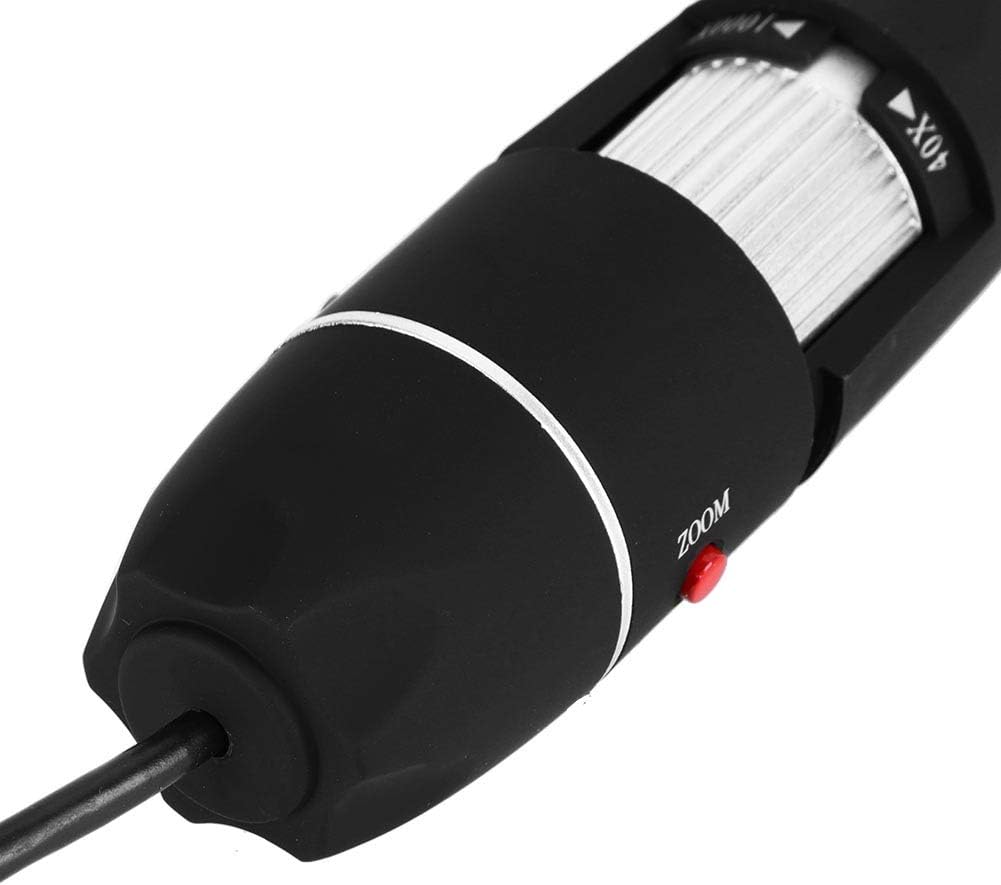
Сүрөт 6.1: деталдуу view of the zoom and focus adjustment wheel on the microscope body, used for precise image clarity and magnification.
6.3 LED жарыктыгын жөндөө
The microscope is equipped with 8 adjustable LED lights. Use the LED Dimming Knob located on the USB cable to increase or decrease the brightness. Adjust the lighting to achieve optimal visibility of your specimen.

Image 6.2: A close-up showing the arrangement of the 8 LEDs around the microscope lens, designed to provide even illumination.

Image 6.3: The front of the microscope with its 8 LEDs illuminated, demonstrating the lighting capability for viewүлгүлөрдү алуу.
6.4 Сүрөттөрдү жана видеолорду тартуу
To capture a still image, press the Snap баскычы on the microscope body or use the corresponding function within the software. To record video, select the video recording option in the software and follow the prompts.

Image 6.4: A hand holding the Zerone USB Digital Microscope, illustrating its ergonomic design and portability for handheld use.
6.5 Продукциянын демонстрациялык видеосу
Watch this video for a visual guide on the features and operation of the Zerone USB Digital Microscope.
6.1-видео: демонстрация видеосуasing the Zerone 1000X Zoom USB Digital Microscope, highlighting its features and how it functions as a digital magnifier and endoscope camera.
7. Техникалык тейлөө
7.1 Тазалоо
- Gently wipe the microscope body with a soft, dry cloth.
- Линза үчүн, чийилип калбашы үчүн, линзаны тазалоочу атайын чүпүрөктү жана эритмени колдонуңуз.
- Абразивдүү тазалагычтарды же эриткичтерди колдонбоңуз.
7.2 Сактоо
When not in use, store the microscope in a clean, dry place, away from direct sunlight and extreme temperatures. Use the original packaging or a protective case to prevent dust accumulation and physical damage.
8. Кыйынчылыктарды
| Көйгөй | Мүмкүн себеп | Чечим |
|---|---|---|
| Экранда сүрөт жок | Microscope not connected properly; Software not launched; Driver issue. | Ensure USB cable is securely connected. Launch the software. Reinstall drivers if necessary. |
| Сүрөт бүдөмүк | Incorrect focus; Incorrect working distance. | Adjust the Zoom/Focus Wheel. Ensure the microscope is at an appropriate distance from the object. |
| Светодиоддор күйбөй жатат | LED dimming knob set to minimum; Power issue. | Rotate the LED Dimming Knob to increase brightness. Check USB connection. |
| Software not detecting device | Driver not installed or corrupted; USB port issue. | Reinstall the software and drivers. Try a different USB port. |
9. Техникалык шарттар
| Өзгөчөлүк | Деталь |
|---|---|
| Бренд | Zerone |
| Модель номери | SKIESOARtbx1zsgua2 |
| Чоңойтуу | 1000X чейин |
| Жарык булагы | 8 жөнгө салынуучу LED |
| Байланыш | USB |
| Шайкеш түзмөктөр | Персоналдык компьютер |
| Материал | Металл |
| Түс | Кара, күмүш |
| Продукциянын өлчөмдөрү | 5.31 x 5.12 x 1.77 дюйм |
| Элемент Салмагы | 7 унция |
10. Кепилдик жана колдоо
For warranty information and technical support, please refer to the documentation included with your product or visit the official Zerone webсайт. Сатып алуу квитанциясын кепилдик дооматтары үчүн сатып алуунун далили катары сактаңыз.