
Walfront HT 9600
Walfront HT9600 Air Quality Monitor User Manual
Модел: HT-9600
1. Киришүү
The Walfront HT9600 Air Quality Monitor is a versatile and portable device designed to accurately measure various air quality parameters, including PM2.5, PM10, dust particle counts, temperature, and humidity. Equipped with a high-definition color display, it provides clear and immediate readings, helping you assess indoor and outdoor air quality. This manual will guide you through the proper use and maintenance of your device.

Figure 1: Walfront HT9600 Air Quality Monitor
2. Продукциянын өзгөчөлүктөрү
- Көп функциялуу өлчөө: Measures PM2.5, PM10, dust particles, temperature, and humidity.
- Color-Coded Pollution Levels: Displays different colors to indicate varying levels of air pollution for easy interpretation.
- High-Definition Digital Display: Features a 2.8-inch LCD screen with 320x240 pixel resolution for clear and bright readings.
- Маалыматтарды сактоо: Capable of storing up to 999 sets of measurement data for tracking air quality trends.
- Автоматтык түрдө өчүрүү: Energy-saving feature that powers off the device after 2 minutes of inactivity.
- Pumping Type Sampлинг: Ensures accurate and efficient air sampлинг.

Figure 2: Bright Color HD Screen of the HT9600
3. Пакеттин мазмуну
Сураныч, бардык буюмдар бар экенине ынануу үчүн пакетти кылдат текшериңиз:
- 1 x Air Quality Monitor (HT-9600)
- 1 x Storage Box/Case
- 1 x User Manual
- 1 x Plug (Power Adapter)
- 1 x Data Line (USB Cable)

3-сүрөт: Пакеттин мазмуну
4. Түзмөк бүттүview
Familiarize yourself with the different parts of the HT9600 Air Quality Monitor:

Figure 4: HT9600 Device Components
- Sampling Air Inlet
- Temperature and Humidity Detection Port
- Cover
- LCD дисплей
- Кубат баскычы
- Run Measurement Button
- Confirm Button (ENTER)
- Shift баскычы
- Flip Up Button (Up Arrow)
- Flip Down Button (Down Arrow)
- Return Button (BACK)
- Сормо порту
- Батарея отсеги
5. Орнотуу
5.1. Аппаратты заряддоо
Before first use, ensure the device is fully charged. Connect the provided data line (USB cable) to the device's charging port and the other end to the power adapter (plug) or a USB power source. The charging indicator on the device will show its status.
5.2. Күйгүзүү / Өчүрүү
- Күйгүзүү үчүн: Press and hold the Power Button (5) until the display lights up.
- Өчүрүү үчүн: Press and hold the Power Button (5) until the display turns off. The device also features an automatic power-off function after 2 minutes of no operation to conserve battery life.
6. Иштөө нускамалары
6.1. Өлчөөлөрдү алуу
The HT9600 is designed for quick and accurate air quality assessment.
- Түзмөк күйгүзүлгөнүн текшериңиз.
- Place the device in the area where you wish to measure air quality. Ensure the Sampling Air Inlet (1) is unobstructed.
- басыңыз RUN Measurement Button (6) to start the sampling process. The device will begin drawing in air and analyzing particles.
- The display (4) will show real-time readings for PM2.5, PM10, particle counts, temperature, and humidity.
- Allow the device to run for at least 120 seconds for stable readings.
6.2. Абанын сапатынын көрсөткүчтөрүн түшүнүү
The device uses a color-coded schematic diagram to represent different pollution levels based on PM2.5 concentration. This provides a quick visual indicator of air quality.

Figure 5: PM2.5 Air Quality Grade Schematic
- Оптималдуу: Average PM2.5 of 24 hours is 0-35 µg/m³ (Green)
- Жакшы: Average PM2.5 of 24 hours is 35-75 µg/m³ (Yellow)
- Light Pollution: Average PM2.5 of 24 hours is 75-115 µg/m³ (Orange)
- Moderate Pollution: Average PM2.5 of 24 hours is 115-150 µg/m³ (Purple)
- High Levels of Pollution: Average PM2.5 of 24 hours is 150-250 µg/m³ (Brown)
- Serious Pollution: Average PM2.5 in 24 hours > 250 µg/m³ (Red)
6.3. Data Storage and Retrieval
The HT9600 can store up to 999 sets of data, allowing you to track air quality trends over time.
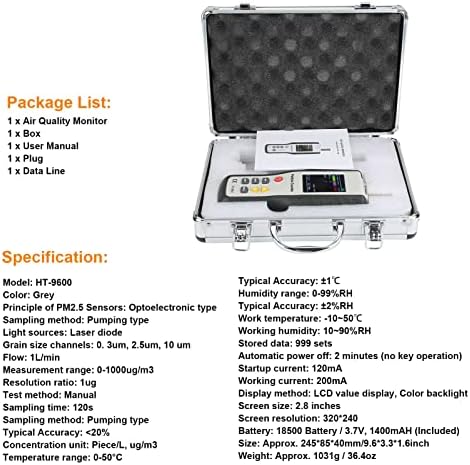
Figure 6: Data Storage Feature
- To Save Data: After a measurement is complete, the device may automatically save the data, or you may need to press the ENTER button (7) to confirm saving. Refer to the on-screen prompts.
- үчүн View Сакталган маалыматтар: Use the Flip Up (9) and Flip Down (10) buttons to navigate through the menu options. Select the 'Data Record' or 'History' option and press ENTER (7) чейин view сакталган өлчөөлөр.
- To Exit Data View: басыңыз КАЙТ баскычы (11).
7. Техникалык тейлөө
7.1. Тазалоо
- Түзмөктүн сыртын жумшак, кургак чүпүрөк менен сүртүңүз.
- Do not use abrasive cleaners, solvents, or corrosive chemicals, as these may damage the device.
- Keep the air inlet and exhaust ports clear of dust and debris. Do not insert any objects into these openings.
7.2. Сактоо
- When not in use, store the device in its original carrying case to protect it from dust and physical damage.
- Салкын, кургак жерде, түз күндүн нурунан жана экстремалдык температурадан алыс сактаңыз.
7.3. Батарея маалыматы
- The device uses a 18500 Battery (3.7V, 1400mAh).
- Дисплейде батареянын заряды аз деген индикатор пайда болгондо, батареяны кайра заряддаңыз.
- Эгер аппарат узак убакыт бою колдонулбаса, батареянын ден соолугун сактоо үчүн аны мезгил-мезгили менен заряддаңыз.
8. Кыйынчылыктарды
If you encounter issues with your HT9600 Air Quality Monitor, please refer to the table below for common problems and solutions.
| Көйгөй | Мүмкүн себеп | Чечим |
|---|---|---|
| Түзмөк күйбөйт. | Батарея аз же заряды жок. | Берилген заряддагычты колдонуу менен аппаратты толук заряддаңыз. |
| Readings are inconsistent or fluctuating. | Air inlet/exhaust blocked; device not stable; environmental interference. | Ensure air inlet/exhaust are clear. Place device on a stable surface. Avoid strong air currents or direct exposure to pollutants during measurement. Allow 120 seconds for stable readings. |
| Экран күңүрт же окулбайт. | Батареянын кубаты аз; дисплей жөндөөлөрү. | Charge the device. Check display brightness settings if available in the menu. |
| Cannot save data. | Memory full; incorrect operation. | Check if memory is full and clear old data if necessary. Follow instructions for saving data. |
| Device powers off unexpectedly. | Automatic power-off activated; low battery. | This is a normal energy-saving feature if no operation for 2 minutes. If it powers off during use, charge the battery. |
9. Техникалык шарттар
| Параметр | Нарк |
|---|---|
| Модел | HT-9600 |
| Түс | Боз |
| PM2.5 сенсорлорунун принциби | Оптоэлектрондук түрү |
| Sampling ыкмасы | Насос түрү |
| Жарык булактары | Лазердик диод |
| Grain Size Channels | 0.3um, 2.5um, 10um |
| Агым | 1л/мин |
| Өлчөө диапазону | 0-1000уг / м3 |
| Резолюция | 1г |
| Сыноо ыкмасы | Manual |
| Sampубакыт | 120с |
| Typical Accuracy (PM) | <20% |
| Концентрациялоо бирдиги | Piece/L, ug/m3 |
| Температура диапазону | 0-50°C |
| Typical Accuracy (Temp) | ±1°C |
| нымдуулук колому | 0-99% RH |
| Typical Accuracy (Humidity) | ± 2% RH |
| Иштөө температурасы | -10~50°C |
| Иштөө нымдуулугу | 10 ~ 90% RH |
| Сакталган маалыматтар | 999 комплект |
| Автоматтык түрдө өчүрүү | 2 minutes (no key operation) |
| Startup Current | 120мА |
| Иштөө агымы | 200мА |
| Көрсөтүү ыкмасы | LCD value display, Color backlight |
| Screen Size | 2.8 дюйм |
| Screen Resolution | 320*240 |
| Батарея | 18500 Battery / 3.7V, 1400mAh (Included) |
| Болжол менен. Көлөм | 245*85*40mm / 9.6*3.3*1.6inch |
| Болжол менен Салмагы | 1031g / 36.4oz (2.29 pounds) |
| Келип чыккан өлкө | Кытай |
10. Кепилдик жана колдоо
Walfront products are manufactured to high quality standards. This product is covered by a standard manufacturer's warranty against defects in materials and workmanship from the date of purchase. Please retain your proof of purchase for warranty claims.
For technical support, troubleshooting assistance beyond this manual, or warranty inquiries, please contact your retailer or the Walfront customer service department. Contact information can typically be found on the product packaging or the official Walfront webсайт.
Ask a question about this manual
Ask about setup, troubleshooting, compatibility, parts, safety, or missing instructions. Manuals+ will review the question and use this page’s manual context to help answer it.