
1. Киришүү
The Hohem iSteady X is a lightweight, foldable 3-axis smartphone gimbal stabilizer designed to capture smooth and stable video footage with your mobile device. This manual provides detailed instructions for setup, operation, maintenance, and troubleshooting to ensure optimal performance.
2. Кутуда эмне бар
Upon unboxing your Hohem iSteady X, verify that all components are present:
- Hohem iSteady X Gimbal Stabilizer
- Мини штатив стенд
- Заряддоо кабели (USB-C)
- Билек боо
- Сактоочу баштык
- Quick Start Guide
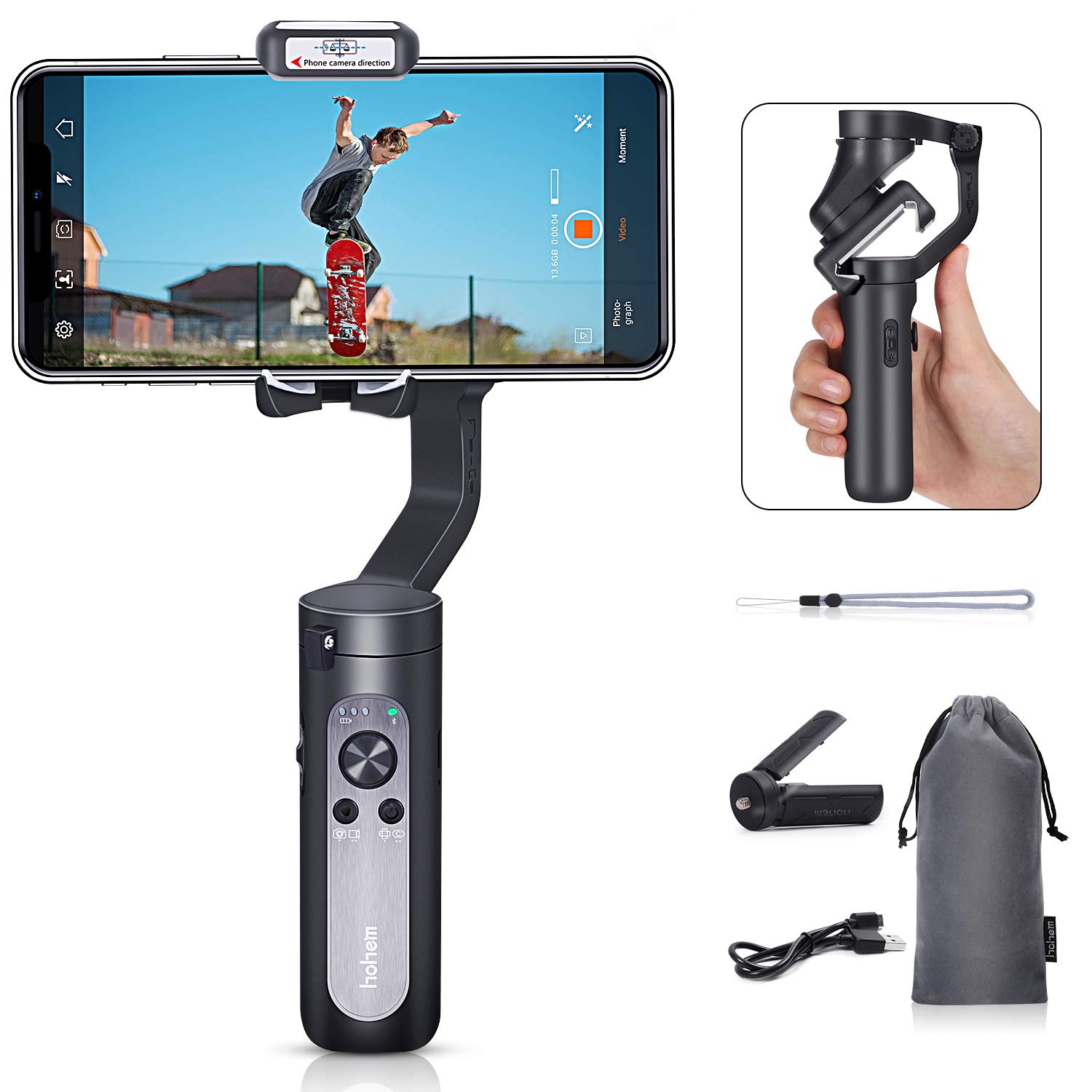
Figure 2.1: Contents of the Hohem iSteady X package, including the gimbal, mini tripod, charging cable, wrist strap, and storage pouch.
3. Орнотуу
3.1 Гимбалды ачуу
The iSteady X is designed to be compact when folded. To unfold, gently extend the gimbal arm until it locks into its operational position. Ensure all motor buckles are unlocked before powering on.

Figure 3.1: Visual guide for unfolding the gimbal, securing the smartphone, and unlocking the motor axes.
3.2 Смартфонуңузду орнотуу жана тең салмактоо
- Ensure your smartphone is removed from its case for proper balancing.
- Place your smartphone securely in the phone clamp.
- Телефондун cl ичиндеги абалын тууралаңызamp to achieve a balanced state. The phone should remain level when the gimbal is powered off.
3.3 Колдонмону жүктөп алуу жана активдештирүү
Before first use, the iSteady X requires activation via the Hohem Pro app. Download the app from your smartphone's app store (iOS App Store or Google Play Store).
- Смартфонуңузда Bluetooth'ду иштетиңиз.
- Launch the Hohem Pro app.
- The app will detect the iSteady X. Tap 'Connect' and then 'Pair' when prompted for Bluetooth pairing.
- Follow the on-screen instructions to complete the activation process. Do not turn off the phone or gimbal during activation.
4. Иштөө нускамалары
4.1 Негизги башкаруу каражаттары
Гимбалдын туткасында интуитивдик башкаруу элементтери бар:
- Кубат баскычы: Long press to power on/off. Single press to switch between photo/video mode. Double press to switch between horizontal/vertical shooting.
- Джойстик: Панорамалоо жана эңкейтүү кыймылдарын башкарат.
- Zoom Slider (T/W): Controls digital zoom within the Hohem Pro app.
- Trigger баскычы: Press and hold to enter All Lock mode. Double press to recenter the gimbal. Triple press to enter Inception mode.
4.2 Атуу режимдери
The Hohem Pro app offers various shooting modes to enhance your video creation:
- Standard Follow Mode (Tilt/Pan Follow): The camera follows your hand movements on both tilt and pan axes, maintaining a steady horizon.
- Пан ээрчүү режими: The camera only follows your pan (horizontal) movements.
- All Lock Mode: The camera remains fixed in its current orientation, ignoring all movements.
- POV (Чекиси View) Режим: The camera follows all three axes (pan, tilt, roll) for dynamic first-person perspective shots.
- Horizontal & Vertical Switch: Easily switch between landscape and portrait orientations for different platforms.

Figure 4.1: The gimbal supports smart switching between horizontal and vertical shooting modes.
- Жүзгө көз салуу: The gimbal automatically tracks a detected face, keeping it centered in the frame.

Figure 4.2: The Hohem Pro app enables smart face-tracking for hands-free recording.
- Кыймылдын убакыт аралыгы: Capture time-lapse videos with dynamic camera movement.

Figure 4.3: The Motion Timelapse feature allows for creative time-lapse videos with programmed movements.
- Auto Low-Angle Shots: The gimbal can automatically adjust to capture stable low-angle footage.

Figure 4.4: The gimbal facilitates smooth auto low-angle shots.
- Auto Inception Mode (270° Roll): Create cinematic spinning shots with a 270-degree roll.

Figure 4.5: Auto Inception Mode allows for dynamic 270-degree rotating video effects.
- Селфи таякчасы режими: The gimbal can be used as an extended selfie stick for wider shots.

Figure 4.6: The gimbal can be quickly switched to selfie stick mode for convenient self-portraits or group shots.
5. Техникалык тейлөө
- Гимбалды таза, чаң менен таштандылардан таза кармаңыз. Тазалоо үчүн жумшак, кургак чүпүрөк колдонуңуз.
- Гимбалды өтө жогорку температурага же нымдуулукка дуушар кылбаңыз.
- Store the gimbal in its provided pouch when not in use to prevent damage.
- Батареянын иштөө мөөнөтүн сактоо үчүн, көп колдонулбаса да, аны үзгүлтүксүз кубаттап туруңуз.
6. Кыйынчылыктарды
- Гимбал күйбөй жатат: Ensure the battery is charged. Connect to the charging cable and try again.
- Гимбал тең салмактуулукту сактабай жатат: Remove the smartphone case. Re-center the smartphone in the clamp.
- Bluetooth байланышы көйгөйлөрү: Ensure Bluetooth is enabled on your phone. Restart the Hohem Pro app and try connecting again. If issues persist, restart both the phone and the gimbal.
- Туруксуз тамак-ашtage: Ensure the smartphone is properly balanced. Check for any obstructions to the gimbal's movement.
7. Техникалык шарттар
| Өзгөчөлүк | Спецификация |
|---|---|
| Продукциянын өлчөмдөрү | 7.04 x 3.11 x 1.53 inches (folded: 179mm x 79mm x 39mm) |
| Элемент Салмагы | 8 унция (227 грамм) |
| Батареялар | 2 литий-иондук батарейкалар талап кылынат (кошулган) |
| Шайкеш түзмөктөр | Уюлдук телефон |
| Түс | Кара |
| ASIN | B07R2J372X |
| UPC | 749390448534 |
8. Кепилдик жана колдоо
For warranty information and customer support, please refer to the official Hohem webсайтка же түздөн-түз кардарларды тейлөөгө кайрылыңыз. Сатып алганыңыздын далили катары сатып алуу дүмүрчөгүңүздү сактаңыз.