
EBYTE RS232
E90-DTU-433L30 Wireless Transceiver
User Manual
1. Продукт бүтүп калдыview
The E90-DTU-433L30 is a high-performance wireless data transceiver designed for reliable long-range communication. Operating within the 410-441MHz frequency range with a power output of 30dBm, it can achieve communication distances up to 8.0km. This device integrates digital data processing, modulation, demodulation, and error correction (FEC) to provide a transparent RS232/RS485 interface, distinguishing it from traditional analog FM transceivers.

Сүрөт 1: Алдыңкы view of the E90-DTU-433L30 Wireless Transceiver, showing RS232, RS485, GND, VCC ports, PWR, TXD, RXD indicators, M0, M1 pins, DC-IN, and antenna connector.
2. Негизги өзгөчөлүктөрү
- Advanced LoRa Modulation: Utilizes military-grade LoRa modulation technology for enhanced communication distance and stability.
- Жогорку кубаттуулугу: Transmission power up to 1W, with multi-level adjustable settings, meeting European industrial standards.
- Wide Interface Support: Provides transparent RS232 and RS485 interfaces for versatile connectivity.
- Күчтүү дизайн: All-aluminum alloy shell for compact size, easy installation, good heat dissipation, and excellent electromagnetic compatibility.
- Жакшыртылган ишенимдүүлүк: Features power reverse connection protection, over-connection protection, and antenna surge protection.
- Ийкемдүү энергия менен камсыздоо: Supports 10-28V power supply, compatible with various power devices or line pressure modes.
- Precise Frequency Stability: Incorporates temperature compensators for frequency stability better than ±1.5PPM.
- Конфигурациялануучу Параметрлер: All parameters such as power, frequency, air speed, and address ID can be set via programming software.
- Төмөн энергия керектөө: Standby current is only 21mA (even lower in power-saving and sleep modes).
- Built-in Watchdog: Ensures automatic module restart in case of exceptions, maintaining continuous operation with previous settings.
3. Техникалык жабдыктар бүттүview
The E90-DTU-433L30 features clearly labeled interfaces and indicators for easy setup and monitoring.

2-сүрөт: Детальдуу view of the transceiver's hardware components, including Antenna Interface, Dip Switch, Power Interface, Function Indicators (PWR, TXD, RXD), RS485 terminals, and RS232 port.
- Антенна интерфейси: SMA-K connector for external antenna connection.
- Dip Switch (M0, M1): Used to set the module's operating mode (e.g., normal, wake-up, power-saving, configuration).
- Power Interface (DC-IN): Input for 10-28V DC power supply.
- Функциянын көрсөткүчтөрү:
- PWR: Күч көрсөткүчү.
- TXD: Transmit data indicator.
- RXD: Receive data indicator.
- RS485 интерфейси: Screw terminals for RS485_A, RS485_B, GND, and VCC connections.
- RS232 интерфейси: DB9 serial port for RS232 communication.
4. Setup and Basic Function
The E90-DTU-433L30 facilitates transparent data transmission between devices using RS232 or RS485 interfaces.
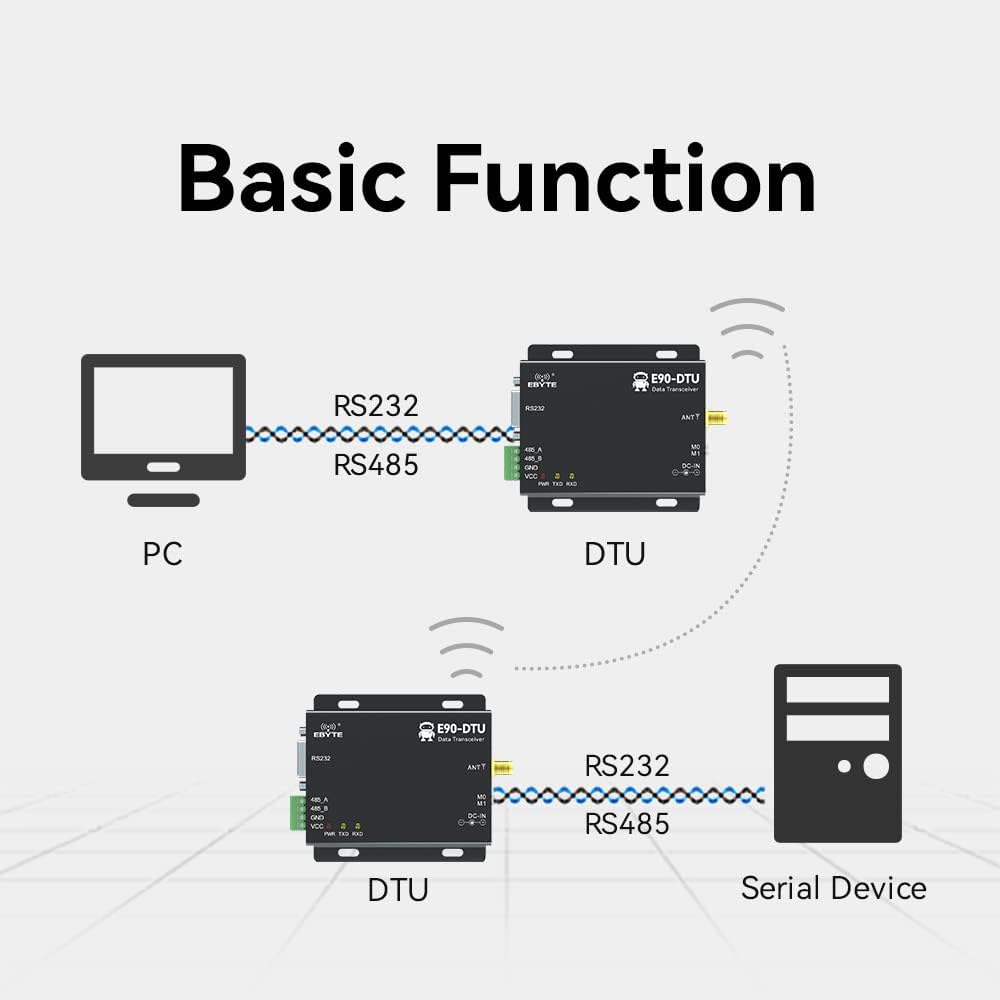
Figure 3: Diagram illustrating typical connections: a PC connected to one DTU via RS232/RS485, and another DTU connected to a serial device via RS232/RS485, communicating wirelessly.
4.1. Баштапкы орнотуу
- Антеннаны туташтыруу: Securely attach the 433MHz antenna to the SMA-K connector.
- Кубат туташуу: Connect a 10-28V DC power supply to the DC-IN port. Ensure correct polarity.
- Маалымат интерфейсинин туташуусу:
- For RS232: Connect your device (e.g., PC) to the DB9 RS232 port using a serial cable.
- For RS485: Connect your device to the RS485_A and RS485_B terminals. Ensure proper A/B wiring.
- Mode Configuration: Set the M0 and M1 dip switches according to your desired operating mode (e.g., transparent transmission, configuration mode). Refer to the detailed technical manual for specific mode settings.
4.2. Программанын конфигурациясы
The E90-DTU-433L30 supports software configuration for various parameters, including frequency, air speed, and address ID.

4-сүрөт: Мисample interface of the Function Configuration Software, available for download from the official webсайт.
It is recommended to download and use the official configuration software to customize the module's settings to match your application requirements. This software allows for precise control over the transceiver's operational parameters.
5. Операция
Once properly configured and connected, the E90-DTU-433L30 operates as a transparent data link. Data sent to its RS232 or RS485 port will be wirelessly transmitted to a paired E90-DTU module, and vice-versa.
- Маалыматтарды өткөрүү: When data is received on the serial input (RS232/RS485), the module automatically modulates and transmits it wirelessly. The TXD indicator will flash.
- Маалыматтарды кабыл алуу: Upon receiving wireless data, the module demodulates it and outputs it through the serial interface. The RXD indicator will flash.
- Режим башкаруу: Ensure both transmitting and receiving modules are set to compatible operating modes (e.g., transparent transmission mode) for seamless communication.
6. Техникалык шарттар
| Спецификация | Нарк |
|---|---|
| ASIN | B07R51G2CD |
| Элементтин моделинин номери | RS232 |
| Бренд | EBAYTE |
| Жалпы Ethernet порттору | 2 |
| Порттардын саны | 2 |
| Maximum Upstream Data Transfer Rate | 433 МГц |
| Модем түрү | Санарип |
| Өндүрүүчү | EBAYTE |
| Дата биринчи жеткиликтүү | 27-сентябрь, 2021-жыл |

Figure 5: Physical dimensions of the E90-DTU-433L30 module, approximately 82mm in length and 62mm in width.
7. Типтүү колдонмолор
The E90-DTU-433L30 is suitable for a wide range of applications requiring reliable wireless data transmission.

6-сүрөт: Мисamples of application environments: Smart home, Agricultural application, Intelligent warehouse, Industrial applications, Device management, and general Wireless data transmission.
- Акылдуу үй системалары
- Agricultural Monitoring and Control
- Intelligent Warehouse Management
- Өнөр жайды автоматташтыруу жана башкаруу
- Алыстан түзмөктү башкаруу
- General Wireless Data Transmission
8. Техникалык тейлөө
To ensure the longevity and optimal performance of your E90-DTU-433L30 transceiver, follow these maintenance guidelines:
- Тазалыкты сактоо: Regularly clean the exterior of the module with a soft, dry cloth. Avoid using harsh chemicals or abrasive materials.
- Экологиялык шарттар: Operate the module within its specified temperature and humidity ranges. Avoid exposure to extreme temperatures, direct sunlight, or high moisture.
- Коопсуз байланыштар: Periodically check all cable connections (power, serial, antenna) to ensure they are secure and free from damage.
- Программалык камсыздоонун жаңыртуулары: Өндүрүүчүнү текшериңиз website for any available firmware updates that may improve performance or address issues.
- Туура иштетүү: Handle the module with care to prevent physical damage. Avoid dropping or subjecting it to strong vibrations.
9. Кыйынчылыктарды
If you encounter issues with your E90-DTU-433L30, consider the following troubleshooting steps:
- Кубат жок:
- Кубат менен камсыздоону текшериңизtage 10-28V DC диапазонунда.
- Check power cable connections and ensure they are secure and correctly polarized.
- Confirm the power outlet or source is functional.
- Эч кандай байланыш:
- Ensure both transmitting and receiving modules are powered on and their PWR indicators are lit.
- Check serial cable connections (RS232/RS485) for proper wiring and secure fit.
- Verify that the M0 and M1 dip switch settings on both modules are identical and configured for the desired operating mode (e.g., transparent transmission).
- Confirm that the frequency, air speed, and address ID settings are consistent across all communicating modules using the configuration software.
- Check antenna connections and ensure antennas are properly installed and not obstructed.
- Reduce the distance between modules or remove obstacles if communication range is an issue.
- Үзгүлтүксүз байланыш:
- Check for sources of electromagnetic interference (EMI) near the modules.
- Ensure the power supply is stable and free from fluctuations.
- Verify antenna integrity and placement.
- Module Not Responding to Software:
- Ensure the module is in configuration mode (check M0/M1 settings).
- Verify the correct COM port is selected in the software.
- Check the serial cable and drivers on your computer.
10. Колдоо жана ресурстар
For detailed technical documentation, software downloads, and further support, please refer to the official EBYTE resources:
- Technical Manual Support: http://www.ebyte.com/en/product-view-news.aspx?id=418
- Өндүрүүчү: EBAYTE
- Официалдуу Webсайт: Visit the EBYTE official website for the latest product information, drivers, and software.
11. Кепилдик маалыматы
Specific warranty terms and conditions for the E90-DTU-433L30 Wireless Transceiver are typically provided at the point of purchase or can be found on the official EBYTE website. Please retain your proof of purchase for any warranty claims. For detailed warranty policy, please consult the manufacturer's official documentation or contact EBYTE customer support directly.
Ask a question about this manual
Ask about setup, troubleshooting, compatibility, parts, safety, or missing instructions. Manuals+ will review the question and use this page’s manual context to help answer it.