
1. Киришүү
Thank you for choosing the Dacom Athlete G05 Bluetooth Headset. This manual provides comprehensive instructions to help you set up, operate, and maintain your new wireless headphones. Please read this manual carefully before use to ensure optimal performance and longevity of your device.
2. Пакеттин мазмуну
Төмөндө тизмеленген нерселердин баары пакетиңизге камтылганын текшериңиз:
- 1 x Dacom Athlete G05 Bluetooth Headset
- 1 x USB заряддоо кабели
- 1 х Колдонуучунун колдонмосу (бул документ)
3. Продукт бүтүп калдыview
The Dacom Athlete G05 is a wireless stereo earphone designed for sports and running, featuring a comfortable in-ear design with ear hooks for secure fit. It connects via Bluetooth V4.1.
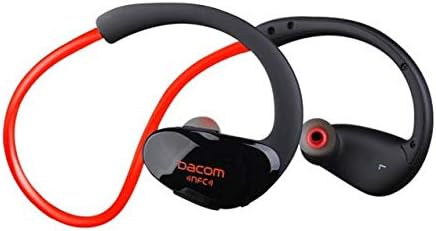
3.1-сүрөт: Фронт view of the Dacom Athlete G05 Bluetooth Headset, showing the earbud and ear hook design.
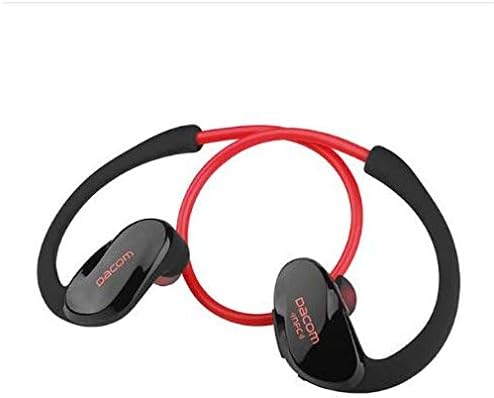
3.2-сүрөт: Арткы view of the Dacom Athlete G05 Bluetooth Headset, illustrating the connecting cable between the two earbuds.
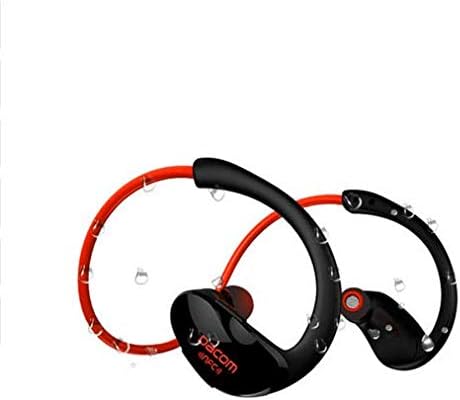
3.3-сүрөт: Dacom Athlete G05 Bluetooth Headset demonstrating water resistance, suitable for sports activities.
4. Орнотуу
4.1 Гарнитураны заряддоо
Before first use, fully charge your Dacom Athlete G05 headset. A full charge typically takes approximately 1.5 to 2 hours.
- Берилген USB кубаттоо кабелин гарнитуранын кубаттоо портуна туташтырыңыз.
- Connect the other end of the USB cable to a power adapter (DC5V 150mAh output recommended) or a computer's USB port.
- The battery indicator light will illuminate during charging and change color or turn off once fully charged.
A fully charged headset provides approximately 8 hours of talk time or music playback, and up to 180 hours of standby time.
4.2 Bluetooth жупташтыруу
To connect your headset to a Bluetooth-enabled device (e.g., smartphone, tablet):
- Гарнитура толугу менен заряддалганын жана өчүрүлгөнүн текшериңиз.
- Press and hold the multi-function button on the headset until the Bluetooth indicator light flashes red and blue alternately, indicating it is in pairing mode.
- Түзмөгүңүздө Bluetooth иштетиңиз жана жеткиликтүү түзмөктөрдү издеңиз.
- Select "Dacom Athlete G05" (or similar name) from the list of found devices.
- Эгер сырсөз суралса, "0000" (төрт нөл) киргизиңиз.
- Once paired, the Bluetooth indicator light will flash blue slowly or turn solid blue, and you will hear a confirmation tone.
The headset supports Bluetooth V4.1 and profiles such as Headset, Handsfree, A2DP, AVRC, and APT-X.
5. Иштөө нускамалары
5.1 Күйгүзүү/өчүрүү
- Күйгүзүү: Press and hold the multi-function button for approximately 3 seconds until the indicator light flashes blue and you hear a power-on tone.
- Өчүрүү: Press and hold the multi-function button for approximately 5 seconds until the indicator light flashes red and you hear a power-off tone.
5.2 Чалууларды башкаруу
- Чакырууга жооп берүү: Short press the multi-function button when a call comes in.
- Чакырууну аяктоо: Short press the multi-function button during a call.
- Чакырууну четке кагуу: Press and hold the multi-function button for 2 seconds when a call comes in.
- Акыркы номерди кайра терүү: Чалуу болбогондо көп функциялуу баскычты эки жолу басыңыз.
5.3 Музыканы ойнотуу
- Ойнотуу/тындыруу: Көп функциялуу баскычты кыска басыңыз.
- Кийинки трек: Үнү + баскычын узакка басыңыз.
- Мурунку трек: Үн көлөмү - баскычын узакка басыңыз.
- Көлөмү: Көлөмү + баскычын кыска басыңыз.
- Үнүн азайтуу: Үн баскычын кыска басыңыз.
Note: The headset features touch control for various functions.
6. Техникалык тейлөө жана кам көрүү
- Гарнитураны кургак кармаңыз. Аны өтө жогорку температурага же нымдуулукка дуушар кылбаңыз.
- Clean the earbuds and charging contacts regularly with a soft, dry cloth.
- Гарнитураны түшүрүүдөн же катуу таасирлерге дуушар кылуудан качыңыз.
- Колдонбогондо гарнитураны салкын, кургак жерде сактаңыз.
- Гарнитураны бөлүктөргө бөлүүгө же өзгөртүүгө аракет кылбаңыз, анткени бул кепилдикти жокко чыгарат.
7. Кыйынчылыктарды
| Көйгөй | Мүмкүн чечим |
|---|---|
| Гарнитура күйбөйт. | Ensure the headset is fully charged. Connect to a power source and try again. |
| Түзмөк менен жупташтыруу мүмкүн эмес. |
|
| Үн жок же үнү төмөн. |
|
| үзгүлтүктүү байланыш. |
|
8. Техникалык шарттар
| Өзгөчөлүк | Деталь |
|---|---|
| Продукт аты | Athlete sports Bluetooth headset |
| Модель номери | G05 |
| Bluetooth версиясы | V4.1 |
| Bluetooth классы | 2-класс |
| Колдоого алынган Profiles | Headset, Handsfree, A2DP, AVRC, APT-X |
| Заряддоо киргизүү | DC5V 150mAh (Power adapter output) |
| Батарея түрү | High-performance lithium polymer battery |
| Talk Time | Болжол менен 8 саат |
| Ойнотуу убактысы | Болжол менен 8 саат |
| Күтүү убактысы | Болжол менен 180 саат |
| Аудио жыштык диапазону | 20Гц-20кГц |
| BT Radio Frequency | 2.400-2.481 ГГц |
| Чыгуу импедансы | 16Ω 3mW |
| Сезимталдуулук | 100-105дБ |
| Наушник форма фактору | Кулакта |
| Байланыш технологиясы | Зымсыз |
| Башкаруу ыкмасы | тийүү |
| Материал | Пластик |
| Түс | Кызыл |
9. Кепилдик жана колдоо
Dacom products are manufactured to the highest quality standards. For warranty information or technical support, please refer to the warranty card included with your purchase or visit the official Dacom webсайт. Кепилдик дооматтары үчүн сатып алганыңыздын далилин сактап коюңуз.