
1. Киришүү
The Transcend DrivePro 550 is a dual-lens dash camera designed to provide comprehensive recording of both the road ahead and the vehicle's interior. Equipped with a front lens featuring a Sony image sensor and a rear lens with infrared LEDs, it ensures clear video capture in various lighting conditions. This manual provides detailed instructions for setting up, operating, and maintaining your DrivePro 550 dash camera.
2. Пакеттин мазмуну
Төмөндө тизмеленген нерселердин баары пакетиңизге камтылганын текшериңиз:
- Transcend DrivePro 550 Dash Camera Unit
- microSD Memory Card (64GB)
- Унаа үчүн бекиткич (соргуч)
- Car Lighter Power Adapter
- Hardwire Power Cable

Image: Retail box of the Transcend DrivePro 550 Dash Camera, showing included accessories.
3. Продукт бүтүп калдыview
Familiarize yourself with the components of your DrivePro 550 dash camera.
3.1 Фронт View

Сүрөт: алдыңкы view of the DrivePro 550, showing the main screen displaying live dual-channel recording.
- Алдыңкы линза: Records the road ahead. Features a Sony image sensor for high-quality video.
- Арткы линза: Records the vehicle's interior. Equipped with four infrared LEDs for enhanced night vision.
- 2.4 дюймдук LCD экран: Түз эфирдеги көрсөтүүлөр view, жаздырылган тамак-ашtage, and menu options.
- Башкаруу баскычтары: For navigation and selection within the menu.
3.2 тарап View жана порттор

Сүрөт: каптал view of the DrivePro 550, highlighting the power input and microSD card slot.
- DC IN порту: Кубат адаптерин туташтыруу үчүн.
- microSD картасынын уячасы: Эстутум картасын салуу үчүн.
3.3 Өлчөмдөр
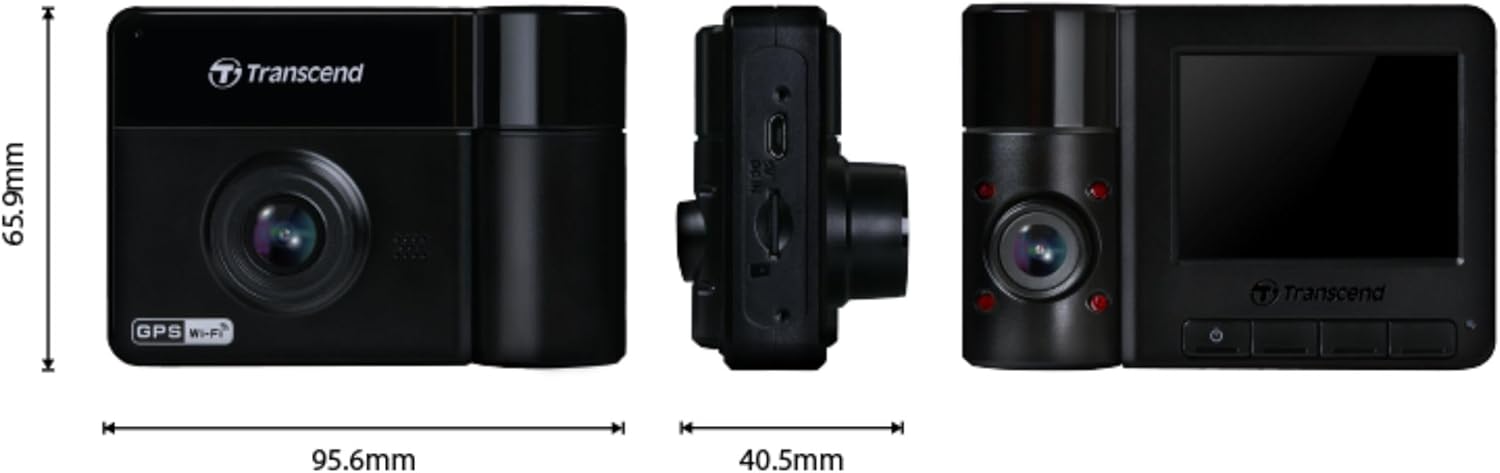
Image: Technical drawing showing the dimensions of the DrivePro 550 unit.
4. Орнотуу
Follow these steps to properly install your DrivePro 550 in your vehicle.
4.1 Видеорегистраторду орнотуу
- Айнегиңизге тоскоолдук кылбаган жерди тандаңыз view of the road. The area behind the rearview mirror is often ideal.
- Clean the chosen area on the windshield thoroughly to ensure a strong suction.
- Attach the suction cup mount to the windshield and secure it by flipping the lever.
- Slide the DrivePro 550 onto the mount until it clicks into place. Adjust the camera angle to ensure both front and interior lenses have a clear view.

Image: The DrivePro 550 dash camera securely mounted on a car windshield.
4.2 microSD картасын салуу
- Панель камерасынын өчүрүлгөнүн текшериңиз.
- Түзмөктүн капталынан microSD карта уячасын табыңыз.
- Insert the provided 64GB microSD card into the slot with the gold contacts facing the back of the camera until it clicks into place.
4.3 Кубатты туташтыруу
- Connect the car lighter power adapter or the hardwire power cable to the DC IN port on the dash camera.
- Plug the other end of the power adapter into your vehicle's 12V power outlet (cigarette lighter socket). If using the hardwire cable, follow professional installation guidelines.
- Электр кабелин алдыңызга тоскоол болбош үчүн алдыңкы айнектин жана инструменттердин панелинин жанынан тыкан өткөрүңүз view же айдоону башкаруу элементтерине тоскоолдук кылуу.
5. Негизги операция
5.1 Күйгүзүү/өчүрүү
- The DrivePro 550 will automatically power on and begin recording when your vehicle's engine starts and power is supplied.
- To manually power on/off, press and hold the power button.
5.2 Жазуу режимдери
- Тынымсыз жаздыруу: The camera records continuously in a loop. When the memory card is full, the oldest fileлар үстүнөн жазылган.
- Шашылыш жазуу: Activated automatically by the built-in G-sensor upon detecting an impact or sudden movement. These files are protected from being overwritten. You can also manually trigger emergency recording by pressing the designated button.

Image: Split-screen view showing simultaneous recording from the front and interior lenses.
5.3 Taking Snapshots
During recording, press the snapshot button to capture a still image of the current view. This can be useful for documenting incidents or scenic views.
6. Өркүндөтүлгөн функциялар
6.1 Wi-Fi Connectivity and DrivePro App
The DrivePro 550 features built-in Wi-Fi, allowing you to connect it to your smartphone or tablet via the Transcend DrivePro App. The app enables:
- Реалдуу убакыт режиминде view эки камеранын каналынын.
- Жаздырылган видеолорду ойнотуу.
- Видео жүктөлүп алынууда fileтүздөн-түз мобилдик түзмөгүңүзгө.
- Adjusting camera settings.
Download the DrivePro App from the App Store (iOS) or Google Play Store (Android).

Image: Smartphone screen showing the Transcend DrivePro App interface, connected to the dash camera.
6.2 Жакшыртылган түнкү көрүнүш
The DrivePro 550 is designed for superior low-light performance:
- The front lens utilizes a Sony image sensor to capture high-resolution images with rich color, even in low light. It supports 1440P 2K QHD recording at 30fps for smooth and crisp footage.
- The rear lens is equipped with four infrared LEDs, significantly improving recording quality in dark interior environments.

Image: Visual comparison of video quality captured by the DrivePro 550 during daytime and nighttime conditions.
6.3 Паркинг режими
When enabled, Parking Mode activates recording when motion is detected, even when your vehicle is parked and the engine is off. This feature requires a continuous power supply to the dash camera (e.g., via the hardwire power cable).
6.4 Убакыт аралыгын жаздыруу
Time-lapse recording allows you to condense hours of footage into a shorter video, providing continuous surveillance without consuming excessive storage space.
6.5 Driver Assistance Systems (ADAS)
The DrivePro 550 includes several ADAS features to enhance driving safety:
- Head-up Display: Shows current speed and driver safety alerts.
- Тилкеден чыгып кетүү жөнүндө эскертүү системасы (LDWS): Унааңыз тилкеден чыгып кетсе, сизге эскертет.
- Алдыга кагылышуу жөнүндө эскертүү системасы (FCWS): Warns you if you are getting too close to the vehicle ahead.
- Ылдамдык сигнализациясы: Notifies you if your vehicle's speed exceeds a preset limit.
- Headlight Reminder: Automatically activates when the DrivePro detects poor lighting conditions.
- Айдоочунун чарчоо эскертүүсү: Reminds the driver to rest after driving for a set period.
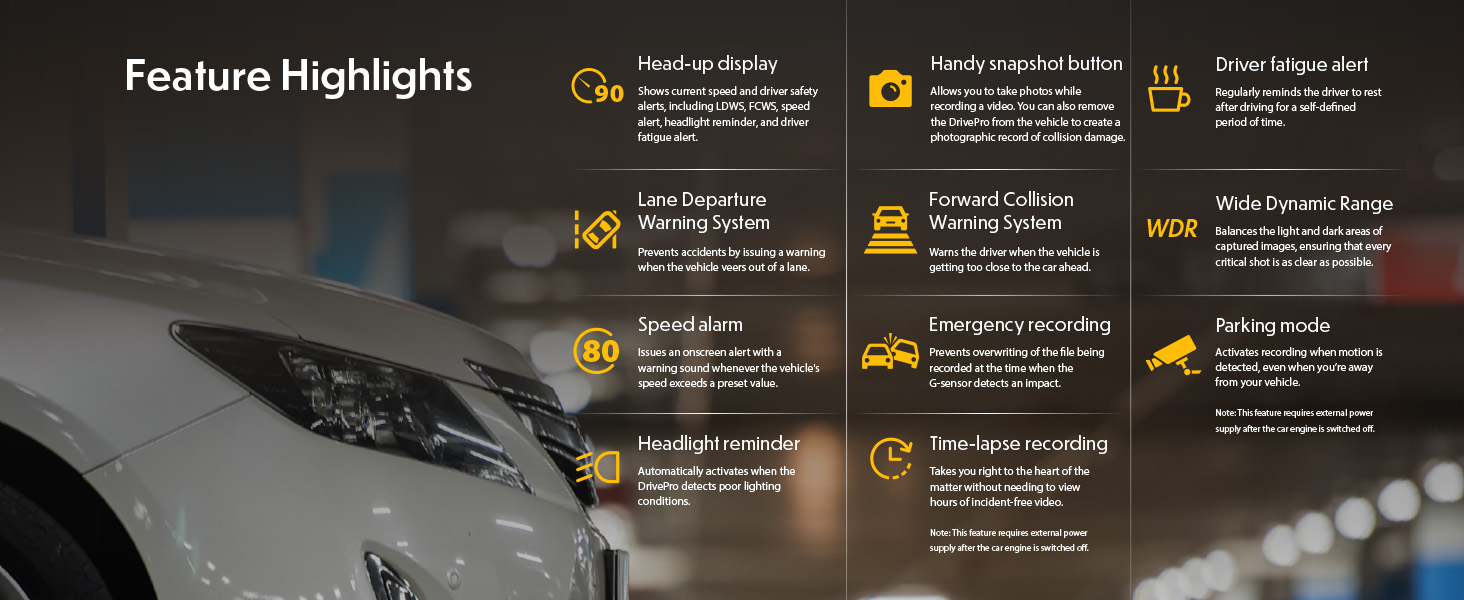
Image: Graphic illustrating the various feature highlights and ADAS functions of the DrivePro 550.
7. Техникалык тейлөө
7.1 Formatting the microSD Card
Regularly format the microSD card to ensure optimal performance and prevent data corruption. This can typically be done through the camera's menu settings. Formatting will erase all data on the card, so back up any important fileс биринчи.
7.2 Камераны тазалоо
Use a soft, dry cloth to clean the camera body and screen. For lenses, use a specialized lens cleaning cloth and solution to avoid scratches. Do not use harsh chemicals or abrasive materials.
8. Кыйынчылыктарды
If you encounter issues with your DrivePro 550, refer to the following common problems and solutions:
- Камера күйбөйт:
- Ensure the power cable is securely connected to both the camera and the vehicle's power outlet.
- Унаанын 12V розеткасынын иштеп жатканын текшериңиз.
- Camera is not recording:
- Verify that a microSD card is inserted correctly.
- Check if the microSD card is full; format it if necessary (after backing up important fileс).
- Ensure the recording function is enabled in the camera settings.
- Видеонун сапаты начар:
- Камера линзаларын тазалаңыз.
- Ensure the windshield area in front of the camera is clean.
- Check video resolution settings; ensure it's set to the desired quality (e.g., 1440P 2K QHD for front lens).
- Wi-Fi туташуу көйгөйлөрү:
- Ensure Wi-Fi is enabled on the camera and your mobile device.
- Камераны да, мобилдик түзмөгүңүздү да өчүрүп күйгүзүңүз.
- Ensure you are within range of the camera's Wi-Fi signal.
9. Техникалык шарттар
| Өзгөчөлүк | Description |
|---|---|
| Бренд | Transcend |
| Модель аты | DrivePro 550 |
| Модель номери | TS-DP550A-64G |
| Унаа кызматынын түрү | Машина |
| Байланыш технологиясы | Инфракызыл, Wi-Fi |
| Видео тартуунун резолюциясы | Front: 1440P 2K QHD (30fps), Rear: 1080p (30fps) |
| Камтылган компоненттер | Dash Camera, 64GB microSD Card, Car Mount, Car Lighter Adapter, Hardwire Power Cable |
| Монтаж түрү | Surface Mount (Suction Cup) |
| Түс | Кара |
| Field Of View | Алдыңкы: 150 градус, арткы: 140 градус |
| Screen Size | 2.4 дюйм |
| Оптикалык сенсор технологиясы | Sony (Front Lens) |
| Flash эс тутум түрү | microSD |
| Элемент Салмагы | 107 грамм |
| Элементтин өлчөмдөрү (D x W x Y) | 7.1" x 5.5" x 2.6" |
10. Кепилдик жана колдоо
10.1 Кепилдик маалыматы
The Transcend DrivePro 550 Dash Camera comes with a 2 жылдык Чектелген Кепилдик. Please retain your proof of purchase for warranty claims. For detailed terms and conditions, refer to the warranty card included in your package or visit the official Transcend webсайт.
10.2 Кардарларды колдоо
For further assistance, technical support, or to download the latest firmware updates and user manuals, please visit the official Transcend website or contact their customer service department. Contact information can typically be found on the Transcend webсайтында же продуктунун таңгагында.