
RHM K222 wooden brown
RHM K222 караоке машинасынын колдонуучу нускамасы
Model: K222 wooden brown
Introduction
Thank you for choosing the RHM K222 Karaoke Machine. This versatile system is designed to deliver high-quality audio and an enjoyable karaoke experience for various indoor activities, including home entertainment, parties, and meetings. This manual provides essential information for setting up, operating, and maintaining your device to ensure optimal performance and longevity.

Figure 1: RHM K222 Karaoke Machine with two wireless microphones.
Коопсуздук маалыматы
Продукцияны колдонуудан мурун бардык коопсуздук нускамаларын кылдат окуп чыгыңыз. Бул колдонмону келечекте маалымат алуу үчүн сактаңыз.
- This machine is designed for indoor use only. Do not expose it to rain, moisture, or extreme temperatures.
- Ensure the power adapter is connected to a compatible power outlet (110-240V, 50/60Hz).
- Агрегатты өз алдынча ажыратпаңыз, оңдобоңуз же өзгөртпөңүз. Бардык тейлөөлөрдү квалификациялуу кызматкерлерге тапшырыңыз.
- Аппаратты жылуулук булактарынан, түз күн нурунан жана күчтүү магнит талааларынан алыс кармаңыз.
- Ашыкча ысып кетүүнүн алдын алуу үчүн вентиляция тешиктерин жабуудан качыңыз.
- Агрегатты жумшак, кургак чүпүрөк менен тазалаңыз. Суюк тазалагычтарды же аэрозолдорду колдонбоңуз.
Пакеттин мазмуну
Төмөндө тизмеленген нерселердин баары пакетиңизге камтылганын текшериңиз:
- RHM K222 Stereo Speaker Unit
- 2 x UHF зымсыз микрофондору
- Алыстан башкаруу
- Кубаттуу адаптер
- USB Charging Cable (for microphones)
- AUX кабели (3.5 мм)
- Оптикалык кабель
- Колдонуучунун Колдонмосу (бул документ)
- 2 x Mic Covers

Figure 2: All items included in the RHM K222 package.
Жайгашуу
Follow these steps to set up your RHM K222 Karaoke Machine:
- Кубат туташуу: Connect the power adapter to the DC IN port on the back of the karaoke machine and then plug it into a wall outlet. The unit will power on automatically or can be turned on using the power button on the top panel.
- Микрофонду кубаттоо: Before first use, ensure the wireless microphones are fully charged using the provided USB charging cable. The microphones have a 400mAh rechargeable battery.
- Микрофонду жупташтыруу: The two UHF wireless microphones are pre-paired with the main unit. Simply turn on the microphones, and they should automatically connect to the speaker.
- Connecting Audio Source: Каалаган аудио киргизүү ыкмасын тандаңыз:
- Bluetooth: Press the 'MODE' button on the top panel or remote until 'BLUE' appears on the display. Enable Bluetooth on your device (e.g., smartphone, tablet) and select 'RHM K222' from the list of available devices to pair.
- Оптикалык: Connect an optical cable (included) from your TV's optical output to the OPTICAL input on the back of the karaoke machine. Select 'OPTICAL' mode on the unit.
- AUX: Use the provided 3.5mm AUX cable to connect your audio device (e.g., PC, MP3 player) to the 'LINE IN' port on the back of the machine. Select 'AUX' mode.
- USB: Аудио камтыган USB дискти салыңыз files into the USB port on the back of the machine. The unit will automatically switch to USB mode and begin playback.
- PC: Connect your PC to the 'PC' port on the back of the machine using a compatible cable. Select 'PC' mode.

Figure 3: Rear panel connections for various audio sources.
Иштөө нускамалары
Негизги блокту башкаруу
- Кубат баскычы: Located on the top panel. Press to turn the unit on/off.
- MODE баскычы: Cycles through input modes (Bluetooth, Optical, AUX, USB, PC).
- Үндү башкаруу элементтери (VOL+/-): Adjust the overall volume of the speaker.
- Ойнотуу башкаруулары: Play/Pause, Next/Previous Track buttons are available on the top panel and remote.
Wireless Microphone Controls
The wireless microphones offer convenient control over your singing experience:
- Кубат баскычы: Press and hold to turn the microphone on/off.
- Микрофондун үнү: Use the dedicated volume buttons on the microphone to adjust your vocal volume independently.
- Echo Adjustment: Adjust the echo effect to add depth to your voice.
- Voice Mixing: Control the balance between your voice and the background music.
- Key Change: Adjust the key of the music to match your vocal range.

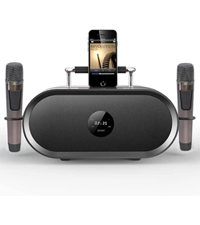
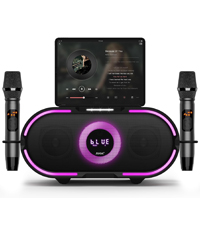
Figure 4: Microphone LED display, control panel, and charging port details.
Үн режимдери
The RHM K222 offers 5 distinct sound modes to enhance your audio experience:
- Түпнуска: Стандарттык аудио ойнотуу.
- Музыка: Жалпы музыка угуу үчүн оптималдаштырылган.
- KTV: Enhanced vocal presence for karaoke performances.
- Кинотеатр: Provides a wider soundstage кино көрүү үчүн.
- Классикалык: Тең салмактуу үн проfile for classical music.

Figure 5: Explore different sound modes for various entertainment needs.
Техникалык тейлөө
Караоке машинаңыздын узак мөөнөттүү иштешин жана оптималдуу иштешин туура тейлөө камсыздайт.
- Тазалоо: Use a soft, dry, lint-free cloth to wipe down the exterior of the unit and microphones. Do not use abrasive cleaners, waxes, or solvents.
- Сактагыч: When not in use for extended periods, store the machine in a cool, dry place, away from direct sunlight and dust.
- Микрофонго кам көрүү: Always place microphones back into their designated holders on the unit to prevent damage.
Проблемаларды чечүү
If you encounter issues with your RHM K222 Karaoke Machine, refer to the following common problems and solutions:
| Көйгөй | Мүмкүн себеп | Чечим |
|---|---|---|
| Күч жок | Кубат адаптери туташкан эмес же туура эмес розетка. | Кубат адаптери түзүлүшкө жана жумушчу розеткага бекем сайылганын текшериңиз. |
| Динамиктен үн жок | Үн өтө төмөн; туура эмес киргизүү режими; аудио булагы маселеси. | Increase speaker volume. Check if the correct input mode is selected. Verify audio source is playing and connected properly. |
| Микрофондор иштебейт | Microphones off or low battery; out of range; not paired. | Turn on microphones and ensure they are charged. Stay within 40ft range. If not paired, turn off both microphones and the unit, then restart. |
| Bluetooth байланышы туруксуз | Too far from unit; interference; device issues. | Move closer to the unit. Avoid obstacles. Disconnect and re-pair the Bluetooth device. |
| Echo/Voice mixing not working | Settings on microphone not adjusted. | Adjust echo and voice mixing settings directly on the wireless microphone. |
Техникалык шарттар
Detailed technical specifications for the RHM K222 Karaoke Machine:
| Өзгөчөлүк | Спецификация |
|---|---|
| Бренд | RHM |
| Модель номери | K222 wooden brown |
| Монтаж түрү | Стол үстү |
| Power Source | Электр розеткасына сайыңыз |
| Туташтыргычтын түрлөрү | Aux, USB, Optical |
| Элемент Салмагы | 15.97 фунт |
| Чыгуу Wattage | 70 Ватт |
| Каналдардын саны | 1 |
| Аудио киргизүү | Bluetooth, USB, Aux In, Optical, iPhone, Android mobile phones, iPad, TV, PC |
| Продукциянын өлчөмдөрү (L x W x Y) | 9.84 x 14.96 x 8.07 дюйм |
| Түс | Жыгач |
| Спикер саны | 1 |
| Байланыш технологиясы | Optical, Bluetooth, Line in |
Кепилдик жана колдоо
RHM products are manufactured to the highest quality standards. For warranty information, technical support, or any inquiries regarding your RHM K222 Karaoke Machine, please refer to the contact information provided on the product packaging or visit the official RHM webсайт. Сатып алуу квитанциясын кепилдик дооматтары үчүн сатып алуунун далили катары сактаңыз.
Ask a question about this manual
Ask about setup, troubleshooting, compatibility, parts, safety, or missing instructions. Manuals+ will review the question and use this page’s manual context to help answer it.