
Introduction
This manual provides instructions for the proper use and maintenance of your replacement remote control for various Sanyo Air Conditioner models. Please read this manual thoroughly before operating the remote control to ensure optimal performance and longevity.

Сүрөт 1: Алдыңкы view of the remote control, showing all buttons and the LCD screen.
Жайгашуу
Батарея орнотуу
Алыстан башкаруу пультун иштеши үчүн эки (2) AAA батарейкасы керек. Батарейкаларды орнотуу үчүн төмөнкү кадамдарды аткарыңыз:
- Пульттун артындагы батарея бөлүкчөсүнүн капкагын табыңыз.
- Капкакты ачуу үчүн аны ылдый же жебе менен көрсөтүлгөн багытта жылдырыңыз.
- Эки AAA батарейканы салып, оң (+) жана терс (-) учтары бөлүмдүн ичиндеги белгилер менен туура дал келгенин текшериңиз.
- Батареянын капкагын бекем чыккыча ордуна жылдырыңыз.
Эскертүү: Эгерде алыстан башкаруу пульту көпкө чейин колдонулбаса, агып кетүүнүн жана бузулуунун алдын алуу үчүн батарейкаларды алып салыңыз.
Иштөө нускамалары
Баскыч функциялары
Familiarize yourself with the functions of each button on your remote control:
- ON/I/OFF: Press to turn the air conditioner unit ON or OFF.
- ТЕМПЕРАТУРА ▲ / ▼: Press the ▲ button to increase the temperature setting, and the ▼ button to decrease it.
- РЕЖИМ: Press repeatedly to cycle through available operating modes:
- АВТО: Бөлмөнүн температурасына жараша иштөө режимин автоматтык түрдө тандайт.
- БАРАКЕЛДЕ: Provides cooling.
- КУРГАК: Бөлмөдөгү нымдуулукту азайтат.
- Күйөрман: Абаны жылытуусуз жана муздатуусуз айлантат.
- ЖЫЛУУ: Provides heating (if supported by your AC unit).
- Күйөрмандардын ылдамдыгы: Press to adjust the fan speed (e.g., Auto, Low, Medium, High).
- FLAP: Controls the vertical swing of the air conditioner's louver. Press to start or stop the swing, or to set the louver at a desired angle.
- ЭКОНОМИЯ: Activates or deactivates the energy-saving mode. This mode typically adjusts temperature settings to reduce power consumption.
- 1HR (Timer): Likely a quick timer setting, possibly for 1 hour of operation or delay. Consult your AC unit's manual for specific functionality.
- ON TIMER / OFF TIMER: Used to set a specific time for the air conditioner to turn ON or OFF automatically.
- Басыңыз ТАЙМЕРДЕ to set the desired power-on time.
- Басыңыз ӨЧҮК ТАЙМЕР to set the desired power-off time.
- Use the TEMP ▲ / ▼ buttons to adjust the time.
- ТЫНЧ: Activates a low-noise operation mode, reducing fan speed and compressor activity for quieter performance.
- LED CLEAN: This button may activate a self-cleaning function for the indoor unit's coil or turn off the display LED lights. Refer to your specific AC unit's manual for details.
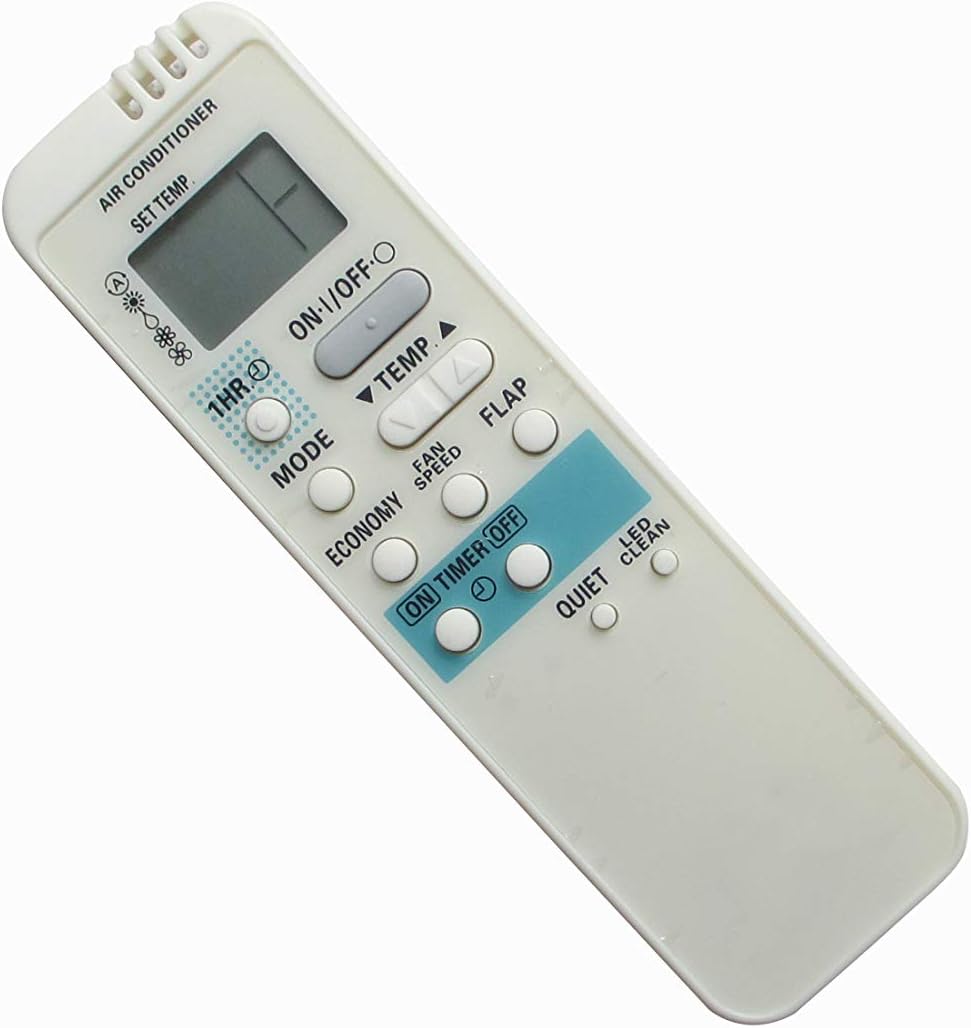

2-сүрөт: Бурчтуу views of the remote control, providing additional perspective on its design and button placement.
Техникалык тейлөө
Алыстан башкарууну тазалоо
Алыстан башкаруу пультун көрүнүшүн жана функционалдуулугун сактоо үчүн:
- Бетти жумшак, кургак чүпүрөк менен сүртүңүз.
- өжөр кир үчүн, dampкездемени суу жана жумшак жуугуч каражат менен бир аз сүртүп, андан кийин дароо кургатыңыз.
- Do not use abrasive cleaners, alcohol, or benzene, as these can damage the surface.
Батареяны алмаштыруу
Replace batteries when the remote control's range decreases or if the display becomes dim. Follow the battery installation steps outlined in the "Setup" section.
Проблемаларды чечүү
Эгерде алыстан башкаруу куралы күтүлгөндөй иштебесе, төмөндөгүлөрдү эске алыңыз:
- No response from AC unit:
- Батареялардын туура орнотулганын жана жетиштүү заряддалганын текшериңиз. Зарыл болсо, алмаштырыңыз.
- Ensure there are no obstructions between the remote control and the AC unit's infrared receiver.
- Verify that the remote control is pointed directly at the AC unit.
- Confirm that the AC unit is powered on and plugged into an electrical outlet.
- Чектелген диапазон:
- Батареяларды алмаштырыңыз.
- Ensure no strong light sources (e.g., direct sunlight, fluorescent lights) are interfering with the infrared signal.
- Туура эмес функция:
- This is a replacement remote. While designed for compatibility, some advanced or unique functions of your original AC remote may not be supported. Refer to the original AC unit's manual for specific features.
- Ensure the remote control model matches the compatible models listed in this manual.
Техникалык шарттар
| Продукт түрү | Replacement AC Remote Control |
| Бренд | Easytry123 |
| Шайкеш түзмөктөр | Sanyo Air Conditioners (Specific models listed in title) |
| Байланыш технологиясы | Инфракызыл (IR) |
| Controller Type | Control Button |
| Power Source | 2 x AAA Батареялар (киргизилген эмес) |
| Өзгөчө өзгөчөлүк | Эргономикалык дизайн |
Кепилдик жана колдоо
As this is a replacement product, warranty and support are typically provided by the seller or manufacturer of the replacement remote control, Easytry123. Please refer to your purchase documentation or contact the seller directly for information regarding warranty coverage, returns, or technical assistance.
For specific operational details of your Sanyo Air Conditioner unit, please consult the original user manual provided with your AC system.