
Easytry123 RCS-3MVPS4E, RCS-3MVHPS4E, RCS-3MVHPS4EE, SAP-KMRV93GJ, SAP-KMRV123GJ, CAF94MR5IAA, CAF124MR5IAA, CAF184MR5IAA
User Manual
Easytry123 Replacement Remote Control for Sanyo Air Conditioners
Models: RCS-3MVPS4E, RCS-3MVHPS4E, RCS-3MVHPS4EE, SAP-KMRV93GJ, SAP-KMRV123GJ, CAF94MR5IAA, CAF124MR5IAA, CAF184MR5IAA
Introduction
This manual provides essential information for the proper setup, operation, and maintenance of your Easytry123 replacement remote control for Sanyo Air Conditioners. Please read this manual thoroughly before using the remote control to ensure optimal performance and longevity.
This remote control is designed as a direct replacement for various Sanyo A/C models, offering infrared connectivity and button-based control for your air conditioning unit.
Продукт бүттүview
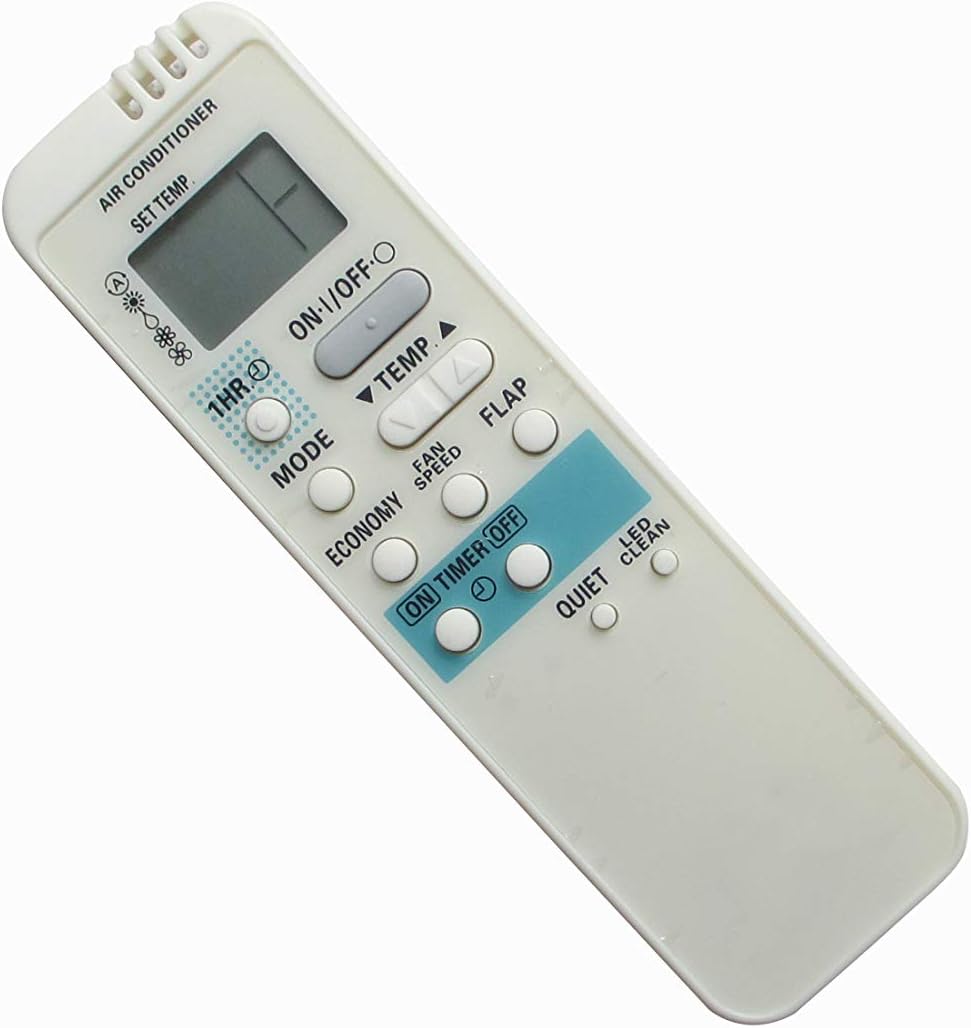
Сүрөт 1: Алдыңкы view of the remote control. This image displays the ergonomic design of the remote, featuring a clear LCD screen at the top and an array of control buttons below it, including power, mode, temperature adjustment, and fan speed.

2-сүрөт: Бурчтуу view of the remote control. This perspective provides a clearer look at the button arrangement and the overall compact form factor of the device.
Жайгашуу
Батарея орнотуу
Алыстан башкаруу пульту иштеши үчүн эки (2) AAA батарейкасы керектелет. Батареялар алыстан башкаруу пульту менен кошо берилбейт.
- Пульттун артындагы батарея бөлүкчөсүнүн капкагын табыңыз.
- Бөлүмдү ачуу үчүн капкакты ылдый жылдырыңыз же илгичти басыңыз.
- Оң (+) жана терс (-) терминалдары бөлүмдүн ичиндеги белгилер менен туура дал келишин камсыз кылып, эки AAA батарейкасын салыңыз.
- Батарея бөлүкчөсүнүн капкагын чыкылдагыча бекем жабыңыз.
Эскертүү: Эгерде алыстан башкаруу пульту көпкө чейин колдонулбаса, агып кетүүнүн жана бузулуунун алдын алуу үчүн батарейкаларды алып салыңыз.
Иштөө нускамалары
Ensure the remote control is pointed directly at the infrared receiver on your Sanyo Air Conditioner unit for proper communication.
Негизги функциялар
- ON/OFF баскычы: Press this button to turn the air conditioner unit ON or OFF.
- ТЕМПЕРАТУРА ▲ / ▼ Баскычтар: Каалаган температура жөндөөлөрүн көбөйтүү же азайтуу үчүн бул баскычтарды колдонуңуз.
Режим тандоо
басыңыз РЕЖИМ Жеткиликтүү иштөө режимдерин карап чыгуу үчүн баскычты кайра-кайра басыңыз:
- Авто режим: The unit automatically selects the operating mode (Cool, Heat, Fan, Dry) based on the room temperature.
- Муздак режим: Бөлмөнү муздатуу үчүн.
- Кургак режим: Бөлмөнүн нымдуулугун азайтуу үчүн.
- Күйөрман режими: Абаны жылытуусуз жана муздатуусуз айлантат.
- Жылытуу режими: For heating the room (if supported by your A/C unit).
Күйөрмандар ылдамдыгын тууралоо
басыңыз Күйөрмандардын ылдамдыгы желдеткичтин ылдамдыгын жөндөө үчүн баскычын басыңыз. Параметрлер адатта Автоматтык, Төмөн, Орто жана Жогорку болуп саналат.
Таймер функциялары
The remote control features ON TIMER and OFF TIMER functions:
- ТАЙМЕР: Press this button to set a time for the unit to turn ON automatically. Use the TEMP ▲ / ▼ buttons to adjust the time.
- ӨЧҮРҮҮ ТАЙМЕРИ: Press this button to set a time for the unit to turn OFF automatically. Use the TEMP ▲ / ▼ buttons to adjust the time.
- 1HR Button: This button may provide a quick 1-hour timer setting, depending on the specific model's functionality.
Атайын функциялар
- FLAP Button: Controls the vertical swing of the air conditioner's louver. Press to adjust the airflow direction or activate continuous swing.
- ECONOMY Button: Activates an energy-saving mode, which may adjust temperature settings slightly to reduce power consumption.
- QUIET баскычы: Reduces the fan speed to a lower setting for quieter operation.
- LED CLEAN Button: This function, if present and supported by your A/C unit, may activate a self-cleaning cycle for the indoor unit's coil. Refer to your A/C unit's manual for details.
Техникалык тейлөө
Алыстан башкарууну тазалоо
To clean the remote control, wipe the surface with a soft, dry cloth. For stubborn dirt, a slightly damp cloth can be used, followed by a dry cloth. Do not use abrasive cleaners, alcohol, or chemical solvents, as these can damage the surface or internal components.
Сактагыч
Пультту салкын, кургак жерде, күндүн түз тийген нурунан жана өтө жогорку температурадан алыс сактаңыз. Эгер узак убакытка сактасаңыз, агып кетпеши үчүн батарейкаларды алып салыңыз.
Проблемаларды чечүү
| Көйгөй | Мүмкүн себеп | Чечим |
|---|---|---|
| Алыстан башкаруу жооп бербей жатат. | Батареялар түгөнүп калган же туура эмес салынган. Пульт менен кондиционердин ортосундагы тоскоолдук. Пульт иштеп турган аймактан тышкары. | Replace batteries with new AAA batteries, ensuring correct polarity. Remove any obstructions. Move closer to the A/C unit. |
| A/C unit not responding to specific functions. | Function not supported by your specific A/C model. Infrared sensor on A/C unit is dirty or blocked. | Verify the function is available on your A/C unit. Clean the infrared sensor on the A/C unit. |
| Пульттун дисплейи күңүрт же бош. | Батареянын кубаттуулугу төмөн. | Батареяларды алмаштырыңыз. |
| Алыстан башкаруу үзгүлтүксүз иштейт. | Weak batteries. Interference from other electronic devices. | Батареяларды алмаштырыңыз. Күчтүү жарык булактары же башка инфракызыл түзүлүштөр тоскоолдук жаратпай турганын текшериңиз. |
Техникалык шарттар
- Продукт түрү: Алмаштыруучу кондиционердин пультунун
- Бренд: Easytry123
- Шайкеш түзмөктөр: Sanyo Air Conditioners (Models: RCS-3MVPS4E, RCS-3MVHPS4E, RCS-3MVHPS4EE, SAP-KMRV93GJ, SAP-KMRV123GJ, CAF94MR5IAA, CAF124MR5IAA, CAF184MR5IAA)
- Байланыш технологиясы: Инфракызыл
- Контроллердин түрү: Control Button
- Өзгөчө өзгөчөлүгү: Эргономикалык дизайн
- Кубат булагы: 2 x AAA Батареялар (киргизилген эмес)
- Келип чыккан өлкө: Кытай
Кепилдик жана колдоо
This replacement remote control is typically covered by the seller's return and refund policy. For specific warranty details or technical support, please refer to the purchase platform or contact the seller directly. Keep your purchase receipt as proof of purchase.
For further assistance, you may also refer to the original user manual of your Sanyo Air Conditioner unit for specific functions and compatibility.
Ask a question about this manual
Ask about setup, troubleshooting, compatibility, parts, safety, or missing instructions. Manuals+ will review the question and use this page’s manual context to help answer it.